Cobre
Cobre solves long-term hydrothermal dispatch – the problem of scheduling water and fuel across power grids with large hydroelectric capacity. It provides an open-source, reproducible implementation built on Rust, Parquet for data interchange, and Python for analysis workflows.
Navigation
Coming from other energy optimization software? If you already work with hydrothermal dispatch tools and want to convert existing case data, see the cobre-bridge conversion guide.
New to SDDP? If you want to understand the algorithm before diving into code, read What Cobre Solves.
Python user? If you want to run studies from Jupyter or a Python script, see the Python Quickstart.
Starting from scratch? See Installation and then Quickstart.
What Cobre Does
- Solve long-term hydrothermal dispatch via Stochastic Dual Dynamic Programming (SDDP), with training, simulation, and policy export.
- Model complex power systems – hydro cascades with variable-head production, thermal units, transmission networks, non-controllable sources, and user-defined generic constraints.
- Generate stochastic scenarios using periodic autoregressive (PAR) inflow models with correlated multi-site noise.
- Run across clusters with hybrid MPI + thread parallelism, producing bit-for-bit identical results regardless of rank or thread count.
- Analyze results from Python using Arrow zero-copy bindings, or directly from Parquet output files.
Quick Links
| GitHub | github.com/cobre-rs/cobre |
| Software Book | You are here |
| API Docs | docs.rs/cobre |
| PyPI | pypi.org/project/cobre-python |
| Methodology Reference | cobre-rs.github.io/cobre-docs |
| License | Apache-2.0 |
What Cobre Solves
The Problem
Power systems with large hydroelectric capacity face a fundamental dilemma: water stored in reservoirs today could generate cheap electricity now, but saving it might avoid burning expensive fuel months from now. The decision is complicated by uncertainty – nobody knows how much rain will fall next month.
This is the hydrothermal dispatch problem: given a network of hydro plants, thermal generators, transmission lines, and uncertain future inflows, find the least-cost operating policy over a multi-year horizon. It is one of the central problems in energy planning for countries like Brazil, Colombia, and Norway.
The problem is hard because decisions are coupled across time (water used today is gone tomorrow), across space (reservoirs in a cascade share the same river), and across scenarios (a drought year requires completely different decisions than a wet year).
How SDDP Works (Conceptual)
Stochastic Dual Dynamic Programming (SDDP) solves this problem by iterating between two phases:
-
Forward pass – Simulate the system from the first stage to the last, making decisions at each stage under sampled uncertainty (random inflows). Record the resulting costs and state transitions.
-
Backward pass – Starting from the last stage and working backwards, use the forward decisions to build “cuts” – linear approximations of the future cost. These cuts capture the trade-off: “if you use this much water now, the expected future cost is at least this much.”
Each iteration improves the policy. After enough iterations, the lower bound (from cuts) and the upper bound (from forward simulations) converge, producing a near-optimal dispatch policy.
What Cobre Provides
- System modeling – Define hydro plants (with cascades, variable-head production, evaporation), thermal units, transmission lines, non-controllable sources, and user-defined constraints.
- Stochastic scenario generation – Fit periodic autoregressive (PAR) models to historical inflow records and generate correlated scenarios.
- SDDP solver – Train a dispatch policy with configurable stopping rules, risk measures, and cut selection strategies.
- Simulation – Evaluate the trained policy across thousands of scenarios, producing per-scenario cost breakdowns and operational trajectories.
- Multiple interfaces – Use the CLI for batch runs, Python for interactive analysis, or the MCP server for AI agent workflows.
Installation
Cobre is a statically linked binary available for the platforms listed below. Choose the method that best fits your environment.
Pre-built Binaries (Recommended)
No Rust toolchain or C compiler required.
Linux and macOS
curl --proto '=https' --tlsv1.2 -LsSf https://github.com/cobre-rs/cobre/releases/latest/download/cobre-cli-installer.sh | sh
The installer places the cobre binary in $CARGO_HOME/bin (typically
~/.cargo/bin). Add that directory to your PATH if it is not already present.
Windows (PowerShell)
powershell -ExecutionPolicy Bypass -c "irm https://github.com/cobre-rs/cobre/releases/latest/download/cobre-cli-installer.ps1 | iex"
Supported Platforms
| Platform | Target Triple |
|---|---|
| macOS (Apple Silicon) | aarch64-apple-darwin |
| macOS (Intel) | x86_64-apple-darwin |
| Linux (x86-64) | x86_64-unknown-linux-gnu |
| Linux (ARM64) | aarch64-unknown-linux-gnu |
| Windows (x86-64) | x86_64-pc-windows-msvc |
You can also download individual archives directly from the GitHub Releases page.
Verify the Installation
cobre version
Expected output (exact versions and arch will vary):
cobre   v0.9.1
solver: HiGHS
comm:   local
zstd:   enabled
arch:   x86_64-linux
build:  release (lto=thin)
From crates.io
cargo install cobre-cli
Requires Rust 1.88+ and build prerequisites (see Build from Source below).
Installs to $CARGO_HOME/bin.
Build from Source
For contributors or unsupported platforms.
Prerequisites
| Dependency | Minimum Version | Notes |
|---|---|---|
| Rust toolchain | 1.88 (stable) | Install via rustup |
| C compiler | any recent GCC or Clang | Required for the HiGHS LP solver |
| CMake | 3.15 | Required for the HiGHS build system |
| Git | any | Required for submodule initialization |
Steps
# Clone the repository
git clone https://github.com/cobre-rs/cobre.git
cd cobre

# Initialize HiGHS submodule (required for the solver backend)
git submodule update --init --recursive

# Build the release binary
cargo build --release -p cobre-cli
The binary is written to target/release/cobre. Optionally install to $CARGO_HOME/bin:
cargo install --path crates/cobre-cli
Verify:
./target/release/cobre version
cargo test --workspace
Choosing the LP Backend
Cobre supports two LP solver backends, selected at build time via Cargo features. Exactly one backend is compiled into any given binary.
| Backend | Feature flag | License | Notes |
|---|---|---|---|
| HiGHS | highs | MIT | Default. No extra steps required. |
| CLP | clp | EPL-2.0 | COIN-OR. Opt-in; requires the CLP/CoinUtils submodules. |
Default build (HiGHS)
cargo build --release -p cobre-cli
No flags are needed. HiGHS is the default backend and the one shipped in pre-built binaries.
CLP build
# Initialize the CLP and CoinUtils submodules first
git submodule update --init --recursive

# Build with CLP, disabling the HiGHS default
cargo build --release -p cobre-cli --no-default-features --features clp
Mutual exclusivity
The highs and clp features are mutually exclusive — exactly one LP backend
is compiled into a binary, and enabling both at once is a compile error. Because
highs is the default feature, selecting CLP requires --no-default-features
to suppress the default before --features clp is applied; a plain
--features clp leaves the highs default on and fails the build. Enabling
neither backend is also a compile error, so a backend is always chosen
explicitly. The default build (no extra flags) uses HiGHS.
Identifying the active backend
The cobre version banner shows which backend is compiled in:
cobre   v0.9.1
solver: CLP 1.17.11
comm:   local
...
The solver and solver_version fields in each run’s
output metadata record the active backend
identifier ("highs" or "clp") and its library version string. These fields
are written by both the CLI and the Python bindings.
Determinism
Each backend is internally deterministic: the same input, solved twice, produces bit-for-bit identical results; permuting the input entities produces the correspondingly permuted output. Switching from one backend to the other may legitimately change numerical results — the two simplex implementations can reach different optimal vertices on degenerate problems, all of which are valid. No cross-backend numerical equality is guaranteed; each backend maintains its own parity baselines.
Migration note
Existing builds are unaffected. The default backend is HiGHS, unchanged from
prior releases. The CLP backend is strictly opt-in: users who do not pass
--no-default-features --features clp continue to build and run against HiGHS
exactly as before.
Known limitation
Re-loading a fresh model into a CLP solver instance after a hot-start snapshot
has been taken is unsupported and guarded against at runtime. This situation does
not arise on the production solve paths; it is relevant only to callers that
construct solver instances directly and interleave load_model calls with
hot-start operations.
Next Steps
- Quickstart — run a complete study end to end using the built-in
1dtoytemplate - Running Studies — validate, run, and inspect results for any case directory
- CLI Reference — complete flag and subcommand reference
Quickstart
This page takes you from zero to a completed SDDP study in three commands using the
built-in 1dtoy template. The template models a single-bus hydrothermal system with
one hydro plant and two thermal units over a 4-stage finite planning horizon — small
enough to run in seconds, complete enough to demonstrate every stage of the workflow.
If you have not installed Cobre yet, start with Installation.

Step 1: Scaffold a Case Directory
cobre init --template 1dtoy my_first_study
Cobre writes 11 input files into a new my_first_study/ directory and prints a
summary to stderr:
 ━━━━━━━━━━━●
 ━━━━━━━━━━━●⚡  COBRE v0.9.1
 ━━━━━━━━━━━●   Power systems in Rust

Created my_first_study case directory from template '1dtoy':

  ✔ config.json                    Algorithm configuration: training (forward passes, stopping rules) and simulation settings
  ✔ initial_conditions.json        Initial reservoir storage volumes for each hydro plant at the start of the planning horizon
  ✔ penalties.json                 Global penalty costs for constraint violations (deficit, excess, spillage, storage bounds, etc.)
  ✔ stages.json                    Planning horizon definition: policy graph type, discount rate, stage dates, time blocks, and scenario counts
  ✔ system/buses.json              Electrical bus definitions with deficit cost segments
  ✔ system/hydros.json             Hydro plant definitions: reservoir bounds, outflow limits, turbine model, and generation limits
  ✔ system/hydro_production_models.json  Per-(hydro, stage) production-model configuration carrying the productivity coefficient
  ✔ system/lines.json              Transmission line definitions (empty in this single-bus example)
  ✔ system/thermals.json           Thermal plant definitions with piecewise cost segments and generation bounds
  ✔ scenarios/inflow_seasonal_stats.parquet  Seasonal PAR(p) statistics for hydro inflow scenario generation (mean, std, lag correlations)
  ✔ scenarios/load_seasonal_stats.parquet    Seasonal PAR(p) statistics for electrical load scenario generation (mean, std, lag correlations)

Next steps:
  -> cobre validate my_first_study
  -> cobre run my_first_study --output my_first_study/results
The directory structure is:
my_first_study/
  config.json
  initial_conditions.json
  penalties.json
  stages.json
  system/
    buses.json
    hydros.json
    hydro_production_models.json
    lines.json
    thermals.json
  scenarios/
    inflow_seasonal_stats.parquet
    load_seasonal_stats.parquet
Step 2: Validate the Case
cobre validate my_first_study
The validation pipeline checks all layers — schema, references, physical feasibility, stochastic consistency, and solver feasibility — and prints entity counts on success:
Valid case: 1 buses, 1 hydros, 2 thermals, 0 lines
  buses: 1
  hydros: 1
  thermals: 2
  lines: 0
If any layer fails, Cobre prints each error prefixed with error: and exits with
code 1. The 1dtoy template always passes validation.
Step 3: Run the Study
cobre run my_first_study --output my_first_study/results
Cobre runs the SDDP training loop (128 iterations, 1 forward pass each) followed by
a simulation pass (100 scenarios). Output is written to my_first_study/results/.
The banner, a progress bar, and a post-run summary are printed to stderr:
Training complete in 0.5s (128 iterations, iteration_limit)
  Lower bound:  1.55955e7 $/stage
  Upper bound:  5.79592e5 +/- 0.00000e0 $/stage
  Gap:          -2590.8% (started at 70.5%)
  Policy rows:  384 active / 384 generated
  LP solves:    5632 (5632 first-try, 0 retried, 0 failed)

Simulation complete in 0.6s (100 scenarios)
  Completed: 100  Failed: 0

Output written to my_first_study/results/
Why is the gap a large negative number? The 1dtoy config uses
forward_passes: 1, which means each training iteration draws a single scenario trajectory for the upper-bound estimate. A single scenario is an extremely noisy sample of the true expected cost — one unlucky trajectory can land far below the lower bound, driving the gap deeply negative. This is expected behavior, not a solver error. The gap only becomes well-behaved and stable when training runs with multiple forward passes, because averaging over more scenarios produces a reliable upper-bound estimate. The 1dtoy template keepsforward_passes: 1for speed; in a production study you would increase this value and add a convergence-based stopping rule so training halts when the gap truly stabilizes.
Exact numerical values (bounds, gap, policy row counts, timing) will vary across
runs because scenario sampling is stochastic. The gap and iteration count depend on
the random seed and the convergence tolerance configured in config.json.
The results directory contains training convergence data, a FlatBuffers policy checkpoint, and Hive-partitioned Parquet files for simulation dispatch results:
my_first_study/results/
  training/
    metadata.json
    convergence.parquet
    dictionaries/
    timing/
  policy/
    cuts/
      stage_000.bin  ...  stage_003.bin
    basis/
      stage_000.bin  ...  stage_003.bin
    metadata.json
  simulation/
    metadata.json
    costs/
    hydros/
    thermals/
    buses/
What’s Next
You have completed a full SDDP study from case setup to results. The following pages go deeper into how the case is structured and how to interpret the output:
- Anatomy of a Case — what each input file controls
- Understanding Results — how to read Parquet output and convergence metrics
- CLI Reference — all flags, subcommands, and exit codes
- Configuration — every
config.jsonfield documented
Python Quickstart
Install Cobre and run a study in a few steps.
Installation
pip install cobre-python
Requires Python 3.12, 3.13, or 3.14.
Run a Case
import cobre

result = cobre.run.run("path/to/case")
The cobre.run.run() function loads the case, trains an SDDP policy, optionally
runs simulation, and writes output files. It returns a dictionary with the
following keys:
| Key | Type | Description |
|---|---|---|
converged | bool | Whether training converged |
iterations | int | Number of training iterations completed |
lower_bound | float | Final lower bound |
upper_bound | float or None | Final upper bound (None if no simulation) |
gap_percent | float or None | Optimality gap percentage (None if unavailable) |
total_time_ms | int | Total wall-clock time in milliseconds |
output_dir | str | Path to the output directory |
simulation | dict or None | Simulation summary (if enabled) |
stochastic | dict or None | Stochastic preprocessing summary |
hydro_models | dict or None | Hydro model summary |
provenance | dict | Build version and environment metadata |
print(f"Converged: {result['converged']}")
print(f"Iterations: {result['iterations']}")
print(f"Lower bound: {result['lower_bound']:.2f}")
if result['gap_percent'] is not None:
    print(f"Gap: {result['gap_percent']:.2f}%")
print(f"Output dir: {result['output_dir']}")
Optional Parameters
result = cobre.run.run(
    "path/to/case",
    output_dir="path/to/output",   # default: case_dir/output
    threads=4,                      # default: 1
    skip_simulation=True,           # default: False
)
Read Output with Polars
Cobre writes results as Parquet files, which can be loaded directly with Polars or any Arrow-compatible library:
import polars as pl

# Convergence trajectory
convergence = pl.read_parquet("output/training/convergence.parquet")
print(convergence.head())

# Simulation costs (if simulation was enabled) — Hive-partitioned
costs = pl.read_parquet("output/simulation/costs/")
print(costs.describe())
Arrow Zero-Copy Loading
For larger datasets, use the built-in Arrow loaders that avoid serialization overhead:
# Returns a pyarrow.Table (zero-copy)
convergence_table = cobre.results.load_convergence_arrow("output/")
simulation_tables = cobre.results.load_simulation_arrow("output/")

# Convert to Polars without copying
import polars as pl
df = pl.from_arrow(convergence_table)
Next Steps
- See the case directory format for input file specifications.
- Explore the examples for ready-to-run cases.
- Read the Jupyter quickstart notebook for a complete end-to-end workflow with visualization.
Anatomy of a Case
A Cobre case directory is a self-contained folder of input files. When you run
cobre run or cobre validate, the first thing Cobre does is call load_case
on that directory. load_case reads every file, runs the layered validation
pipeline (schema, references, physical feasibility, stochastic consistency, solver
feasibility), and produces a fully-validated System object ready for the solver.
This page walks through every file in the 1dtoy example, explaining what each
field controls and why it matters. The example lives in examples/1dtoy/ in the
repository and is also available via cobre init --template 1dtoy.
For the complete field-by-field schema reference, see Case Format Reference.
Directory Structure
The 1dtoy case contains the input files listed below, across three directories:
1dtoy/
  config.json
  initial_conditions.json
  penalties.json
  stages.json
  system/
    buses.json
    hydros.json
    hydro_production_models.json
    lines.json
    thermals.json
  scenarios/
    inflow_seasonal_stats.parquet
    load_seasonal_stats.parquet
The four root-level files configure the solver and define the time horizon. The
system/ subdirectory holds the power system entities. The scenarios/
subdirectory holds the stochastic input data that drives scenario generation.
Root-Level Files
config.json
config.json controls all solver parameters: how many training iterations to run,
when to stop, whether to follow training with a simulation pass, and more.
{
  "training": {
    "forward_passes": 1,
    "stopping_rules": [
      {
        "type": "iteration_limit",
        "limit": 128
      }
    ]
  },
  "simulation": {
    "enabled": true,
    "num_scenarios": 100
  }
}
The training section is mandatory. forward_passes: 1 means each training
iteration draws one scenario trajectory. The stopping_rules array must contain
at least one iteration_limit rule. Here the solver stops after 128 iterations.
For production studies you would typically also add a convergence-based stopping
rule such as bound_stalling, but for a small tutorial case an iteration limit
is sufficient.
The simulation section is optional and defaults to disabled. Here it is enabled
with 100 scenarios. After training completes, Cobre evaluates the trained policy
over 100 independently sampled scenarios and writes the results to the output
directory.
For the full list of configuration options, see Configuration.
penalties.json
penalties.json defines the global penalty cost defaults. These costs are added
to the LP objective whenever a physical constraint is violated in a soft-constraint
sense — for example, when demand cannot be fully served (deficit) or when a
reservoir bound is violated. Setting these costs high relative to actual generation
costs ensures that violations are used as a last resort rather than a cheap
dispatch option.
{
  "bus": {
    "deficit_segments": [
      {
        "depth_mw": 500.0,
        "cost": 7000.0
      },
      {
        "depth_mw": null,
        "cost": 7500.0
      }
    ],
    "excess_cost": 100.0
  },
  "line": {
    "exchange_cost": 2.0
  },
  "hydro": {
    "spillage_cost": 0.01,
    "turbined_cost": 0.05,
    "diversion_cost": 0.1,
    "storage_violation_below_cost": 10000.0,
    "filling_target_violation_cost": 6000.0,
    "turbined_violation_below_cost": 500.0,
    "outflow_violation_below_cost": 500.0,
    "outflow_violation_above_cost": 500.0,
    "generation_violation_below_cost": 1000.0,
    "evaporation_violation_cost": 5000.0,
    "water_withdrawal_violation_cost": 1000.0
  },
  "non_controllable_source": {
    "curtailment_cost": 0.005
  }
}
The bus.deficit_segments array defines a piecewise-linear deficit cost curve.
The first segment covers the first 500 MW of unserved energy at 7000 $/MWh.
Beyond 500 MW, the cost rises to 7500 $/MWh (the segment with depth_mw: null
is always the final unbounded tier). The two-tier structure mimics a typical
Value of Lost Load model where the first tranche represents interruptible load
and the second represents non-interruptible load. excess_cost penalizes
over-injection at 100 $/MWh.
Hydro penalty costs cover a range of operational constraint violations. The low
spillage_cost (0.01 $/hm3) makes spillage the cheapest way to release water
when turbine capacity is exhausted. The high storage_violation_below_cost
(10,000 $/hm3) makes dropping below the minimum reservoir storage the costliest
hydro violation — priced above even the deficit cost — so the solver avoids it
except in genuine water shortage. filling_target_violation_cost (6,000 $/hm3)
is deliberately set below the deficit cost, so missing a reservoir filling target
is discouraged but never takes priority over serving load.
Individual entities can override these global defaults in their own JSON files
using a penalties block. The reference page documents all override options.
stages.json
stages.json defines the temporal structure of the study: the sequence of
planning stages, the load blocks within each stage, the number of scenarios to
sample at each stage during training, and the policy graph horizon type.
{
  "policy_graph": {
    "type": "finite_horizon",
    "annual_discount_rate": 0.12
  },
  "stages": [
    {
      "id": 0,
      "start_date": "2024-01-01",
      "end_date": "2024-02-01",
      "blocks": [
        {
          "id": 0,
          "name": "SINGLE",
          "hours": 744
        }
      ],
      "num_scenarios": 10
    },
    {
      "id": 1,
      "start_date": "2024-02-01",
      "end_date": "2024-03-01",
      "blocks": [
        {
          "id": 0,
          "name": "SINGLE",
          "hours": 696
        }
      ],
      "num_scenarios": 10
    },
    {
      "id": 2,
      "start_date": "2024-03-01",
      "end_date": "2024-04-01",
      "blocks": [
        {
          "id": 0,
          "name": "SINGLE",
          "hours": 744
        }
      ],
      "num_scenarios": 10
    },
    {
      "id": 3,
      "start_date": "2024-04-01",
      "end_date": "2024-05-01",
      "blocks": [
        {
          "id": 0,
          "name": "SINGLE",
          "hours": 720
        }
      ],
      "num_scenarios": 10
    }
  ]
}
policy_graph.type: "finite_horizon" means the planning horizon is a linear
sequence of stages with no cyclic structure and zero terminal value after the
last stage. The annual_discount_rate: 0.12 applies a 12% annual discount to
future stage costs.
The stages array defines four monthly stages covering January through April 2024.
Each stage has a single load block named SINGLE that spans the entire month. The
hours values match the actual number of hours in each calendar month (744 for
January, 696 for February in 2024, and so on). These hours are used when converting
power (MW) to energy (MWh) in the LP objective.
num_scenarios: 10 means 10 scenario trajectories are sampled at each stage during
training forward passes. A small number like 10 keeps the tutorial fast; real studies
use more trajectories for a more representative scenario tree.
Each stage can optionally include a risk_measure field. When omitted (as in
the 1dtoy example), it defaults to "expectation" (risk-neutral expected value).
To use CVaR (Conditional Value at Risk), specify an object:
"risk_measure": { "cvar": { "alpha": 0.50, "lambda": 0.25 } }
alpha is the CVaR confidence level (0, 1] and lambda is the weight on the
CVaR component in the convex combination (1 - lambda) * E[Z] + lambda * CVaR_alpha[Z].
Setting lambda: 0 or alpha: 1 reduces to expectation.
initial_conditions.json
initial_conditions.json provides the reservoir storage levels at the beginning
of the study. Every hydro plant that participates in the study must have an entry
here.
{
  "storage": [
    {
      "hydro_id": 0,
      "value_hm3": 83.222
    }
  ],
  "filling_storage": []
}
storage covers operating reservoirs: plants that both generate power and store
water between stages. hydro_id: 0 corresponds to UHE1 defined in
system/hydros.json. The initial storage is 83.222 hm³, which is about 8.3% of
the 1000 hm³ maximum capacity — a low-storage starting condition that forces the
solver to balance generation against the risk of running dry.
filling_storage covers filling reservoirs — reservoirs that do not generate power
but feed downstream plants. The 1dtoy case has no filling reservoirs, so this
array is empty. It must still be present (even if empty) to satisfy the schema.
system/ Files
system/buses.json
Buses are the nodes of the electrical network. Every generator and load is connected to a bus. The bus balance constraint ensures that injections equal withdrawals at every bus in every LP solve.
{
  "buses": [
    {
      "id": 0,
      "name": "SIN",
      "deficit_segments": [
        {
          "depth_mw": null,
          "cost": 7500.0
        }
      ]
    }
  ]
}
The 1dtoy case has a single bus named SIN (Sistema Interligado Nacional,
the Brazilian interconnected system). A single-bus model treats the entire system
as one copper-plate node: there are no transmission constraints.
The bus-level deficit_segments here overrides the global default from
penalties.json with a simpler single-tier structure: unlimited deficit at
7500 $/MWh. When an entity-level override is present, it takes precedence over
the global default.
system/lines.json
Transmission lines connect pairs of buses and carry power flows subject to capacity limits. In a single-bus model, no lines are needed.
{
  "lines": []
}
The file must be present even if the lines array is empty. The validator
checks for the file and would raise a schema error if it were absent.
system/hydros.json
Hydro plants have a reservoir (water storage), a turbine (converts water flow to electricity), and optional cascade linkage to downstream plants.
{
  "hydros": [
    {
      "id": 0,
      "name": "UHE1",
      "bus_id": 0,
      "downstream_id": null,
      "reservoir": {
        "min_storage_hm3": 0.0,
        "max_storage_hm3": 1000.0
      },
      "outflow": {
        "min_outflow_m3s": 0.0,
        "max_outflow_m3s": 50.0
      },
      "generation": {
        "model": "constant_productivity",
        "min_turbined_m3s": 0.0,
        "max_turbined_m3s": 50.0,
        "min_generation_mw": 0.0,
        "max_generation_mw": 50.0
      }
    }
  ]
}
UHE1 connects to bus 0 (SIN). downstream_id: null means it is a tailwater
plant — there is no plant downstream that receives its outflow.
The reservoir block defines storage bounds in hm³ (cubic hectometres). UHE1
can hold between 0 and 1000 hm³. The minimum of 0 means the reservoir can be
fully emptied, which is common for run-of-river-adjacent plants.
The outflow block limits total outflow (turbined + spilled) to 50 m³/s maximum.
This is a physical constraint representing the river channel capacity below the dam.
The generation block uses "constant_productivity", the simplest turbine model:
generation (MW) equals turbined flow (m³/s) times the productivity coefficient
from system/hydro_production_models.json. The turbine can pass between 0 and
50 m³/s, and the resulting generation is bounded between 0 and 50 MW.
system/hydro_production_models.json
hydro_production_models.json defines how each hydro plant converts turbined
flow into electrical power. It is an optional system input — when absent, each
plant falls back to the model field in its generation block in hydros.json.
When present, it overrides that model on a per-plant, per-stage-range basis,
enabling different productivity models across seasons or study periods.
The 1dtoy case uses a constant-productivity model for UHE1 across all stages:
{
  "$schema": "https://raw.githubusercontent.com/cobre-rs/cobre/refs/heads/main/book/src/schemas/production_models.schema.json",
  "production_models": [
    {
      "hydro_id": 0,
      "selection_mode": "stage_ranges",
      "stage_ranges": [
        {
          "start_stage_id": 0,
          "end_stage_id": null,
          "model": "constant_productivity",
          "productivity_mw_per_m3s": 1.0
        }
      ]
    }
  ]
}
The production_models array holds one entry per hydro plant that requires an
override. selection_mode: "stage_ranges" means the model is selected by
stage range: each stage_ranges entry applies from start_stage_id to
end_stage_id (inclusive; null means the last stage). Here a single range
covers all four stages with constant_productivity at 1.0 MW/(m³/s), meaning
every cubic metre per second of turbined flow yields exactly 1 MW of generation.
For the complete field reference, see Case Format Reference.
system/thermals.json
Thermal plants are dispatchable generators with a fixed cost per MWh. The piecewise cost structure allows modeling fuel cost curves by defining multiple capacity segments at increasing costs.
{
  "thermals": [
    {
      "id": 0,
      "name": "UTE1",
      "bus_id": 0,
      "cost_segments": [
        {
          "capacity_mw": 15.0,
          "cost_per_mwh": 5.0
        }
      ],
      "generation": {
        "min_mw": 0.0,
        "max_mw": 15.0
      }
    },
    {
      "id": 1,
      "name": "UTE2",
      "bus_id": 0,
      "cost_segments": [
        {
          "capacity_mw": 15.0,
          "cost_per_mwh": 10.0
        }
      ],
      "generation": {
        "min_mw": 0.0,
        "max_mw": 15.0
      }
    }
  ]
}
Both thermal plants connect to bus 0. UTE1 is the cheaper unit at 5 $/MWh and
UTE2 costs 10 $/MWh. Both are limited to 15 MW maximum dispatch. In the LP,
Cobre will always prefer UTE1 over UTE2 and prefer both over deficit (7500 $/MWh),
creating a natural merit-order dispatch.
Each thermal has a single cost segment covering its entire capacity. For plants
with variable heat rates you would add additional segments — for example,
{ "capacity_mw": 10.0, "cost_per_mwh": 8.0 } followed by
{ "capacity_mw": 5.0, "cost_per_mwh": 12.0 } to model a plant that becomes
progressively more expensive at higher output.
scenarios/ Files
The scenarios/ directory holds Parquet files that parameterize the stochastic
models used to generate inflow and load scenarios during training and simulation.
Unlike the JSON files, these are binary columnar files that cannot be inspected
with a text editor.
scenarios/inflow_seasonal_stats.parquet
This file contains the seasonal mean and standard deviation of historical inflows for each (hydro plant, stage) pair, plus the autoregressive order for the PAR(p) model. Cobre uses these statistics to fit a periodic autoregressive model that generates correlated inflow scenarios across stages.
Expected columns:
| Column | Type | Description |
|---|---|---|
hydro_id | INT32 | Hydro plant identifier (matches id in hydros.json) |
stage_id | INT32 | Stage identifier (matches id in stages.json) |
mean_m3s | DOUBLE | Seasonal mean inflow in m³/s (must be finite) |
std_m3s | DOUBLE | Seasonal standard deviation in m³/s (must be >= 0) |
The 1dtoy file has 4 rows, one for each stage, for the single hydro plant UHE1
(hydro_id = 0). When an inflow_ar_coefficients.parquet file is also present,
Cobre uses the lag coefficients to build a PAR(p) model. The 1dtoy case has no
AR coefficients file, so all inflows use white noise (order 0).
To inspect a Parquet file on your machine, use any of:
import polars as pl
df = pl.read_parquet("scenarios/inflow_seasonal_stats.parquet")
print(df)
import pandas as pd
df = pd.read_parquet("scenarios/inflow_seasonal_stats.parquet")
print(df)
-- DuckDB
SELECT * FROM read_parquet('scenarios/inflow_seasonal_stats.parquet');
scenarios/load_seasonal_stats.parquet
This file contains the seasonal statistics for electrical load at each bus. It drives the stochastic load model that generates demand scenarios during training and simulation.
Expected columns:
| Column | Type | Description |
|---|---|---|
bus_id | INT32 | Bus identifier (matches id in buses.json) |
stage_id | INT32 | Stage identifier (matches id in stages.json) |
mean_mw | DOUBLE | Seasonal mean load in MW (must be finite) |
std_mw | DOUBLE | Seasonal standard deviation in MW (must be >= 0, 0 = deterministic) |
The 1dtoy file has 4 rows, one for each stage, for the single bus SIN
(bus_id = 0). The load mean and standard deviation determine how much demand
the system must serve in each scenario and how uncertain that demand is.
Additional Files in Production Cases
The 1dtoy example contains the files shown above. Larger cases may include additional files that are not needed for this minimal example:
my_real_case/
  config.json
  initial_conditions.json
  penalties.json
  stages.json
  system/
    buses.json
    hydros.json
    lines.json
    thermals.json
    hydro_production_models.json       Per-plant production model overrides (optional)
    non_controllable_sources.json      NCS plant definitions (wind, solar)
  scenarios/
    inflow_seasonal_stats.parquet      Inflow PAR(p) statistics
    inflow_ar_coefficients.parquet     Pre-computed AR coefficients (optional)
    inflow_history.parquet             Historical inflow records for auto-estimation
    load_seasonal_stats.parquet        Load PAR(p) statistics
    non_controllable_stats.parquet     NCS stochastic availability factors
    non_controllable_factors.json      NCS per-block availability factors
    load_factors.json                  Per-bus, per-block load demand factors
    hydro_geometry.parquet             Forebay/tailrace curves for FPHA model
  constraints/
    generic_constraints.json           User-defined generic LP constraints
    generic_constraint_bounds.parquet  Per-stage bounds for generic constraints
    hydro_bounds.parquet               Per-stage hydro operational bounds
    thermal_bounds.parquet             Per-stage thermal generation bounds
    line_bounds.parquet                Per-stage transmission capacity bounds
    exchange_factors.json              Per-block exchange capacity factors
Not all of these files are required. Cobre loads them if present and skips them if absent (except for the core files, which are always mandatory; listed above).
What’s Next
Now that you understand what each file does, the next page walks you through creating a case from scratch:
- Building a System — step-by-step guide to creating every file
- Case Format Reference — complete field-by-field schema
- Configuration — all
config.jsonfields documented
Building a System
This page walks you through creating a minimal case directory from scratch,
explaining why each file exists and what each field controls. The target is a
single-bus hydrothermal system identical to the 1dtoy template: one bus, one
hydro plant, two thermal units, and a four-month planning horizon.
If you want to start from a working template instead, use:
cobre init --template 1dtoy my_study
This page is for users who want to understand the structure of every file before touching real data.
Prerequisites
Create an empty directory and enter it:
mkdir my_study
cd my_study
mkdir system
You will need the JSON files listed below. By the end of this guide your directory will look like:
my_study/
  config.json
  initial_conditions.json
  penalties.json
  stages.json
  system/
    buses.json
    hydros.json
    lines.json
    thermals.json
The scenarios/ subdirectory is optional for a minimal case. Cobre can generate
white-noise inflow and load scenarios using only the stage definitions, without
Parquet statistics files.
Step 1: Create config.json
config.json tells Cobre how to run the study. At minimum it needs a training
section with a forward_passes count and at least one stopping_rules entry.
Create my_study/config.json:
{
  "training": {
    "forward_passes": 1,
    "stopping_rules": [
      {
        "type": "iteration_limit",
        "limit": 128
      }
    ]
  },
  "simulation": {
    "enabled": true,
    "num_scenarios": 100
  }
}
forward_passes controls how many scenario trajectories are drawn per training
iteration. Start with 1 for fast iteration during case development; raise it for
production runs, where more trajectories lower the per-iteration variance.
stopping_rules must contain at least one iteration_limit entry. The solver
will run until one of the configured rules triggers. Here it stops after 128
iterations regardless of convergence. You can add a second rule — for example,
{ "type": "time_limit", "seconds": 300 } — and the solver will stop when
either condition is met.
The simulation block is optional. When enabled: true, Cobre runs a
post-training simulation pass using num_scenarios independently sampled
scenarios and writes dispatch results to Parquet files.
For the full list of configuration options including warm-start, cut selection, and output controls, see Configuration.
Step 2: Create stages.json
stages.json defines the time horizon. Each stage represents a planning period.
The solver builds one LP sub-problem per stage per scenario trajectory.
Create my_study/stages.json:
{
  "policy_graph": {
    "type": "finite_horizon",
    "annual_discount_rate": 0.12
  },
  "stages": [
    {
      "id": 0,
      "start_date": "2024-01-01",
      "end_date": "2024-02-01",
      "blocks": [
        {
          "id": 0,
          "name": "SINGLE",
          "hours": 744
        }
      ],
      "num_scenarios": 10
    },
    {
      "id": 1,
      "start_date": "2024-02-01",
      "end_date": "2024-03-01",
      "blocks": [
        {
          "id": 0,
          "name": "SINGLE",
          "hours": 696
        }
      ],
      "num_scenarios": 10
    },
    {
      "id": 2,
      "start_date": "2024-03-01",
      "end_date": "2024-04-01",
      "blocks": [
        {
          "id": 0,
          "name": "SINGLE",
          "hours": 744
        }
      ],
      "num_scenarios": 10
    },
    {
      "id": 3,
      "start_date": "2024-04-01",
      "end_date": "2024-05-01",
      "blocks": [
        {
          "id": 0,
          "name": "SINGLE",
          "hours": 720
        }
      ],
      "num_scenarios": 10
    }
  ]
}
policy_graph.type: "finite_horizon" is the correct choice for a planning
horizon with a definite end date and no cycling. The annual_discount_rate is
applied to discount future stage costs back to present value. A rate of 0.12
means costs one year in the future are worth 88% of present costs.
Each stage entry needs an id (0-indexed integer), a start_date and end_date
in ISO 8601 format, an array of blocks, and a num_scenarios count.
The blocks array subdivides a stage into load periods. A single block named
SINGLE that spans all the hours of the month is the simplest choice. More
detailed studies use two or three blocks (peak/off-peak/overnight) to capture
intra-stage load variation. The hours value must equal the actual number of
hours in the stage: these hours convert MW dispatch levels to MWh costs in the
LP objective.
num_scenarios is the number of inflow/load scenario trajectories sampled at
each stage during training. More scenarios per iteration produce less-noisy
cut estimates at the cost of more LP solves per iteration.
Step 3: Create penalties.json
Penalty costs define how much the solver pays when it cannot satisfy a constraint without violating a physical bound. High penalties make violations expensive so the solver avoids them; low penalties on minor constraints (like spillage) allow the solver to use flexibility when needed.
Create my_study/penalties.json:
{
  "bus": {
    "deficit_segments": [
      {
        "depth_mw": 500.0,
        "cost": 7000.0
      },
      {
        "depth_mw": null,
        "cost": 7500.0
      }
    ],
    "excess_cost": 100.0
  },
  "line": {
    "exchange_cost": 2.0
  },
  "hydro": {
    "spillage_cost": 0.01,
    "turbined_cost": 0.05,
    "diversion_cost": 0.1,
    "storage_violation_below_cost": 10000.0,
    "filling_target_violation_cost": 6000.0,
    "turbined_violation_below_cost": 500.0,
    "outflow_violation_below_cost": 500.0,
    "outflow_violation_above_cost": 500.0,
    "generation_violation_below_cost": 1000.0,
    "evaporation_violation_cost": 5000.0,
    "water_withdrawal_violation_cost": 1000.0
  },
  "non_controllable_source": {
    "curtailment_cost": 0.005
  }
}
The bus.deficit_segments array must end with a segment where depth_mw is
null. This unbounded final segment ensures the LP always has a feasible solution
even when generation capacity is insufficient to cover load. All four top-level
sections (bus, line, hydro, non_controllable_source) are required even
if your system contains none of that entity type.
Individual penalty values can be overridden per entity by adding a penalties
block inside any entity definition in the system/ files. The global values
here serve as the default for any entity that does not specify its own.
Step 4: Create system/buses.json
A bus is an electrical node. All generators and loads connect to a bus. Every system needs at least one bus.
Create my_study/system/buses.json:
{
  "buses": [
    {
      "id": 0,
      "name": "SIN",
      "deficit_segments": [
        {
          "depth_mw": null,
          "cost": 1000.0
        }
      ]
    }
  ]
}
id must be a unique non-negative integer. name is a human-readable label
used in output files and validation messages. The deficit_segments override
here replaces the global deficit curve from penalties.json for this specific
bus. A single unbounded segment at 1000 $/MWh is the simplest possible deficit
model.
If you omit deficit_segments from a bus, Cobre uses the global default from
penalties.json for that bus. Explicit overrides are useful when different buses
have different Value of Lost Load characteristics.
Step 5: Create system/lines.json
Transmission lines connect pairs of buses and impose flow limits between them. A single-bus system has no lines.
Create my_study/system/lines.json:
{
  "lines": []
}
The file must exist even with an empty array. The validator checks that the file
is present and that its schema is valid. If you later add a second bus, you can
add lines here by specifying source_bus_id, target_bus_id, direct_mw, and
reverse_mw for each line.
Step 6: Create system/thermals.json
Thermal plants are dispatchable generators. They have a fixed cost per MWh of generation and physical capacity bounds. Add them in increasing cost order as a matter of convention, though the LP will find the optimal merit order regardless.
Create my_study/system/thermals.json:
{
  "thermals": [
    {
      "id": 0,
      "name": "UTE1",
      "bus_id": 0,
      "cost_per_mwh": 5.0,
      "generation": {
        "min_mw": 0.0,
        "max_mw": 15.0
      }
    },
    {
      "id": 1,
      "name": "UTE2",
      "bus_id": 0,
      "cost_per_mwh": 10.0,
      "generation": {
        "min_mw": 0.0,
        "max_mw": 15.0
      }
    }
  ]
}
bus_id: 0 connects both plants to the SIN bus. cost_per_mwh is the
scalar marginal cost of generation [$/MWh]. The LP dispatches the plant at any
level between min_mw and max_mw, with cost equal to
dispatched_mw * hours_in_block * cost_per_mwh.
generation.min_mw: 0.0 means the plant can be turned off completely. A
non-zero minimum would represent a must-run commitment constraint. max_mw
caps the generation level.
The bus_id must reference a bus id defined in buses.json. The validator
will catch any broken reference and report it as a reference integrity error.
Step 7: Create system/hydros.json
Hydro plants have three components: a reservoir (state variable between stages), a turbine (converts water flow to electricity), and optional cascade linkage to downstream plants.
Create my_study/system/hydros.json:
{
  "hydros": [
    {
      "id": 0,
      "name": "UHE1",
      "bus_id": 0,
      "downstream_id": null,
      "reservoir": {
        "min_storage_hm3": 0.0,
        "max_storage_hm3": 1000.0
      },
      "outflow": {
        "min_outflow_m3s": 0.0,
        "max_outflow_m3s": 50.0
      },
      "generation": {
        "model": "constant_productivity",
        "min_turbined_m3s": 0.0,
        "max_turbined_m3s": 50.0,
        "min_generation_mw": 0.0,
        "max_generation_mw": 50.0
      }
    }
  ]
}
downstream_id: null marks UHE1 as a tailwater plant. To model a cascade where
plant A flows into plant B, you would set downstream_id: <B's id> on plant A.
Cobre enforces that the downstream graph is acyclic.
The reservoir block uses hm³ (cubic hectometres) as the unit for water volume.
min_storage_hm3: 0.0 allows the reservoir to empty completely. If your plant
has a dead storage (volume below the turbine intake), set min_storage_hm3 to
that value.
The outflow block limits total outflow (turbined flow plus spillage). The upper
bound max_outflow_m3s: 50.0 models the river channel capacity. Setting a
non-zero min_outflow_m3s would represent a minimum ecological flow requirement.
The generation block uses "constant_productivity", the simplest of the three
supported turbine models. The other two — "linearized_head" and "fpha" (four-
piece hyperplane approximation) — model head-dependent productivity for variable-
head plants. The productivity coefficient that converts turbined flow to generated
power is supplied in system/hydro_production_models.json. For details on all
three models, see Hydro Plants.
Step 8: Create initial_conditions.json
Every hydro plant needs an initial reservoir storage value at the start of the study. This is the state the solver uses for stage 0’s water balance equation.
Create my_study/initial_conditions.json:
{
  "storage": [
    {
      "hydro_id": 0,
      "value_hm3": 83.222
    }
  ],
  "filling_storage": []
}
hydro_id: 0 matches UHE1 defined in system/hydros.json. Every hydro plant
in the system must have exactly one entry in either storage or
filling_storage — not both, not neither. The validator checks this.
value_hm3: 83.222 sets the initial reservoir at about 8.3% of its 1000 hm³
capacity. Choosing a realistic initial condition matters for short horizons
because the first few stages will be heavily influenced by whether the reservoir
starts full or nearly empty. For multi-year studies the initial condition has
less impact on later stages.
filling_storage is for filling reservoirs — reservoirs that accumulate water
but do not generate power. The 1dtoy system has none, so this array is empty.
It must be present even when empty.
Step 9: Validate Your Case
With those files in place, validate the case to confirm every layer passes:
cobre validate my_study
On success, Cobre prints the entity counts:
Valid case: 1 buses, 1 hydros, 2 thermals, 0 lines
  buses: 1
  hydros: 1
  thermals: 2
  lines: 0
If any validation layer fails, each error is prefixed with error: and the
exit code is 1. Common errors at this stage:
reference error: hydro 0 references bus 99 which does not exist— abus_idinhydros.jsondoes not match anyidinbuses.json.initial conditions: hydro 0 has no initial storage entry— a hydro plant inhydros.jsonis missing frominitial_conditions.json.penalties.json: non_controllable_source section missing— a required top-level section is absent frompenalties.json, even if the system has no NCS plants.
Fix each reported error and re-run cobre validate until the exit code is 0.
What’s Next
Run the case directly:
cobre run my_study --output my_study/results
Your hand-built case should match the 1dtoy template; verify with the diff below:
cobre init --template 1dtoy 1dtoy_reference
diff -r my_study 1dtoy_reference
From here, the natural next steps are:
- Understanding Results — how to read the Parquet output files
- Anatomy of a Case — detailed explanation of every field in these files
- Case Format Reference — complete schema with all optional fields
- Configuration — advanced
config.jsonoptions including warm-start and cut selection
System Modeling
A Cobre case describes a power system as a collection of entities. Each entity represents a physical component — a bus, a generator, a transmission line — or a contractual obligation. Together, they form the complete model that the solver turns into a sequence of LP sub-problems, one per stage per scenario trajectory.
The fundamental organizing principle: every generator and every load connects to a bus. A bus is an electrical node at which the power balance constraint must hold. At each stage and each load block, the LP enforces that the total power injected into a bus equals the total power withdrawn from it. When the constraint cannot be satisfied by physical generation alone, deficit slack variables absorb the gap at a penalty cost, ensuring the LP always has a feasible solution.
Entities are grouped by type and stored in a System object. The System is built
from the case directory by load_case, which runs a layered validation pipeline
before handing the model to the solver. Within the System, all entity collections
are kept in canonical ID-sorted order. This ordering is an invariant: it guarantees
that simulation results are bit-for-bit identical regardless of the order entities
appear in the input files.
Entity Types
Every modeled entity type contributes LP variables and constraints in optimization and simulation.
| Entity Type | Status | JSON File | Description |
|---|---|---|---|
| Bus | Full | system/buses.json | Electrical node. Power balance constraint per stage per block. See Network Topology. |
| Line | Full | system/lines.json | Transmission interconnection between two buses with flow limits and losses. See Network Topology. |
| Hydro | Full | system/hydros.json | Reservoir-turbine-spillway system with cascade linkage. See Hydro Plants. |
| Thermal | Full | system/thermals.json | Dispatchable generator with piecewise-linear cost curve. See Thermal Units. |
| Pumping Station | Full | system/pumping_stations.json | Pumped-storage or water-transfer station. Contributes a per-block pumped-flow variable; withdraws water from a source reservoir and injects it into a destination reservoir, consuming power from its bus. |
| Non-Controllable | Full | system/non_controllable_sources.json | Variable renewable source (wind, solar, run-of-river). Generation variable bounded by available capacity × block factor, with curtailment penalty. |
| Contract | Full | system/energy_contracts.json | Bilateral energy purchase or sale obligation. Contributes one LP column per block per direction (import or export), bounded by [min_mw, max_mw], with a signed injection into the bus power balance. |
Non-Controllable Sources
A non-controllable source (NCS) represents a variable renewable generator whose output is externally specified rather than optimized by the solver. Typical examples include wind farms, utility-scale solar arrays, and run-of-river hydro units without significant storage. The solver dispatches the NCS at its full available capacity unless doing so would oversupply the bus, in which case curtailment occurs and the solver pays a curtailment penalty.
Each NCS contributes one generation LP variable per block, bounded by:
0 <= generation_mw <= available_generation_mw * block_factor
where available_generation_mw comes from constraints/ncs_bounds.parquet
(with system/non_controllable_sources.json providing the base value) and
block_factor from scenarios/non_controllable_factors.json (default 1.0).
When scenarios/non_controllable_stats.parquet is present, NCS availability
becomes stochastic: each forward and backward pass scenario draws a random
availability factor and the LP column upper bound varies per scenario. See
Stochastic Modeling
for details.
The objective coefficient is -curtailment_cost * block_hours, making it
cheaper to generate than to curtail. The NCS generation variable injects +1.0 MW
at its connected bus in the power balance constraint, identical to a thermal plant.
Simulation output is written to simulation/non_controllables/ with columns
for generation_mw, available_mw, curtailment_mw, and curtailment_cost
per (stage, block, source) triplet. See the
Output Format Reference for the complete schema.
Pumping Stations
A pumping station represents a pumped-storage or water-transfer installation that moves water from a source hydro reservoir uphill to a destination hydro reservoir, consuming electrical power in the process.
Each pumping station contributes one per-block pumped-flow decision variable,
bounded by [min_m3s, max_m3s]. The pumped flow appears with opposite signs in
the two reservoir water-balance rows: it is subtracted from the source reservoir
and added to the destination reservoir. The power drawn from the station’s bus is:
power_consumed_mw = consumption_mw_per_m3s × flow_m3s
This power appears as a load on the bus power-balance row, identical in structure
to a bus load demand. Simulation output is written to simulation/pumping_stations/
and the associated cost is reported in the pumping_cost column.
Pumping stations support the same commissioning window available on other entity
types: when entry_stage_id and exit_stage_id are set, the station contributes
LP variables only at stages in [entry_stage_id, exit_stage_id). Outside that
window the station contributes no columns. A worked example is available at
examples/deterministic/d32-reversible-plant.
Energy Contracts
An energy contract represents a bilateral purchase or sale obligation with a
counterparty outside the modeled system. Each contract contributes one LP column
per block per direction on its bus_id. An import contract injects power into the
bus (+1.0 coefficient in the power-balance row); an export contract withdraws
power from the bus (−1.0 coefficient). The column is bounded by:
min_mw <= power_mw <= max_mw
The price sign follows the economic convention: a positive price_per_mwh
represents a cost (the system pays for imported energy), and a negative
price_per_mwh represents revenue (the system earns from exported energy).
Contracts support the same commissioning window used by other entity types:
when entry_stage_id and exit_stage_id are set, the contract is active only
at stages in [entry_stage_id, exit_stage_id). At dormant stages the column
bounds are pinned to [0, 0], and the output row is emitted with power_mw = 0
and operative_state_code = 1 — the row is never absent.
Stage-varying bounds and prices are supplied via constraints/contract_bounds.parquet,
which accepts sparse (contract_id, stage_id) rows carrying any combination of
min_mw, max_mw, and price_per_mwh. Absent rows use the base entity values.
A non-zero min_mw at a given stage acts as a take-or-pay floor: the LP must
dispatch at least that quantity at the contract price.
Contract dispatch is stateless: contracts carry no state variable and do not
contribute to Benders cuts. All contract cost is booked inside resource_cost
in the cost breakdown. Simulation output is written to simulation/contracts/
with columns for stage_id, block_id, contract_id, power_mw,
energy_mwh, price_per_mwh, total_cost, and operative_state_code. See
the Output Format Reference for the complete
schema.
Worked example — examples/deterministic/d41-energy-contracts
The D41 case has two contracts on a single bus, with three stages of 730 h each.
Contract 0 — import, always active:
{
  "id": 0,
  "type": "import",
  "price_per_mwh": 200.0,
  "limits": { "min_mw": 0.0, "max_mw": 50.0 }
}
At stage 0 the import dispatches (power_mw > 0): the LP draws up to 50 MW
of purchased energy at $200/MWh to balance the bus.
Contract 1 — export, commissioned at stage 1 only:
{
  "id": 1,
  "type": "export",
  "entry_stage_id": 1,
  "exit_stage_id": 2,
  "price_per_mwh": -150.0,
  "limits": { "min_mw": 0.0, "max_mw": 30.0 }
}
At stage 0 the export is dormant (operative_state_code = 1, power_mw = 0).
At stage 1 the export is active: the LP can dispatch up to 30 MW of sold energy,
earning $150/MWh (total_cost < 0).
Stage-2 override on contract 0 via constraints/contract_bounds.parquet:
contract_id | stage_id | min_mw | price_per_mwh |
|---|---|---|---|
| 0 | 2 | 10.0 | 999.0 |
At stage 2 the import is pinned to its min_mw = 10.0 take-or-pay floor and
priced at $999/MWh. The LP must dispatch at least 10 MW regardless of the thermal
cost, because the floor is a hard column lower bound in the LP.
How Entities Connect
The network is bus-centric. Every entity that produces or consumes power is
attached to a bus via a bus_id field:
   Hydro ──┐
           │ inject
  Thermal ─┤
           ├──> Bus <──── Line ────> Bus
  NCS ─────┘
  Import ──┘
                │
               load
                │
           Export
         Pumping Station
At each stage and load block, the LP enforces the bus balance constraint:
  sum(generation at bus) + sum(imports from lines) + deficit
    = load_demand + sum(exports to lines) + excess
Deficit and excess slack variables absorb imbalance at a penalty cost, ensuring the LP is always feasible. When the deficit penalty is high enough relative to the cost of available generation, the solver will prefer to generate rather than incur deficit.
Cascade topology governs hydro plant interactions. A hydro plant with a non-null
downstream_id sends all of its outflow — turbined flow plus spillage — into the
downstream plant’s reservoir at the same stage. The cascade forms a directed forest:
multiple upstream plants may flow into a single downstream plant, but no cycles
are allowed. Water balance is computed in topological order — upstream plants first,
downstream plants last — in a single pass per stage.
Declaration-Order Invariance
The order in which entities appear in the JSON input files does not affect results.
Cobre reads all entities from their files, then sorts each collection by entity ID
before building the System. Every function that processes entity collections
operates on this canonical sorted order.
This invariant has a practical consequence: you can rearrange entries in
buses.json, hydros.json, or any other entity file without changing the
simulation output. You can also add new entities with lower IDs than existing ones
without disturbing results for the existing entities.
Penalties and Soft Constraints
LP solvers require feasible problems. Physical constraints — minimum outflow, minimum turbined flow, reservoir bounds — can become infeasible under extreme stochastic scenarios (very low inflow, very high load). Cobre handles this by making nearly every physical constraint soft: instead of a hard infeasibility, the solver pays a penalty cost to violate the constraint by a small amount.
Penalties are set at three levels, resolved from most specific to most general:
- Stage-level override — penalty files for individual stages, when present
- Entity-level override — a
penaltiesblock inside the entity’s JSON object - Global default — the top-level
penalties.jsonfile in the case directory
This three-tier cascade lets you set a strict global spillage penalty and relax it for a specific plant that is known to spill frequently in wet years. For details on the penalty fields for each entity type, see the Configuration guide and the Case Format Reference.
The bus deficit segments are the most important penalty to configure correctly.
A deficit cost that is too low makes the solver prefer deficit over building
generation capacity; a cost that is too high (or an unbounded segment that is
absent) can cause numerical instability. The final deficit segment must always
have depth_mw: null (unbounded) to guarantee LP feasibility.
Entity Lifecycle
Entities can enter service or be decommissioned at specified stages using
entry_stage_id and exit_stage_id fields:
| Field | Type | Meaning |
|---|---|---|
entry_stage_id | integer or null | Stage index at which the entity enters service (inclusive). null = available from stage 0 |
exit_stage_id | integer or null | Stage index from which the entity is decommissioned — inactive at this stage and after, so the active window is the half-open range [entry_stage_id, exit_stage_id). null = never decommissioned |
These fields are available on Hydro, Thermal, Line, NonControllableSource,
PumpingStation, and EnergyContract entities. When a plant has entry_stage_id: 12,
the LP does not include any variables for that plant in stages 0 through 11. From
stage 12 onward, the plant appears in every sub-problem as normal.
Lifecycle fields are useful for planning studies that span commissioning or retirement
events: new thermal plants coming online mid-horizon, or aging hydro units being
decommissioned. Each lifecycle event is validated to ensure that entry_stage_id
falls within the stage range defined in stages.json.
Related Pages
- Hydro Plants — complete field reference for
system/hydros.json - Thermal Units — complete field reference for
system/thermals.json - Network Topology — buses, lines, deficit modeling, and transmission
- Anatomy of a Case — walkthrough of every file in the
1dtoyexample - Case Format Reference — complete JSON schema for all input files
Hydro Plants
Hydroelectric power plants are the central dispatchable resource in Cobre’s system model. Unlike thermal units, which convert fuel into electricity at a cost, hydro plants manage a reservoir — a state variable that persists between stages and couples the dispatch decisions of today to the feasibility of tomorrow. This intertemporal coupling is precisely why hydrothermal scheduling requires stochastic dynamic programming rather than a simple merit-order dispatch.
A hydro plant in Cobre is composed of three physical components: a reservoir that stores water between stages, a turbine that converts water flow into electrical generation, and a spillway that releases excess water without producing power. Each stage’s LP sub-problem contains one water balance constraint per plant: inflow plus beginning storage equals turbined flow plus spillage plus ending storage. The solver decides how much to turbine and how much to store, trading off present-stage generation against future-stage optionality.
Plants can be linked into a cascade via the downstream_id field. When plant A
has downstream_id pointing to plant B, all water released from A (turbined flow
plus spillage) enters B’s reservoir at the same stage. Cascade topology is validated
to be acyclic — no chain of downstream references may loop back to an earlier plant.
For a step-by-step introduction to writing hydros.json, see
Building a System and
Anatomy of a Case. This page provides the
complete field reference with all optional fields documented.
Theory reference: For the mathematical formulation of hydro modeling and the SDDP algorithm that drives dispatch decisions, see SDDP Theory in the methodology reference.
JSON Schema
Hydro plants are defined in system/hydros.json. The top-level object has a single
key "hydros" containing an array of plant objects. The following example shows
all fields — required and optional — for a single plant:
{
  "hydros": [
    {
      "id": 1,
      "name": "UHE Tucuruí",
      "bus_id": 0,
      "downstream_id": null,
      "entry_stage_id": null,
      "exit_stage_id": null,
      "reservoir": {
        "min_storage_hm3": 50.0,
        "max_storage_hm3": 45000.0
      },
      "outflow": {
        "min_outflow_m3s": 1000.0,
        "max_outflow_m3s": 100000.0
      },
      "generation": {
        "model": "constant_productivity",
        "min_turbined_m3s": 500.0,
        "max_turbined_m3s": 22500.0,
        "min_generation_mw": 0.0,
        "max_generation_mw": 8370.0
      },
      "tailrace": {
        "type": "polynomial",
        "coefficients": [5.0, 0.001]
      },
      "hydraulic_losses": {
        "type": "factor",
        "value": 0.03
      },
      "efficiency": {
        "type": "constant",
        "value": 0.93
      },
      "evaporation": {
        "coefficients_mm": [
          80.0, 75.0, 70.0, 65.0, 60.0, 55.0, 60.0, 65.0, 70.0, 75.0, 80.0, 85.0
        ]
      },
      "diversion": {
        "downstream_id": 2,
        "max_flow_m3s": 200.0
      },
      "filling": {
        "start_stage_id": 48,
        "filling_min_rate_m3s": 100.0
      },
      "penalties": {
        "spillage_cost": 0.01,
        "diversion_cost": 0.1,
        "turbined_cost": 0.05,
        "storage_violation_below_cost": 10000.0,
        "filling_target_violation_cost": 6000.0,
        "turbined_violation_below_cost": 500.0,
        "outflow_violation_below_cost": 500.0,
        "outflow_violation_above_cost": 500.0,
        "generation_violation_below_cost": 1000.0,
        "evaporation_violation_cost": 5000.0,
        "water_withdrawal_violation_cost": 1000.0
      }
    }
  ]
}
The 1dtoy template uses a minimal hydro definition that omits all optional fields.
Only id, name, bus_id, downstream_id, reservoir, outflow, and generation
are required. All other top-level keys (tailrace, hydraulic_losses, efficiency,
evaporation, diversion, filling, penalties) are optional and default to off
when absent.
Core Fields
These fields appear at the top level of each hydro plant object.
| Field | Type | Required | Description |
|---|---|---|---|
id | integer | Yes | Unique non-negative integer identifier. Must be unique across all hydro plants. Referenced by initial_conditions.json and by other plants via downstream_id. |
name | string | Yes | Human-readable plant name. Used in output files, validation messages, and log output. |
bus_id | integer | Yes | Identifier of the electrical bus to which this plant’s generation is injected. Must match an id in buses.json. |
downstream_id | integer or null | Yes | Identifier of the plant that receives this plant’s outflow. null means the plant is at the bottom of its cascade — outflow leaves the system. |
entry_stage_id | integer or null | No | Stage index at which the plant enters service (inclusive). null means the plant is available from stage 0. |
exit_stage_id | integer or null | No | Stage index at which the plant is decommissioned (inclusive). null means the plant is never decommissioned. |
Reservoir
The reservoir block defines the operational storage bounds for the plant. Storage
is tracked in hm³ (cubic hectometres; 1 hm³ = 10⁶ m³). The beginning-of-stage
storage is the state variable that links consecutive stages in the LP.
"reservoir": {
  "min_storage_hm3": 0.0,
  "max_storage_hm3": 1000.0
}
| Field | Type | Description |
|---|---|---|
min_storage_hm3 | number | Minimum operational storage (dead volume). Water below this level cannot reach the turbine intakes. For plants that can empty completely, use 0.0. |
max_storage_hm3 | number | Maximum operational storage (flood control level). When the reservoir reaches this level, all excess inflow must be spilled. Must be strictly greater than min_storage_hm3. |
Setting min_storage_hm3 to the dead volume of your reservoir is important for
correctly computing the usable storage range. A reservoir with 500 hm³ total
physical capacity but 100 hm³ below the turbine intakes should be modeled as
min_storage_hm3: 100.0, max_storage_hm3: 500.0.
Outflow Constraints
The outflow block constrains total outflow from the plant. Total outflow equals
turbined flow plus spillage. These constraints are enforced by soft penalties
when they cannot be satisfied due to extreme scenario conditions.
"outflow": {
  "min_outflow_m3s": 0.0,
  "max_outflow_m3s": 50.0
}
| Field | Type | Description |
|---|---|---|
min_outflow_m3s | number | Minimum total outflow required at all times [m³/s]. Set to the ecological flow requirement or minimum riparian right. Use 0.0 if there is no minimum requirement. |
max_outflow_m3s | number or null | Maximum total outflow [m³/s]. Models the physical capacity of the river channel below the dam. null means no upper bound on outflow. |
Minimum outflow is a hard lower bound on the sum of turbined flow and spillage.
When the solver cannot meet this bound (for example, because the reservoir is
nearly empty and inflow is very low), a violation slack variable is added to the
LP at the cost specified by outflow_violation_below_cost in the penalties block.
Generation Models
The generation block configures the turbine model for dispatch purposes. It
provides the default production function used when no hydro_production_models.json
file is present, or for any plant not listed there. All variants share the core
turbine bounds (min_turbined_m3s, max_turbined_m3s) and generation bounds
(min_generation_mw, max_generation_mw). The model key selects which
production function converts flow to power.
"generation": {
  "model": "constant_productivity",
  "min_turbined_m3s": 0.0,
  "max_turbined_m3s": 50.0,
  "min_generation_mw": 0.0,
  "max_generation_mw": 50.0
}
| Field | Type | Description |
|---|---|---|
model | string | Production function variant. See the model table below. |
min_turbined_m3s | number | Minimum turbined flow [m³/s]. Non-zero values model a minimum stable turbine operation. |
max_turbined_m3s | number | Maximum turbined flow (installed turbine capacity) [m³/s]. |
min_generation_mw | number | Minimum electrical generation [MW]. |
max_generation_mw | number | Maximum electrical generation (installed capacity) [MW]. |
Available Production Function Models
| Model | model value | Status | Description |
|---|---|---|---|
| Constant productivity | "constant_productivity" | Available | power = productivity * turbined_flow. Independent of reservoir head. Productivity coefficient supplied per stage range or season in system/hydro_production_models.json. |
| FPHA | "fpha" | Available | Piecewise-linear envelope of the nonlinear production function. Head-dependent. Configured via hydro_production_models.json. See below. |
| Linearized head | "linearized_head" | Not yet available | Head-dependent productivity linearized around an operating point at each stage. Will be documented when released. |
For the 1dtoy example and for most initial studies, constant_productivity is
the correct choice. The productivity coefficient encodes the plant’s average
efficiency and net head, and is supplied in system/hydro_production_models.json.
For a plant with 80 m net head and 90% efficiency, the theoretical productivity is
approximately 9.81 × 80 × 0.90 / 1000 ≈ 0.706 MW/(m³/s).
FPHA Production Model
The FPHA (Função de Produção Hidroelétrica Aproximada) model represents the nonlinear relationship between reservoir volume, turbined flow, spillage, and electrical generation as a piecewise-linear envelope. It captures the head dependence of hydro production — plants with high reservoir levels generate more power for the same turbined flow.
FPHA is configured per plant and per stage via system/hydro_production_models.json.
A plant not listed in that file uses the model specified in its generation block
in hydros.json.
Configuration File
system/hydro_production_models.json maps each hydro plant to a production model
selection strategy. The file is optional; when absent, all plants use their
generation.model from hydros.json.
Two selection strategies are supported:
stage_ranges — assigns a model to each contiguous stage interval:
{
  "$schema": "../schemas/production_models.schema.json",
  "production_models": [
    {
      "hydro_id": 1,
      "selection_mode": "stage_ranges",
      "stage_ranges": [
        {
          "start_stage_id": 0,
          "end_stage_id": null,
          "model": "fpha",
          "fpha_config": {
            "source": "precomputed"
          }
        }
      ]
    }
  ]
}
Each stage range and season entry for a constant_productivity or
linearized_head plant must supply its productivity coefficient through
exactly one source: either an inline productivity_mw_per_m3s field on the
entry, or a matching (hydro, stage) row in
system/hydro_energy_productivity.parquet
(see Per-Range and Per-Season Productivity below).
seasonal — assigns a model based on season index, with a fallback for seasons
not explicitly listed:
{
  "$schema": "../schemas/production_models.schema.json",
  "production_models": [
    {
      "hydro_id": 1,
      "selection_mode": "seasonal",
      "default_model": "constant_productivity",
      "seasons": [
        {
          "season_id": 0,
          "model": "fpha",
          "fpha_config": {
            "source": "computed",
            "volume_discretization_points": 7,
            "turbine_discretization_points": 7
          }
        }
      ]
    }
  ]
}
Season indices are 0-based and match the season map defined in stages.json.
reference_volume
Each stage range and season entry may carry an optional reference_volume
sibling of fpha_config, declaring the reference operating volume the
computed-FPHA fit and the equivalent-productivity derivation consume. Set
exactly one of two mutually-exclusive forms:
volume_hm3— an absolute storage value in hm³ (finite and> 0.0).percentile— a fraction in[0.0, 1.0]of the plant’s operating range.
"reference_volume": { "percentile": 0.65 }
This is the single source of truth for the reference volume; it replaces the
retired reference_volume_hm3 column of system/hydro_energy_productivity.parquet.
Hyperplane Sources
When a plant is configured with model: "fpha", the fpha_config.source field
selects where the hyperplane coefficients come from.
source: "precomputed"
Hyperplanes are loaded directly from system/fpha_hyperplanes.parquet. Use this
source when you have pre-fitted hyperplanes from a previous run or from an external
tool.
"fpha_config": {
  "source": "precomputed"
}
The fpha_config block for "precomputed" requires no additional fields. The
discretization and fitting options are ignored — the hyperplanes are used as-is.
The Parquet file must be present at system/fpha_hyperplanes.parquet. Its schema is:
| Column | Type | Required | Description |
|---|---|---|---|
hydro_id | INT32 | Yes | Hydro plant identifier |
stage_id | INT32? | No | Stage the plane applies to (null = all stages) |
plane_id | INT32 | Yes | Plane index within this hydro |
gamma_0 | DOUBLE | Yes | Intercept coefficient (MW) |
gamma_v | DOUBLE | Yes | Volume coefficient (MW/hm³). Must be positive. |
gamma_q | DOUBLE | Yes | Turbined flow coefficient (MW per m³/s) |
gamma_s | DOUBLE | Yes | Spillage coefficient (MW per m³/s). Must be ≤ 0. |
kappa | DOUBLE? | No | Correction factor (default: 1.0) |
valid_v_min_hm3 | DOUBLE? | No | Minimum volume where this plane is valid (hm³) |
valid_v_max_hm3 | DOUBLE? | No | Maximum volume where this plane is valid (hm³) |
valid_q_max_m3s | DOUBLE? | No | Maximum turbined flow where this plane is valid (m³/s) |
Each (hydro_id, stage_id) group must have at least 1 plane. Rows are sorted by
(hydro_id, stage_id, plane_id) ascending; null stage_id sorts before any
non-null value.
source: "computed"
Hyperplanes are fitted at runtime from the plant’s physical geometry. Cobre
evaluates the production function phi(v, q) (at spillage = 0) on a
(volume, turbined-flow) grid, takes the 3-D convex hull of the resulting
cloud using vendored qhull, applies a least-squares α correction to the
intercept, and then fits a per-plane lateral/spillage secant. Fits are
resolved independently per stage (one fit per season or stage range), so
plants whose head-efficiency characteristics change across seasons get
stage-specific plane sets. Run-of-river plants with a single operating
volume (constant forebay) are supported: the volume dimension collapses and
the fit produces a valid single-volume hyperplane set.
This source requires:
- The hydro plant must have
tailrace,hydraulic_losses, andefficiencymodels defined inhydros.json. system/hydro_geometry.parquetmust contain at least 1 row for the plant. A single row is valid for run-of-river plants with a constant forebay (γ_V = 0).linearized_headstill requires at least 2 rows because it fits a head slope in volume; that constraint does not apply to FPHA.
"fpha_config": {
  "source": "computed",
  "volume_discretization_points": 5,
  "turbine_discretization_points": 5,
  "spillage_discretization_points": 5,
  "max_planes_per_hydro": 10,
  "fitting_window": null
}
All fields except source are optional:
| Field | Default | Description |
|---|---|---|
volume_discretization_points | 5 | Number of volume grid points for fitting. Must be >= 2. |
turbine_discretization_points | 5 | Number of turbined-flow grid points. Must be >= 2. |
spillage_discretization_points | 5 | Number of spillage grid points. Must be >= 2. |
max_planes_per_hydro | 10 | Maximum planes to retain per (hydro, stage) after the convex-hull fit. Must be >= 1. |
fitting_window | null | Optional volume range for fitting. When absent, the full operating range [min_storage_hm3, max_storage_hm3] is used. |
The fitting_window field restricts which portion of the operating range is used to
construct the grid. Use it when the plant rarely operates near one extreme and you
want the planes to be tighter in the operating region. Two bound variants are
supported per dimension, and they are mutually exclusive:
"fitting_window": {
  "volume_min_hm3": 1000.0,
  "volume_max_hm3": 40000.0
}
"fitting_window": {
  "volume_min_percentile": 5.0,
  "volume_max_percentile": 95.0
}
Do not mix absolute (_hm3) and percentile (_percentile) bounds for the same
limit — the validator will reject the configuration.
Fit-Quality Warning
After fitting, Cobre evaluates every fitted plane set against the exact production function on the spillage = 0 grid (the V/Q envelope). When the relative mean absolute deviation between the fitted envelope and the exact function exceeds 5 %, a warning is logged naming the plant and stage:
Warning: hydro 'UHE Example' stage 3 FPHA fit deviation = 6.2 % (> 5 %).
Consider increasing discretization points or narrowing the fitting window.
The warning is informational — the run continues with the fitted planes. The threshold of 5 % is assessed on the spillage = 0 grid and reflects how well the V/Q envelope was captured; the spillage secant correction is applied separately and is not included in this check.
For source: "precomputed", the kappa column in system/fpha_hyperplanes.parquet
is read as a back-compat correction factor applied to each plane’s intercept.
When the column is absent or null, kappa defaults to 1.0 (the stored intercepts are
used unchanged). The kappa derivation and warning are removed from the computed path;
they apply only to precomputed inputs that carry an explicit kappa value.
Parquet Export for Round-Trip Use
When hyperplanes are fitted at runtime (source: "computed"), the fitted
coefficients are automatically written to:
output/hydro_models/fpha_hyperplanes.parquet
This file uses the same 11-column schema as the input system/fpha_hyperplanes.parquet.
To switch from computed to precomputed fitting on a subsequent run, copy this file
to system/fpha_hyperplanes.parquet and change source to "precomputed" in
hydro_production_models.json.
Plane Reduction (fpha_plane_reduction)
The optional file-level fpha_plane_reduction block in
system/hydro_production_models.json merges near-parallel or near-coincident FPHA
planes after fitting, reducing the LP column count without changing the fitted
approximation significantly. It is off by default (absent = no reduction) and is
applied uniformly to every plant in the file.
Two mutually exclusive methods are supported, selected by the method field:
Angle method — merges planes whose normal vectors are within tolerance_deg
degrees of each other:
"fpha_plane_reduction": {
  "method": "angle",
  "tolerance_deg": 2.0
}
| Field | Required | Description |
|---|---|---|
method | Yes | Must be "angle". |
tolerance_deg | Yes | Maximum angle between plane normals to merge them. Finite, in [0.0, 90.0]. |
Distance method — merges planes whose sampled mean-squared distance stays within
tolerance_pct of each other, using n_samples sample points:
"fpha_plane_reduction": {
  "method": "distance",
  "tolerance_pct": 0.01,
  "n_samples": 200
}
| Field | Required | Description |
|---|---|---|
method | Yes | Must be "distance". |
tolerance_pct | Yes | Maximum relative MSE distance (fraction) to treat two planes as coincident. Finite, >= 0.0. |
n_samples | Yes | Number of sample points used to estimate the distance. Must be >= 1. |
Supplying a field that belongs to the other method is a load-time error
(deny_unknown_fields). The origin plane (zero generation at zero turbining) is
never merged into another plane. The distance method is deterministically seeded:
its sample draws are bit-identical across input ordering and rank count.
Per-Range and Per-Season Productivity
For constant_productivity and linearized_head hydros, the equivalent
productivity ρ_eq [MW/(m³/s)] for each (hydro, stage) pair must be supplied
by exactly one of two sources:
system/hydro_production_models.json— setproductivity_mw_per_m3sdirectly on astage_rangeor seasonal entry. Use this when productivity is constant across a range of stages or repeats with the season cycle.system/hydro_energy_productivity.parquet— supply a row in theequivalent_productivity_mw_per_m3scolumn. A row withstage_idset refines a single stage; a row withstage_id = NULLis a per-hydro default that covers any stage not refined by a stage-specific row. Use this for per-stage numerical refinement of an otherwise declarative JSON configuration.
Resolution order at load time:
- Parquet stage-specific row (exact
stage_idmatch). - Parquet per-hydro default row (
stage_id = NULL). - JSON
productivity_mw_per_m3son the matching stage range or season.
If neither source supplies a value for a (hydro, stage) pair, loading
fails with a clear schema error naming both files. Supplying a value
from both files for the same (hydro, stage) is also rejected — pick
exactly one source per pair.
{
  "start_stage_id": 12,
  "end_stage_id": 24,
  "model": "constant_productivity",
  "productivity_mw_per_m3s": 0.72
}
| Field | Type | Required | Description |
|---|---|---|---|
productivity_mw_per_m3s | number | Optional (non-FPHA) | Productivity coefficient [MW/(m³/s)]. Finite and non-negative when present (>= 0.0); 0.0 marks a planned-outage stage. Omit to supply via the parquet. Rejected on FPHA. |
Validation rules:
productivity_mw_per_m3smust be finite and non-negative (>= 0.0) when present.0.0is accepted as a planned-outage marker.productivity_mw_per_m3sis rejected whenmodelis"fpha"(FPHA derives productivity from VHA geometry and ρ_esp, not a scalar coefficient).- For
constant_productivityandlinearized_head, the JSON value may be omitted (or set tonull) when the parquet override supplies the value for the same(hydro, stage).
For FPHA hydros, ρ_eq is derived from VHA geometry and ρ_esp. The parquet
column equivalent_productivity_mw_per_m3s may still supply an override
that replaces the derivation when present.
Cascade Topology
The downstream_id field creates a directed chain of hydro plants. Water released
from an upstream plant — whether turbined or spilled — enters the downstream
plant’s reservoir in the same stage.
To model a three-plant cascade where plant 0 flows into plant 1, which flows into plant 2:
{ "id": 0, "downstream_id": 1, ... }
{ "id": 1, "downstream_id": 2, ... }
{ "id": 2, "downstream_id": null, ... }
Cobre validates that the downstream graph is acyclic: no chain of
downstream_id references may return to a plant already in the chain. A cycle
would make the water balance equation unsolvable. The validator reports the cycle
as a topology error with the full chain of plant IDs.
Plants with downstream_id: null are tailwater plants — their outflow leaves
the basin. Each connected component of the cascade graph must have exactly one
tailwater plant (the chain’s end node). A cascade component with no tailwater plant
would be a cycle, which the validator rejects.
Advanced Fields
The following fields enable more detailed physical modeling. They are all optional. For most system planning studies, these fields can be omitted; they become relevant when calibrating a model against historical dispatch data or when the head variation at a plant is significant.
Tailrace Model
The tailrace block models the downstream water level as a function of total
outflow. The tailrace elevation affects the net hydraulic head and is used by the
linearized_head and fpha generation models. When absent, tailrace elevation
is treated as zero.
Two variants are supported:
Polynomial — height = a₀ + a₁·Q + a₂·Q² + …
"tailrace": {
  "type": "polynomial",
  "coefficients": [5.0, 0.001]
}
coefficients is an array of polynomial coefficients in ascending power order.
coefficients[0] is the constant term (height at zero outflow in metres),
coefficients[1] is the coefficient for Q¹, and so on.
Piecewise — linearly interpolated between (outflow, height) breakpoints.
"tailrace": {
  "type": "piecewise",
  "points": [
    { "outflow_m3s": 0.0, "height_m": 3.0 },
    { "outflow_m3s": 5000.0, "height_m": 4.5 },
    { "outflow_m3s": 15000.0, "height_m": 6.2 }
  ]
}
Points must be sorted in ascending outflow_m3s order. The solver interpolates
linearly between adjacent points.
Hydraulic Losses
The hydraulic_losses block models head loss in the penstock and draft tube.
Hydraulic losses reduce the effective head available at the turbine. When absent,
the penstock is modeled as lossless.
Factor — loss as a fraction of net head:
"hydraulic_losses": { "type": "factor", "value": 0.03 }
value is a dimensionless fraction (e.g., 0.03 = 3% of net head).
Constant — fixed head loss regardless of flow:
"hydraulic_losses": { "type": "constant", "value_m": 2.5 }
value_m is the fixed head loss in metres.
Efficiency Model
The efficiency block scales the power output from the hydraulic power available.
When absent, 100% efficiency is assumed.
Currently only the "constant" variant is supported:
"efficiency": { "type": "constant", "value": 0.93 }
value is a dimensionless fraction in the range (0, 1]. A value of 0.93 means
the turbine converts 93% of available hydraulic power to electrical output.
Evaporation
The evaporation block models the net water flux at the reservoir surface.
When absent, no evaporation is modeled. Coefficients are signed: positive
values represent net evaporative loss, negative values represent net rainfall
input on the lake surface (precipitation on the reservoir exceeds open-water
evaporation, common in wet months of tropical and subtropical basins).
"evaporation": {
  "coefficients_mm": [
    80.0, 75.0, 70.0, 65.0, 60.0, 55.0,
    60.0, 65.0, 70.0, 75.0, 80.0, 85.0
  ],
  "reference_volumes_hm3": [
    15000, 12000, 10000, 8000, 6000, 5000,
    5500, 7000, 9000, 11000, 13000, 14500
  ]
}
| Field | Type | Required | Description |
|---|---|---|---|
coefficients_mm | array | Yes | Exactly 12 values, one per calendar month (index 0 = January, index 11 = December). Values are in mm/month and may be negative (net rainfall on the lake surface). The net flux is computed from reservoir area. |
reference_volumes_hm3 | array | No | Exactly 12 reference volumes [hm³] used as linearization points for evaporation, one per month. Must be within [min_storage_hm3, max_storage_hm3]. When absent, the algorithm uses its own default (e.g., mid-point of the storage range). |
Diversion Channel
The diversion block models a water diversion channel that routes flow directly
from this plant’s reservoir to a downstream plant’s reservoir, bypassing turbines
and spillways. When absent, no diversion is modeled.
"diversion": {
  "downstream_id": 2,
  "max_flow_m3s": 200.0
}
| Field | Description |
|---|---|
downstream_id | Identifier of the plant whose reservoir receives the diverted flow. |
max_flow_m3s | Maximum diversion flow capacity [m³/s]. |
Filling Configuration
The filling block enables a filling operation mode, where the reservoir is
intentionally filled from an external, fixed inflow source (such as a diversion
works from an unrelated basin) during a defined stage window. When absent, no
filling operation is active.
"filling": {
  "start_stage_id": 48,
  "filling_min_rate_m3s": 100.0
}
| Field | Description |
|---|---|
start_stage_id | Stage index at which filling begins (inclusive). |
filling_min_rate_m3s | Per-stage minimum accumulation rate during filling [m³/s]: anchors a per-stage minimum target-storage trajectory on min_storage_hm3. Not an applied inflow and not a cap. |
Penalties
The penalties block inside a hydro plant definition overrides the global defaults
from penalties.json for that specific plant. When the block is absent, all penalty
values fall back to the global defaults. When it is present, it must contain all penalty
fields.
Penalty costs are added to the LP objective when soft constraint violations occur. They do not represent physical costs — they are optimization weights that guide the solver to avoid infeasible or undesirable operating states.
"penalties": {
  "spillage_cost": 0.01,
  "diversion_cost": 0.1,
  "turbined_cost": 0.05,
  "storage_violation_below_cost": 10000.0,
  "filling_target_violation_cost": 6000.0,
  "turbined_violation_below_cost": 500.0,
  "outflow_violation_below_cost": 500.0,
  "outflow_violation_above_cost": 500.0,
  "generation_violation_below_cost": 1000.0,
  "evaporation_violation_cost": 5000.0,
  "water_withdrawal_violation_cost": 1000.0,
  "water_withdrawal_violation_pos_cost": 1200.0,
  "water_withdrawal_violation_neg_cost": 800.0,
  "evaporation_violation_pos_cost": 5000.0,
  "evaporation_violation_neg_cost": 5000.0,
  "inflow_nonnegativity_cost": 1000.0
}
| Field | Unit | Description |
|---|---|---|
spillage_cost | $/m³/s | Penalty per m³/s of water spilled. Setting this low (e.g., 0.01) makes spillage the least-cost way to relieve a flood situation. Setting it high penalizes wasted water in water-scarce scenarios. |
diversion_cost | $/m³/s | Penalty per m³/s of diverted flow exceeding the diversion channel capacity. |
turbined_cost | $/MWh | Regularization cost per MWh of turbined generation; applied to every hydro’s turbine column regardless of production model. |
storage_violation_below_cost | $/hm³ | Penalty per hm³ of storage below min_storage_hm3. Should be set high (thousands) to make violations a last resort. |
filling_target_violation_cost | $/hm³ | Penalty per hm³ of storage below the filling target. Only active when a filling block is present. |
turbined_violation_below_cost | $/m³/s | Penalty per m³/s of turbined flow below min_turbined_m3s. Applied per block. |
outflow_violation_below_cost | $/m³/s | Penalty per m³/s of total outflow below min_outflow_m3s. Set high to enforce ecological flow requirements. Applied per block. |
outflow_violation_above_cost | $/m³/s | Penalty per m³/s of total outflow above max_outflow_m3s. Set high to enforce flood channel capacity limits. Applied per block. |
generation_violation_below_cost | $/MW | Penalty per MW of generation below min_generation_mw. Applied per block. |
evaporation_violation_cost | $/mm | Symmetric evaporation violation penalty. Applies to both directions unless overridden by directional fields. |
water_withdrawal_violation_cost | $/m³/s | Symmetric water withdrawal violation penalty. Applies to both directions unless overridden by directional fields. |
evaporation_violation_pos_cost | $/mm | Over-evaporation violation penalty. Overrides evaporation_violation_cost for the positive direction. |
evaporation_violation_neg_cost | $/mm | Under-evaporation violation penalty. Overrides evaporation_violation_cost for the negative direction. |
water_withdrawal_violation_pos_cost | $/m³/s | Over-withdrawal violation penalty. Overrides water_withdrawal_violation_cost for the positive direction. |
water_withdrawal_violation_neg_cost | $/m³/s | Under-withdrawal violation penalty. Overrides water_withdrawal_violation_cost for the negative direction. |
inflow_nonnegativity_cost | $/m³/s | Per-plant override for the global inflow non-negativity penalty. Only active when modeling.inflow_non_negativity.method is "penalty" or "truncation_with_penalty". |
The evaporation_violation_cost and water_withdrawal_violation_cost fields act as
symmetric defaults: the same penalty applies whether the violation is positive
(over-evaporation or over-withdrawal) or negative (under-evaporation or
under-withdrawal). When the directional fields are present
(evaporation_violation_pos_cost, evaporation_violation_neg_cost,
water_withdrawal_violation_pos_cost, water_withdrawal_violation_neg_cost),
they override the symmetric default for their respective direction, allowing
asymmetric penalty weights. The turbined_violation_below_cost,
outflow_violation_below_cost, outflow_violation_above_cost, and
generation_violation_below_cost penalties are applied independently to each
dispatch block within a stage.
Three-Tier Resolution Cascade
Penalty values are resolved from the most specific to the most general source:
- Stage-level override (defined in stage-specific penalty files, when present)
- Entity-level override (the
penaltiesblock inside the plant’s JSON object) - Global default (the
hydrosection ofpenalties.json)
The penalties block on a plant replaces the global default for that plant alone.
All plants that do not have a penalties block use the global values from
penalties.json. The global penalties.json file must always be present and must
contain all hydro penalty fields.
Validation Rules
Cobre’s layered validation pipeline checks the following conditions on hydro
plants. Violations are reported as error messages with the failing plant’s id
and the nature of the problem.
| Rule | Error Class | Description |
|---|---|---|
| Bus reference integrity | Reference error | Every bus_id must match an id in buses.json. |
| Downstream reference integrity | Reference error | Every non-null downstream_id must match an id in hydros.json. |
| Cascade acyclicity | Topology error | The directed graph of downstream_id links must be acyclic. |
| Storage bounds ordering | Physical feasibility | min_storage_hm3 must be less than max_storage_hm3. |
| Outflow bounds ordering | Physical feasibility | When max_outflow_m3s is present, it must be greater than or equal to min_outflow_m3s. |
| Turbine bounds ordering | Physical feasibility | min_turbined_m3s must be less than or equal to max_turbined_m3s. |
| Generation bounds consistency | Physical feasibility | min_generation_mw must be less than or equal to max_generation_mw. |
| Initial conditions completeness | Reference error | Every hydro plant must have exactly one entry in initial_conditions.json (either in storage or filling_storage, not both). |
| Evaporation array length | Schema error | When evaporation is present, coefficients_mm must have exactly 12 values. reference_volumes_hm3, when present, must also have exactly 12 values within [min_storage_hm3, max_storage_hm3]. |
| FPHA geometry coverage | Dimensional error | Every plant configured with fpha must have at least 1 row in system/hydro_geometry.parquet (a single row is valid for run-of-river plants); every plant configured with linearized_head must have at least 2 rows. |
| FPHA plane coverage | Dimensional error | Every (hydro_id, stage_id) group in system/fpha_hyperplanes.parquet must have at least 1 plane. |
| FPHA coefficient signs | Semantic error | gamma_v must be positive; gamma_s must be non-positive. |
| Geometry monotonicity | Semantic error | volume_hm3 must be strictly increasing; height_m and area_km2 must be non-decreasing. |
Related Pages
- Anatomy of a Case — walks through the complete
1dtoyhydro definition - Building a System — step-by-step guide to writing
hydros.jsonfrom scratch - System Modeling — overview of all entity types and how they interact
- Case Format Reference — complete JSON schema for all input files
Energy Variables
Cobre computes five energy-related quantities for each hydro plant at every stage
and writes them to simulation/hydros/. These quantities are derived from
productivity coefficients that summarise how efficiently each plant — and its
downstream cascade — converts water volume into electrical energy. This page
explains what those coefficients are, how they are derived, and what the five
output columns mean.
Equivalent Productivity (ρ_eq)
The equivalent productivity ρ_eq [MW/(m³/s)] is a single scalar that
represents the power yield per unit of turbined flow at a specific operating
point (V_ref, Q_ref). It collapses the head, tailrace, and hydraulic loss
effects into one number for a given stage.
For the two fixed-productivity models (constant_productivity and
linearized_head), ρ_eq is supplied per (hydro, stage) by exactly one of
the inline productivity_mw_per_m3s field on
system/hydro_production_models.json or the
equivalent_productivity_mw_per_m3s column in
system/hydro_energy_productivity.parquet. Supplying the same (hydro, stage)
value in both files is rejected at load time. For FPHA plants the head is
variable, so ρ_eq is computed at a reference operating point:
ρ_eq = ρ_esp × h_eq(V_ref, Q_ref)

where:
  ρ_esp  = specific productivity [MW/(m³/s)/m]
  h_eq   = h_fore(V_ref) − h_tail(Q_ref) − h_loss  [m]
  h_fore = forebay elevation interpolated from the VHA curve at V_ref
  h_tail = tailrace elevation at Q_ref (0 if no tailrace model)
  h_loss = hydraulic head loss at Q_ref (0 if no loss model)
The reference operating point defaults to:
V_ref = V_min + fraction × (V_max − V_min)
Q_ref = max_turbined_m3s
where fraction is a per-(hydro, season) value resolved from the reference
volume configuration.
Derivation Precedence for FPHA Plants
Cobre resolves ρ_eq for each FPHA hydro in the following priority order at
each stage:
- Override table — an explicit
equivalent_productivity_mw_per_m3sentry insystem/hydro_energy_productivity.parquetfor the(hydro_id, stage_id)pair (or a per-hydro default row withstage_id = NULL). - VHA geometry + ρ_esp —
ρ_espfrom the plant’sspecific_productivity_mw_per_m3s_per_mfield inhydros.jsonand VHA rows fromsystem/hydro_geometry.parquet, evaluated at(V_ref, Q_ref). - Error — if neither source is available,
StudySetup::newreturns:
FPHA hydro '<name>' (<id>) cannot derive ρ_eq for stage <N>:
no VHA geometry + ρ_esp pair is present and no override entry exists.
Remediation: (1) supply VHA geometry rows and specific_productivity (ρ_esp)
for this hydro, (2) add an entry in system/hydro_energy_productivity.parquet,
or (3) change the hydro's generation_model away from FPHA.
Non-FPHA plants follow the same priority order minus the VHA path: the
equivalent_productivity_mw_per_m3s column wins when present, otherwise the
inline productivity_mw_per_m3s field on system/hydro_production_models.json
is used. Supplying the same (hydro, stage) in both files is rejected at load
time; supplying neither is also rejected.
Accumulated Productivity (ρ_acum)
The accumulated productivity ρ_acum [MW/(m³/s)] sums the equivalent
productivities along the cascade from the plant itself down to the last plant
before the sea (or tail of the river). A unit of water flowing through the
entire downstream chain generates ρ_acum megawatts in aggregate.
ρ_acum(hydro) = ρ_eq(hydro) + ρ_acum(downstream hydro)
For the plant at the tail of the cascade (no downstream neighbour):
ρ_acum(tail) = ρ_eq(tail)
Two-Plant Cascade Example
Consider two plants, A and B, where A discharges into B:
River → [Reservoir A] → turbine A → [Reservoir B] → turbine B → tailwater
Suppose at a given stage:
ρ_eq(A) = 2.50 MW/(m³/s)
ρ_eq(B) = 1.80 MW/(m³/s)
Then:
ρ_acum(B) = ρ_eq(B)              = 1.80 MW/(m³/s)
ρ_acum(A) = ρ_eq(A) + ρ_acum(B) = 2.50 + 1.80 = 4.30 MW/(m³/s)
Water released by A eventually passes through both turbines; its energy value is 4.30 MW per m³/s of turbined flow.
The Five Output Columns
All five columns appear in every row of simulation/hydros/. The schema
position is after generation_mwh and before spillage_cost.
equivalent_productivity_mw_per_m3s
The ρ_eq value for this plant at this stage, in MW/(m³/s). Never null.
Derived as described above: override table first, then VHA geometry, then stored scalar for non-FPHA models.
accumulated_productivity_mw_per_m3s
The ρ_acum value for this plant at this stage, in MW/(m³/s). Never null.
For a tail plant, equals equivalent_productivity_mw_per_m3s. For a headwater
plant in a long cascade, may be several times larger.
incremental_inflow_energy_mw
The power equivalent of the natural incremental inflow to this plant at this stage, expressed as an average MW over the stage:
incremental_inflow_energy_mw = ρ_acum × incremental_inflow_m3s
This is the natural-inflow-energy contribution of this plant’s incremental inflow in MW. It measures how much firm energy the incoming water represents considering the full cascade downstream.
Using the two-plant cascade above with an incremental inflow to A of 200 m³/s:
incremental_inflow_energy_mw(A) = 4.30 × 200 = 860 MW
stored_energy_initial_mwh
The energy content of the water stored in the reservoir at the beginning of the stage, expressed in MWh:
stored_energy_initial_mwh = (storage_initial_hm3 − V_min) × ρ_acum × 1e6 / 3600
The factor 1e6 / 3600 converts hm³ to m³ and then seconds to hours (1 hm³ =
1×10⁶ m³; 1 MWh = 3600 MWs = 3600 MW·s). Only the usable storage above the
minimum operational volume V_min is counted.
Using the cascade example with V_min(A) = 50 hm³ and storage_initial(A) = 200 hm³:
stored_energy_initial_mwh(A) = (200 − 50) × 4.30 × 1e6 / 3600 ≈ 179,167 MWh
stored_energy_final_mwh
Same formula as stored_energy_initial_mwh, applied to storage_final_hm3:
stored_energy_final_mwh = (storage_final_hm3 − V_min) × ρ_acum × 1e6 / 3600
This column is the stored energy at the end of the stage in MWh.
Productivity Override File
system/hydro_energy_productivity.parquet is an optional file that allows you
to override any of the three scalars (ρ_eq, Q_ref, ρ_esp) on a
per-(hydro, stage) basis. The reference operating volume V_ref is no longer
an override column here — declare it per production model via reference_volume
in system/hydro_production_models.json. Rows with stage_id = NULL serve as a per-hydro
default that applies to all stages not covered by a stage-specific row.
See the Case Directory Format reference for the full column table and validation rules.
Diversion Channels
Plants with a diversion channel are treated as standard cascade members for
energy-variable purposes. The plant’s ρ_eq and ρ_acum are derived from its
own production model and its position in the main cascade topology. Diverted
flow is accounted for in incremental_inflow_m3s through the normal water
balance; the energy variables reflect the declared topology without special
diversion-specific adjustments.
Scalar Parameters
A scalar parameter is a named, typed value that can be referenced by name
from generic-constraint coefficient expressions. Instead of hard-coding a
coefficient in the constraint expression, you declare the parameter once in an
input file and reference it with the @name sigil. The solver resolves each
parameter to a concrete f64 value before building the LP for each stage.
Parameters are useful when:
- The same physical quantity (e.g. a plant’s equivalent productivity) appears in multiple constraints and should stay consistent automatically.
- A coefficient varies by stage or season and you want a single place to maintain those values rather than editing multiple constraint expressions.
- The coefficient is derived from hydro geometry data and should be kept in sync with the model automatically.
Input Files
Scalar parameters are loaded from a single JSON file:
system/scalar_parameters.json
The file is optional. When absent, no parameters are loaded and any @name
token in a constraint expression causes a load error.
Top-level object shape:
{
  "$schema": "https://raw.githubusercontent.com/cobre-rs/cobre/refs/heads/main/book/src/schemas/scalar_parameters.schema.json",
  "scalar_parameters": [
    { "id": 1, "name": "discount_rate", "kind": "constant", "value": 0.05 },
    {
      "id": 2,
      "name": "demand",
      "kind": "per_stage",
      "values": [
        [0, 100.0],
        [1, 110.0],
        [2, 105.0]
      ]
    },
    {
      "id": 3,
      "name": "wet_season_factor",
      "kind": "seasonal",
      "values": [
        [0, 1.2],
        [1, 0.8]
      ]
    },
    {
      "id": 4,
      "name": "hydro_prod",
      "kind": "computed",
      "computed_spec": { "tag": "equivalent_productivity", "hydro_id": 7 }
    }
  ]
}
Per-entry fields present on every parameter:
| Field | Type | Description |
|---|---|---|
id | integer | Unique parameter identifier (int32). Must be unique across all entries. |
name | string | Unique parameter name. Non-empty, no leading or trailing whitespace. |
kind | string | One of constant, per_stage, seasonal, computed. |
Kind-specific payload fields (present only for the matching kind):
kind | Extra field(s) |
|---|---|
constant | "value": <f64> — one finite value for all stages |
per_stage | "values": [[stage_id, value], ...] — contiguous from 0, all finite |
seasonal | "values": [[season_id, value], ...] — unique season indices, all finite |
computed | "computed_spec": { "tag": "<variant>", "hydro_id": <int> } |
Unknown fields on any entry are rejected at parse time.
Parameter Kinds
constant
One value applied to every stage.
{ "id": 1, "name": "demand_scale", "kind": "constant", "value": 1.05 }
per_stage
One value per study stage. The values array contains [stage_id, value]
pairs. Stage indices must form a contiguous range starting at 0 (i.e.
[0, 1, 2, …, N-1]). Duplicate indices and gaps are both rejected.
{
  "id": 2,
  "name": "hydro_limit_factor",
  "kind": "per_stage",
  "values": [
    [0, 0.9],
    [1, 0.85],
    [2, 0.8]
  ]
}
seasonal
One value per season, keyed by season_id. The value for a given stage is
looked up by the stage’s season. Season indices need not be contiguous but must
be unique within the entry.
{
  "id": 3,
  "name": "wet_season_weight",
  "kind": "seasonal",
  "values": [
    [0, 1.2],
    [1, 0.95],
    [2, 0.8],
    [3, 1.1]
  ]
}
computed
The value is derived from hydro geometry data by the solver — no numeric values
are needed. The computed_spec object carries the variant tag and plant
reference:
{
  "id": 4,
  "name": "rho_eq_h1",
  "kind": "computed",
  "computed_spec": { "tag": "equivalent_productivity", "hydro_id": 1 }
}
Computed Parameter Catalog
Seven hydro-indexed quantities are available as computed parameters:
tag | Symbol | Unit | Description |
|---|---|---|---|
equivalent_productivity | ρ_eq | MW/(m³/s) | Equivalent productivity at the reference point |
accumulated_productivity | ρ_acum | MW/(m³/s) | Accumulated cascade productivity |
reference_volume | V_ref | hm³ | Reference reservoir volume |
reference_turbine | Q_ref | m³/s | Reference turbined flow |
min_storage | V_min | hm³ | Minimum operational reservoir storage |
max_storage | V_max | hm³ | Maximum operational reservoir storage |
specific_productivity | ρ_esp | MW/(m³/s)/m | Specific productivity from hydros.json |
All seven are stage-resolved: the value provided to the LP builder is the scalar for the stage currently being built.
Referencing a Parameter in a Constraint
Generic constraints in constraints/generic_constraints.json carry a free-form
expression string. Normally a coefficient is a literal number:
{
  "id": 0,
  "name": "min_cascade_energy",
  "expression": "3.6 * hydro_generation(1) + 3.6 * hydro_generation(2)",
  "sense": ">=",
  "slack": { "enabled": true, "penalty": 5000.0 }
}
Replace literal coefficients with @name to reference a parameter. The
expression parser recognises three term shapes involving @:
@name * variable(...)              — parameter coefficient, implicit scale 1.0
literal * @name * variable(...)    — literal scale multiplied by parameter coefficient
Using a computed parameter instead:
{
  "id": 0,
  "name": "min_cascade_energy",
  "expression": "@rho_eq_h1 * hydro_generation(1) + @rho_eq_h2 * hydro_generation(2)",
  "sense": ">=",
  "slack": { "enabled": true, "penalty": 5000.0 }
}
With the definitions above (rho_eq_h1 resolved from the VHA geometry for hydro 1,
rho_eq_h2 for hydro 2), the LP coefficient is updated automatically each stage
as the equivalent productivity changes.
If @name is used but no parameter with that name has been loaded, the case
fails with a schema error during load.
Validation Rules
idvalues must be unique across all entries.namevalues must be unique (case-sensitive), non-empty, and have no leading or trailing whitespace.kindmust be exactly one ofconstant,per_stage,seasonal, orcomputed.- For
constant:valuemust be present and finite. - For
per_stage:valuesmust be present and non-empty; thestage_idintegers must form a contiguous range starting at 0; all values must be finite. - For
seasonal:valuesmust be present and non-empty;season_idvalues must be unique within the entry; all values must be finite. - For
computed:computed_specmust be present with a validtag(one of the seven listed above) and ahydro_idinteger. Existence of the referenced hydro is validated during cross-reference checks after all entity files are loaded. - Unknown JSON fields on any entry are rejected immediately at parse time.
Thermal Units
Thermal power plants are the dispatchable generation assets that complement hydro
in Cobre’s system model. The term “thermal” covers any generator whose output is
bounded by installed capacity and whose dispatch incurs an explicit cost per MWh:
combustion turbines, combined-cycle plants, coal-fired units, nuclear plants, and
diesel generators all map onto the same Cobre Thermal entity type.
Unlike hydro plants, thermal units carry no state between stages. Each stage’s LP sub-problem treats a thermal unit as a bounded generation variable with a marginal cost. The solver dispatches thermal units in merit order — from cheapest to most expensive — to meet any residual demand not covered by hydro generation. In a hydrothermal system, the long-run value of stored water is compared against the short-run cost of thermal dispatch at each stage, which is the fundamental trade-off the SDDP algorithm optimizes.
The cost structure of a thermal unit is modeled with a scalar marginal cost
(cost_per_mwh). The LP dispatches the unit at any level between min_mw and
max_mw, with the generation cost equal to dispatched_mw * hours_in_block * cost_per_mwh.
For an introductory walkthrough of writing thermals.json, see
Building a System and
Anatomy of a Case. This page provides the
complete field reference, including anticipated dispatch configuration.
JSON Schema
Thermal units are defined in system/thermals.json. The top-level object has a
single key "thermals" containing an array of unit objects. The following example
shows all fields, including the optional entry_stage_id, exit_stage_id, and
anticipated_config:
{
  "thermals": [
    {
      "id": 0,
      "name": "UTE1",
      "bus_id": 0,
      "cost_per_mwh": 5.0,
      "generation": {
        "min_mw": 0.0,
        "max_mw": 15.0
      }
    },
    {
      "id": 1,
      "name": "Angra 1",
      "bus_id": 0,
      "entry_stage_id": null,
      "exit_stage_id": null,
      "cost_per_mwh": 50.0,
      "generation": {
        "min_mw": 0.0,
        "max_mw": 657.0
      },
      "anticipated_config": {
        "lead_stages": 2
      }
    }
  ]
}
The first plant (UTE1) matches the 1dtoy template format: a cost per MWh with
no optional fields. The second plant (Angra 1) shows the complete schema with
anticipated dispatch. The fields entry_stage_id, exit_stage_id, and
anticipated_config are optional and can be omitted.
Core Fields
These fields appear at the top level of each thermal unit object.
| Field | Type | Required | Description |
|---|---|---|---|
id | integer | Yes | Unique non-negative integer identifier. Must be unique across all thermal units. |
name | string | Yes | Human-readable plant name. Used in output files, validation messages, and log output. |
bus_id | integer | Yes | Identifier of the electrical bus to which this unit’s generation is injected. Must match an id in buses.json. |
cost_per_mwh | number | Yes | Marginal cost of generation [$/MWh]. Must be ≥ 0.0. |
entry_stage_id | integer or null | No | Stage index at which the unit enters service (inclusive). null means the unit is available from stage 0. |
exit_stage_id | integer or null | No | Stage index at which the unit is decommissioned (inclusive). null means the unit is never decommissioned. |
Generation Bounds
The generation block sets the output limits for the unit (stored internally as
min_generation_mw and max_generation_mw on the Thermal struct). These are
enforced as hard bounds on the generation variable in each stage LP.
"generation": {
  "min_mw": 0.0,
  "max_mw": 657.0
}
| Field | Type | Description |
|---|---|---|
min_mw | number | Minimum electrical generation (minimum stable load) [MW]. A non-zero value represents a must-run commitment: the solver is required to dispatch at least this much generation whenever the unit is in service. |
max_mw | number | Maximum electrical generation (installed capacity) [MW]. |
A min_mw of 0.0 means the unit can be turned off completely — it is treated as
an interruptible resource. A non-zero min_mw (for example, 100.0 for a plant
whose turbine must spin continuously for mechanical reasons) means the LP must
always dispatch at least that amount whenever the plant is active.
Anticipated Dispatch Configuration
The optional anticipated_config block enables anticipated dispatch for thermal
units that require advance scheduling over multiple stages due to commitment lead
times — for example, a plant that must be booked several weeks before the dispatch
occurs.
"anticipated_config": {
  "lead_stages": 2
}
| Field | Type | Description |
|---|---|---|
lead_stages | integer | Number of stages of dispatch anticipation. A value of 2 means the generation commitment for stage t must be decided at stage t - 2. |
How anticipated dispatch works
When a thermal unit has lead_stages = K, its dispatch commitment is split across
two roles that appear at different stages:
- Decision stage (
t): the LP at stagetsets the generation level that will be deliveredKstages later. This decision variable is carried forward as state. - Delivery stage (
t + K): the LP at staget + Kreceives the committed MW value as a fixed bound, reflecting that the generation level was locked in earlier.
Consider a 3-stage finite-horizon study with one anticipated thermal unit configured
as "lead_stages": 2:
| Stage | Role for this unit | anticipated_decision_mw | anticipated_committed_mw |
|---|---|---|---|
| 0 | Decision | non-null (commitment placed for delivery at stage 2) | null (no matured delivery yet) |
| 1 | Decision (horizon boundary: stage 1 + 2 = 3 = total stages) | non-null | null (delivery requires K ≤ stage index; 2 ≤ 1 is false) |
| 2 | Delivery | null (stage 2 + 2 = 4 exceeds the horizon) | non-null (matured commitment from stage 0) |
The null values in this table are not errors — they reflect the position of a
stage within the horizon. At the first stages the commitment is being placed but
has not yet matured; at the last stage the commitment has matured but there are no
more future stages to place new decisions into.
For a lead_stages = 1 configuration on a 2-stage study, the coupling is simpler:
the decision placed at stage 0 matures at stage 1. Stage 0 shows a non-null
anticipated_decision_mw and null anticipated_committed_mw; stage 1 shows the
reverse.
Pairing with initial_conditions.json
Because anticipated dispatch carries state across stages, every anticipated thermal
unit must have a corresponding entry in past_anticipated_commitments in
initial_conditions.json:
{
  "storage": [],
  "filling_storage": [],
  "past_anticipated_commitments": [
    {
      "thermal_id": 2,
      "values_mw": [0.0, 0.0]
    }
  ]
}
The values_mw array must have exactly lead_stages entries. The values are
ordered chronologically from oldest to most recent: values_mw[0] corresponds to
the oldest pending slot and values_mw[lead_stages - 1] to the most recent.
For the example above with lead_stages = 2, the array has length 2. Supplying an
array of a different length is a validation error.
Current limitation: every entry in values_mw must be 0.0. Pre-horizon
commitments (generation dispatched outside the study horizon that delivers during
the study) cannot be expressed in the current version. The semantic validator rejects
any non-zero values_mw entry with an explicit error message naming the thermal id
and the offending slot index. Set all entries to 0.0 when constructing
initial_conditions.json for studies with anticipated thermal units.
Support for non-zero pre-horizon commitments is planned for a future release.
The past_anticipated_commitments key is optional in the JSON file and defaults to
an empty list for studies that have no anticipated thermal units.
Reading the outputs
After a simulation run, three additional columns appear in
simulation/thermals/scenario_id=NNNN/data.parquet for every thermal unit. See
Output Format Reference for the full column schema.
The anticipated-dispatch columns are:
| Column | Type | Nullable | Meaning |
|---|---|---|---|
is_anticipated | Boolean | No | true for units configured with anticipated_config; false for all others. |
anticipated_committed_mw | Float64 | Yes | The committed MW value that matures and is delivered at this stage. null at early stages before any commitment has matured, and always null for non-anticipated units. |
anticipated_decision_mw | Float64 | Yes | The commitment placed at this stage for delivery K stages later. null when no forward decision is available (e.g., at the final stages of the horizon, or for non-anticipated units). |
Regular (non-anticipated) thermal units always have is_anticipated = false and
both optional columns set to null. Rows for anticipated units have
is_anticipated = true; the two nullable columns are populated according to each
stage’s position relative to the decision and delivery windows described above.
Training output also records anticipated-dispatch state in
training/dictionaries/state_dictionary.json. For each anticipated thermal unit,
the dictionary contains one entry per slot index from 0 to K_max - 1 where
K_max is the maximum lead_stages across all anticipated thermals in the study.
Entries are emitted in slot-major order. Each entry has the following shape:
{
  "type": "anticipated_state",
  "entity_type": "thermal",
  "entity_id": 2,
  "slot_index": 0,
  "lead_stages": 2,
  "unit": "MW"
}
The lead_stages field reflects the plant’s own K_i, not the study-wide
K_max. For a plant where K_i < K_max (mixed-K studies), entries with
slot_index >= lead_stages are structural padding — those slots are
deterministically zero and exist only to align the ring buffer to a uniform
stride. Filter slot_index < lead_stages to keep only the active slots.
For a study with a single anticipated thermal unit (id = 2) configured as
lead_stages = 2, the state dictionary contains exactly two such entries: one
with slot_index = 0 and one with slot_index = 1 — both active, since
K_max = lead_stages = 2. The slot index identifies which pending commitment
the state variable tracks: slot 0 holds the oldest still-pending commitment and
slot lead_stages - 1 holds the most recent.
Constraining commitments via generic constraints
The anticipated-commitment decision variable can be referenced directly in a
generic constraint using the anticipated_decision(N) expression syntax, where
N is the thermal unit’s id. This lets you cap, floor, or couple the MW level
committed at each decision stage across multiple anticipated thermals.
{
  "constraints": [
    {
      "id": 1,
      "name": "cap_ant_t1",
      "expression": "anticipated_decision(2)",
      "sense": "<=",
      "slack": { "enabled": false }
    }
  ]
}
With a matching bound row in constraints/generic_constraint_bounds.parquet
that sets bound = 20.0 at stage 0, the constraint limits the commitment placed
at stage 0 for delivery 2 stages later to at most 20 MW.
Two semantic rules apply:
anticipated_decision(N)must reference a thermal that carries ananticipated_configblock. Referencing a non-anticipated thermal is a hard error (BusinessRuleViolation).thermal_generation(N)referencing an anticipated thermal emits aSemanticAmbiguitywarning, because the variable is the per-block generation at the current stage and does not represent the forward commitment. Useanticipated_decision(N)when the intent is to constrain the commitment level.
For context on the constraint file format see Generic Constraints.
Validation Rules
Cobre’s layered validation pipeline checks the following conditions on thermal
units. Violations are reported as error messages with the failing unit’s id.
| Rule | Error Class | Description |
|---|---|---|
| Bus reference integrity | Reference error | Every bus_id must match an id in buses.json. |
| Non-negative cost | Schema error | cost_per_mwh must be ≥ 0.0. |
| Generation bounds ordering | Physical feasibility | min_mw must be less than or equal to max_mw. |
| Anticipated lead validity | Physical feasibility | When anticipated_config is present, lead_stages must be a positive integer (>= 1). |
Related Pages
- Anatomy of a Case — walks through the complete
1dtoythermal definitions - Building a System — step-by-step guide to writing
thermals.jsonfrom scratch - System Modeling — overview of all entity types and how they interact
- Case Format Reference — complete JSON schema for all input files
Network Topology
The electrical network in Cobre describes how generators and loads are connected and how power can move between regions. At the heart of the network model is the bus: a named node at which power balance must be maintained every stage and every load block. Generators inject power into buses; loads withdraw power from buses; transmission lines transfer power between buses.
The simplest possible model is a single-bus (copper-plate) system: one bus
that aggregates all generation and all load into a single node. In a copper-plate
model there are no flow limits, no transmission losses, and no geographical
differentiation in price or dispatch. The 1dtoy template uses a single-bus
configuration. This is the right starting point for system-level capacity planning
studies where the internal transmission network is not the focus.
A multi-bus system introduces two or more buses connected by transmission lines. Lines impose flow limits between buses. When a line’s capacity is binding, each bus has its own locational marginal price, and the dispatch in one region cannot freely substitute for a deficit in another. Multi-bus models are appropriate when regional subsystems have constrained interconnections that influence dispatch, investment decisions, or price formation.
Buses
Every generator and every load must be attached to a bus. Buses are defined in
system/buses.json under a top-level "buses" array.
JSON Schema
{
  "buses": [
    {
      "id": 0,
      "name": "SIN",
      "deficit_segments": [
        {
          "depth_mw": null,
          "cost": 1000.0
        }
      ]
    }
  ]
}
This is the complete buses.json from the 1dtoy example: one bus with a single
unbounded deficit segment at 1000 $/MWh. Surplus-generation (excess) cost is not a
per-bus field; it comes from the global penalties.json default (with per-stage
overrides via the penalty-override path).
Core Fields
| Field | Type | Required | Description |
|---|---|---|---|
id | integer | Yes | Unique non-negative integer identifier. Must be unique across all buses. |
name | string | Yes | Human-readable bus name. Used in output files, validation messages, and log output. |
deficit_segments | array | No | Piecewise-linear deficit cost curve. Overrides the global defaults from penalties.json for this bus. See Deficit Modeling. |
Bus Balance Constraint
For every bus b, every stage t, and every load block k, the LP enforces:
  generation_injected(b, t, k)
  + imports_from_lines(b, t, k)
  + deficit(b, t, k)
  = load_demand(b, t, k)
  + exports_to_lines(b, t, k)
  + excess(b, t, k)
deficit and excess are non-negative slack variables added to the LP objective
at their respective penalty costs. The deficit slack makes the problem feasible
when there is not enough generation to meet demand. The excess slack absorbs
surplus generation when more power is produced than can be consumed or transmitted
away.
Deficit Modeling
Deficit represents unserved load — demand that the solver cannot cover with available generation. The deficit cost is the Value of Lost Load (VoLL) from the solver’s perspective: the penalty the LP pays per MWh of unserved demand.
Deficit Segments
Rather than a single flat VoLL, Cobre models deficit costs as a piecewise-linear
curve: a sequence of segments with increasing costs. The segments are cumulative.
The first segment covers the first depth_mw MW of deficit at the lowest cost,
the second segment covers the next depth_mw MW at a higher cost, and so on.
"deficit_segments": [
  { "depth_mw": 500.0, "cost": 1000.0 },
  { "depth_mw": null,  "cost": 5000.0 }
]
In this two-segment example, the first 500 MW of deficit costs 1000 $/MWh. Any
deficit above 500 MW costs 5000 $/MWh. The final segment must have depth_mw: null
(unbounded), which guarantees the LP can always find a feasible solution regardless
of the generation shortfall.
| Field | Type | Description |
|---|---|---|
depth_mw | number or null | MW of deficit covered by this segment. null for the final unbounded segment. |
cost | number | Penalty cost per MWh of deficit in this segment [$/MWh]. Must be positive. Segments should be in ascending cost. |
Two-Tier Penalty Resolution
Deficit segment costs are resolved from the most specific to the most general source:
- Bus-level override — the
deficit_segmentsarray inside the bus’s JSON object - Global default — the
bus.deficit_segmentssection ofpenalties.json
When deficit_segments is omitted from a bus definition, Cobre uses the global
default from penalties.json. This makes it easy to set a system-wide VoLL and
then override it for specific buses with different reliability requirements.
Note: Deficit segment costs are not stage-varying. Only
excess_costsupports per-stage overrides via penalty override files.
Choosing Deficit Costs
A tiered configuration uses a moderate cost for the first segment (to allow partial deficit in extreme scenarios without distorting the optimality cuts too much) and a higher cost for the unbounded final segment (to make full deficit a last resort). The relative ordering of segment costs matters more than their absolute values: each tier must be higher than the one before it, and the final tier must be high enough that the solver prefers dispatching any available generation over incurring unbounded deficit.
Setting the deficit cost too low relative to thermal generation costs will cause the solver to prefer deficit over building reserves, which misrepresents the cost of unserved energy. Setting the final tier very high can worsen LP conditioning.
Lines
Transmission lines connect pairs of buses and impose flow limits on power transfer
between them. Lines are defined in system/lines.json under a top-level "lines"
array. A single-bus system has an empty lines array.
JSON Schema
The following example shows a two-bus system with a single connecting line:
{
  "lines": [
    {
      "id": 0,
      "name": "North-South Interconnection",
      "source_bus_id": 0,
      "target_bus_id": 1,
      "entry_stage_id": null,
      "exit_stage_id": null,
      "capacity": {
        "direct_mw": 1000.0,
        "reverse_mw": 800.0
      },
      "losses_percent": 2.5,
      "exchange_cost": 1.0
    }
  ]
}
This line allows up to 1000 MW to flow from bus 0 to bus 1, and up to 800 MW in
the reverse direction. A 2.5% transmission loss is applied to all flow. The
exchange_cost is an optional per-line override of the global value from
penalties.json — it is a regularization penalty, not a physical cost.
Core Fields
| Field | Type | Required | Description |
|---|---|---|---|
id | integer | Yes | Unique non-negative integer identifier. Must be unique across all lines. |
name | string | Yes | Human-readable line name. Used in output files, validation messages, and log output. |
source_bus_id | integer | Yes | Bus ID at the source end. Defines the “direct” flow direction. Must match an id in buses.json. |
target_bus_id | integer | Yes | Bus ID at the target end. Must match an id in buses.json. Must differ from source_bus_id. |
entry_stage_id | integer or null | No | Stage at which the line enters service (inclusive). null means available from stage 0. |
exit_stage_id | integer or null | No | Stage at which the line is decommissioned (inclusive). null means never decommissioned. |
capacity.direct_mw | number | Yes | Maximum flow from source to target [MW]. Hard upper bound on the flow variable. |
capacity.reverse_mw | number | Yes | Maximum flow from target to source [MW]. Hard upper bound on the reverse flow variable. |
losses_percent | number | No | Transmission losses as a percentage of transmitted power (e.g., 2.5 means 2.5%). Defaults to 0.0 for lossless transfer. |
exchange_cost | number | No | Regularization penalty per MWh of flow [$/MWh]. Overrides the global default from penalties.json. See note below. |
Exchange Cost Note
The exchange_cost is not a tariff or a physical transmission cost — it is a
regularization penalty added to the LP objective to give the solver a strict
preference between equivalent dispatch solutions. Without any exchange cost, the
solver is indifferent between using or not using a lossless, uncongested line,
which can cause oscillations between equivalent solutions across iterations.
A small exchange cost (0.5–2.0 $/MWh) breaks this degeneracy without meaningfully
distorting the economic dispatch. The global default is set in penalties.json
under line.exchange_cost. Per-line overrides are supported via the optional
exchange_cost field on each line object, which takes precedence over the global
default. Lines without an explicit exchange_cost use the global value.
Transmission Losses
When losses_percent is non-zero, the power arriving at the target bus is less
than the power leaving the source bus. If bus A sends F MW to bus B over a line
with 2.5% losses, then:
- Bus A’s balance sees an outflow of
FMW - Bus B’s balance sees an inflow of
F * (1 - 0.025) = 0.975 * FMW
The lost power (0.025 * F MW) does not appear anywhere in the network — it represents heat dissipated in the conductor. From the LP’s perspective, losses increase the effective cost of transferring power: the source bus must generate more to deliver the same amount at the target bus.
Setting losses_percent: 0.0 models a lossless (superconductive) connection.
This is appropriate for short, high-voltage DC links or for cases where transmission
losses are not a modeling concern.
Single-Bus vs Multi-Bus
When to use a single-bus model
A single bus (copper-plate) is appropriate when:
- You are building an initial case and want to isolate dispatch economics from network effects
- Transmission constraints are not binding in the scenarios you are studying
- The system is geographically compact with ample interconnection capacity
- You are validating the stochastic model before adding network complexity
The 1dtoy template is a single-bus case. All generators and loads connect to
bus 0 (SIN), and lines.json contains an empty array.
When to use a multi-bus model
A multi-bus model is appropriate when:
- Different regions have distinct generation mixes and load profiles
- Transmission capacity is a binding constraint that affects dispatch or pricing
- You need locational marginal prices for investment decisions or contract pricing
- You are modeling a system where curtailment of cheap generation (wind in one region, hydro in another) is caused by transmission congestion
Adding a second bus
To extend the 1dtoy template to two buses, add a second bus to buses.json:
{
  "buses": [
    { "id": 0, "name": "North" },
    { "id": 1, "name": "South" }
  ]
}
Then add a line to lines.json:
{
  "lines": [
    {
      "id": 0,
      "name": "North-South",
      "source_bus_id": 0,
      "target_bus_id": 1,
      "capacity": {
        "direct_mw": 500.0,
        "reverse_mw": 500.0
      },
      "losses_percent": 1.0,
      "exchange_cost": 1.0
    }
  ]
}
Assign each generator and load to the appropriate bus by setting its bus_id.
When you run cobre validate, the validator will confirm that all bus_id
references resolve to existing buses.
Validation Rules
Cobre’s layered validation pipeline checks the following conditions for buses
and lines. Violations are reported as error messages with the failing entity’s id.
| Rule | Error Class | Description |
|---|---|---|
| Bus reference integrity | Reference error | Every bus_id on any entity (hydro, thermal, contract, line, etc.) must match an id in buses.json. |
| Line source bus existence | Reference error | source_bus_id on each line must match an id in buses.json. |
| Line target bus existence | Reference error | target_bus_id on each line must match an id in buses.json. |
| No self-loops | Physical feasibility | source_bus_id and target_bus_id must differ on every line. A line from a bus to itself is not meaningful. |
| Deficit segment ordering | Physical feasibility | Deficit segments must be listed with ascending costs. The final segment must have depth_mw: null. |
| Unbounded final segment | Physical feasibility | The last entry in every deficit_segments array must have depth_mw: null to guarantee LP feasibility. |
| Non-negative capacity | Physical feasibility | capacity.direct_mw and capacity.reverse_mw must be non-negative. |
| Non-negative losses | Physical feasibility | losses_percent must be >= 0.0. |
When a bus ID referenced by a generator does not exist in buses.json, the
validator reports the error as:
reference error: thermal 2 references bus 99 which does not exist
Fix the bus_id or add the missing bus and re-run cobre validate until the
exit code is 0.
Related Pages
- System Modeling — overview of all entity types and how they compose the LP
- Anatomy of a Case — walkthrough of the complete
1dtoycase includingbuses.jsonandlines.json - Building a System — step-by-step guide to creating buses and lines from scratch
- Case Format Reference — complete JSON schema for all input files
Stochastic Modeling
Hydrothermal dispatch is inherently uncertain. Reservoir inflows depend on rainfall and snowmelt that cannot be known in advance, and electrical load varies in ways that are predictable in aggregate but noisy at any given moment. A dispatch policy that ignores uncertainty will systematically under-prepare for dry periods and over-commit thermal capacity in wet years.
Cobre addresses this by treating inflows and loads as stochastic processes. During training, the solver samples many scenario trajectories and builds a policy that performs well across the distribution of possible futures — not just for a single forecast. The stochastic layer is responsible for generating those scenario trajectories in a statistically sound, reproducible way.
The stochastic models are driven by historical statistics provided by the user
in the scenarios/ directory of the case. If no scenarios/ directory is
present, Cobre falls back to white-noise generation using only the stage
definitions in stages.json. For any study with real hydro plants, providing
historical inflow statistics gives the PAR(p) model the seasonal means, standard
deviations, and AR structure it needs; without it, Cobre falls back to white
noise, which does not reflect real inflow dynamics.
The scenarios/ Directory
The scenarios/ directory sits alongside the other input files in the case
directory:
my_study/
  config.json
  stages.json
  ...
  scenarios/
    inflow_seasonal_stats.parquet
    load_seasonal_stats.parquet
    inflow_ar_coefficients.parquet    (when PAR model order > 0)
    inflow_history.parquet            (alternative to pre-computed stats)
    non_controllable_stats.parquet    (stochastic NCS availability)
    external_inflow_scenarios.parquet (per-class external inflow)
    external_load_scenarios.parquet   (per-class external load)
    external_ncs_scenarios.parquet    (per-class external NCS)
    correlation.json
    noise_openings.parquet            (user-supplied opening tree, optional)
The directory is optional. When it is absent, Cobre generates independent standard-normal noise at each stage for each hydro plant and scales it by a default standard deviation — effectively treating all uncertainty as white noise. This is sufficient for verifying a case loads correctly, but is not representative of real inflow dynamics.
When scenarios/ is present, Cobre reads the Parquet files and fits a
Periodic Autoregressive (PAR(p)) model for each hydro plant and each bus.
The fitted model generates correlated, seasonally-varying inflow and load
trajectories that reflect the historical statistics you supply.
Inflow Statistics
inflow_seasonal_stats.parquet provides the seasonal distribution of
historical inflows for every (hydro plant, stage) pair.
Schema
| Column | Type | Nullable | Description |
|---|---|---|---|
hydro_id | INT32 | No | Hydro plant identifier (matches id in hydros.json) |
stage_id | INT32 | No | Stage identifier (matches id in stages.json) |
mean_m3s | DOUBLE | No | Seasonal mean inflow in m³/s (must be finite) |
std_m3s | DOUBLE | No | Seasonal standard deviation in m³/s (must be >= 0) |
The file must contain exactly one row per (hydro_id, stage_id) pair.
Every hydro plant defined in hydros.json must have a row for every stage
defined in stages.json. The validator will reject the case if any
combination is missing. The AR model order (number of lags) is determined
from the inflow_ar_coefficients.parquet file when present, not from this file.
For the 1dtoy example, the file has 4 rows — one for each of the four
monthly stages — for the single hydro plant UHE1 (hydro_id = 0).
Inspecting the file
# Polars
import polars as pl
df = pl.read_parquet("scenarios/inflow_seasonal_stats.parquet")
print(df)
# Pandas
import pandas as pd
df = pd.read_parquet("scenarios/inflow_seasonal_stats.parquet")
print(df)
-- DuckDB
SELECT * FROM read_parquet('scenarios/inflow_seasonal_stats.parquet');
# R with arrow
library(arrow)
df <- read_parquet("scenarios/inflow_seasonal_stats.parquet")
print(df)
Load Statistics
load_seasonal_stats.parquet provides the seasonal distribution of
electrical demand at each bus. It drives the stochastic load model used
during training and simulation.
Schema
| Column | Type | Nullable | Description |
|---|---|---|---|
bus_id | INT32 | No | Bus identifier (matches id in buses.json) |
stage_id | INT32 | No | Stage identifier (matches id in stages.json) |
mean_mw | DOUBLE | No | Seasonal mean load in MW (must be finite) |
std_mw | DOUBLE | No | Seasonal standard deviation in MW (must be >= 0, 0 = deterministic) |
One row per (bus_id, stage_id) pair is required. Every bus in buses.json
must have a row for every stage. The load mean and standard deviation determine
both the expected demand level and how much it varies across scenarios in each
stage. A std_mw of 0.0 indicates deterministic load for that bus-stage pair.
The PAR(p) Model
PAR(p) stands for Periodic Autoregressive model of order p. It is the standard model for hydro inflow time series in long-term hydrothermal planning because inflows have two key properties the model captures well: seasonal patterns (wet seasons and dry seasons recur predictably each year) and autocorrelation (a wet month tends to be followed by another wet month, and vice versa).
What the AR order controls
The AR order (number of autoregressive lags) is determined by the
inflow_ar_coefficients.parquet file. If the file is absent or contains
no coefficients for a given (hydro_id, stage_id), the model defaults to
white noise (order 0). When estimated from history, the order is selected
automatically via PACF (see Estimation from History).
Order 0 — white noise. The inflow at each stage is drawn independently from a normal distribution with the specified mean and standard deviation. There is no memory between stages: knowing last month’s inflow tells you nothing about this month’s. This is the simplest setting and appropriate when you lack historical data to fit AR coefficients, or when the inflow series shows very little autocorrelation.
Order > 0 — periodic autoregressive. The inflow at each stage depends on the inflows at the preceding p stages, weighted by coefficients that reflect the seasonal autocorrelation structure. A wet period is followed by another wet period with the probability implied by the coefficients. Higher AR orders capture longer-range dependencies: order 1 captures month-to-month persistence, order 2 adds two-month memory, and so on. Monthly inflow series often show strong order-1 or order-2 autocorrelation; validate against your data.
AR coefficients file
When a non-trivial AR model is desired, Cobre requires an
inflow_ar_coefficients.parquet file in the scenarios/ directory. This
file contains the fitted AR coefficients in standardized form (as produced
by the periodic Yule-Walker equations). The schema and the fitting procedure
are documented in the Case Format Reference.
The 1dtoy example has no AR coefficients file, so all inflows use white
noise (order 0).
When to use higher AR orders
In general:
- Use order 0 when historical data is short or when you want to establish a baseline with the simplest possible model.
- Use order 1 for most real hydro systems. Monthly inflows have strong one-month autocorrelation, and a first-order model captures the bulk of it.
- Use order 2 or higher when the inflow series shows multi-month persistence (common in systems with large upstream catchments or snowmelt storage). Validate with autocorrelation plots of your historical data.
- AR coefficients require
std_m3s > 0in the corresponding seasonal statistics — zero variance makes the model non-identifiable.
For the theoretical derivation of the PAR(p) model, see Stochastic Modeling and PAR(p) Autoregressive Models in the methodology reference.
Annual component (PAR(p)-A)
Some hydro systems show persistence that spans more than one or two months — the kind of year-long memory that a standard PAR(p) model cannot capture with a few short lags. The annual component extension (PAR(p)-A) addresses this by adding one extra term to the autoregressive equation: the rolling 12-month average of the inflow series, which acts as a slow-moving background signal.
When to use it. Enable the annual component when your historical inflow series displays multi-year persistence or when a standard PAR model leaves significant residual autocorrelation at annual lags. It is most useful for systems with large upstream catchments where wet or dry conditions accumulate over an entire hydrological year.
How to enable it. Set "order_selection": "pacf_annual" in the estimation block
of config.json. No other configuration change is required; Cobre detects the setting
and extends the estimation pipeline automatically.
What it produces. In addition to the standard estimation outputs, Cobre writes
inflow_annual_component.parquet to the output directory. This file contains five
columns — hydro_id, stage_id, annual_coefficient, annual_mean_m3s, and
annual_std_m3s — one row per (hydro, stage) pair. The AnnualComponent type on
InflowModel carries the same three values at runtime.
For the mathematical derivation of the PAR(p)-A model, see PAR(p) Autoregressive Models in the methodology reference.
Estimation from History
Instead of supplying pre-computed seasonal statistics in
inflow_seasonal_stats.parquet, you can provide raw historical inflow
observations and let Cobre estimate the PAR(p) parameters for you.
Input: inflow_history.parquet
Place inflow_history.parquet in the scenarios/ directory. The schema
and required column types are documented in the
Case Format Reference. Each row represents
one historical observation of inflow at a given hydro plant and stage.
What Cobre estimates
When inflow_history.parquet is present, Cobre performs the following
estimation steps automatically before building the scenario model:
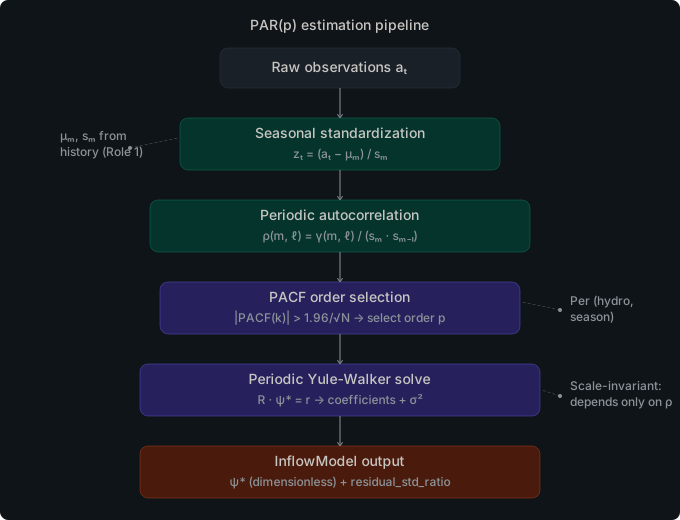
-
Seasonal statistics — mean and standard deviation are computed from the historical observations for each (hydro plant, stage) pair. These replace the values you would otherwise provide in
inflow_seasonal_stats.parquet. -
History classification — Each (hydro plant, stage) observation series is classified before fitting. Constant or near-constant series, saturating caps, and series dominated by a single modal value are detected automatically and routed to a degenerate fit (order 0) so that downstream stages do not over-fit a structurally uninformative bucket. Series with more than 10% strictly negative observations are flagged for diagnostics but otherwise fitted normally.
-
AR order selection — Cobre evaluates candidate orders and selects the best fit per (hydro plant, stage) using the periodic partial autocorrelation function (PACF) with a 95% significance threshold. This avoids overfitting in series with little autocorrelation and captures meaningful persistence where it exists. Two extensions over the classical PACF rule cover the corner cases the classical rule leaves implicit: (i) a structural-zero short-circuit forces the model to order 0 when the lag-1 conditional FACP is exactly zero (degenerate covariance), and (ii) a minimum-order-1 default keeps an AR(1) base whenever the lag-1 FACP is well defined but no lag exceeds the threshold.
-
AR coefficients — Coefficients for the selected order are estimated by solving the periodic Yule-Walker matrix system, which correctly accounts for the non-Toeplitz covariance structure of periodic autoregressive processes.
-
Maceira-Damazio iterative order reduction — After the initial fit, the recursively-composed contributions of each lag through the periodic monthly chain are computed. If any contribution is negative — a signal that the lag’s cumulative influence opposes the expected persistence direction and would propagate as an unstable Benders cut — the offending season’s AR ceiling is reduced and the Yule-Walker fit is re-run at the new ceiling. The reduction iterates across all seasons until every season’s contribution recursion yields non-negative entries.
-
Spatial correlation — The contemporaneous correlation between hydro plants is estimated from the historical residuals after AR fitting. The resulting correlation matrix is used by the spectral noise generator in exactly the same way as a manually specified
correlation.json.
History vs. pre-computed stats: choose one
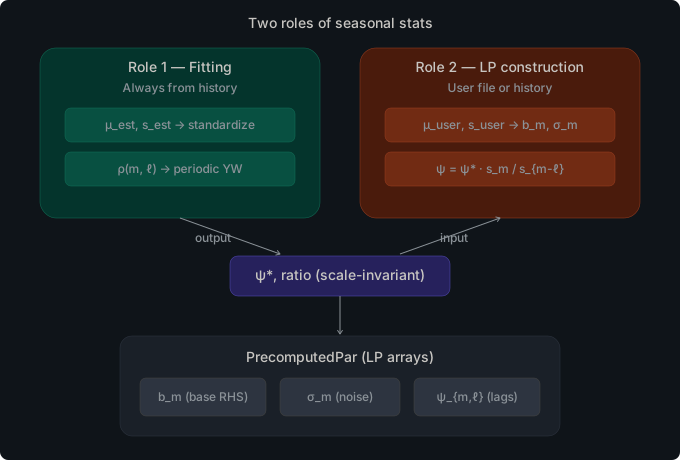
inflow_history.parquet and inflow_seasonal_stats.parquet serve different
roles in the inflow model. When only inflow_history.parquet is present
(and inflow_seasonal_stats.parquet is absent), Cobre activates the
estimation path and derives seasonal statistics and AR coefficients from the
historical data. When inflow_seasonal_stats.parquet is present, it is used
directly regardless of whether inflow_history.parquet is also present.
Use history-based estimation when raw observations are available and you want
Cobre to handle the statistical fitting; use pre-computed stats when you have
already fitted the model externally or when you need precise control over the
parameters.
Inflow Source Resolution
The PAR(p) inflow model is built from up to five files in scenarios/. Three
of them — inflow_history.parquet, inflow_seasonal_stats.parquet, and
inflow_ar_coefficients.parquet — drive path resolution: their
presence/absence selects which of seven estimation paths Cobre executes. The
remaining two — correlation.json and inflow_annual_component.parquet — layer
orthogonally on top of that path.
Path-driver flags
| Symbol | File | Role |
|---|---|---|
| H | scenarios/inflow_history.parquet | Raw observations for fitting |
| S | scenarios/inflow_seasonal_stats.parquet | User-supplied μ, σ per (hydro, stage) |
| R | scenarios/inflow_ar_coefficients.parquet | User-supplied AR coefficients ψ[ℓ] |
The seven estimation paths
For each combination of (H, S, R), Cobre selects exactly one path and resolves
each model output as follows:
| # | H | S | R | Path | Seasonal stats μ, σ | AR coefficients ψ[ℓ] | Annual component (PAR-A) | Correlation Σ |
|---|---|---|---|---|---|---|---|---|
| 1 | 0 | 0 | 0 | Deterministic | no PAR model | none | n/a | identity, unless correlation.json provided |
| 2 | 0 | 1 | 0 | UserStatsWhiteNoise | user file | order-0 (white noise) | user file (if provided), else none | identity, unless correlation.json provided |
| 3 | 0 | 1 | 1 | UserProvidedNoHistory | user file | user file | user file (if provided), else none | identity, unless correlation.json provided |
| 4 | 1 | 0 | 0 | FullEstimation | fitted from H | fitted from H (PACF + Yule-Walker + Maceira-Damazio) | fitted from H iff order_selection = "pacf_annual" ¹ | estimated from H residuals, unless correlation.json provided |
| 5 | 1 | 0 | 1 | UserArHistoryStats | fitted from H | user file | always empty ² | estimated from H residuals using user ψ, unless correlation.json provided |
| 6 | 1 | 1 | 0 | PartialEstimation | user file (fitting stats used only for the YW solve) | fitted from H | fitted from H iff pacf_annual ¹ | estimated from H residuals using fitting stats, unless correlation.json provided |
| 7 | 1 | 1 | 1 | UserProvidedAll | user file | user file | user file (if provided), else none | identity, unless correlation.json provided ³ |
¹ When order_selection ≠ "pacf_annual", the fitted annual component is empty
even on paths 4 and 6.
² Path 5 explicitly discards any user-supplied
inflow_annual_component.parquet.
³ History is not re-consumed on path 7; correlation falls back to identity
unless correlation.json is supplied.
Invalid combinations collapse to
Deterministic. Cases with R=1 but H=0 and S=0 fall back to row 1 — AR coefficients alone cannot drive estimation.
The two orthogonal layers
correlation.json — wins on every path
When correlation.json is present, Cobre uses it verbatim regardless of which
of the seven paths runs. When absent, behavior splits:
- Estimation paths (4, 5, 6) — Σ is estimated from PAR residuals on
H. - Pass-through paths (1, 2, 3, 7) — Σ defaults to identity (independent noise).
This is the only file in the inflow stack that behaves as a true global override.
inflow_annual_component.parquet — only honored on pass-through paths
The user file is loaded by cobre-io and threaded into assemble_inflow_models,
but the estimation paths overwrite it:
| Path | User-supplied annual component is … |
|---|---|
Deterministic | n/a (no inflow models) |
UserStatsWhiteNoise | honored |
UserProvidedNoHistory | honored |
FullEstimation | overwritten by fitted values |
UserArHistoryStats | silently dropped (replaced by vec![]) |
PartialEstimation | overwritten by fitted values |
UserProvidedAll | honored |
To ship a hand-crafted PAR-A annual file, supply S and R so the run
lands on path 7 (UserProvidedAll).
Decision tree
                       ┌─ inflow_history.parquet present? ─┐
                       │                                   │
                      yes                                  no
                       │                                   │
        ┌─ seasonal_stats present? ─┐         ┌─ seasonal_stats present? ─┐
        │                           │         │                           │
       yes                          no       yes                          no
        │                           │         │                           │
 ┌── ar_coeffs? ──┐         ┌── ar_coeffs? ──┐ │                  → Deterministic (1)
 │                │         │                │ │
yes               no        yes              no│
 │                │         │                │ │
UserProvidedAll   Partial   UserAr           Full
     (7)         Estimation HistoryStats     Estimation
                    (6)         (5)              (4)
                                              ┌── ar_coeffs? ──┐
                                              │                │
                                             yes               no
                                              │                │
                                       UserProvidedNoHistory  UserStatsWhiteNoise
                                              (3)                  (2)
Practical recipes
| Goal | Files to provide | Path landed |
|---|---|---|
| Smoke-test the LP without stochasticity | (no scenarios files) | 1 |
| Deterministic seasonal levels, no autoregression | inflow_seasonal_stats.parquet | 2 |
| Fully user-specified PAR(p) without raw observations | inflow_seasonal_stats.parquet, inflow_ar_coefficients.parquet | 3 |
| Hands-off: fit everything from raw observations | inflow_history.parquet | 4 |
| Fit stats from history, override the AR structure | inflow_history.parquet, inflow_ar_coefficients.parquet | 5 |
| Override the levels (μ, σ) but let Cobre fit the AR | inflow_history.parquet, inflow_seasonal_stats.parquet | 6 |
| Provide every parameter, including the PAR-A annual term | All three of H, S, R (and optionally annual file) | 7 |
| Pin a custom spatial correlation on any path | Add correlation.json | any |
The canonical implementation lives in crates/cobre-sddp/src/stochastic/estimation.rs —
EstimationPath::resolve and the dispatch in estimate_from_history — with the
per-path fitting logic in run_estimation (path 4), run_partial_estimation
(path 6), and run_user_ar_estimation (path 5).
Multi-Resolution Studies
Cobre supports studies that mix stages at different temporal resolutions — for example, weekly stages within a month followed by monthly stages, or monthly stages transitioning to quarterly stages. Three mechanisms handle the stochastic implications of these layouts automatically.
Noise Sharing
When multiple SDDP stages share the same season_id (for example, four weekly
stages all assigned to the April season), Cobre automatically shares PAR noise
draws across those stages. Each group of same-season_id stages within a
calendar period receives identical noise realizations, so that sub-monthly
stages present a consistent inflow trajectory that is consistent with the
monthly PAR model they were fitted from.
This sharing is controlled by a noise_group_id precomputed for each stage at
case load time. Uniform monthly studies assign a unique group to each stage, so
noise sharing has no effect and zero runtime overhead for standard studies. The
mechanism is seed-deterministic: identical tree_seed values produce identical
grouped noise assignments across runs and across MPI ranks.
Observation Aggregation
When the study uses a Custom cycle type with seasons of different durations
(for example, 12 monthly seasons followed by 4 quarterly seasons), Cobre
aggregates fine-grained historical observations into coarser season buckets
before PAR fitting. A user who provides monthly inflow_history.parquet for a
study that includes quarterly stages does not need to pre-aggregate the data:
Cobre calls aggregate_observations_to_season internally using
duration-weighted averaging to derive one observation per (hydro, season, year)
at the appropriate resolution for each PAR model.
The coarsening direction is mandatory — aggregating monthly to quarterly is supported; disaggregating quarterly to monthly is not and returns an error. Monthly-uniform studies bypass this step entirely.
Lag Resolution Transition
For studies that transition from monthly to quarterly stages, the PAR lag state must change resolution at the boundary. During the monthly phase, each monthly inflow is accumulated into a ring buffer indexed by the downstream (quarterly) lag. When the first quarterly stage is reached, the ring buffer contains a complete set of duration-weighted monthly contributions and the lag state is rebuilt from those values.
This transition is implemented in StageLagTransition via downstream
accumulation fields and is transparent to the LP and the cut representation.
The transition introduces no state variables in the LP; the lag state is an
internal solver variable updated in the hot-path functions. For
uniform-resolution studies, the downstream accumulation fields are unused and
the transition is a no-op.
For the full technical background — including the ring buffer design, frozen-lag
semantics, and the noise group precomputation algorithm — consult the temporal-resolution-debts design document in docs/design/.
Correlation
Hydro plants that share a watershed tend to have correlated inflows: when the upstream basin receives heavy rainfall, all plants along the river benefit simultaneously. Ignoring this correlation can cause the optimizer to underestimate the risk of a system-wide dry spell. Correlation can also be configured between load buses and between NCS entities.
Default behavior: independent noise
When no correlation configuration is provided, Cobre treats each entity’s
noise as independent of all others. Each entity draws its own noise
realization at each stage without any coupling. This is the correct setting
for the 1dtoy example, which has only one hydro plant.
Configuring spatial correlation
For multi-entity systems, Cobre supports spectral spatial correlation.
A correlation model is specified in correlation.json in the case directory
and defines named correlation groups, each with a symmetric correlation matrix.
The spectral method (eigendecomposition + matrix square root) is preferred
because it handles estimated matrices that are not strictly positive-definite
and rank-deficient matrices naturally, without requiring the matrix to satisfy
Cholesky conditions.
{
  "method": "spectral",
  "profiles": {
    "default": {
      "correlation_groups": [
        {
          "name": "basin_south",
          "entities": [
            { "type": "inflow", "id": 0 },
            { "type": "inflow", "id": 1 }
          ],
          "matrix": [
            [1.0, 0.7],
            [0.7, 1.0]
          ]
        }
      ]
    }
  }
}
Backward compatibility:
"method": "cholesky"is accepted for existing case files and behaves identically to"spectral"as of v0.4.0.
Valid entity types
The "type" field in each entity reference must be one of:
"inflow"— hydro inflow series (entityidmatchesidinhydros.json)"load"— stochastic load demand (entityidmatchesidinbuses.json)"ncs"— non-controllable source availability (entityidmatchesidinnon_controllable_sources.json)
Same-type enforcement
All entities within a single correlation group must share the same entity
type. Mixing entity types — for example, placing an "inflow" entity and a
"load" entity in the same group — is not supported and produces a
StochasticError::InvalidCorrelation error at case load time. If you want to
correlate inflow with load, define separate groups with the same correlation
structure for each class.
Entities not listed in any group retain independent noise. Multiple profiles can be defined and scheduled to activate for specific stages (for example, using a wet-season correlation structure in January through March and a dry-season structure for the remaining months). Detailed correlation configuration documentation will be added with future multi-plant example cases.
Stochastic Load
Electrical load at each bus can be modeled as a stochastic process in
addition to, or independently of, inflow uncertainty. When
load_seasonal_stats.parquet is present in the scenarios/ directory,
Cobre applies a noise model to bus demand during training and simulation.
How load noise works
Load noise uses the same PAR(p) framework as inflows. For each bus and each
stage, Cobre draws a noise realization scaled by the bus’s mean_mw and
std_mw values from load_seasonal_stats.parquet. This realization is then
applied as a multiplicative factor on the base demand for that bus and stage:
the sampled load replaces the deterministic demand value during scenario
generation.
A bus with std_mw = 0 gets deterministic demand at each stage; a bus with
std_mw > 0 gets demand noise proportional to the standard deviation.
Optional: deterministic loads without the file
load_seasonal_stats.parquet is entirely optional. When the file is absent,
Cobre treats all bus demands as deterministic: the demand at each bus and
stage is the fixed value from the case data, with no noise applied. This is
the correct setting for studies where load uncertainty is negligible or where
you want to isolate inflow uncertainty in isolation.
Stochastic NCS Availability
Non-controllable sources (wind, solar, run-of-river) can have stochastic
available generation. When scenarios/non_controllable_stats.parquet is
present, Cobre samples a per-scenario availability factor for each NCS entity
and applies it to the entity’s max_generation_mw.
Schema
The file provides one row per (ncs_id, stage_id) pair:
| Column | Type | Nullable | Description |
|---|---|---|---|
ncs_id | INT32 | No | NCS entity ID (matches id in non_controllable_sources.json) |
stage_id | INT32 | No | Stage identifier (matches id in stages.json) |
mean | DOUBLE | No | Mean availability factor (dimensionless, must be in [0, 1]) |
std | DOUBLE | No | Standard deviation of availability factor (must be >= 0) |
How it works
For each forward and backward pass scenario, Cobre draws a standard normal
noise value η from the opening tree and computes:
A_r = max_generation_mw × clamp(mean + std × η, 0, 1)
The result A_r is then multiplied by the per-block factor from
scenarios/non_controllable_factors.json (default 1.0) to produce the
final NCS column upper bound:
col_upper = A_r × block_factor
With std = 0, the availability is deterministic at mean × max_generation_mw,
making the stochastic pipeline a strict generalization of the deterministic
ncs_bounds.parquet approach.
Optional: deterministic NCS without the file
When non_controllable_stats.parquet is absent, NCS availability is
deterministic: the LP column upper bound comes from constraints/ncs_bounds.parquet
(or defaults to max_generation_mw). No per-scenario variation occurs.
Seeds and Reproducibility
num_scenarios in stages.json
Each stage in stages.json has a num_scenarios field that controls how
many scenario branches are pre-generated for the opening scenario tree used
during the backward pass. A larger value gives the backward pass more
diverse inflow realizations to evaluate cuts against, at the cost of a
proportionally larger opening tree in memory. For the 1dtoy example this
is set to 10. Larger values increase scenario-tree diversity at proportional memory cost.
forward_passes in config.json
The forward_passes field in config.json controls how many scenario
trajectories are sampled during each training iteration’s forward pass.
This is distinct from num_scenarios: the forward pass draws new
trajectories on each iteration using a deterministic per-iteration seed,
while num_scenarios controls the pre-generated backward-pass tree.
Dual-Seed Architecture
Cobre uses two independent seeds, each controlling a different part of the stochastic pipeline:
training.tree_seed in config.json — the base seed for the opening
scenario tree. This seed governs all backward-pass openings and, when the
sampling scheme is in_sample (the default), also governs the forward-pass
scenario selection. When the same case is run with the same tree_seed, the
opening tree is bitwise identical across runs, regardless of the number of MPI
ranks.
training.scenario_source.seed in config.json — the forward seed used
when the sampling scheme is out_of_sample, historical, or external. This
seed controls the noise generated on-the-fly during each forward pass. It is
completely independent of tree_seed: changing it does not affect the
backward-pass tree, and changing tree_seed does not affect the forward pass.
tree_seed is optional: when omitted, Cobre uses a default seed of 42
(deterministic but arbitrary). scenario_source.seed is required when any
class uses out_of_sample, historical, or external; it is unused (and
may be omitted) when all classes use in_sample. To make a run fully
reproducible, specify both seeds explicitly:
// config.json
{
  "training": {
    "tree_seed": 42,
    "forward_passes": 50,
    "stopping_rules": [{ "type": "iteration_limit", "limit": 200 }],
    "scenario_source": {
      "seed": 99,
      "inflow": { "scheme": "out_of_sample" },
      "load": { "scheme": "in_sample" },
      "ncs": { "scheme": "in_sample" }
    }
  }
}
When tree_seed is set to null in config.json, Cobre uses a default
seed of 42, producing a deterministic opening tree. Set tree_seed
explicitly to make the choice intentional. For scenario_source.seed, a
null value is only valid when all classes use in_sample (where no
forward-pass noise is generated); omitting it with any other scheme
triggers a validation error.
Noise Methods
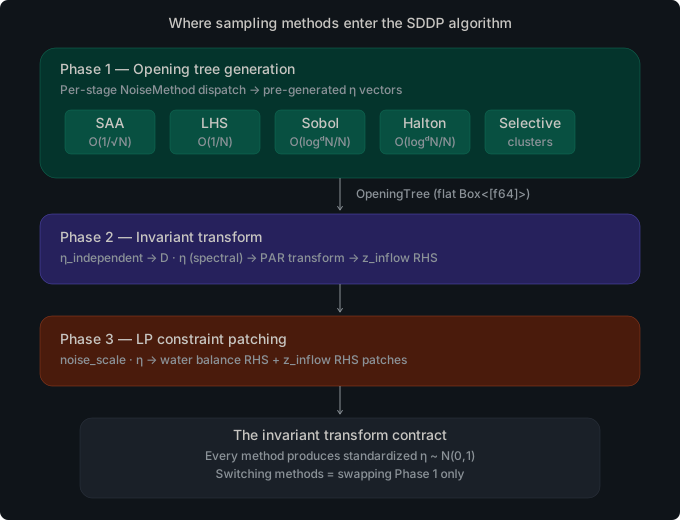
The sampling_method field in each stage entry of stages.json controls
how noise vectors are generated within that stage when building the opening
scenario tree. This is orthogonal to the sampling scheme (see
Sampling Schemes below), which controls where the
forward-pass noise comes from. The noise method controls the algorithm;
the sampling scheme controls the source.
All methods produce standardized η ~ N(0,1) vectors. Everything downstream — the spectral correlation transform, the PAR model, and the LP constraint patching — is identical regardless of which method produced the noise. Switching from SAA to Sobol is a one-field configuration change.
The default method is "saa" when sampling_method is omitted.
SAA — Sample Average Approximation
SAA (Sample Average Approximation) is pure Monte Carlo sampling. Each opening
draws an independent sequence of standard-normal values from a Pcg64
generator seeded deterministically from the stage and opening index. There
is no coordination between openings; each is drawn without knowledge of the
others.
SAA is the simplest and most general method. It works for any dimension count
and any branching factor, and it has no restrictions on num_scenarios. Use
SAA as your baseline when you are uncertain which method to choose, or when
your branching factor is small (fewer than 50 scenarios per stage).
Configure SAA by setting "sampling_method": "saa" (or by omitting the
field, since SAA is the default).
LHS — Latin Hypercube Sampling
LHS (Latin Hypercube Sampling) is stratified sampling. For a stage with
N = num_scenarios openings, each dimension is divided into N
equal-probability strata [k/N, (k+1)/N) for k = 0, …, N-1. Exactly one
sample is placed within each stratum, and a Fisher-Yates shuffle independently
assigns strata to openings for every dimension. The result is marginal
uniformity: when you project all N noise vectors onto any single dimension,
the resulting samples cover the entire range of the standard-normal
distribution uniformly, with no stratum left empty.
LHS reduces the variance of sample-average estimates compared to SAA for the
same N, which typically means a better-converged backward-pass cut
approximation for the same computational budget. It is well-suited to moderate
branching factors and works for any dimension count.
Configure LHS by setting "sampling_method": "lhs" in the stage entry.
QMC-Sobol
QMC-Sobol uses Sobol quasi-random sequences, which are low-discrepancy
sequences that fill the unit hypercube more evenly than independent random
draws. Cobre implements the Joe-Kuo 2010 direction number dataset with
Matousek linear scrambling. The scrambling applies an affine transformation
x' = a·x + b (mod 2^32) with seed-derived parameters to each dimension,
breaking correlations between dimensions while preserving the low-discrepancy
property. The batch generator uses a Gray-code recurrence for O(1) updates
per point.
QMC-Sobol provides a faster convergence rate than both SAA and LHS for smooth
integrands, meaning that a smaller branching factor can achieve equivalent
policy quality. The convergence benefit is strongest when num_scenarios is a
power of 2 (32, 64, 128, 256, …), because Sobol sequences have optimal
2-equidistribution properties at powers of 2. You can use other values of
num_scenarios, but the theoretical convergence advantage is reduced.
QMC-Sobol supports up to 21,201 dimensions. If your system dimension (the total number of hydro plants, load buses, and NCS entities) exceeds 21,201, Cobre will return an error and refuse to run. In practice, this limit is never reached in hydrothermal planning models.
Configure QMC-Sobol by setting "sampling_method": "qmc_sobol".
QMC-Halton
QMC-Halton uses Halton sequences, another family of low-discrepancy
sequences. Each dimension uses a distinct prime base: dimension 1 uses
base 2, dimension 2 uses base 3, dimension 3 uses base 5, and so on. The
prime bases are computed at initialization time using the sieve of
Eratosthenes (sieve_primes). Cobre applies Owen-style random digit
scrambling to each dimension: a random permutation table is applied to each
digit position in each dimension, breaking the correlation artifacts that
affect plain Halton sequences at high dimensions (sometimes called the
“Halton curse”). Permutation tables are derived deterministically from the
stage seed.
QMC-Halton has no dimension limit — it can handle arbitrarily many dimensions by sieving as many primes as needed. This makes it a good alternative to QMC-Sobol for very high-dimensional cases, though in practice the dimension limit of QMC-Sobol (21,201) is rarely reached. The convergence properties of QMC-Halton are similar to QMC-Sobol but the scrambling approach differs; some integrands favor one over the other.
Configure QMC-Halton by setting "sampling_method": "qmc_halton".
HistoricalResiduals
HistoricalResiduals uses standardized noise values derived from actual
historical inflow observations rather than from synthetic distributions. For
each opening in the stage, Cobre selects a historical year (a “window”) from
the HistoricalScenarioLibrary and reads the pre-computed PAR residuals for
that year and stage directly into the noise vector. No random number generator
is invoked; the noise is determined entirely by which historical year is
selected.
This method requires inflow_history.parquet in the scenarios/ directory.
Cobre inverts the PAR(p) model for every valid (window, stage, hydro) triple
at case load time, computing:
eta = (obs - mu - sum(psi[l] * lag[l])) / sigma
where obs is the raw historical inflow, mu and sigma are the seasonal
mean and standard deviation, and psi[l] * lag[l] is the AR contribution
from the preceding l lags. The resulting eta values are stored once and
reused across training runs.
Window selection. For each opening, the window index is chosen deterministically using a hash of the base seed, the opening index, and the stage ID:
window_idx = derive_opening_seed(seed, opening, stage) % n_windows
Selection is with replacement, so the same historical year can appear in
multiple openings of the same stage. When n_windows < branching_factor, the
opening count for that stage is clamped to n_windows and Cobre emits a
warning. Having fewer historical windows than the branching factor is
acceptable — it means the opening tree samples the same years more than once
— but the policy quality is limited by the size of the historical record.
Correlation handling. HistoricalResiduals skips the spectral correlation step that all other noise methods apply after generation. Because each window corresponds to a real historical year, the joint distribution of eta values across hydro plants already reflects the empirical spatial correlation from that year. Applying a synthetic correlation transform on top of real residuals would distort rather than improve the representation.
Non-hydro slots. Only the hydro segment of the noise vector is filled from the historical library. Load and NCS slots are zeroed; those entities use their own noise sources as configured by the sampling scheme.
Configure HistoricalResiduals by setting
"sampling_method": "historical_residuals" in the stage entry of
stages.json:
{
  "id": 0,
  "start_date": "2024-01-01",
  "end_date": "2024-02-01",
  "blocks": [{ "id": 0, "name": "SINGLE", "hours": 744 }],
  "num_scenarios": 50,
  "sampling_method": "historical_residuals"
}
Use HistoricalResiduals when you want the backward-pass opening tree to be grounded in real historical sequences rather than synthetic draws. This is particularly useful when the historical record contains unusual events (severe droughts, extreme wet years) that are difficult to represent faithfully with a parametric distribution.
Selective (Reserved)
The "selective" method is reserved for future use. It is intended to
support representative scenario selection (clustering-based methods), but
the required infrastructure is not yet implemented. If you configure a stage
with "sampling_method": "selective", Cobre will return an error for the
opening tree generator. In the out-of-sample forward pass, it falls back to
SAA and emits a diagnostic warning.
Comparison
The following diagrams illustrate how each method distributes samples. SAA shows random clumps and gaps; LHS guarantees one sample per stratum; Sobol and Halton fill the space with low-discrepancy sequences.
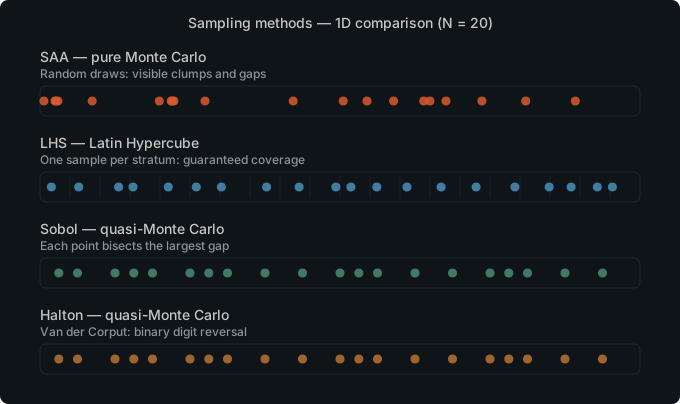
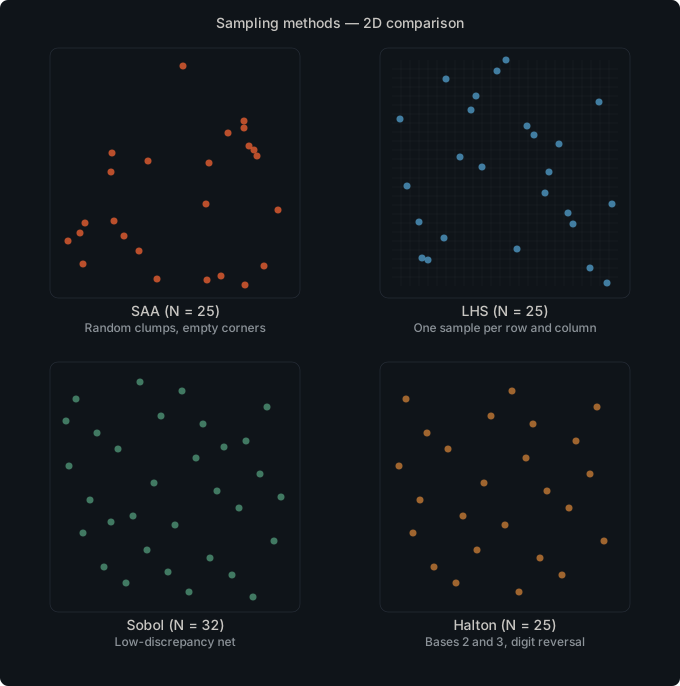
| Method | Convergence rate | Dimension limit | Scenario count | Best for |
|---|---|---|---|---|
| SAA | O(N^{-1/2}) | None | Any | General use, small branching factors |
| LHS | Lower variance than SAA (same order) | None | Any | Moderate scenario counts, any dimension |
| QMC-Sobol | O(N^{-1} log^d N) | 21,201 | Powers of 2 preferred | Faster asymptotic convergence for smooth integrands, low-to-medium dimension |
| QMC-Halton | O(N^{-1} log^d N) | None | Any | High-dimension alternative to Sobol |
| HistoricalResiduals | N/A (empirical) | None | Limited by history length | Preserving empirical correlation, short history |
| Selective | N/A | N/A | N/A | Not implemented; reserved for future use |
Per-Stage Method Configuration
The sampling_method field is set per stage in stages.json. Different
stages in the same study can use different methods. This is useful when you
want a high-quality low-discrepancy method for the near-term stages (where
policy quality matters most) while using the simpler SAA for distant stages
where the investment decisions are less sensitive to sampling quality.
The following example configures a two-stage study where stage 0 uses LHS and stage 1 uses QMC-Sobol:
{
  "policy_graph": { "type": "finite_horizon", "annual_discount_rate": 0.12 },
  "stages": [
    {
      "id": 0,
      "start_date": "2024-01-01",
      "end_date": "2024-02-01",
      "blocks": [{ "id": 0, "name": "SINGLE", "hours": 744 }],
      "num_scenarios": 100,
      "sampling_method": "lhs"
    },
    {
      "id": 1,
      "start_date": "2024-02-01",
      "end_date": "2024-03-01",
      "blocks": [{ "id": 0, "name": "SINGLE", "hours": 696 }],
      "num_scenarios": 128,
      "sampling_method": "qmc_sobol"
    }
  ]
}
Mixed configurations are fully supported. Cobre applies each stage’s method independently when building the opening tree.
Sampling Schemes
The sampling scheme controls where the forward-pass noise comes from. This is a different concept from the noise method: the noise method controls the algorithm used to generate noise vectors for the opening tree, while the sampling scheme controls whether the forward pass reuses the pre-generated tree, generates fresh noise on-the-fly, replays historical observations, or reads from an externally supplied file.
Each entity class — inflow, load, and NCS — independently specifies its
forward-pass noise source. The sampling scheme is configured in config.json
under training.scenario_source using a per-class format:
// config.json
{
  "training": {
    "forward_passes": 50,
    "stopping_rules": [{ "type": "iteration_limit", "limit": 200 }],
    "scenario_source": {
      "seed": 42,
      "inflow": { "scheme": "in_sample" },
      "load": { "scheme": "in_sample" },
      "ncs": { "scheme": "in_sample" }
    }
  }
}
All three class keys ("inflow", "load", "ncs") default to
"in_sample" when absent. The "seed" field is shared across all classes
and is required when any class uses "out_of_sample", "historical", or
"external".
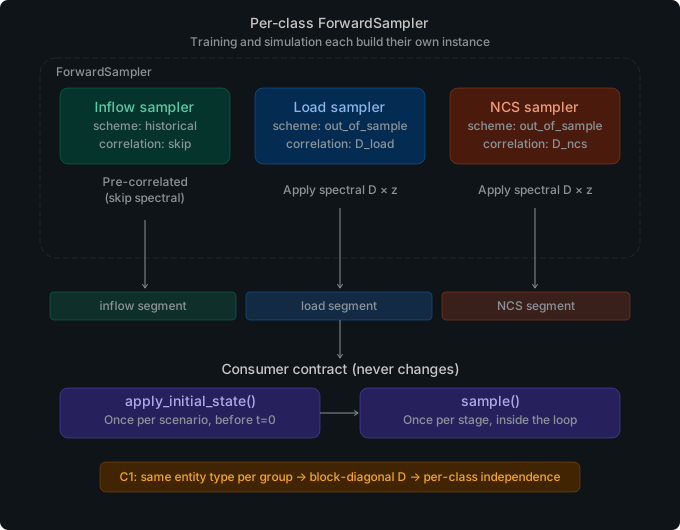
Independent simulation sampling:
simulation.scenario_sourceinconfig.jsoncan be set independently oftraining.scenario_source. Whensimulation.scenario_sourceis absent, the simulation phase falls back to the scheme configured undertraining.scenario_source. This lets you train with in-sample noise and simulate with out-of-sample or historical noise without changing the training configuration.
InSample (default)
With "scheme": "in_sample", the forward pass reuses the pre-generated
opening tree. At each (iteration, scenario, stage) triple, the solver
selects one opening from the tree using a deterministic per-iteration hash
derived from tree_seed. The backward pass and the forward pass see the
same set of noise realizations: the same scenarios that were used to build
cuts are the scenarios against which the forward trajectories are evaluated.
InSample is the default when training.scenario_source is absent from config.json.
It is simple to configure, requires no additional seed, and is appropriate for
most studies. The main limitation is that the forward pass cannot evaluate the
policy on noise realizations outside the opening tree, which can lead to an
optimistic bias when the branching factor is small.
OutOfSample
With "scheme": "out_of_sample", the forward pass generates fresh noise
on-the-fly at each (iteration, scenario, stage) triple. The fresh noise is
drawn from the same distribution as the opening tree but is independent of it
— the forward pass never looks at the tree. Each call derives a unique noise
vector from training.scenario_source.seed, the iteration index, the scenario
index, and the stage ID. The per-stage sampling_method controls which
algorithm (SAA, LHS, QMC-Sobol, or QMC-Halton) is used to generate the fresh
noise.
OutOfSample requires training.scenario_source.seed to be set. Configure it as follows:
// config.json
{
  "training": {
    "forward_passes": 50,
    "stopping_rules": [{ "type": "iteration_limit", "limit": 200 }],
    "scenario_source": {
      "seed": 99,
      "inflow": { "scheme": "out_of_sample" },
      "load": { "scheme": "in_sample" },
      "ncs": { "scheme": "in_sample" }
    }
  }
}
OutOfSample is preferred when you want to evaluate policy quality on scenarios that are independent of the scenarios used to build the policy. This avoids the in-sample optimism that arises with small branching factors, where the policy has effectively “seen” all the noise realizations during training. OutOfSample is especially useful during simulation, where you want an unbiased estimate of the policy’s expected cost on new scenarios.
Historical
With "scheme": "historical", the forward pass replays standardized noise
derived from historical inflow observations stored in inflow_history.parquet.
This allows you to evaluate the policy against actual historical sequences —
what would the policy have done during the drought of 1953 or the wet year of
1974?
Historical sampling applies only to the inflow class. The load and NCS classes configure their own schemes independently and are unaffected by the inflow class using Historical.
Window discovery
A “window” is a starting year y for which every hydro plant in the study has
a complete sequence of historical observations covering the entire study period
(plus the PAR model lag order of pre-study seasons needed to seed the AR
state). Cobre discovers valid windows by scanning inflow_history.parquet and
checking completeness for every candidate starting year.
When historical_years is absent from training.scenario_source, Cobre
auto-discovers all valid windows from the history file. If the history file covers years 1940
through 2010 and the study spans 12 monthly stages, then every year for which
the history is complete (accounting for the required pre-window lag seasons)
becomes a valid window.
Configuring historical_years
To restrict the pool of candidate windows, set historical_years in
scenario_source. Two forms are supported:
Explicit list — specify the exact starting years to use:
// config.json
{
  "training": {
    "forward_passes": 50,
    "stopping_rules": [{ "type": "iteration_limit", "limit": 200 }],
    "scenario_source": {
      "seed": 7,
      "inflow": { "scheme": "historical" },
      "load": { "scheme": "in_sample" },
      "ncs": { "scheme": "in_sample" },
      "historical_years": [1940, 1953]
    }
  }
}
Inclusive range — specify a contiguous span of starting years:
// config.json
{
  "training": {
    "forward_passes": 50,
    "stopping_rules": [{ "type": "iteration_limit", "limit": 200 }],
    "scenario_source": {
      "seed": 7,
      "inflow": { "scheme": "historical" },
      "load": { "scheme": "in_sample" },
      "ncs": { "scheme": "in_sample" },
      "historical_years": { "from": 1940, "to": 2010 }
    }
  }
}
In both forms, Cobre validates each candidate year against the history file
and silently discards years for which the data is incomplete. If no valid
windows remain after filtering, Cobre returns a StochasticError::InsufficientData
error. When the number of valid windows is smaller than forward_passes, a
diagnostic warning is emitted and windows are repeated across forward passes.
Lag seeding (apply_initial_state)
For PAR models with order > 0, the first stage of each forward pass requires historical inflow values from the stages immediately before the window’s start year — the “pre-study” lags. Historical sampling uses the raw historical observations at those pre-window stages directly as the PAR state vector. This means the AR dynamics of the first forward stage are initialized from the real historical record rather than from a generated value, preserving the continuity invariant between pre-window history and the replayed scenario.
How the HistoricalScenarioLibrary is used
At case load time, Cobre constructs a HistoricalScenarioLibrary by inverting
the PAR(p) model for every valid (window, stage) pair: it computes the
standardized noise value η = (obs − deterministic_base − Σ ψ[ℓ]·lag[ℓ]) / σ
using the raw historical inflow as lags. The resulting eta values are stored in
a flat buffer indexed by (window, stage, hydro). During the forward pass, the
ClassSampler::Historical variant selects a window deterministically from the
seed and iteration/scenario indices, then retrieves the pre-computed eta slice
for each stage without any per-step recomputation.
Scenario selection: random without replacement
Historical, External, and LHS all use the same underlying mechanism to select items from a pool without repetition: a seed-derived Fisher-Yates permutation. Each forward-pass scenario gets a unique window (or external trajectory, or LHS stratum) within each round, with no inter-worker communication required.
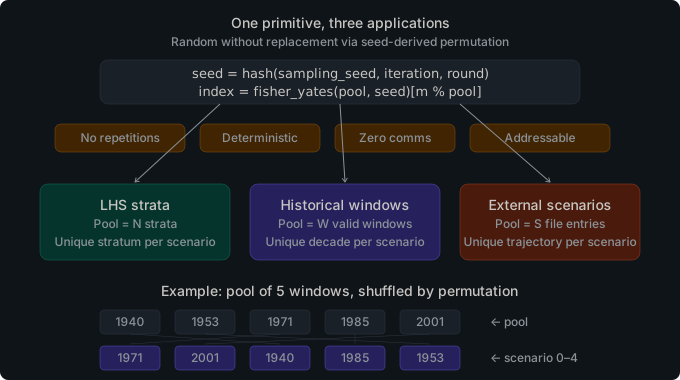
External
With "scheme": "external", the forward pass reads pre-generated scenario
realizations from per-class Parquet files in the scenarios/ directory. This
enables integration with external scenario generation tools — for example, a
climate model, a market forecast engine, or a bespoke sampling framework — and
injects their output directly into the Cobre forward pass.
Each entity class that uses External sampling requires its own file. The three files and their schemas are:
external_inflow_scenarios.parquet
| Column | Type | Nullable | Description |
|---|---|---|---|
stage_id | INT32 | No | Stage identifier (matches id in stages.json) |
scenario_id | INT32 | No | Zero-based scenario index (0 to n_scenarios − 1) |
hydro_id | INT32 | No | Hydro plant ID (matches id in hydros.json) |
value_m3s | DOUBLE | No | Inflow realization in m³/s for this (stage, scenario, hydro) |
external_load_scenarios.parquet
| Column | Type | Nullable | Description |
|---|---|---|---|
stage_id | INT32 | No | Stage identifier (matches id in stages.json) |
scenario_id | INT32 | No | Zero-based scenario index (0 to n_scenarios − 1) |
bus_id | INT32 | No | Bus ID (matches id in buses.json) |
value_mw | DOUBLE | No | Load realization in MW for this (stage, scenario, bus) |
external_ncs_scenarios.parquet
| Column | Type | Nullable | Description |
|---|---|---|---|
stage_id | INT32 | No | Stage identifier (matches id in stages.json) |
scenario_id | INT32 | No | Zero-based scenario index (0 to n_scenarios − 1) |
ncs_id | INT32 | No | NCS entity ID (matches id in non_controllable_sources.json) |
value | DOUBLE | No | Availability realization for this (stage, scenario, NCS) |
External standardization
Cobre does not use the raw values from external files directly. Before the forward pass can use them, each value is converted to the same standardized noise space (eta) that the PAR model and the opening tree use internally:
- Inflow — full PAR(p) inversion via
solve_par_noise: the observed value is converted toη = (obs − deterministic_base − Σ ψ[ℓ]·lag[ℓ]) / σusing the fitted PAR model coefficients and seasonal statistics. - Load — simple z-score normalization:
η = (value − mean) / stdusing themean_mwandstd_mwfromload_seasonal_stats.parquet. - NCS — simple z-score normalization:
η = (value − mean) / stdusing themeanandstdfromnon_controllable_stats.parquet.
The resulting eta values are stored in an ExternalScenarioLibrary — one
per class — and the ClassSampler::External variant retrieves them by
(stage, scenario) index during the forward pass.
Configuring External sampling
// config.json
{
  "training": {
    "forward_passes": 50,
    "stopping_rules": [{ "type": "iteration_limit", "limit": 200 }],
    "scenario_source": {
      "seed": 1,
      "inflow": { "scheme": "external" },
      "load": { "scheme": "external" },
      "ncs": { "scheme": "in_sample" }
    }
  }
}
Each class is configured independently. In the example above, inflow and load use external files while NCS uses the in-sample opening tree.
User-Supplied Opening Trees
By default, Cobre generates the backward-pass opening tree internally using
SipHash-derived seeds and the spatial correlation spectral factor. If you need
to supply your own noise realizations — for cross-tool comparison, sensitivity
analysis, or round-trip replay — you can place scenarios/noise_openings.parquet
in the case directory before running.
When the file is present, Cobre loads the opening tree from it instead of calling the internal generator. When the file is absent, the default generator runs as usual.
Schema
The file has exactly four columns:
| Column | Type | Required | Description |
|---|---|---|---|
stage_id | INT32 | Yes | Zero-based stage index (0 to n_stages − 1) |
opening_index | UINT32 | Yes | Zero-based opening index within the stage (0 to openings_per_stage − 1) |
entity_index | UINT32 | Yes | Zero-based entity index in system dimension order |
value | DOUBLE | Yes | Noise realization for this (stage, opening, entity) triple |
Entity ordering
The entity_index column follows the system dimension convention:
- Hydro entities, sorted by canonical ID (ascending)
- Load buses, sorted by canonical ID (ascending)
- NCS entities, sorted by canonical ID (ascending)
This matches the ordering used by Cobre’s internal opening tree generator. The file stores only indices, not entity identifiers, so an incorrect ordering causes silent value misassignment rather than a schema error. Double-check the entity ordering when constructing the file externally.
Use cases
- Cross-tool comparison. Generate a set of noise realizations in an external tool and inject them into Cobre to compare policy quality on identical scenarios.
- Sensitivity analysis. Construct an extreme scenario (for example, all hydros at minimum inflow for the entire study) and evaluate how the policy responds.
- Round-trip replay. Export the opening tree that Cobre used in a training
run with
exports.stochastic: trueinconfig.json, copyoutput/stochastic/noise_openings.parquettoscenarios/, and re-run to reproduce the exact same backward-pass context. See Exporting Stochastic Artifacts for the complete workflow.
Interaction with tree_seed
The training.tree_seed field in config.json remains required even when a
user-supplied opening tree is present. The opening tree and forward-pass noise
are independent: tree_seed governs the forward-pass scenario sampling
performed by sample_forward(), which uses SipHash seeds derived independently
of the opening tree. Supplying a custom opening tree has no effect on forward-pass
noise.
Limitations
- Partial-stage override is not supported. You must supply openings for all study stages. If you want to replace a subset of stages while keeping the rest internally generated, you must supply a complete tree and duplicate the internally generated values for the unmodified stages.
- User-supplied noise is used as-is. The spectral spatial correlation factor is not applied again. You are responsible for any spatial correlation structure encoded in the values you supply.
The file schema and validation rules are documented in the noise_openings.rs module.
Inflow Non-Negativity
Normal distributions used in PAR(p) models have unbounded support: even with a positive mean, there is a non-zero probability of drawing a negative noise realisation that, after applying the AR dynamics, produces a negative inflow value. Negative inflow has no physical meaning and, if uncorrected, would violate water balance constraints in the LP.
Cobre provides two available methods for handling negative inflow realisations,
controlled by the modeling.inflow_non_negativity.method field in config.json.
Penalty method (default)
The penalty method adds a high-cost slack variable to each water balance
row. When the solver encounters a scenario where the inflow would be negative,
it draws on this virtual inflow at the penalty cost rather than violating the
balance constraint. The penalty cost is configurable via the
inflow_non_negativity field in the case configuration; the default keeps it
high enough that the slack is used only when necessary.
In practice, the penalty is rarely activated in well-specified studies. It acts as a backstop for low-probability tail realisations. It is the default method.
Truncation method
Available since v0.1.1, the truncation method evaluates the full inflow
value before constructing the LP and clamps any negative result to zero. The
water balance row receives the clamped inflow directly; no slack variable is
added and no penalty cost is incurred. To enable truncation, set the method
field in config.json:
{
  "modeling": {
    "inflow_non_negativity": {
      "method": "truncation"
    }
  }
}
Truncation eliminates the penalty cost for tail realisations at the expense of introducing a small bias: scenarios where the true inflow would be slightly negative are treated as zero-inflow scenarios, which is conservative but physically interpretable. For most well-specified studies, both methods produce similar results because negative realisations are rare.
Truncation with penalty
A combined truncation with penalty method is available, configured by
setting method to "truncation_with_penalty" in config.json:
{
  "modeling": {
    "inflow_non_negativity": {
      "method": "truncation_with_penalty"
    }
  }
}
This method applies both truncation and a bounded slack variable: the inflow
is clamped to zero and a slack penalised by
penalties.json::hydro.inflow_nonnegativity_cost is added, providing a smooth
backstop for extreme tail realisations.
For the mathematical theory behind all three methods, see the Inflow Non-Negativity page in the methodology reference, or Oliveira et al. (2022), Energies 15(3):1115.
Temporal Resolution and PAR
The PAR(p) model is parameterized by season_id. Every stage in stages.json
carries a season_id that selects its PAR parameters — mean (mu), standard
deviation (sigma), and autoregressive coefficients (psi) — from the fitted
model. When multiple stages share the same season_id, they receive identical
stochastic parameters.
This design choice reflects a fundamental data-resolution constraint. If the
historical observations are at monthly resolution, the fitted PAR parameters
describe the distribution of monthly inflows. Applying those parameters to
sub-monthly stages (for example, four weekly stages all assigned
season_id = 3 for April) does not create additional information — it
reproduces the same monthly-scale noise for each week.
Why sub-monthly stages share noise. Sub-monthly stages sharing a
season_id receive the same PAR parameters and, for the HistoricalResiduals
noise method, the same noise realizations. This is not a limitation of the
implementation — it is an honest representation of what monthly-resolution
data can tell you. Monthly history cannot support independent weekly noise
draws; doing so would fabricate variability that does not exist in the record.
Users who need true sub-monthly variability should supply it through External
scenarios from a dedicated short-term model.
Recommended pattern for weekly decision granularity. When weekly dispatch decisions matter but external weekly scenarios are not available, the recommended approach is to use a monthly SDDP stage with chronological blocks rather than multiple weekly SDDP stages:
{
  "id": 0,
  "start_date": "2024-01-01",
  "end_date": "2024-02-01",
  "season_id": 0,
  "blocks": [
    { "id": 0, "name": "WEEK1", "hours": 168 },
    { "id": 1, "name": "WEEK2", "hours": 168 },
    { "id": 2, "name": "WEEK3", "hours": 168 },
    { "id": 3, "name": "WEEK4", "hours": 240 }
  ],
  "num_scenarios": 50
}
One monthly stage with four weekly chronological blocks provides weekly dispatch granularity in the LP while keeping one noise realization per month — consistent with the data resolution. The stage boundary carries a single Benders cut at monthly resolution. This avoids both the fabricated weekly variability and the lag-accumulation complications that arise with four independent weekly SDDP stages.
For the full technical background on temporal resolution design, including
applicability matrices for different study patterns, consult the temporal-resolution-debts design document in docs/design/.
Validation Rules
Cobre validates the consistency of temporal resolution settings at case load
time. The following rules apply when season_definitions is present in
stages.json and inflow_history.parquet is the active estimation source.
Rule 27 (error): season_id range coverage.
Every stage season_id must reference a season defined in
season_definitions. If a stage has season_id = 5 but the season map only
defines seasons 0–11, Cobre emits a BusinessRuleViolation error and
refuses to build the stochastic model.
- Triggers when: a stage’s
season_idis not present inseason_definitions.seasons[].id. - Resolution: Add the missing season to
season_definitions, or correct theseason_idin the stage entry.
Rule 28 (warning): observation coverage.
When a season has no inflow observations in inflow_history.parquet and the
inflow sampling scheme is not external, PAR estimation for that season will
have no data. Cobre emits a ModelQuality warning. This is not an error
because External-only seasons legitimately have no history requirement.
- Triggers when: a season defined in
season_definitionshas zero observations ininflow_history.parquetand the inflow scheme is notexternal. - Resolution: Provide historical observations for the season, switch the
inflow scheme to
externalfor that study, or remove the season if it is unused.
Rule 29 (error): resolution consistency.
All stages sharing the same season_id must have durations within 7 days of
each other. A stage group where one member is a monthly stage (28–31 days)
and another is a quarterly stage (89–92 days) indicates conflicting PAR model
parameterisations for the same season, and Cobre emits a
BusinessRuleViolation error.
- Triggers when: the maximum and minimum durations among stages in the
same
season_idgroup differ by more than 7 days. - Resolution: Assign distinct
season_idvalues to stages at different temporal resolutions (e.g., monthly stages use IDs 0–11, quarterly stages use IDs 12–15 in a customSeasonMap).
Rule 30 (warning): contiguity.
A season defined in season_definitions but not referenced by any stage will
have no PAR parameters and no observations. Cobre emits a ModelQuality
warning for each such season. This catches accidental gaps in the season ID
space (e.g., defining seasons 0–11 but stages only using 0–9).
- Triggers when: a season defined in
season_definitionsis not referenced by any stage’sseason_id. - Resolution: Remove the unreferenced season from
season_definitions, or assign it to at least one stage.
Rule 31 (error): observation-to-season alignment.
If any (hydro_id, season_id, year) triple has more than one observation in
inflow_history.parquet, the observation data has finer temporal resolution
than the season definitions. The PAR estimation pipeline expects exactly one
observation per (hydro, season, year). Multiple observations distort
parameter estimates. Cobre emits a BusinessRuleViolation error.
- Triggers when: a hydro plant has two or more observations in
inflow_history.parquetthat map to the same(season_id, year)pair (for example, daily observations paired with monthly seasons, or two monthly entries for the same hydro-season-year). - Resolution: Aggregate the finer-resolution observations to match the
season resolution before providing the file. Provide exactly one row per
(hydro_id, season_id, year)ininflow_history.parquet.
Related Pages
- Anatomy of a Case — introductory walkthrough of the
scenarios/directory and Parquet schemas - Configuration — full documentation of
config.jsonfields includingtree_seedandforward_passes - cobre-stochastic — internal architecture of the stochastic crate: PAR preprocessing, spectral correlation, opening tree, and seed derivation
Configuration
All runtime parameters for cobre run are controlled by config.json in the
case directory. This page documents every section and field.
Minimal Config
{
  "training": {
    "forward_passes": 50,
    "stopping_rules": [{ "type": "iteration_limit", "limit": 100 }]
  }
}
All other sections are optional with defaults documented below.
training
Controls the SDDP training phase.
Mandatory Fields
| Field | Type | Description |
|---|---|---|
forward_passes | integer | Number of scenario trajectories per iteration. Larger values reduce variance in each iteration’s cut but increase cost per iteration. |
stopping_rules | array | At least one stopping rule (see below). The rule set must contain at least one iteration_limit rule. |
Optional Fields
| Field | Type | Default | Description |
|---|---|---|---|
enabled | boolean | true | Set to false to skip training and proceed directly to simulation (requires a pre-trained policy). |
tree_seed | integer | null | Random seed for the opening scenario tree. When null, a default seed of 42 is used (deterministic but arbitrary). See Stochastic Modeling for the dual-seed architecture. |
stopping_mode | "any" or "all" | "any" | How multiple stopping rules combine: "any" stops when the first rule is satisfied; "all" requires all rules to be satisfied simultaneously. |
For the per-class scenario_source configuration, see the
scenario_source sub-section below and
Stochastic Modeling.
scenario_source
Controls where the forward-pass noise comes from for each entity class during
training. When absent, all classes default to in_sample (reusing the
pre-generated opening tree).
| Field | Type | Default | Description |
|---|---|---|---|
seed | integer or null | null | Shared forward-pass seed for out_of_sample, historical, and external schemes. |
inflow | object | in_sample | Sampling scheme for hydro inflow. Object with "scheme" key. |
load | object | in_sample | Sampling scheme for bus load. Object with "scheme" key. |
ncs | object | in_sample | Sampling scheme for NCS availability. Object with "scheme" key. |
historical_years | array or object | auto-discover | Restrict the pool of historical windows. List ([1940, 1953]) or range ({"from": 1940, "to": 2010}). |
Valid values for "scheme": "in_sample", "out_of_sample", "historical", "external".
Example — out-of-sample inflow with in-sample load and NCS:
{
  "training": {
    "tree_seed": 42,
    "forward_passes": 50,
    "stopping_rules": [{ "type": "iteration_limit", "limit": 200 }],
    "scenario_source": {
      "seed": 99,
      "inflow": { "scheme": "out_of_sample" },
      "load": { "scheme": "in_sample" },
      "ncs": { "scheme": "in_sample" }
    }
  }
}
See Stochastic Modeling — Sampling Schemes
for a full description of each scheme and the historical_years field.
Stopping Rules
Each entry in stopping_rules is a JSON object with a "type" discriminator.
iteration_limit
Stop after a fixed number of training iterations.
{ "type": "iteration_limit", "limit": 200 }
| Field | Type | Description |
|---|---|---|
limit | integer | Maximum number of SDDP iterations to run. |
time_limit
Stop after a wall-clock time budget is exhausted.
{ "type": "time_limit", "seconds": 3600.0 }
| Field | Type | Description |
|---|---|---|
seconds | float | Maximum training time in seconds. |
bound_stalling
Stop when the relative improvement in the lower bound falls below a threshold.
{ "type": "bound_stalling", "iterations": 20, "tolerance": 0.0001 }
| Field | Type | Description |
|---|---|---|
iterations | integer | Window size: the number of past iterations over which to compute the relative improvement. |
tolerance | float | Relative improvement threshold. Training stops when the improvement over the window is below this value. |
simulation
Stop when both the lower bound and a Monte Carlo policy cost estimate have stabilized. Periodically runs a batch of forward simulations and compares the result against previous evaluations.
{
  "type": "simulation",
  "replications": 100,
  "period": 10,
  "bound_window": 5,
  "distance_tol": 0.01,
  "bound_tol": 0.0001
}
| Field | Type | Description |
|---|---|---|
replications | integer | Number of Monte Carlo forward simulations per check. |
period | integer | Iterations between simulation checks. |
bound_window | integer | Number of past iterations for bound stability check. |
distance_tol | float | Normalized distance threshold between consecutive simulation results. |
bound_tol | float | Relative tolerance for bound stability. |
stopping_mode
When multiple stopping rules are listed, stopping_mode controls how they
combine:
"any"(default): stop when any one rule is satisfied."all": stop only when every rule is satisfied simultaneously.
{
  "training": {
    "forward_passes": 50,
    "stopping_mode": "all",
    "stopping_rules": [
      { "type": "iteration_limit", "limit": 500 },
      { "type": "bound_stalling", "iterations": 20, "tolerance": 0.0001 }
    ]
  }
}
simulation
Controls the optional post-training simulation phase.
| Field | Type | Default | Description |
|---|---|---|---|
enabled | boolean | false | Enable the simulation phase after training. |
num_scenarios | integer | 2000 | Number of independent Monte Carlo simulation scenarios to evaluate. |
When simulation.enabled is false or num_scenarios is 0, the simulation
phase is skipped entirely.
Example:
{
  "simulation": {
    "enabled": true,
    "num_scenarios": 1000
  }
}
scenario_source
Controls where the forward-pass noise comes from during the simulation phase.
When absent, simulation falls back to the scheme configured under
training.scenario_source. This allows you to train with in-sample noise and
simulate with a different scheme (for example, out-of-sample or historical)
without modifying the training configuration.
The fields are identical to training.scenario_source:
| Field | Type | Default | Description |
|---|---|---|---|
seed | integer or null | null | Shared forward-pass seed for out_of_sample, historical, and external schemes. |
inflow | object | in_sample | Sampling scheme for hydro inflow. Object with "scheme" key. |
load | object | in_sample | Sampling scheme for bus load. Object with "scheme" key. |
ncs | object | in_sample | Sampling scheme for NCS availability. Object with "scheme" key. |
historical_years | array or object | auto-discover | Restrict the pool of historical windows. List ([1940, 1953]) or range ({"from": 1940, "to": 2010}). |
Example — simulate with out-of-sample inflow while training uses in-sample:
{
  "training": {
    "forward_passes": 50,
    "stopping_rules": [{ "type": "iteration_limit", "limit": 200 }]
  },
  "simulation": {
    "enabled": true,
    "num_scenarios": 2000,
    "scenario_source": {
      "seed": 77,
      "inflow": { "scheme": "out_of_sample" },
      "load": { "scheme": "in_sample" },
      "ncs": { "scheme": "in_sample" }
    }
  }
}
modeling
Controls physical modeling options.
| Field | Type | Default | Description |
|---|---|---|---|
inflow_non_negativity | object | see below | Strategy for handling negative PAR model inflow draws. |
inflow_non_negativity
| Field | Type | Default | Description |
|---|---|---|---|
method | string | "penalty" | One of "none", "penalty", "truncation", or "truncation_with_penalty". |
"none"– no treatment; negative inflows are passed through to the LP."penalty"– adds a slack variable to the LP that absorbs negative inflow realisations. The slack carries a per-hydro objective cost frompenalties.json::hydro.inflow_nonnegativity_cost."truncation"– clamps negative PAR model draws to zero before applying noise."truncation_with_penalty"– combines both: clamps the inflow to zero and adds a bounded slack variable penalised bypenalties.json::hydro.inflow_nonnegativity_cost, providing a smooth backstop for extreme tail realisations.
Example:
{
  "modeling": {
    "inflow_non_negativity": {
      "method": "penalty"
    }
  }
}
cut_selection
Controls the row management pipeline for managing row pool growth. The pipeline has up to two stages: strategy-based selection and budget enforcement. Row management periodically scans the row pool and deactivates rows that are unlikely to improve the policy, reducing LP size without sacrificing convergence quality. For a detailed explanation of each stage, see Performance Accelerators.
The block has two always-on knobs at the top level plus a selection
sub-object that chooses the method and carries only that method’s parameters.
Omitting selection (or setting it to null) disables row selection — that is
the default.
Always-on fields
| Field | Type | Default | Description |
|---|---|---|---|
row_activity_tolerance | float | 0.0 | Minimum dual-multiplier magnitude for a constraint row to count as binding at a solution point. Rows whose dual falls below this are treated as inactive in tracking. |
max_active_per_stage | integer | null | Hard cap on active rows per stage LP, enforced after the selection method runs. null = no cap. |
selection | object | null | The active selection method and its parameters (see below). null (the default) disables row selection. |
The selection object
selection.method is the discriminator; each method exposes only its own
parameters. Supplying a parameter that belongs to a different method is a config
load error, and a misspelled method is rejected with the list of valid methods.
-
"level1"— evaluates all populated rows at every visited state and retains any row whose value is withintie_toleranceof the per-state maximum at some state. Least aggressive; preserves the convergence guarantee.Field Type Default Description tie_tolerancefloat 1e-10A row is active at a state when within this of the best row value there. check_frequencyinteger 5Iterations between periodic pruning checks. Must be > 0. -
"lml1"— at each visited state, retains only the oldest eligible row withintie_toleranceof the per-state maximum; the selected set is the union of those per-state survivors. More aggressive than"level1". Same fields as"level1"(tie_tolerance,check_frequency). -
"domination"— removes rows dominated at all visited states.Field Type Default Description domination_tolerancefloat – A row survives if within this of the maximum at any visited state. Required. check_frequencyinteger 5Iterations between periodic pruning checks. Must be > 0. -
"dynamic"— a per-solve lazy loop that loads only a small resident subset of rows per solve while retaining the full pool. The resident set is seeded from the most recent iterations, and each lazy-solve round adds the most-violated candidate rows.Field Type Default Description start_iterationinteger 2First 1-based iteration at which the lazy loop becomes active. Must be >= 1.seed_windowinteger 5Number of most-recent iterations whose rows seed the initial resident set. 0is valid (seeds only the current iteration).candidate_recencyinteger nullOnly rows generated within the last candidate_recencyiterations are scored.null(the default) is unbounded — every pool row is a candidate, which preserves exactness.Some(n)(must be>= 1) makes the loop deliberately inexact: rows older than the window are never added.max_added_per_roundinteger 10Maximum rows added per lazy-solve round. Must be >= 1.violation_tolerancefloat 1e-10Violation tolerance for accepting a candidate row. Must be > 0.
The dynamic method is mutually exclusive with the periodic-pruning methods by
construction — choosing it from the tagged selection block means none of
level1 / lml1 / domination can run.
Example with the dynamic method:
{
  "training": {
    "cut_selection": {
      "row_activity_tolerance": 1e-6,
      "max_active_per_stage": 4000,
      "selection": {
        "method": "dynamic",
        "start_iteration": 2,
        "seed_window": 5,
        "max_added_per_round": 10,
        "violation_tolerance": 1e-10
      }
    }
  }
}
Example with the level1 method and a per-stage budget:
{
  "training": {
    "cut_selection": {
      "row_activity_tolerance": 1e-6,
      "max_active_per_stage": 500,
      "selection": {
        "method": "level1",
        "tie_tolerance": 1e-10,
        "check_frequency": 5
      }
    }
  }
}
estimation
Controls the PAR(p) model estimation pipeline. When the case provides
inflow_history.parquet, Cobre can automatically estimate AR coefficients
instead of requiring pre-computed inflow_ar_coefficients.parquet.
| Field | Type | Default | Description |
|---|---|---|---|
max_order | integer | 6 | Maximum lag order considered during autoregressive model fitting. |
order_selection | string | "pacf" | Order selection criterion: "pacf" (PACF-based) or "pacf_annual" (PACF with annual component). |
min_observations_per_season | integer | 30 | Minimum observations per (entity, season) group to proceed with estimation. |
max_coefficient_magnitude | float | null | Safety net: reduce to order 0 if any coefficient exceeds this magnitude. |
Example:
{
  "estimation": {
    "max_order": 6,
    "order_selection": "pacf",
    "min_observations_per_season": 30
  }
}
Setting "order_selection": "pacf_annual" activates the annual component extension. When
enabled, the estimation pipeline performs four additional steps beyond the classical PAR
path: (1) the Yule-Walker system is extended to include a cross-correlation term between
the current-season inflow and the rolling 12-month average; (2) per-season sample
statistics (mean and standard deviation) of that rolling average are computed for each
hydro plant; (3) the coefficient, mean, and standard deviation are written to
inflow_annual_component.parquet in the output directory; and (4) the lag stride used
when building the LP noise columns is widened to accommodate the extra annual term. Use
this option when your inflow series shows persistence that extends beyond the
standard seasonal lag window.
policy
Controls policy persistence (checkpoint saving and warm-start loading).
| Field | Type | Default | Description |
|---|---|---|---|
path | string | "./policy" | Directory where policy data (cuts, states) is stored. |
mode | "fresh", "warm_start", or "resume" | "fresh" | Initialization mode. "fresh" starts from scratch; "warm_start" loads cuts from a previous run; "resume" continues an interrupted run. |
validate_compatibility | boolean | true | When loading a policy, verify that entity counts, stage counts, and cut dimensions match the current system. |
boundary | object or null | null | Terminal boundary cut configuration for coupling with an outer model’s FCF. See below. |
checkpointing
| Field | Type | Default | Description |
|---|---|---|---|
enabled | boolean | false | Enable periodic checkpointing during training. |
initial_iteration | integer | null | First iteration to write a checkpoint. |
interval_iterations | integer | null | Iterations between checkpoints. |
store_basis | boolean | false | Include LP basis in checkpoints for warm-start. |
compress | boolean | false | Compress checkpoint files. |
boundary
Optional configuration for loading terminal-stage boundary cuts from a different Cobre policy checkpoint. When present, the solver loads cuts from the source checkpoint and injects them as fixed boundary conditions at the terminal stage of the current study. The imported cuts are not updated by training — they remain fixed throughout.
This enables Cobre-to-Cobre model coupling: a monthly study produces a policy checkpoint, and a weekly+monthly coupled study loads that checkpoint’s cuts as its terminal-stage future cost function.
| Field | Type | Description |
|---|---|---|
path | string | Path to the source policy checkpoint directory. |
source_stage | integer | 0-based stage index in the source checkpoint to load cuts from. |
Example — load stage 2’s cuts from a monthly policy as terminal boundary:
{
  "policy": {
    "mode": "fresh",
    "boundary": {
      "path": "../monthly_study/policy",
      "source_stage": 2
    }
  }
}
See Policy Management — Boundary Cuts for a full explanation of the coupling workflow.
Temporal Resolution
Cobre does not have dedicated config.json fields for temporal resolution. The
resolution of each stage is determined entirely by the date boundaries in
stages.json. However, when stages.json defines stages at different temporal
resolutions — for example, four weekly stages within a month followed by monthly
stages, or monthly stages transitioning to quarterly stages — three mechanisms
activate automatically that users should understand.
Noise Group Sharing
When multiple SDDP stages share the same season_id within the same calendar
period (for example, four weekly stages all assigned season_id: 0 for
January), they receive identical PAR noise draws. This ensures that sub-monthly
stages present an inflow trajectory consistent with the monthly PAR model they
were fitted from, rather than fabricating independent weekly variability that
the historical record does not support.
Observation Aggregation
When the study includes stages at different resolutions (for example, monthly
and quarterly), Cobre automatically aggregates fine-grained historical
observations into coarser season buckets before PAR fitting. A user supplying
monthly inflow_history.parquet for a study that includes quarterly stages does
not need to pre-aggregate the data; Cobre derives one observation per
(entity, season, year) at the appropriate coarser resolution. Aggregating in the
opposite direction (disaggregating coarser observations to a finer resolution)
is not supported and will produce a validation error at case load time.
Lag Resolution Transition
For studies that transition from monthly to quarterly stages, the PAR lag state changes resolution at the boundary. During the monthly phase, each monthly inflow is accumulated into a ring buffer indexed by the downstream (quarterly) lag. When the first quarterly stage is reached, the ring buffer contains a complete set of duration-weighted monthly contributions, and the lag state is rebuilt automatically. This transition is transparent to the LP and the cut representation; it introduces no additional LP variables.
Example: Weekly Stages Within a Month
The following stages.json excerpt shows four weekly stages within January
(stages 0-3, all with season_id: 0) followed by a normal monthly stage for
February (season_id: 1). Stages 0-3 share the same season_id and will
therefore receive identical PAR noise draws during training:
[
  {
    "id": 0,
    "start_date": "2024-01-01",
    "end_date": "2024-01-08",
    "season_id": 0,
    "num_scenarios": 50
  },
  {
    "id": 1,
    "start_date": "2024-01-08",
    "end_date": "2024-01-15",
    "season_id": 0,
    "num_scenarios": 50
  },
  {
    "id": 2,
    "start_date": "2024-01-15",
    "end_date": "2024-01-22",
    "season_id": 0,
    "num_scenarios": 50
  },
  {
    "id": 3,
    "start_date": "2024-01-22",
    "end_date": "2024-02-01",
    "season_id": 0,
    "num_scenarios": 50
  },
  {
    "id": 4,
    "start_date": "2024-02-01",
    "end_date": "2024-03-01",
    "season_id": 1,
    "num_scenarios": 50
  }
]
Recommended Alternative: Weekly Blocks Within a Monthly Stage
When weekly dispatch granularity is needed but true weekly-resolution noise
data is unavailable, the recommended approach is to use a single monthly SDDP
stage with chronological blocks rather than four separate weekly SDDP stages.
This provides weekly LP granularity while keeping one noise realization per
month — consistent with the data resolution — and avoids the lag-accumulation
complications that arise with multiple independent weekly stages. See
Stochastic Modeling — Temporal Resolution and PAR
for the full explanation and a stages.json example of the block pattern.
See Also (Temporal Resolution)
- Stochastic Modeling — Multi-Resolution Studies — detailed mechanism descriptions including the noise group precomputation algorithm, observation aggregation internals, and lag ring buffer design
- Stochastic Modeling — Temporal Resolution and PAR — the honest representation principle, the recommended weekly-block pattern, and validation rules 27-31
exports
Controls which outputs are written to the results directory.
| Field | Type | Default | Description |
|---|---|---|---|
states | boolean | false | Write visited forward-pass trial points to the policy checkpoint (FlatBuffers). |
stochastic | boolean | false | Export stochastic preprocessing artifacts to output/stochastic/. |
fpha_deviation_points | boolean | false | Export the per-grid-point computed-FPHA fit-deviation table to output/hydro_models/fpha_deviation_points.parquet. Opt-in because it emits one row per (hydro, stage, V, Q) sample point at spillage = 0. |
Full Example
{
  "$schema": "https://raw.githubusercontent.com/cobre-rs/cobre/refs/heads/main/book/src/schemas/config.schema.json",
  "training": {
    "tree_seed": 42,
    "forward_passes": 50,
    "stopping_rules": [
      { "type": "iteration_limit", "limit": 200 },
      { "type": "bound_stalling", "iterations": 20, "tolerance": 0.0001 }
    ],
    "stopping_mode": "any",
    "scenario_source": {
      "seed": 99,
      "inflow": { "scheme": "out_of_sample" },
      "load": { "scheme": "in_sample" },
      "ncs": { "scheme": "in_sample" }
    },
    "cut_selection": {
      "row_activity_tolerance": 1e-6,
      "max_active_per_stage": null,
      "selection": {
        "method": "level1",
        "tie_tolerance": 1e-10,
        "check_frequency": 5
      }
    }
  },
  "modeling": {
    "inflow_non_negativity": {
      "method": "penalty"
    }
  },
  "simulation": {
    "enabled": true,
    "num_scenarios": 2000
  },
  "policy": {
    "path": "./policy",
    "mode": "fresh"
  },
  "exports": {
    "states": false,
    "stochastic": false
  }
}
Advanced Fields
The Config struct supports additional sections not documented on this page.
These fields are deserialized from config.json when present but are intended
for advanced use cases and may change between releases:
| Section | Purpose |
|---|---|
upper_bound_evaluation | Inner approximation upper-bound evaluation settings |
training.solver | LP solver options (see Solver Safeguards for details) |
simulation.io_channel_capacity | Async I/O channel buffer size for simulation output writing |
All fields have defaults and can be omitted. Every JSON input file rejects
unknown keys, so misspelled fields raise a parse error rather than being
silently ignored. For the complete list of fields and their types, see the
Config struct in the cobre-io API docs.
See Also
- Case Directory Format — full schema for all input files
- Running Studies — end-to-end workflow guide
- Error Codes — validation errors including
SchemaErrorfor config fields - Stochastic Modeling — Temporal Resolution — how stage resolution affects PAR noise sharing and validation rules
Performance Accelerators
This chapter documents the performance optimization techniques built into Cobre’s SDDP solver. Each accelerator addresses a specific cost driver in the training loop and is active by default unless noted otherwise. Understanding them helps users interpret timing statistics, configure cut management strategies, and diagnose performance regressions.
LP Setup Optimizations
Each SDDP iteration requires solving hundreds to thousands of LP subproblems. Minimizing per-solve overhead is critical.
Model Persistence
The structural LP for each stage (the constraint matrix, variable bounds,
and objective coefficients) is assembled once at initialization into a
StageTemplate. During the training loop, the solver loads the template
once per (worker, stage) pair and then only patches the scenario-dependent
row bounds for each forward-pass scenario. This avoids rebuilding the
entire LP from scratch at every scenario evaluation.
The simulation pipeline uses the same pattern: a stage-major loop loads
the LP once per (worker, stage) and then iterates over scenarios, patching
bounds only. This reduces LP assembly overhead from O(scenarios x stages)
to O(workers x stages).
Incremental Cut Injection
Benders cuts are appended to the persistent lower-bound LP via add_rows
without rebuilding the structural model. A CutRowMap provides O(1)
slot-to-row lookup so the incremental append skips cuts that are already
present.
The LB LP is strictly append-only: rows generated during training are appended and never removed, which keeps the lower bound monotonically non-decreasing across iterations. Row selection in the shared row pool still affects the forward and backward passes — pool-deactivated rows remain as LP rows in the LB solver but are not re-evaluated, so they contribute only their binding value at the trial point.
PatchBuffer Pre-Allocation
The PatchBuffer holds three parallel arrays (indices, lower, upper)
consumed by the solver’s set_row_bounds call. It is sized once at
construction for the maximum number of patches across all stages:
| Category | Range | Content |
|---|---|---|
| 1 | [0, N) | Storage-fixing: equality constraint at incoming storage |
| 2 | [N, N*(1+L)) | Lag-fixing: equality constraint at AR lagged inflows |
| 3 | [N*(1+L), N*(2+L)) | Noise-fixing: equality constraint at scenario noise |
| 4 | [N*(2+L), N*(2+L) + M*B) | Load balance: stochastic load demand per bus per block |
| 5 | [N*(2+L) + M*B, ...) | z-inflow RHS: inflow variable bounds |
Where N = hydro plants, L = max PAR order, M = stochastic load buses, B = max blocks per stage. The buffer is reused across all iterations and scenarios with zero hot-path allocation.
Solver Safeguards
When HiGHS returns a non-terminal error (SOLVE_ERROR or UNKNOWN),
the solver automatically escalates through a 12-level retry sequence
organized in two phases, with per-level and overall wall-clock budgets.
The caller never sees intermediate failures — only the final
Ok(solution) or Err(SolverError).
Phase 1 (levels 0–4): Cumulative Sequence
Each level stacks on top of the previous:
| Level | Action |
|---|---|
| 0 | Clear cached basis and factorization |
| 1 | Enable presolve |
| 2 | Switch to dual simplex |
| 3 | Relax feasibility tolerances (1e-6) |
| 4 | Switch to interior point method (IPM) |
Phase 2 (levels 5–11): Extended Strategies
Each level starts from restored defaults with presolve and iteration limits, then applies level-specific options:
| Level | Action |
|---|---|
| 5 | Scale strategy 3 |
| 6 | Primal simplex + scale strategy 4 |
| 7 | Scale strategy 3 + relaxed tolerances |
| 8 | Objective scale (-10) |
| 9 | Primal simplex + objective scale (-10) + bound scale (-5) |
| 10 | Objective scale (-13) + bound scale (-8) + relaxed tolerances |
| 11 | IPM + objective/bound scaling + relaxed tolerances |
Budgets: 15 seconds per level in Phase 1, 30 seconds per level in
Phase 2, 120 seconds overall. Iteration limits are set to
max(100_000, 50 x num_cols) for simplex and 10,000 for IPM.
Default solver settings are restored unconditionally after the retry loop,
regardless of outcome. The per-level retry histogram is recorded in
SolverStatistics.retry_level_histogram and written to
training/solver/retry_histogram.parquet for post-run analysis.
LP Scaling
Before each stage’s LP template is built, a prescaler normalizes the constraint matrix coefficients toward 1.0, improving numerical conditioning and reducing the need for HiGHS’s internal scaling.
Column Scaling
For each column j, the scale factor is
1 / sqrt(max|A_ij| * min|A_ij|) over non-zero entries. The matrix
values, objective coefficients, and column bounds are scaled in-place.
After solving, primal values are unscaled: x_original[j] = col_scale[j] * x_scaled[j].
Row Scaling
Applied after column scaling with the same geometric-mean formula per row.
After solving, duals are unscaled: dual_original[i] = row_scale[i] * dual_scaled[i].
Cost Scale Factor
A constant COST_SCALE_FACTOR = 1000 is applied to all objective
coefficients to reduce the magnitude of objective coefficients, improving
simplex numerical stability.
Because the prescaler normalizes matrix entries toward 1.0, HiGHS’s
internal scaling (simplex_scale_strategy) is disabled (set to 0) in
every solver profile — including the retry-escalation levels — to avoid
double-scaling the already-conditioned matrix.
The scaling diagnostics are written to training/scaling_report.json
after template construction, documenting the coefficient range before
and after scaling for each stage.
Cut Management Pipeline
As training progresses, the row pool grows and LP solve times increase. Cobre provides a two-stage row management pipeline to control this growth while preserving convergence guarantees.
The pipeline runs after each iteration’s backward pass and cut synchronization:
Stage 1: Strategy-based selection  (check_frequency gated)
    |
    v
Stage 2: Budget enforcement        (every iteration)
Stage 1: Strategy-Based Selection
Four strategies are available, configured via
cut_selection in config.json:
| Strategy | Selection Mechanism | Aggressiveness |
|---|---|---|
level1 | Deactivates cuts below tie_tolerance of the per-state max at every visited state | Least |
lml1 | Deactivates cuts that are not the oldest eligible within tie_tolerance at any visited state | Medium |
domination | Deactivates cuts below domination_tolerance of the per-state max at every visited state (all populated cuts) | Most |
dynamic | Lazy incremental scheme: adds at most max_added_per_round cuts per inner re-solve round that violate the current LP solution by more than violation_tolerance; never deactivates cuts from the pool | Different |
level1, lml1, and domination respect check_frequency: selection runs
only at iterations that are multiples of check_frequency. Stage 0 is
always exempt (its rows drive the lower bound and are never backward-pass
successors). Selection runs in parallel across stages via rayon.
level1, lml1, and domination share a single value-evaluation kernel
that performs O(|populated cuts| x |visited states|) work per stage per
check. Every populated cut is evaluated at every visited forward-pass
state (including cuts currently flagged inactive, which means a previously
deactivated cut can be reactivated when it later achieves the maximum at
some state). The visited-states archive is collected during training for
these three variants. The tie_tolerance parameter (default 1e-10) on
level1 and lml1 controls how closely a cut must approach the per-state
maximum to be retained; domination uses the domination_tolerance field
for the same purpose.
dynamic (Dynamic Cut Selection, DCS) operates differently: it is a
per-solve lazy selection loop that adds cuts on demand rather than
deactivating from a full pool scan. It never invokes the value-evaluation
kernel and does not respect check_frequency. The initial active set is
seeded from the seed_window most recent iterations. See
cut_selection for the full parameter
reference.
Stage 2: Budget Enforcement
A hard-cap safety net on LP size, enabled via max_active_per_stage.
When the number of active rows exceeds the budget after Stage 1, the
pool evicts rows sorted by staleness (last_active_iter ascending,
then active_count ascending). Rows from the current iteration are
always protected.
Unlike Stage 1, budget enforcement runs every iteration (not gated
by check_frequency).
Configuration:
{
  "training": {
    "cut_selection": {
      "max_active_per_stage": 500,
      "selection": {
        "method": "level1",
        "tie_tolerance": 1e-10,
        "check_frequency": 5
      }
    }
  }
}
Why it matters: High-parallelism configurations (many forward passes, few iterations) accumulate more active rows than low-parallelism configurations (fewer forward passes, more iterations), making each backward LP solve proportionally more expensive. Bounding LP size makes high-parallelism configurations viable without unbounded solve-time growth.
Observability
The row management pipeline writes per-stage statistics to
training/cut_selection/iterations.parquet with 10 columns:
| Column | Description |
|---|---|
iteration | Training iteration |
stage | Stage index |
cuts_populated | Total row slots populated |
cuts_active_before | Active rows before selection |
cuts_deactivated | Rows deactivated by Stage 1 |
cuts_reactivated | Rows reactivated by Stage 1 |
cuts_active_after | Active rows after Stage 1 |
selection_time_ms | Wall-clock time for the selection |
budget_evicted | Rows evicted by Stage 2 (null if disabled) |
active_after_budget | Active rows after Stage 2 (null if disabled) |
Basis Warm-Start
Reusing the LP simplex basis from the previous solve reduces the number of simplex pivots needed for subsequent solves.
BasisStore
The BasisStore holds one Basis per (scenario, stage) pair in a flat
array indexed as bases[scenario * num_stages + stage]. Before the parallel
forward pass, the store is split into disjoint per-worker sub-views
(split_workers_mut) so no synchronization is needed during writes.
The Basis struct stores solver-native i32 status codes directly,
enabling zero-copy warm-starts via memcpy — no per-element enum
translation is needed.
Simulation Basis Broadcast
When running with MPI, rank 0’s scenario-0 basis is broadcast to all ranks before the simulation phase. This ensures all ranks warm-start simulation from the same LP vertex, regardless of rank count.
Basis Reconstruction
Each stored warm-start basis is wrapped in a CapturedBasis { basis, base_row_count, cut_row_slots, state_at_capture } struct that records
the LP row count and the ordered list of row-pool slot indices at
capture time, alongside the state vector at which the basis was
captured. The reconstruct_basis function in
cobre-sddp::basis_reconstruct is the sole entry point for applying a
stored basis across row-set churn on the forward pass, backward pass,
and simulation pipeline.
When a stored basis is applied to an LP whose appended rows have changed,
reconstruct_basis walks the current LP’s appended rows, looks each slot
up in an O(1) scratch map built from cut_row_slots, and classifies
each row into one of two paths:
- Preserved (slot present in the stored basis): the original status is copied verbatim.
- New (slot not present — a row added since capture): the row is
unconditionally assigned
NONBASIC_LOWER(tight guess).
Each NONBASIC_LOWER classification on a new row requires a
compensating demotion on a preserved row to keep HiGHS’s
column-basic + row-basic invariant. The stalest preserved-LOWER
candidate is promoted, ranked lexicographically by insertion order.
When new-LOWER classifications outnumber preserved-LOWER
candidates, a tail fallback flips the most recent new-LOWER rows
back to BASIC until the invariant holds.
Reconstruction is always active when a stored basis exists — there is
no configuration flag. The basis_activity_window config knob that
earlier versions accepted has been removed; a config that still sets it
now fails to load with an unknown-field error.
The in-memory SolverStatistics::basis_reconstructions counter tracks how
often reconstruct_basis was invoked with a non-empty stored basis.
Backward-Pass Basis Cache
During training, rank 0’s ω=0 backward-pass worker captures a fresh
basis for every stage into a per-iteration backward cache. At end of
iteration the cache is broadcast to all ranks, and on the next
iteration’s backward pass every rank’s ω=0 solve warm-starts from the
cached basis instead of falling back to the forward-pass BasisStore.
The first iteration has no backward cache yet, so it uses the forward
cache exclusively.
The backward cache matters because rows added earlier in the current
iteration’s backward walk are new relative to the previous
iteration’s stored basis — so the classifier fires frequently on
backward solves, while the forward pass sees mostly preserved slots
and the classifier rarely runs. A warm-start at ω=0 also cascades
through the remaining openings (ω=1..n_openings-1) via HiGHS’s
retained factorization, amplifying the per-solve impact.
Parallel Execution
Backward Pass Work-Stealing
The backward pass parallelizes the inner trial-point loop using atomic
counter work-stealing: each worker claims the next available trial-point
index via AtomicUsize::fetch_add(1, Relaxed). This keeps all threads
busy even when trial points solve in variable time.
After the parallel region, staged rows are sorted by trial_point_idx
and inserted into the FCF in deterministic order, guaranteeing bit-for-bit
identical results regardless of thread count or completion order.
Per-Phase Solver Profiles
Each algorithmic phase — forward sweep, backward sweep, and simulation — can
be configured with a distinct HighsProfile that sets the LP solver’s
feasibility tolerances and per-attempt iteration caps. Tuning BACKWARD_PROFILE
to tighter tolerances or stricter iteration caps can reduce backward-pass
solve time variance, which in turn improves load balance across worker threads
and shortens wall-clock training time. FORWARD_PROFILE and
SIMULATION_PROFILE ship equal to HighsProfile::default(), while
BACKWARD_PROFILE already overrides simplex_price_strategy to 2
(RowHyperSparse) to exploit sparsity on the backward LPs; all other backward
fields match the default.
Forward Pass and Simulation
Scenarios are statically partitioned across solver workspace instances (not rayon’s default work-stealing), making the scenario-to-worker assignment deterministic. Within each scenario, the LP is loaded once per stage and only row bounds are patched per scenario.
Lower Bound Evaluation
The lower bound evaluation (solving a stage-0 LP for every opening in the tree) runs as a single-threaded serial loop on rank 0. Each opening patches correctness-critical per-opening state (e.g. NCS column bounds) on a shared solver, so the openings cannot be split across workers without fragmenting those sequential steps; the step is therefore not parallelized.
Communication-Free Seed Derivation
Forward pass noise is generated without inter-rank communication. Each
rank independently derives its noise seed from
(base_seed, iteration, scenario, stage) using deterministic SipHash-1-3
seed derivation. The opening tree is pre-generated once before training
and shared read-only.
Memory Efficiency
Pre-Allocation Discipline
The forward, backward, and simulation per-solve hot paths make no heap allocations inside the iteration loop; all workspace buffers are allocated once before the loop. (The periodic cut-selection pass is the one documented exception — its rayon fold/reduce kernel allocates per-leaf scratch.) The pre-allocated buffers are:
| Buffer | Size |
|---|---|
TrajectoryRecord flat vec | forward_passes x num_stages records |
PatchBuffer | N*(2+L) + M*max_blocks entries |
ExchangeBuffers (state allgatherv) | local_count x num_ranks x n_state floats |
CutSyncBuffers (row-sync allgatherv) | max_cuts_per_rank x num_ranks x cut_wire_size bytes |
ScratchBuffers per worker | noise, inflow, lag matrix, PAR, eta, load, z-inflow buffers |
Basis per worker | pre-allocated with template_rows + max_cut_rows entries |
CutPool Flat Coefficient Storage
Row coefficients are stored as a single contiguous Vec<f64> of size
capacity x state_dimension rather than a Vec<Vec<f64>>. This provides
cache-friendly sequential access during batch iteration (row evaluation,
dominance checks) and eliminates per-row heap allocation.
Lazy FCF Growth
The CutPool grows its coefficient storage on demand using a doubling
strategy (minimum 16 slots) rather than pre-allocating to the theoretical
maximum capacity. This prevents memory exhaustion on pathological parameter
combinations (e.g., 1000 iterations x 1000 forward passes x 50 states x
120 stages would require 48 GB with eager pre-allocation).
O(1) Active Row Count
CutPool maintains a cached_active_count that is updated incrementally
on each activation/deactivation, making active_count() O(1) instead of
requiring a scan of the entire pool.
Compile-Time Solver Dispatch
SolverInterface is resolved as a generic type parameter at compile time,
not as Box<dyn SolverInterface>. All solver calls monomorphize to direct
function calls with no virtual dispatch overhead — critical when tens of
millions of LP solves occur per training run.
See Also
- Configuration — row-selection and row management configuration
- Output Format — timing, solver statistics, and row-selection output schemas
- cobre-solver — solver interface and retry escalation details
- cobre-sddp — training loop architecture and data structures
Running Studies
End-to-end workflow for running an SDDP study with cobre run, interpreting output,
and inspecting results.
Preparing a Case Directory
A case directory is a folder containing all input data files required by Cobre. The minimum required structure is:
my_study/
  config.json
  penalties.json
  stages.json
  initial_conditions.json
  system/
    buses.json
    hydros.json
    thermals.json
    lines.json
All eight files are required. Before running, validate the input:
cobre validate /path/to/my_study
Successful validation prints entity counts and exits with code 0:

When validation detects errors — such as missing required fields or constraint violations — it reports them with severity labels and exits with code 1:

Fix any reported errors before proceeding. See Case Directory Format for the full schema.
Running cobre run
cobre run /path/to/my_study
By default, results are written to <CASE_DIR>/output/. To specify a different
location:
cobre run /path/to/my_study --output /path/to/results
Lifecycle Stages
- Load — reads input files, runs layered validation (exits code 1 on validation failure, 2 on I/O error)
- Train — builds the SDDP policy by iterating forward/backward passes; stops when stopping rules are met
- Simulate — (optional) evaluates the policy over independent scenarios; requires
simulation.enabled = true - Write — writes Hive-partitioned Parquet (tabular), JSON manifests/metadata, and FlatBuffers output
Terminal Output
Banner
When stderr is a terminal, a banner shows the version and solver backend.
Use --quiet to suppress the banner, progress bars, and post-run summary.
Errors are always written to stderr regardless of --quiet.
Progress Bars
During training, a progress bar shows current iteration count. In --quiet mode,
no progress bars are printed. Errors are always written to stderr.
Summary
After all stages complete, a run summary is printed to stderr with:
- Training: iteration count, convergence status, bounds, gap, cuts, solves, time
- Simulation (when enabled): scenarios requested, completed, failed
- Output directory: absolute path to results
Checking Results
Use cobre report to inspect the results:
cobre report /path/to/my_study/output
Reads manifest files and prints JSON to stdout (suitable for piping to jq):
cobre report /path/to/my_study/output | jq '.training.convergence.final_gap_percent'
Exits with code 0 on success or 2 if the results directory does not exist.
Common Workflows
Training Only
To run training without simulation, set simulation.enabled to false in
config.json:
{ "simulation": { "enabled": false } }
Simulation Against a Saved Policy
To evaluate a previously trained policy without re-training:
{
  "training": { "enabled": false },
  "policy": { "mode": "warm_start", "path": "./policy" }
}
Cobre loads the policy cuts, skips training entirely, and runs simulation. See Policy Management for details on warm-start and resume modes.
Multi-threading
Use --threads to accelerate training and simulation with intra-rank
parallelism:
cobre run /path/to/my_study --threads 4

The thread pool is used for forward-pass batching and simulation scenario evaluation. Speedup depends on the number of forward passes and simulation scenarios configured.
Quiet Mode for Scripts
cobre run /path/to/my_study --quiet
exit_code=$?
if [ $exit_code -ne 0 ]; then
  echo "Study failed with exit code $exit_code" >&2
fi
Suppresses banner and progress output, suitable for batch scripts.
Checking Exit Codes
| Exit Code | Meaning | Action |
|---|---|---|
0 | Success | Results are available in the output directory |
1 | Validation error | Fix the input data and re-run cobre validate |
2 | I/O error | Check file paths and permissions |
3 | Solver error | Check constraint bounds in the case data |
4 | Internal error | Check environment; report at the issue tracker |
See CLI Reference for the full exit code table.
Exporting Stochastic Artifacts
Set exports.stochastic to true in config.json to write the stochastic
preprocessing artifacts to output/stochastic/ before training begins:
{
  "exports": {
    "stochastic": true
  }
}
What is exported
| File | Written when |
|---|---|
output/stochastic/inflow_seasonal_stats.parquet | Estimation was performed |
output/stochastic/inflow_ar_coefficients.parquet | Estimation was performed |
output/stochastic/correlation.json | Always |
output/stochastic/fitting_report.json | Estimation was performed |
output/stochastic/noise_openings.parquet | Always |
output/stochastic/load_seasonal_stats.parquet | Load buses exist |
“Estimation was performed” means the user did not supply the corresponding
scenario file; Cobre derived it from inflow_history.parquet.
Round-trip workflow
Because every exported file uses the exact same schema as the corresponding
input file, you can copy the exported artifacts back to scenarios/ and
re-run to reproduce the identical stochastic context without re-running
estimation:
# Step 1: initial run with stochastic export enabled in config.json
cobre run my_case

# Step 2: copy artifacts to scenarios/
cp -r my_case/output/stochastic/* my_case/scenarios/

# Step 3: re-run — estimation is skipped, opening tree is loaded directly
cobre run my_case
The re-run is faster (no Levinson-Durbin fitting or spectral decomposition) and produces bit-for-bit identical stochastic artifacts.
For the complete schema of each exported file, see Stochastic Artifacts in the Output Format Reference.
Policy Management
Cobre stores the trained future-cost function (cuts), LP basis, and visited
states in a policy directory. The policy section of config.json controls
where that directory lives, whether training starts from scratch or from a
prior checkpoint, and how often intermediate checkpoints are written during
training.
Policy Modes
The policy.mode field selects one of three initialization strategies. The
default is "fresh".
Fresh (Default)
Training starts from an empty future-cost function. All prior cuts in
policy.path are ignored (or the directory does not yet exist).
{ "policy": { "mode": "fresh" } }
Use "fresh" for new studies or when you want a clean training run with no
influence from earlier iterations.
Warm Start
Cobre loads the cuts from an existing policy checkpoint before training begins. Training then continues, adding new cuts on top of the loaded ones. The loaded cuts count as the initial future-cost approximation.
{ "policy": { "mode": "warm_start", "path": "./policy" } }
Use "warm_start" when you have a policy from a previous run (possibly with
different parameters) and want to accelerate convergence by reusing its cuts.
Set policy.validate_compatibility to true (the default) to have Cobre
verify that the state dimension and entity layout of the saved policy match the
current system before loading.
Resume
Cobre reads the checkpoint metadata to determine how many iterations were completed, then resumes training from that point. The RNG seed and iteration counter are restored so the noise sequences are identical to an uninterrupted run.
{ "policy": { "mode": "resume", "path": "./policy" } }
Use "resume" after an interrupted training run (power loss, job timeout, or
manual cancellation) to continue exactly where training stopped. Requires that
checkpointing was enabled in the interrupted run.
Simulation-Only Mode
To evaluate a previously trained policy without re-running training, disable training and load the policy in warm-start mode:
{
  "training": { "enabled": false },
  "policy": { "mode": "warm_start", "path": "./policy" }
}
Cobre loads the cuts from policy.path, skips the training phase entirely, and
runs the post-training simulation using the loaded future-cost function. This
is useful for running additional simulation scenarios on a policy that has
already converged, or for comparing multiple saved policies on the same
scenarios.
Checkpointing Configuration
The policy.checkpointing section controls periodic checkpointing during
training. All fields are optional; omitting a field leaves the solver default
in effect.
| Field | Type | Description |
|---|---|---|
enabled | boolean or null | Enable periodic checkpointing. When null or omitted, checkpointing is disabled. |
initial_iteration | integer or null | First iteration at which a checkpoint is written. When null, the first checkpoint uses interval_iterations. |
interval_iterations | integer or null | Number of iterations between successive checkpoints. When null, defaults to the solver’s built-in interval. |
store_basis | boolean or null | Include LP basis files in checkpoints. Enables faster basis warm-start on resume. When null, basis is omitted. |
compress | boolean or null | Compress checkpoint binary files. Reduces disk usage at the cost of slightly slower reads and writes. |
Example enabling checkpointing every 50 iterations starting at iteration 100, with basis storage and compression:
{
  "policy": {
    "path": "./policy",
    "checkpointing": {
      "enabled": true,
      "initial_iteration": 100,
      "interval_iterations": 50,
      "store_basis": true,
      "compress": true
    }
  }
}
Checkpoint Directory Contents
A written checkpoint has the following layout under policy.path:
policy/
  metadata.json          -- run metadata and compatibility hashes (written last)
  cuts/
    stage_000.bin        -- cut coefficients and intercepts for stage 0
    stage_001.bin        -- cut coefficients and intercepts for stage 1
    ...
  basis/
    stage_000.bin        -- LP basis for stage 0 (when store_basis is enabled)
    stage_001.bin
    ...
  states/
    stage_000.bin        -- visited states for dominated cut selection, stage 0
    stage_001.bin
    ...
metadata.json is written last. Its presence signals that the checkpoint
is complete and safe to load. An interrupted write leaves metadata.json
absent; Cobre treats a directory without metadata.json as an incomplete
checkpoint and refuses to load it.
The metadata.json file records the number of completed iterations,
lower-bound and upper-bound values, state dimension, number of stages,
configuration and system hashes (used by validate_compatibility), forward
passes per iteration, and the RNG seed. These fields allow Cobre to verify
that a saved policy is compatible with the current system before loading it
in "warm_start" or "resume" mode.
Boundary Cuts
Boundary cuts allow a Cobre study to load terminal-stage future cost function (FCF) approximations from a different Cobre policy checkpoint. This is the mechanism for model coupling — a short-horizon study (e.g., weekly+monthly coupled study) can use the long-horizon policy (e.g., a monthly long-horizon model) as its terminal boundary condition, ensuring that end-of-horizon decisions account for the long-term future cost of water.
How it works
- Run a monthly study and produce a policy checkpoint (the “outer” model).
- Run a weekly+monthly study with
policy.boundarypointing to the monthly checkpoint. Cobre loads cuts from the specified stage and injects them into the terminal stage’s row pool as fixed boundary conditions.
The imported boundary cuts are not updated by the SDDP training algorithm. They remain fixed throughout training and simulation, providing a floor on the terminal-stage future cost.
Configuration
Add a boundary object to the policy section of config.json:
{
  "policy": {
    "mode": "fresh",
    "boundary": {
      "path": "../monthly_study/policy",
      "source_stage": 2
    }
  }
}
| Field | Type | Description |
|---|---|---|
path | string | Path to the source Cobre policy checkpoint directory. |
source_stage | integer | 0-based stage index in the source checkpoint to load cuts from. |
When boundary is absent or null, no boundary cuts are loaded (the default).
Compatibility requirements
The source checkpoint must have the same state dimension (number of hydro
plants and maximum PAR order) as the current study. Cobre validates this
automatically when validate_compatibility is true. If the dimensions
don’t match, loading fails with a descriptive error.
Production coupling workflow
The typical production coupling pipeline uses boundary cuts as follows:
Monthly Cobre study (12 stages)
  └─ policy checkpoint: cuts for stages 0–11

Weekly+monthly coupled study (W1, W2, W3, W4, M2)
  └─ policy.boundary.path = "../monthly/policy"
  └─ policy.boundary.source_stage = 2  (March cuts → terminal FCF)
The coupled study’s terminal stage (M2) receives the monthly model’s March cuts as its future cost function. The lag accumulation mechanism ensures that the state vector’s lag values at the terminal stage are monthly averages, making the imported cut coefficients evaluate correctly.
Interaction with warm-start
Boundary cuts and warm-start are independent features. You can combine them:
{
  "policy": {
    "mode": "warm_start",
    "path": "./policy",
    "boundary": {
      "path": "../monthly/policy",
      "source_stage": 2
    }
  }
}
This loads the previous coupled study’s own cuts via warm-start AND loads the monthly model’s boundary cuts at the terminal stage. Both sets of cuts contribute to the lower bound.
See Also
- Configuration — every
config.jsonfield documented - Running Studies — common workflows including training-only and simulation-only runs
- Output Format — detailed description of every output file
cobre-bridge: Case Conversion
cobre-bridge is a standalone Python package that converts power system case data from legacy formats to the Cobre input format. It currently supports conversion from the data format used by Brazilian hydrothermal dispatch tools.
The package is maintained in a separate repository: github.com/cobre-rs/cobre-bridge.
Installation
pip install cobre-bridge
To enable post-conversion validation with the Cobre solver:
pip install cobre-bridge cobre-python
Converting a Case
The convert subcommand reads a source case directory and writes a complete
Cobre case directory:
cobre-bridge convert newave /path/to/source/case /path/to/output/case
Options
| Flag | Description |
|---|---|
--validate | Run cobre validate on the output after conversion. |
--force | Overwrite the destination directory if it already exists. |
--verbose | Enable detailed logging output. |
What Gets Converted
The conversion pipeline transforms the source case’s input files into a complete Cobre case directory. The mapping covers:
| Source Concept | Cobre Entity | Output File |
|---|---|---|
| Hydro plant configuration | HydroPlant | system/hydros.json |
| Thermal plant configuration | ThermalUnit | system/thermals.json |
| Subsystem definitions | Bus | system/buses.json |
| Inter-area exchange limits | Line | system/lines.json |
| Non-controllable sources | NonControllableSource | system/non_controllable_sources.json |
| Historical inflow records | PAR(p) inflow model | scenarios/inflow_history.parquet |
| Demand time series | Load seasonal statistics | scenarios/load_seasonal_stats.parquet |
| Study horizon configuration | Stage definitions | stages.json |
| Solver parameters | Config | config.json |
| Reservoir bounds/overrides | Per-stage hydro bounds | constraints/hydro_bounds.parquet |
| Thermal maintenance windows | Per-stage thermal bounds | constraints/thermal_bounds.parquet |
| Transmission capacity | Per-stage line bounds | constraints/line_bounds.parquet |
| VminOP / electric / AGRINT | Generic LP constraints | constraints/generic_constraints.json |
Output Directory Structure
output/
  config.json
  stages.json
  penalties.json
  initial_conditions.json
  system/
    hydros.json
    thermals.json
    buses.json
    lines.json
    non_controllable_sources.json
    hydro_production_models.json       (when applicable)
    hydro_geometry.parquet             (forebay/tailrace curves)
  scenarios/
    inflow_seasonal_stats.parquet
    inflow_history.parquet
    load_seasonal_stats.parquet
    load_factors.json
    non_controllable_stats.parquet
    non_controllable_factors.json
  constraints/
    generic_constraints.json
    generic_constraint_bounds.parquet
    hydro_bounds.parquet
    thermal_bounds.parquet
    line_bounds.parquet
    exchange_factors.json
Not all files are always produced. Optional files (e.g., hydro_production_models.json,
generic constraints) are written only when the source data contains the relevant
configuration.
Comparing Results
After running both the source tool and Cobre on the same case, the compare
subcommand checks LP bounds for consistency:
cobre-bridge compare newave /path/to/source/sintese /path/to/cobre/output \
  --tolerance 1e-3
| Flag | Description |
|---|---|
--tolerance | Absolute tolerance for bound comparison (default: 1e-3). |
--output PATH | Write a detailed diff report as a Parquet file. |
--summary | Print only summary counts, not individual mismatches. |
--variables | Filter to specific variables (e.g., storage_min,turbined_max). |
The comparison reads the source tool’s synthesis output and Cobre’s
training/dictionaries/bounds.parquet, aligns entities by name, and reports
any mismatches beyond the tolerance.
Python API
For programmatic use, import the conversion pipeline directly:
from pathlib import Path
from cobre_bridge.pipeline import convert_newave_case

report = convert_newave_case(
    src=Path("/path/to/source/case"),
    dst=Path("/path/to/output/case"),
)
print(report)  # ConversionReport with entity counts and warnings
Conversion Details
Entity ID Remapping
Source systems typically use 1-based integer IDs. cobre-bridge remaps all entity IDs to 0-based integers in a deterministic order derived from the source configuration files. This ensures consistent output regardless of file ordering.
Fictitious Plant Filtering
Plants marked as fictitious in the source data (used internally by some tools for accounting purposes) are automatically excluded from the conversion output.
Risk Measure Support
When the source case configures risk-averse optimization (CVaR), cobre-bridge
converts the alpha and lambda parameters to per-stage risk_measure entries
in stages.json. Three modes are supported:
- Disabled – all stages use
"expectation". - Constant – all stages use the same CVaR parameters.
- Temporal – per-stage alpha/lambda values, with fallback to constants when a stage override is zero.
Generic Constraints
Three types of user-defined constraints are converted and merged into a
single generic_constraints.json file with sequential IDs:
- VminOP – minimum stored energy constraints (weighted sum of storage across a group of reservoirs).
- Electric – operational constraints on hydro generation and line flows.
- AGRINT – group dispatch constraints for thermal and hydro plants.
Dependencies
| Package | Purpose |
|---|---|
inewave | Reads legacy fixed-width and binary input files |
pyarrow | Writes Parquet output tables |
pandas | DataFrame manipulation during conversion |
cobre-python | Optional: post-conversion validation |
See Also
- Anatomy of a Case – what each output file controls
- Configuration – all
config.jsonfields - Case Directory Format – complete input schema reference
Understanding Results
After cobre run completes, the output directory contains three categories of
artifacts: training convergence data, a saved policy checkpoint, and simulation
dispatch results. This page explains how to read each category and how to query
the results programmatically using cobre report.
If you have not yet run the quickstart, complete Quickstart
first — this page references the my_first_study/results/ directory produced
by that walkthrough.
The Post-Run Summary
When cobre run finishes, it prints a summary block to stderr. The 1dtoy run
from the quickstart produces output similar to:
Training complete in 0.5s (128 iterations, iteration_limit)
  Lower bound:  1.55955e7 $/stage
  Upper bound:  5.79592e5 +/- 0.00000e0 $/stage
  Gap:          -2590.8% (started at 70.5%)
  Policy rows:  384 active / 384 generated
  LP solves:    5632 (5632 first-try, 0 retried, 0 failed)

Simulation complete in 0.6s (100 scenarios)
  Completed: 100  Failed: 0

Output written to my_first_study/results/
Exact numerical values vary across runs because scenario sampling is stochastic. The values below are representative of the 1dtoy example; your run will differ slightly.
| Line | What it means |
|---|---|
Training complete in 0.5s (128 iterations, iteration_limit) | Training ran for 128 iterations (the limit set in config.json) and stopped because the iteration limit was reached, not because a convergence criterion was met. |
Lower bound: 1.55955e7 $/stage | The optimizer’s best proven lower bound on the minimum expected cost per stage. As training progresses this value rises and stabilizes. |
Upper bound: 5.79592e5 +/- 0.00000e0 $/stage | A statistical estimate of the true expected cost, computed from the forward-pass scenarios in the final iteration. The +/- term is the standard deviation across those scenarios. With forward_passes: 1 this is a single-scenario estimate, so the standard deviation is zero and the estimate is highly variable. |
Gap: -2590.8% (started at 70.5%) | The relative distance between the lower and upper bounds expressed as a percentage. The large negative value is expected with forward_passes: 1: a single forward-pass scenario is a noisy upper-bound estimate that can land far below the lower bound. Increasing forward_passes produces a stable, well-behaved gap. |
Policy rows: 384 active / 384 generated | The total number of optimality cut rows in the policy pool. All 384 are currently active; none were deactivated (the 1dtoy config does not enable cut selection). |
LP solves: 5632 (5632 first-try, 0 retried, 0 failed) | Total number of linear programs solved across all stages and iterations, with a breakdown by outcome. |
Simulation complete in 0.6s (100 scenarios) | The post-training simulation evaluated the trained policy over 100 independently sampled scenarios. |
Completed: 100 Failed: 0 | All 100 scenarios completed without solver errors. |
Output written to my_first_study/results/ | Root path of the output directory. |
Lower bound vs. upper bound. The lower bound is the optimizer’s proven best estimate of the minimum achievable cost. The upper bound is the average cost observed when running the current policy over sampled scenarios. When the gap is small, the policy is near-optimal. When the gap is large, running more iterations will typically narrow it further.
Termination reasons. The parenthetical after the iteration count explains why training stopped:
iteration_limit— the maximum iteration count was reached (the 1dtoy default).converged at iter N— a convergence criterion was met at iteration N and training stopped early. This appears when you configure abound_stallingor similar rule inconfig.json.
Theory reference: For the mathematical definition of lower and upper bounds, optimality gap, and stopping criteria, see Convergence in the methodology reference.
Output Directory Structure
All artifacts are written under the results directory you specified with --output.
The 1dtoy run produces:
my_first_study/results/
  training/
    metadata.json           Run metadata: configuration, convergence, row-pool, bounds, solve stats
    convergence.parquet     Per-iteration convergence metrics (lower bound, upper bound, gap)
    dictionaries/
      codes.json            Integer-to-string code mappings for entity categories
      state_dictionary.json State variable definitions and units
      entities.csv          Entity registry (id, name, type)
      variables.csv         LP variable registry
      bounds.parquet        LP variable bound definitions
    timing/
      iterations.parquet    Per-iteration wall-clock timing broken down by phase
  policy/
    cuts/
      stage_000.bin         FlatBuffers-encoded optimality cuts for stage 0
      stage_001.bin         ... stage 1
      stage_002.bin         ... stage 2
      stage_003.bin         ... stage 3
    basis/
      stage_000.bin         LP basis checkpoints for warm-starting
      stage_001.bin
      stage_002.bin
      stage_003.bin
    metadata.json           Policy metadata: stage count, cut counts per stage
  simulation/
    metadata.json           Run metadata: scenario counts, cost statistics, solve stats
    buses/
      scenario_id=0000/data.parquet
      scenario_id=0001/data.parquet
      ...                   One partition per scenario
    costs/
      scenario_id=0000/data.parquet
      ...
    hydros/
      scenario_id=0000/data.parquet
      ...
    thermals/
      scenario_id=0000/data.parquet
      ...
    inflow_lags/            Inflow lag state data used to initialize scenario chains
The three top-level subdirectories have distinct roles:
training/— everything produced during the training loop: convergence history, timing, and the dictionaries needed to interpret LP variable indices.policy/— the trained policy checkpoint. These binary files encode the optimality cuts built during training. They can be used to resume or extend a study.simulation/— the dispatch results from evaluating the trained policy over 100 simulation scenarios.
Training Results
Reading training/metadata.json
The training metadata file is the canonical record of what happened during training. The 1dtoy run produces:
{
  "cobre_version": "0.9.1",
  "hostname": "<hostname>",
  "solver": "highs",
  "solver_version": "<solver version>",
  "started_at": "<timestamp>",
  "completed_at": "<timestamp>",
  "duration_seconds": 0.15,
  "status": "complete",
  "configuration": {
    "seed": null,
    "max_iterations": 128,
    "forward_passes": 1,
    "stopping_mode": "any",
    "policy_mode": "fresh"
  },
  "problem_dimensions": {
    "num_stages": 4,
    "num_hydros": 1,
    "num_thermals": 2,
    "num_buses": 1,
    "num_lines": 0
  },
  "iterations": {
    "completed": 128,
    "converged_at": null
  },
  "convergence": {
    "achieved": false,
    "final_gap_percent": -2590.77437875556,
    "termination_reason": "iteration_limit"
  },
  "row_pool": {
    "total_generated": 384,
    "total_active": 384,
    "peak_active": 384,
    "cuts_active": 384,
    "rows_in_lp_total": 0,
    "rows_in_lp_solve_count": 0,
    "rows_in_lp_max": 0
  },
  "bounds": {
    "final_lower_bound": 15595518.381798675,
    "final_upper_bound": 579592.1986224408,
    "final_upper_bound_std": 0.0
  },
  "solve_stats": {
    "total_lp_solves": 5632,
    "first_try": 5632,
    "retried": 0,
    "failed": 0,
    "forward_solve_seconds": 0.016,
    "backward_solve_seconds": 0.079,
    "parallelism": 1
  },
  "distribution": {
    "backend": "local",
    "world_size": 1,
    "ranks_participated": 1,
    "num_nodes": 1,
    "threads_per_rank": 1,
    "hosts": [{ "hostname": "<hostname>", "ranks": [0] }]
  }
}
Field-by-field explanation of the key fields:
| Field | Meaning |
|---|---|
cobre_version | The cobre binary version that produced this output. Useful for auditing results from different releases. |
solver | LP backend used: "highs" or "clp". |
status | "complete" when the training run finished normally. |
iterations.completed | Number of training iterations that were executed. |
iterations.converged_at | If training stopped early due to a convergence criterion, the iteration number where it stopped. null for an iteration-limit stop. |
convergence.achieved | true if a convergence stopping rule was satisfied, false if the iteration limit was reached first. |
convergence.final_gap_percent | The gap between lower and upper bounds at the end of training, as a percentage. A large or negative value (as seen in the 1dtoy case) indicates the bounds have not tightened sufficiently. |
convergence.termination_reason | Machine-readable reason for stopping. Common values: "iteration_limit", "bound_stalling". |
row_pool.total_generated | Total optimality cut rows created across all stages over the entire training run. |
row_pool.total_active | Cut rows still active in the pool at the end of training. |
row_pool.peak_active | Highest number of simultaneously active cut rows observed during training. |
row_pool.cuts_active | Cut rows currently active in the LP at termination. |
row_pool.rows_in_lp_total | Sum of resident rows-in-LP over every lazy-selection solve. Zero when no lazy selection ran. |
row_pool.rows_in_lp_solve_count | Number of lazy-selection solves in the run. Zero when no lazy selection ran. |
row_pool.rows_in_lp_max | Largest resident rows-in-LP over any single lazy-selection solve. Zero when no lazy selection ran. |
bounds.final_lower_bound | Final proven lower bound on the minimum expected cost at termination. |
bounds.final_upper_bound | Final upper bound estimate at termination. null when upper-bound evaluation is disabled. |
distribution.backend | Communication backend: "local" for single-process, "mpi" for distributed runs. |
distribution.world_size | Number of processes involved in the run. 1 for single-process runs. |
distribution.threads_per_rank | Number of rayon worker threads per process. |
What “converged” means in practice. A converged run (convergence.achieved: true) means a stopping rule determined that continuing would not meaningfully
improve the policy. The 1dtoy case hits its 128-iteration budget before a
convergence rule fires, so achieved is false. For larger studies, configure
a bound_stalling or gap_threshold stopping rule in config.json to stop
automatically when the gap stabilizes.
Simulation Results
Hive-Partitioned Layout
The simulation output uses Hive partitioning: results are split into one
data.parquet file per scenario, stored in a directory named
scenario_id=NNNN/. This layout is natively understood by Polars, Pandas
(via PyArrow), R’s arrow package, and DuckDB — they can read the entire
simulation/costs/ directory as a single table and filter by scenario_id
at the storage layer without loading all data into memory.
The four entity categories are:
| Directory | Contents |
|---|---|
buses/ | Power balance results: load, generation injections, deficit, and excess at each bus per stage and block. |
hydros/ | Hydro dispatch: turbined flow, spillage, reservoir storage levels, inflows, and generation per plant per stage and block. |
thermals/ | Thermal dispatch: generation output per unit per cost segment per stage and block. |
costs/ | Objective cost breakdown: total cost, thermal cost, hydro cost, penalty cost, and discount factor per stage. |
Results are in Parquet format. To read them, use any columnar data tool:
# Polars — reads all 100 scenarios at once
import polars as pl
df = pl.read_parquet("my_first_study/results/simulation/costs/")
print(df.head())
# Pandas + PyArrow
import pandas as pd
df = pd.read_parquet("my_first_study/results/simulation/costs/")
print(df.head())
-- DuckDB — filter to a single scenario
SELECT * FROM read_parquet('my_first_study/results/simulation/costs/**/*.parquet')
WHERE scenario_id = 0;
# R with arrow
library(arrow)
ds <- open_dataset("my_first_study/results/simulation/costs/")
dplyr::collect(dplyr::filter(ds, scenario_id == 0))
Querying Results with cobre report
cobre report reads the JSON metadata files and prints a structured JSON summary to
stdout. Use it with jq to extract specific metrics in scripts or CI pipelines.
# Print the full report
cobre report my_first_study/results
The output has this top-level shape:
{
  "output_directory": "/abs/path/to/results",
  "status": "complete",
  "bounds": { "final_lower_bound": ..., "final_upper_bound": ... },
  "training": { "iterations": {}, "convergence": {}, "row_pool": {}, "bounds": {}, "configuration": {}, "problem_dimensions": {} },
  "cost": { "mean_cost": ..., "std_cost": ... } | null,
  "simulation": { "scenarios": {}, "cost": {} } | null
}
Practical jq queries
# Extract the final convergence gap
cobre report my_first_study/results | jq '.training.convergence.final_gap_percent'

# Check how many iterations ran
cobre report my_first_study/results | jq '.training.iterations.completed'

# Check simulation scenario counts
cobre report my_first_study/results | jq '.simulation.scenarios'

# Use the status in a CI script: exit non-zero if training failed
status=$(cobre report my_first_study/results | jq -r '.status')
if [ "$status" != "complete" ]; then
  echo "Run did not complete successfully: $status" >&2
  exit 1
fi

# Check convergence was achieved (returns true or false)
cobre report my_first_study/results | jq '.training.convergence.achieved'
For the complete cobre report documentation and all available JSON fields,
see CLI Reference.
For a detailed description of every field in every output file, see Output Format Reference.
See Also
- Convergence & Diagnostics — advanced analysis patterns and convergence assessment
- CLI Reference — all flags, subcommands, and exit codes
- Configuration — every
config.jsonfield documented
Convergence & Diagnostics
Understanding Results explains what each output file contains and how to read it. This page goes one level deeper: it provides practical analysis patterns for answering domain questions from the data. It assumes you are comfortable loading Parquet files in your preferred tool.
The focus is on convergence diagnostics and simulation analysis. By the end of this page you will know how to assess whether a run converged, how to extract generation and cost statistics across scenarios, and how to identify common problems from the output data.
Convergence Diagnostics
Reading the gap from training/metadata.json
The manifest is the first place to check after any run. The key fields for convergence assessment are:
{
  "convergence": {
    "achieved": false,
    "final_gap_percent": 0.6,
    "termination_reason": "iteration_limit"
  },
  "iterations": {
    "completed": 128,
    "converged_at": null
  }
}
| Field | What to look for |
|---|---|
convergence.achieved | true means a stopping rule declared convergence. false means the run exhausted its iteration budget. |
convergence.final_gap_percent | The gap between lower and upper bounds at termination. Smaller is better. See guidelines below. |
convergence.termination_reason | "iteration_limit" is the most common; "bound_stalling" means the gap stopped shrinking. |
iterations.converged_at | Non-null only when achieved is true. Tells you how many iterations the run actually needed. |
Gap guidelines. There is no universal threshold — acceptable gap depends on the decision being made and the study’s time horizon. As rough guidance:
- Below 1%: acceptable for most decisions. The policy cost is within 1% of the theoretical optimum.
- 1% to 5%: acceptable for long-horizon planning studies where model uncertainty is already large.
- Above 5%: warrants investigation. The policy may be significantly suboptimal.
What to do if the gap is large:
- Increase
limitin theiteration_limitstopping rule. - Increase
forward_passesinconfig.jsonto reduce noise in the upper bound estimate per iteration. - Check
training/convergence.parquet(see next section) to see whether the gap is still decreasing or has plateaued. - Check for solver infeasibilities: if
simulation/metadata.jsonshows failed scenarios, the policy may be encountering numerically difficult stages.
Reading Convergence History
training/convergence.parquet contains one row per training iteration with
the full convergence history. Its schema:
| Column | Type | Description |
|---|---|---|
iteration | INT32 | Iteration number (1-based) |
lower_bound | FLOAT64 | Optimizer’s proven lower bound on the expected cost |
upper_bound_mean | FLOAT64 | Statistical upper bound estimate (mean over forward passes) |
upper_bound_std | FLOAT64 | Standard deviation of the upper bound estimate |
gap_percent | FLOAT64 | Relative gap as a percentage (null when lower_bound <= 0) |
cuts_added | INT32 | Cuts added to the pool in this iteration |
cuts_removed | INT32 | Cuts removed by the cut selection strategy |
cuts_active | INT64 | Total active cuts across all stages after this iteration |
time_forward_ms | INT64 | Wall-clock time for the forward pass in milliseconds |
time_backward_ms | INT64 | Wall-clock time for the backward pass in milliseconds |
time_total_ms | INT64 | Total wall-clock time for the iteration in milliseconds |
forward_passes | INT32 | Number of forward pass scenarios in this iteration |
lp_solves | INT64 | Cumulative LP solves up to this iteration |
mean_rows_in_lp | FLOAT64 | Mean cuts loaded per LP solve this iteration under dynamic cut selection (0 otherwise) |
Python (Polars)
import polars as pl
import matplotlib.pyplot as plt

df = pl.read_parquet("results/training/convergence.parquet")

# Plot convergence bounds over iterations
plt.figure(figsize=(10, 4))
plt.plot(df["iteration"], df["lower_bound"], label="Lower bound")
plt.plot(df["iteration"], df["upper_bound_mean"], label="Upper bound (mean)")
plt.fill_between(
    df["iteration"].to_list(),
    (df["upper_bound_mean"] - df["upper_bound_std"]).to_list(),
    (df["upper_bound_mean"] + df["upper_bound_std"]).to_list(),
    alpha=0.2,
    label="Upper bound ± 1 std",
)
plt.xlabel("Iteration")
plt.ylabel("Expected cost ($/stage)")
plt.legend()
plt.tight_layout()
plt.show()

# Check final gap
final = df.filter(pl.col("iteration") == df["iteration"].max())
print(final.select(["iteration", "lower_bound", "upper_bound_mean", "gap_percent"]))
R
library(arrow)
library(ggplot2)

df <- read_parquet("results/training/convergence.parquet")

# Plot convergence bounds
ggplot(df, aes(x = iteration)) +
  geom_line(aes(y = lower_bound, color = "Lower bound")) +
  geom_line(aes(y = upper_bound_mean, color = "Upper bound")) +
  geom_ribbon(
    aes(
      ymin = upper_bound_mean - upper_bound_std,
      ymax = upper_bound_mean + upper_bound_std
    ),
    alpha = 0.2
  ) +
  labs(
    x = "Iteration",
    y = "Expected cost ($/stage)",
    color = NULL
  ) +
  theme_minimal()

# Print final gap
tail(df[, c("iteration", "lower_bound", "upper_bound_mean", "gap_percent")], 1)
What to look for in the convergence plot:
- Both bounds should move toward each other over iterations. The lower bound rises; the upper bound mean falls and its standard deviation narrows.
- A lower bound that stays flat after the first few iterations suggests the
backward pass cuts are not improving: check
cuts_addedto confirm cuts are being generated. - An upper bound that oscillates widely without narrowing suggests the
forward_passescount is too low to produce a stable estimate.
Analyzing Simulation Results
The simulation output is Hive-partitioned: results are stored in one
data.parquet file per scenario under simulation/<category>/scenario_id=NNNN/.
Polars, Pandas, R arrow, and DuckDB all support reading the entire directory
as a single table and filtering by scenario_id at the storage layer.
Aggregating across scenarios
The most common operation is computing statistics across all scenarios for a given entity or stage.
Python (Polars) — mean and percentiles:
import polars as pl

# Load all hydro results across all scenarios
hydros = pl.read_parquet("results/simulation/hydros/")

# Mean generation per hydro plant per stage, across all scenarios
mean_gen = (
    hydros
    .group_by(["hydro_id", "stage_id"])
    .agg(
        pl.col("generation_mwh").mean().alias("mean_generation_mwh"),
        pl.col("generation_mwh").quantile(0.10).alias("p10_generation_mwh"),
        pl.col("generation_mwh").quantile(0.90).alias("p90_generation_mwh"),
    )
    .sort(["hydro_id", "stage_id"])
)
print(mean_gen)
R:
library(arrow)
library(dplyr)

# Load all hydro results
hydros <- open_dataset("results/simulation/hydros/") |> collect()

# Mean and P10/P90 generation per hydro plant per stage
mean_gen <- hydros |>
  group_by(hydro_id, stage_id) |>
  summarise(
    mean_generation_mwh = mean(generation_mwh),
    p10_generation_mwh  = quantile(generation_mwh, 0.10),
    p90_generation_mwh  = quantile(generation_mwh, 0.90),
    .groups = "drop"
  ) |>
  arrange(hydro_id, stage_id)

print(mean_gen)
Filtering to a single scenario
# Polars — read only scenario 0 (avoids loading all partitions)
costs_s0 = pl.read_parquet(
    "results/simulation/costs/",
    hive_partitioning=True,
).filter(pl.col("scenario_id") == 0)
-- DuckDB
SELECT * FROM read_parquet('results/simulation/costs/**/*.parquet')
WHERE scenario_id = 0
ORDER BY stage_id;
Common Analysis Tasks
(a) Expected generation by hydro plant
import polars as pl

hydros = pl.read_parquet("results/simulation/hydros/")
expected = (
    hydros
    .group_by("hydro_id")
    .agg(pl.col("generation_mwh").mean().alias("mean_annual_generation_mwh"))
    .sort("hydro_id")
)
print(expected)
(b) Expected thermal generation cost
thermals = pl.read_parquet("results/simulation/thermals/")
thermal_cost = (
    thermals
    .group_by("thermal_id")
    .agg(pl.col("generation_cost").mean().alias("mean_total_cost"))
    .sort("thermal_id")
)
print(thermal_cost)
In R:
library(arrow)
library(dplyr)

thermals <- open_dataset("results/simulation/thermals/") |> collect()

thermal_cost <- thermals |>
  group_by(thermal_id) |>
  summarise(mean_total_cost = mean(generation_cost), .groups = "drop") |>
  arrange(thermal_id)

print(thermal_cost)
(c) Deficit probability per bus
A scenario has a deficit at a given stage if deficit_mwh > 0 for any bus
in that stage. The deficit probability is the fraction of scenarios where
this occurs.
buses = pl.read_parquet("results/simulation/buses/")
n_scenarios = buses["scenario_id"].n_unique()

deficit_prob = (
    buses
    .group_by(["bus_id", "stage_id"])
    .agg(
        (pl.col("deficit_mwh") > 0).mean().alias("deficit_probability")
    )
    .sort(["bus_id", "stage_id"])
)
print(deficit_prob)
(d) Water value (shadow price) from hydro output
The water_value_per_hm3 column in simulation/hydros/ records the shadow
price of reservoir storage at each stage — the marginal value of having one
additional hm³ of stored water. This is the water value, a key output of
the SDDP policy.
hydros = pl.read_parquet("results/simulation/hydros/")
water_value = (
    hydros
    .group_by(["hydro_id", "stage_id"])
    .agg(pl.col("water_value_per_hm3").mean().alias("mean_water_value"))
    .sort(["hydro_id", "stage_id"])
)
print(water_value)
A high water value at a given stage means the reservoir is scarce relative to expected future demand — the solver is conserving water for later stages. A water value near zero means the reservoir is abundant and water has little marginal value at that point in time.
Using cobre report
cobre report provides a quick machine-readable summary without loading any
Parquet files:
cobre report results/
Use it in scripts or CI pipelines to extract a specific metric without writing a data loading script:
# Check the final gap in a CI pipeline
gap=$(cobre report results/ | jq '.training.convergence.final_gap_percent')
echo "Final gap: ${gap}%"
For all available cobre report fields and flags, see
CLI Reference.
Troubleshooting
Gap not converging
The gap stays large after many iterations, or the lower bound rises very slowly.
Possible causes:
- Too few iterations. The most common cause. Increase the
iteration_limit. - Too few forward passes. A
forward_passescount of 1 (as in the 1dtoy tutorial) gives high variance in the upper bound estimate. Raising theforward_passescount averages the estimate over more scenarios per iteration. - Numerically difficult stages. Check
training/convergence.parquetfor iterations wherecuts_addedis zero — this can indicate stages where the backward pass is not generating improving cuts. - Policy horizon issues. Verify
stages.jsonhas the correct stage ordering and thatpolicy_graph.typeis set correctly.
Unexpected deficit
Simulation scenarios show non-zero deficit_mwh in simulation/buses/ but
the system should have enough capacity.
Possible causes:
- Insufficient thermal capacity. Compare total load (
load_mwsummed across buses) against total thermal capacity. If load exceeds generation capacity in some scenarios, deficit is unavoidable. - Hydro reservoir ran dry. Check
storage_final_hm3insimulation/hydros/. If it hits zero in early stages, subsequent stages have no hydro generation and may resort to deficit. - Very low deficit penalty. If
deficit_segmentsinpenalties.jsonare priced below thermal generation cost, the solver will prefer deficit over generation. Increase the deficit cost.
Zero generation from a plant
A thermal or hydro plant shows zero generation in all scenarios.
Possible causes:
- Plant is more expensive than deficit. Check the plant’s cost against the bus deficit penalty. If the cost exceeds the penalty, deficit is cheaper and the solver avoids dispatching the plant.
- Bus connectivity. Verify the plant’s
bus_idmatches a bus that actually has load. A plant connected to a zero-load bus will never be dispatched. - Hydro: reservoir constraints too tight. If
min_storage_hm3is close to the initial storage level, the solver cannot turbine water without risking a storage violation. Reviewinitial_conditions.jsonand storage bounds inhydros.json.
Related Pages
- Understanding Results — file-by-file walkthrough of every output artifact
- Output Format Reference — complete field-by-field schema for all output files
- Configuration — all
config.jsonfields including stopping rules and seed
CLI Reference
Synopsis
cobre [--color <WHEN>] <SUBCOMMAND> [OPTIONS]
Global Options
| Option | Type | Default | Description |
|---|---|---|---|
--color <WHEN> | auto | always | never | auto | Control ANSI color output on stderr. always forces color on — useful under mpiexec which pipes stderr through a non-TTY. Also honoured via COBRE_COLOR. |
Subcommands
| Subcommand | Synopsis | Description |
|---|---|---|
init | cobre init [OPTIONS] [DIRECTORY] | Scaffold a new case directory from an embedded template |
run | cobre run <CASE_DIR> [OPTIONS] | Load, train, simulate, and write results |
validate | cobre validate <CASE_DIR> | Validate a case directory and print a diagnostic report |
report | cobre report <RESULTS_DIR> | Query results from a completed run and print JSON to stdout |
summary | cobre summary <OUTPUT_DIR> | Display the post-run summary from a completed output directory |
schema | cobre schema <COMMAND> | Manage JSON Schema files for case directory input types |
version | cobre version | Print version, solver backend, and build information |
cobre init
Scaffolds a new case directory from an embedded template. Creates all required
input files (config.json, penalties.json, stages.json, system files, etc.)
so a new user can start from a working example.
Arguments
| Argument | Type | Description |
|---|---|---|
[DIRECTORY] | Path | Target directory where template files will be written |
Options
| Option | Type | Default | Description |
|---|---|---|---|
--template <NAME> | string | — | Template name to scaffold (e.g., 1dtoy) |
--list | flag | off | List all available templates and exit |
--force | flag | off | Overwrite existing files in the target directory |
Examples
# List available templates
cobre init --list

# Scaffold the 1dtoy example in a new directory
cobre init --template 1dtoy my_study

# Overwrite files in an existing directory
cobre init --template 1dtoy --force my_study
cobre run
Executes the full solve lifecycle for a case directory:
- Load — reads all input files and runs the layered validation pipeline
- Train — trains an SDDP policy using the configured stopping rules
- Simulate — (optional) evaluates the trained policy over simulation scenarios
- Write — writes all output files to the results directory
Whether simulation runs is controlled by simulation.enabled in config.json.
Stochastic artifact export is controlled by exports.stochastic in config.json.
Arguments
| Argument | Type | Description |
|---|---|---|
<CASE_DIR> | Path | Path to the case directory containing input data files and config.json |
Options
| Option | Type | Default | Description |
|---|---|---|---|
--output <DIR> | Path | <CASE_DIR>/output/ | Output directory for results |
--threads <N> | integer | 1 | Number of worker threads per MPI rank. Each thread solves its own LP instances; scenarios are distributed across threads. Resolves: --threads > COBRE_THREADS > 1. |
--quiet | flag | off | Suppress the banner and progress bars. Errors still go to stderr |
Config-First Principle
The CLI follows a config-first design: config.json defines what to compute,
CLI flags define how to run it. A study is fully specified by its case directory —
the same case produces the same results regardless of which CLI flags are used.
| Concern | Controlled by |
|---|---|
| Simulation on/off | simulation.enabled in config.json |
| Stochastic export on/off | exports.stochastic in config.json |
| Forward passes, iterations | training.* in config.json |
| Cut selection | training.cut_selection in config.json |
| Inflow method | modeling.inflow_non_negativity in config.json |
Examples
# Run a study with default output location
cobre run /data/cases/hydro_study

# Write results to a custom directory
cobre run /data/cases/hydro_study --output /data/results/run_001

# Use 4 worker threads per MPI rank
cobre run /data/cases/hydro_study --threads 4

# Run without any terminal decorations (useful in scripts)
cobre run /data/cases/hydro_study --quiet

# Force color output when running under mpiexec
cobre --color always run /data/cases/hydro_study

# Run with MPI across 4 ranks
mpiexec -np 4 cobre run /data/cases/hydro_study
SLURM clusters
On SLURM-managed clusters, launch Cobre with srun instead of mpiexec.
SLURM handles process placement, CPU binding, and NUMA-aware memory
allocation automatically.
Basic launch:
srun --mpi=pmi2 -n 4 ./cobre-mpi run /data/cases/hydro_study
Hybrid MPI + threads (recommended for production):
Cobre uses MPI for inter-node communication and rayon threads for
intra-node parallel LP solves. Set --cpus-per-task to control the
thread count per rank:
#!/bin/bash
#SBATCH --job-name=cobre
#SBATCH --nodes=4
#SBATCH --ntasks-per-node=2
#SBATCH --cpus-per-task=16
#SBATCH --mem-bind=local
#SBATCH --output=cobre_%j.log

# Pin each rank to its allocated cores; use NUMA-local memory.
srun --cpu-bind=cores --mpi=pmi2 ./cobre-mpi run /data/case \
    --threads "$SLURM_CPUS_PER_TASK"
Key SLURM flags for Cobre:
| Flag | Purpose |
|---|---|
--mpi=pmi2 | Use PMI-2 process startup (recommended for MPICH) |
--mpi=pmix | Alternative: use PMIx (SLURM 22.05+, MPICH 4+) |
--ntasks-per-node=N | MPI ranks per node |
--cpus-per-task=T | Cores per rank (sets rayon thread pool size) |
--cpu-bind=cores | Pin each rank’s threads to specific cores |
--mem-bind=local | Allocate memory from the NUMA node closest to the bound cores |
--distribution=block:block | Pack ranks on nodes, cores on sockets |
--hint=compute_bound | Use all cores per socket |
Tip: On modern SLURM clusters (22.05+),
--mpi=pmixis preferred over--mpi=pmi2for better scalability. Check your cluster’s default withsrun --mpi=list.
cobre validate
Runs the layered validation pipeline and prints a diagnostic report to stdout.
On success, prints entity counts:
Valid case: 3 buses, 12 hydros, 8 thermals, 4 lines
  buses: 3
  hydros: 12
  thermals: 8
  lines: 4
On failure, prints each error prefixed with error: and exits with code 1.
Arguments
| Argument | Type | Description |
|---|---|---|
<CASE_DIR> | Path | Path to the case directory to validate |
Options
None.
Examples
# Validate a case directory before running
cobre validate /data/cases/hydro_study

# Use in a script: only proceed if validation passes
cobre validate /data/cases/hydro_study && cobre run /data/cases/hydro_study
cobre report
Reads the JSON manifests written by cobre run and prints a JSON summary to stdout.
The output has the following top-level shape:
{
  "output_directory": "/abs/path/to/results",
  "status": "complete",
  "bounds": { "final_lower_bound": ..., "final_upper_bound": ... },
  "training": { "iterations": {}, "convergence": {}, "row_pool": {}, "bounds": {}, "configuration": {}, "problem_dimensions": {} },
  "cost": { "mean_cost": ..., "std_cost": ... } | null,
  "simulation": { "scenarios": {}, "cost": {} } | null
}
cost and simulation are null when the corresponding files are absent
(e.g., when simulation was disabled in config.json).
Arguments
| Argument | Type | Description |
|---|---|---|
<RESULTS_DIR> | Path | Path to the results directory produced by cobre run |
Options
None.
Examples
# Print the full report to the terminal
cobre report /data/cases/hydro_study/output

# Extract the convergence gap using jq
cobre report /data/cases/hydro_study/output | jq '.training.convergence.final_gap_percent'

# Check the run status in a script
status=$(cobre report /data/cases/hydro_study/output | jq -r '.status')
if [ "$status" = "complete" ]; then
  echo "Training converged"
fi
cobre summary
Reads the training manifest and convergence log from a completed run’s output
directory and prints the same human-readable summary table that cobre run
displays at the end of a study. This lets users inspect a past run without
re-executing it.
All output goes to stderr, matching the cobre run convention. stdout is
reserved for machine-readable output (see cobre report).
File resolution
| File | Required | Behaviour when absent |
|---|---|---|
training/metadata.json | Yes | Exits with code 2 (I/O error) |
training/convergence.parquet | No | Falls back to zero-valued timing fields; gap comes from metadata.json |
simulation/metadata.json | No | Simulation section is omitted from the output |
Output format
Training complete in 3m 42s (42 iterations, converged at iter 38)
  Lower bound:  4.85000e4 $/stage
  Upper bound:  4.90000e4 +/- 2.50000e2 $/stage
  Gap:          1.0%
  Cuts:         980000 active / 1250000 generated
  LP solves:    84000

Simulation complete in 0.0s (200 scenarios)
  Completed: 198  Failed: 2
The simulation section is omitted when simulation/metadata.json is absent
(e.g., when simulation was disabled in config.json).
Arguments
| Argument | Type | Description |
|---|---|---|
<OUTPUT_DIR> | Path | Path to the output directory produced by cobre run |
Options
None.
Examples
# Print the summary for a completed run
cobre summary /data/cases/hydro_study/output

# Inspect a run that used a custom output directory
cobre summary /data/results/run_001
cobre schema
Manages JSON Schema files for case directory input types. Currently supports exporting schemas.
Subcommands
| Subcommand | Synopsis | Description |
|---|---|---|
export | cobre schema export [--output-dir <DIR>] | Export JSON Schema files for all input types |
| Option | Type | Default | Description |
|---|---|---|---|
--output-dir <DIR> | Path | . | Directory to write schema files into. Created if absent. Existing schemas are overwritten. |
Examples
# Export schemas to the current directory
cobre schema export

# Export schemas to a specific directory
cobre schema export --output-dir /data/schemas
cobre version
Prints the binary version, active solver and communication backends, compression support, host architecture, and build profile.
Output Format
cobre   v0.9.1
solver: HiGHS
comm:   local
zstd:   enabled
arch:   x86_64-linux
build:  release (lto=thin)
| Line | Description |
|---|---|
cobre v{version} | Binary version from Cargo.toml |
solver: HiGHS | Active LP solver backend (HiGHS in all standard builds) |
comm: local or comm: mpi | Communication backend (mpi only when compiled with the mpi feature) |
zstd: enabled | Output compression support |
arch: {arch}-{os} | Host CPU architecture and operating system |
build: release or build: debug | Cargo build profile |
Arguments
None.
Options
None.
Exit Codes
All subcommands follow the same exit code convention.
| Code | Category | Cause |
|---|---|---|
0 | Success | The command completed without errors |
1 | Validation | Case directory failed the validation pipeline — schema errors, cross-reference errors, semantic constraint violations, or policy compatibility mismatches |
2 | I/O | File not found, permission denied, disk full, or write failure during loading or output |
3 | Solver | LP infeasible subproblem or numerical solver failure during training or simulation |
4 | Internal | Communication failure, unexpected channel closure, or other software/environment problem |
Codes 1–2 indicate user-correctable input problems; codes 3–4 indicate case/environment
problems. Error messages are printed to stderr with error: prefix and hint lines.
See Error Codes for a detailed catalog.
Environment Variables
| Variable | Description |
|---|---|
COBRE_COMM_BACKEND | Override the communication backend at runtime. Set to local to force the local backend even when the binary was compiled with mpi support. |
COBRE_THREADS | Number of worker threads per MPI rank for cobre run. Overridden by the --threads flag. Must be a positive integer. |
COBRE_COLOR | Override color output when --color auto is in effect. Set to always or never. Ignored if --color always or --color never is given explicitly. |
FORCE_COLOR | Force color output on (any non-empty value). Checked after COBRE_COLOR. See force-color.org. |
NO_COLOR | Disable colored terminal output. Respected by the banner and error formatters. Set to any non-empty value. See no-color.org. |
COLUMNS | Terminal width hint. Used by progress bars under MPI (where stderr is a pipe) to compute correct cursor movement. Inherited from the launching shell. |
The 1dtoy Example
The 1dtoy case ships in examples/1dtoy/ in the Cobre repository. It is the
smallest complete hydrothermal dispatch problem that exercises every stage of the
workflow: input loading, layered validation, stochastic training, and post-training
simulation. The case solves in under a second and produces inspectable output files.
This page is a self-contained annotated reference. For the pedagogical walkthrough that explains each file field by field, see Anatomy of a Case. For the complete schema reference, see Case Format Reference.
System Description
| Element | Count | Details |
|---|---|---|
| Buses | 1 | SIN — single copper-plate node, no transmission constraints |
| Hydro plants | 1 | UHE1 — 1000 hm³ reservoir, 50 MW capacity, constant productivity (1 MW per m³/s) |
| Thermals | 2 | UTE1 at 5 $/MWh (15 MW), UTE2 at 10 $/MWh (15 MW) |
| Lines | 0 | Single-bus model, no transmission lines |
| Stages | 4 | Monthly, January–April 2024, 10 scenarios per stage during training |
| Simulation | 100 | Post-training evaluation over 100 independently sampled scenarios |
The system has 80 MW of total dispatchable capacity (50 MW hydro + 15 MW UTE1 + 15 MW UTE2). The initial reservoir level is 83.222 hm³ — about 8.3% of maximum capacity — creating a low-storage starting condition where the solver must weigh immediate turbine dispatch against the risk of running short in later stages.
The merit order is: hydro (zero fuel cost) first, then UTE1 (5 $/MWh), then UTE2 (10 $/MWh), then deficit (1000 $/MWh as last resort). The solver learns this ordering implicitly through the Benders cuts it generates.
Input Files
config.json
{
  "$schema": "https://raw.githubusercontent.com/cobre-rs/cobre/refs/heads/main/book/src/schemas/config.schema.json",
  "training": {
    "forward_passes": 1,
    "stopping_rules": [
      {
        "type": "iteration_limit",
        "limit": 128
      }
    ],
    "scenario_source": {
      "seed": 42,
      "inflow": { "scheme": "in_sample" },
      "load": { "scheme": "in_sample" },
      "ncs": { "scheme": "in_sample" }
    }
  },
  "simulation": {
    "enabled": true,
    "num_scenarios": 100
  },
  "modeling": {
    "inflow_non_negativity": {
      "method": "none"
    }
  }
}
forward_passes: 1 draws one scenario trajectory per training iteration, which
is standard for single-cut SDDP. The only stopping rule is an iteration_limit
of 128, so a run executes all 128 iterations. In a production study
you would add a convergence-based rule such as "type": "bound_stalling", "iterations": 20, "tolerance": 0.01
to stop early when the lower bound improvement stalls.
The scenario_source block configures per-class scenario sampling. Here all three
entity classes (inflow, load, NCS) use in_sample, meaning forward-pass noise is
drawn from the pre-generated opening tree. The seed: 42 controls the forward-pass
RNG (unused for in_sample but included for explicitness).
modeling.inflow_non_negativity.method: "none" allows the PAR(p) noise model to
produce negative inflow samples without truncation. This is appropriate when inflow
values are already log-transformed or when the scenario generation method handles
non-negativity separately.
For the full configuration schema, see Configuration.
stages.json (excerpt — Stage 0)
{
  "$schema": "https://raw.githubusercontent.com/cobre-rs/cobre/refs/heads/main/book/src/schemas/stages.schema.json",
  "policy_graph": {
    "type": "finite_horizon",
    "annual_discount_rate": 0.12
  },
  "stages": [
    {
      "id": 0,
      "start_date": "2024-01-01",
      "end_date": "2024-02-01",
      "blocks": [{ "id": 0, "name": "SINGLE", "hours": 744 }],
      "num_scenarios": 10
    }
  ]
}
The remaining three stages follow the same pattern, covering February, March, and
April 2024 with hours values matching each calendar month (696 for February 2024,
744 for March, 720 for April).
policy_graph.type: "finite_horizon" produces a linear stage chain — Stage 0 feeds
Stage 1, Stage 1 feeds Stage 2, and Stage 3 has zero terminal value. The
annual_discount_rate: 0.12 applies a 12% annual discount when aggregating costs
across stages, converting monthly LP costs to a comparable present-value basis.
Each stage has one load block named SINGLE. The hours field converts power
(MW) to energy (MWh) in the LP objective: 744 hours × MW = MWh of energy produced
or consumed. A multi-block stage (e.g., peak/off-peak) would list multiple entries
in the blocks array.
system/hydros.json
{
  "$schema": "https://raw.githubusercontent.com/cobre-rs/cobre/refs/heads/main/book/src/schemas/hydros.schema.json",
  "hydros": [
    {
      "id": 0,
      "name": "UHE1",
      "bus_id": 0,
      "downstream_id": null,
      "reservoir": {
        "min_storage_hm3": 0.0,
        "max_storage_hm3": 1000.0
      },
      "outflow": {
        "min_outflow_m3s": 0.0,
        "max_outflow_m3s": 50.0
      },
      "generation": {
        "model": "constant_productivity",
        "min_turbined_m3s": 0.0,
        "max_turbined_m3s": 50.0,
        "min_generation_mw": 0.0,
        "max_generation_mw": 50.0
      }
    }
  ]
}
UHE1 is a standalone tailwater plant (downstream_id: null). The reservoir
can hold 0–1000 hm³. Total outflow (turbined plus spilled) is capped at 50 m³/s,
representing the physical river channel capacity below the dam.
The constant_productivity turbine model converts flow to power linearly:
power (MW) = flow (m³/s) × productivity coefficient from
system/hydro_production_models.json. More accurate production functions use
the FPHA model with a reservoir geometry table, but constant productivity is
sufficient for this tutorial system.
For the hydro field reference, see Case Format Reference.
system/thermals.json (abbreviated)
{
  "thermals": [
    {
      "id": 0,
      "name": "UTE1",
      "bus_id": 0,
      "cost_segments": [{ "capacity_mw": 15.0, "cost_per_mwh": 5.0 }],
      "generation": { "min_mw": 0.0, "max_mw": 15.0 }
    },
    {
      "id": 1,
      "name": "UTE2",
      "bus_id": 0,
      "cost_segments": [{ "capacity_mw": 15.0, "cost_per_mwh": 10.0 }],
      "generation": { "min_mw": 0.0, "max_mw": 15.0 }
    }
  ]
}
Two single-segment thermals at different costs create a two-step merit order above zero-marginal-cost hydro. In each LP solve the solver dispatches UTE1 before UTE2 because it is cheaper, and it will only reach UTE2 when hydro and UTE1 combined cannot meet demand.
initial_conditions.json
{
  "storage": [{ "hydro_id": 0, "value_hm3": 83.222 }],
  "filling_storage": []
}
The initial reservoir level is 83.222 hm³, about 8.3% of the 1000 hm³ maximum.
This low starting level is deliberate: it forces the solver to learn a policy
that conserves water in early stages when the reservoir is nearly empty while
still meeting demand. The filling_storage array is empty because there are no
filling reservoirs (non-generating upstream storage) in this case.
Convergence Behavior
A training run writes its results to output/training/. With this configuration
the solver runs all 128 iterations and stops at the iteration limit (no
convergence-based stopping rule is configured in config.json).
Training summary (from output/training/metadata.json):
  Iterations completed:    128
  Termination reason:      iteration_limit
  Convergence achieved:    false
  Cuts generated:          384
  Cuts active:             384
To test for convergence, add a bound_stalling rule alongside the iteration limit:
{
  "training": {
    "forward_passes": 1,
    "stopping_rules": [
      { "type": "iteration_limit", "limit": 200 },
      { "type": "bound_stalling", "iterations": 20, "tolerance": 0.01 }
    ]
  }
}
With this configuration, training ends once the lower bound improvement over the configured rolling window falls below the tolerance — the iteration count depends on the seed. Numerical values like gap percentages are stochastic — your run will differ from any pre-recorded reference values.
The convergence.parquet file in the training output records lower bound, upper
bound, and gap at every iteration, so you can plot convergence progress after the
run.
Output Structure
After running cobre run examples/1dtoy, the output directory contains three subdirectories:
output/
  training/
    metadata.json           # Run metadata: status, iterations, convergence, cuts, problem dimensions
    convergence.parquet     # Per-iteration lower bound, upper bound, gap
    timing/                 # Per-stage, per-iteration solver timing
    dictionaries/           # Variable and entity dictionaries for output parsing
    _SUCCESS                # Zero-byte sentinel written on clean completion
  simulation/
    metadata.json           # Simulation metadata: total/completed/failed scenarios
    buses/                  # Bus dispatch results (Hive-partitioned by scenario)
      scenario_id=0000/
        data.parquet
      ...
      scenario_id=0099/
        data.parquet
    hydros/                 # Hydro dispatch results (storage, turbined, spilled)
    thermals/               # Thermal dispatch results (generation by segment)
    costs/                  # Per-stage costs
    inflow_lags/            # Inflow lag state variables used in each scenario
    _SUCCESS
  policy/
    basis/                  # LP basis snapshots for warm-starting
    cuts/                   # FlatBuffers policy checkpoint (Benders cuts)
    metadata.json           # Policy version and dimensions
Key files
| File | What it contains |
|---|---|
training/metadata.json | Run status, convergence result, iteration count, row pool statistics, problem dimensions |
training/convergence.parquet | Lower bound, upper bound, gap per iteration — use this to plot convergence |
simulation/buses/scenario_id=N/data.parquet | Bus-level demand, generation, deficit per stage for scenario N |
simulation/hydros/scenario_id=N/data.parquet | Storage level, turbined flow, spillage per stage for scenario N |
simulation/costs/scenario_id=N/data.parquet | Total cost per stage for scenario N |
policy/cuts/ | Saved Benders cuts — load this with --policy to warm-start a future run |
Querying results
All Parquet files are readable with any columnar query tool:
import polars as pl

# Convergence plot data
df = pl.read_parquet("output/training/convergence.parquet")
print(df.head())

# Hydro dispatch for scenario 0
df = pl.read_parquet(
    "output/simulation/hydros/scenario_id=0000/data.parquet"
)
print(df)
-- DuckDB: average reservoir storage across all 100 simulation scenarios
SELECT stage_id, AVG(storage_hm3) AS mean_storage
FROM read_parquet('output/simulation/hydros/*/data.parquet')
GROUP BY stage_id
ORDER BY stage_id;
For the complete output schema reference, see Output Format.
Running the Example
Generated output is not committed to the repository — produce it by running the case yourself:
# Validate the input files
cobre validate examples/1dtoy

# Run training and simulation (writes to the output directory)
cobre run examples/1dtoy --output output
To scaffold a fresh copy of the 1dtoy case into a new directory:
cobre init --template 1dtoy my_study
cobre validate my_study
cobre run my_study --output my_study/output
The 4ree Example
The 4ree case ships in examples/4ree/ in the Cobre repository. It models the
four-region Brazilian interconnected power system — SUDESTE, SUL, NORDESTE, and
NORTE — with hydro and thermal generation over a 12-month planning horizon
(January–December 2015). The source data is the 4ree example from the
sddp-lab reference implementation.
This case is larger and more structurally complex than the 1dtoy example. It
exercises the multi-bus power balance, bidirectional transmission line constraints,
and independent hydro cascades. It is intended for structural validation of the LP
formulation against a real-world system topology, not for producing physically
meaningful dispatch results (see Known Limitations).
System Description
| Element | Count | Details |
|---|---|---|
| Buses | 5 | SUDESTE (0), SUL (1), NORDESTE (2), NORTE (3), NOFICT1 (4) |
| Hydro plants | 4 | One per real region, independent cascades, constant productivity |
| Thermals | 126 | All original sddp-lab thermals, remapped to 4 real buses |
| Lines | 5 | SUDESTE-SUL, SUDESTE-NORDESTE, SUDESTE-NOFICT1, NORDESTE-NOFICT1, NORTE-NOFICT1 |
| Stages | 12 | Monthly, January 2015 – December 2015, 1 block per stage |
| Simulation | 100 | Post-training evaluation over 100 independently sampled scenarios |
The system has four independent hydro cascades, each with a single reservoir serving its own real region. NOFICT1 is a fictitious aggregation node with zero load that acts as a transit hub connecting NORTE, NORDESTE, and SUDESTE. All five transmission lines are bidirectional with asymmetric capacity.
Initial reservoir storage values come directly from the sddp-lab source data:
| Hydro plant | Region | Initial storage (hm³) |
|---|---|---|
| 0 | SUDESTE | 38343.9 |
| 1 | SUL | 10068.8 |
| 2 | NORDESTE | 9030.2 |
| 3 | NORTE | 5161.9 |
Network Topology
NOFICT1 serves as a hub node through which NORTE, NORDESTE, and SUDESTE exchange energy. SUL connects directly to SUDESTE. The topology is:
 SUL ──────────── SUDESTE ──────────── NORDESTE
                     │                    │
                     └────── NOFICT1 ─────┘
                                 │
                               NORTE
Line capacities (direct / reverse MW):
| Line | Source | Target | Direct (MW) | Reverse (MW) |
|---|---|---|---|---|
| SUDESTE_SUL | SUDESTE | SUL | 7500 | 5470 |
| SUDESTE_NORDESTE | SUDESTE | NORDESTE | 1000 | 600 |
| SUDESTE_NOFICT1 | SUDESTE | NOFICT1 | 4000 | 2940 |
| NORDESTE_NOFICT1 | NORDESTE | NOFICT1 | 3500 | 3300 |
| NORTE_NOFICT1 | NORTE | NOFICT1 | 10000 | 4407 |
The direct direction is defined as from the lower bus ID to the higher bus ID
(e.g., SUDESTE→SUL, SUDESTE→NOFICT1). All five lines are represented as single
bidirectional entries using Cobre’s capacity.direct_mw / capacity.reverse_mw
fields.
Input Files
config.json
{
  "$schema": "https://raw.githubusercontent.com/cobre-rs/cobre/refs/heads/main/book/src/schemas/config.schema.json",
  "training": {
    "forward_passes": 4,
    "stopping_rules": [
      {
        "type": "iteration_limit",
        "limit": 256
      }
    ],
    "scenario_source": {
      "seed": 42,
      "inflow": { "scheme": "in_sample" },
      "load": { "scheme": "in_sample" },
      "ncs": { "scheme": "in_sample" }
    }
  },
  "simulation": {
    "enabled": true,
    "num_scenarios": 100
  },
  "modeling": {
    "inflow_non_negativity": {
      "method": "none"
    }
  }
}
forward_passes: 4 draws four scenario trajectories per training iteration (multi-cut
SDDP). The iteration limit is 256 — higher than the 1dtoy case to
allow more cuts to accumulate across the 12-stage horizon. No convergence-based
stopping rule is configured; the iteration limit acts as the sole termination
criterion.
The scenario_source block configures per-class scenario sampling. All three
entity classes use in_sample with seed: 42 for deterministic forward-pass
noise.
modeling.inflow_non_negativity.method: "none" allows the PAR(p) noise model to
produce negative samples without truncation. This setting has no practical effect
here because the seasonal statistics have non-negative means that dominate the
noise.
stages.json (excerpt — Stages 0 and 1)
{
  "$schema": "https://raw.githubusercontent.com/cobre-rs/cobre/refs/heads/main/book/src/schemas/stages.schema.json",
  "policy_graph": {
    "type": "finite_horizon",
    "annual_discount_rate": 0.0
  },
  "stages": [
    {
      "id": 0,
      "start_date": "2015-01-01",
      "end_date": "2015-02-01",
      "blocks": [{ "id": 0, "name": "SINGLE", "hours": 744 }],
      "num_scenarios": 10
    },
    {
      "id": 1,
      "start_date": "2015-02-01",
      "end_date": "2015-03-01",
      "blocks": [{ "id": 0, "name": "SINGLE", "hours": 672 }],
      "num_scenarios": 10
    }
  ]
}
The remaining ten stages follow the same pattern covering March 2015 through
December 2015. Each stage has one load block (SINGLE) whose hours value
matches the calendar month length.
annual_discount_rate: 0.0 matches the sddp-lab source data, which used zero
discount on all policy graph edges. The 1dtoy case uses 12% annual discount;
this case uses 0%, so costs are summed directly across stages without discounting.
Usage
Validate the case (checks all five validation layers):
cobre validate examples/4ree
Run training and simulation:
cobre run examples/4ree
To write output to an explicit directory:
cobre run examples/4ree --output output
The run produces the same output directory structure as the 1dtoy case:
output/training/, output/simulation/, and output/policy/. See
Output Structure in the 1dtoy page for the
full file listing.
With 12 stages and 126 thermals the LP is substantially larger than 1dtoy. Runtime scales with the LP size and the configured iteration count.
Conversion Decisions
The 4ree case was converted from the sddp-lab reference implementation. Several structural decisions were made during the conversion; understanding them is necessary for correctly interpreting the results.
Bus ID remapping
sddp-lab uses 1-indexed bus IDs; Cobre uses 0-indexed IDs. The mapping is:
| sddp-lab ID | sddp-lab name | Cobre ID | Cobre name |
|---|---|---|---|
| 1 | SUDESTE | 0 | SUDESTE |
| 2 | SUL | 1 | SUL |
| 3 | NORDESTE | 2 | NORDESTE |
| 4 | NORTE | 3 | NORTE |
| 5 | NOFICT1 | 4 | NOFICT1 |
All bus_id references in hydros, thermals, and lines are remapped accordingly.
Thermal IDs are also remapped from 1-indexed (sddp-lab) to 0-indexed (Cobre).
NOFICT1 as a transit hub
sddp-lab includes a fictitious aggregation node NOFICT1 (sddp-lab id=5) with zero load that acts as an intermediate hub connecting northern generation to southern load centers. In this conversion NOFICT1 is retained as bus id=4 because three of the five modeled transmission lines use it as an endpoint.
All 126 thermals in sddp-lab connect to real buses 1–4; none were attached to bus 5, so no thermal reassignment was needed. No hydro plant is assigned to NOFICT1 — the four hydro cascades remain tied to the four real regions.
Line merging
The original sddp-lab model used paired unidirectional lines to represent
asymmetric capacity. Cobre’s capacity.direct_mw and capacity.reverse_mw fields
encode both directions in a single line entry. Ten sddp-lab lines collapse to five
Cobre lines:
| Cobre line name | direct_mw | reverse_mw |
|---|---|---|
| SUDESTE_SUL | 7500 | 5470 |
| SUDESTE_NORDESTE | 1000 | 600 |
| SUDESTE_NOFICT1 | 4000 | 2940 |
| NORDESTE_NOFICT1 | 3500 | 3300 |
| NORTE_NOFICT1 | 10000 | 4407 |
The direct direction is defined as from the lower bus ID to the higher bus ID
(SUDESTE→SUL, SUDESTE→NORDESTE, SUDESTE→NOFICT1, NORDESTE→NOFICT1, NORTE→NOFICT1).
Inflow model
sddp-lab uses per-season LogNormal marginal distributions with independent hydros for its 4ree inflow scenarios. Cobre uses PAR(p) with additive normal noise. Converting LogNormal(mu, sigma) parameters to PAR(0) normal parameters requires moment-matching, but the resulting distributions have fundamentally different tail shapes, making convergence bound comparisons unreliable.
Decision: provide seasonal statistics via the scenarios/ directory and run with
stochastic inflows using PAR(p). The scenarios/inflow_seasonal_stats.parquet
file supplies per-season means and standard deviations derived from the sddp-lab
LogNormal parameters via moment-matching. The resulting distributions differ from
the original LogNormal tails, so convergence bounds remain incomparable with
sddp-lab, but the model produces physically plausible hydro dispatch.
Risk measure
The sddp-lab 4ree case uses CVaR (alpha=0.5, lambda=0.5). Cobre supports both
Expectation (risk-neutral) and CVaR risk measures via stages.json. However, this
example currently runs with the default Expectation risk measure to keep the case
simple. To match sddp-lab’s objective, configure CVaR in the stage definitions
with {"cvar": {"alpha": 0.5, "lambda": 0.5}}. Even with matching risk measures,
numerical results may differ due to the deterministic-inflow simplification.
Discount rate
sddp-lab’s policy graph edges all carry discount_rate: 0.0. The stages.json
annual_discount_rate: 0.0 field matches this, so costs are accumulated without
discounting across the 12-month horizon.
Spillage penalty
The sddp-lab hydros.csv lists spillage_penalty = 1 ($/hm³) for all hydros.
The global spillage penalty in penalties.json is set to 1.0 $/hm³ to match.
Known Limitations
Results are not comparable to sddp-lab. Structural differences make objective values and dispatch patterns incomparable: PAR(p) normal versus lognormal inflow distributions (different tail shapes despite moment-matching), default Expectation versus CVaR risk measure (configurable — see Risk measure), and differences in how the NOFICT1 hub lines are modeled. Use this case for LP structural validation and for verifying that stochastic inflow sampling behaves correctly.
NOFICT1 carries no load and no generation. As a fictitious hub node, NOFICT1 has a zero-load balance constraint. Energy may flow through it in transit between NORTE, NORDESTE, and SUDESTE, but there is no generator or consumer attached directly to it.
Deterministic Regression Suite
The examples/deterministic/ directory contains hand-built regression cases that anchor
the solver against analytically derived expected costs. Each case has minimal stochastic
structure (typically a single scenario per stage) so the optimal cost is computable by
hand and used as a fixed-point reference in the test suite. Cases are numbered sequentially,
one per modeled feature.
These cases are not intended for production-style policy training. They are regression
anchors: any change to the solver, LP builder, or stochastic pipeline that perturbs a
deterministic case cost is flagged as a behavioural change. The test suite runs all
cases under cargo nextest run --workspace and compares each result against its stored
expected cost.
The suite covers a progression from the simplest thermal-only system through the modeled features; new features add cases at the end of the sequence.
Case Index
| Directory | Focus | Notes |
|---|---|---|
d01-thermal-dispatch | Thermal-only dispatch | No hydro plants; establishes the cheapest baseline cost. |
d02-single-hydro | Single hydro plant | Minimal hydro case with constant productivity. |
d03-two-hydro-cascade | Two-plant hydro cascade | Verifies cascade water-balance: outflow from upstream plant becomes inflow to downstream. |
d04-transmission | Transmission constraints | Adds a transmission line with binding capacity to verify flow limits and marginal costs. |
d05-fpha-constant-head | FPHA with precomputed hyperplanes (constant head) | Hydro generation modelled via precomputed FPHA hyperplanes; head is fixed so hyperplanes degenerate to a single plane. |
d06-fpha-variable-head | FPHA with precomputed hyperplanes (variable head) | Head varies with reservoir level; verifies multi-plane FPHA selection and average-storage constraint. |
d07-fpha-computed | FPHA in computed mode | FPHA hyperplanes generated from hydro geometry at solve time rather than precomputed. |
d08-evaporation | Reservoir evaporation | Linearised surface-area evaporation loss; verifies water-balance accounting of evaporated volume. |
d09-multi-deficit | Multiple deficit buses | More than one bus with potential supply shortfall; verifies independent deficit variables per bus. |
d10-inflow-nonnegativity | Inflow non-negativity | Tests the inflow non-negativity enforcement methods when PAR(p) noise can produce negative samples. |
d11-water-withdrawal | Water withdrawal | Verifies volumetric water withdrawal from a reservoir modelled as a non-generation outflow demand. |
d12-par-annual | PAR(p)-A annual order selection | Regression case for PACF-based annual order selection (pacf_annual) in the PAR(p) inflow fitting pipeline. |
d13-generic-constraint | Generic linear constraint | Regression case for user-defined generic linear constraints across system entities. |
d14-block-factors | Block load and generation factors | Verifies per-block scaling factors applied to load and generation limits across intraday blocks. |
d15-non-controllable-source | Non-controllable source (NCS) | Regression case for stochastic non-controllable generation with availability factors. |
d16-par1-lag-shift | PAR(1) lag-shift | Verifies correct lag indexing when fitting PAR(1) models with a non-zero season offset. |
d17-evaporation-mixed-sign | Mixed-sign evaporation coefficients | Verifies that monthly evaporation coefficients can be negative (net rainfall) or positive (evaporation loss) and that the signed evaporation-outflow variable absorbs both without triggering violation slacks. |
d19-multi-hydro-par | Multi-hydro PAR(p) inflow | Regression case for PAR(p) fitting applied to multiple hydro plants simultaneously. |
d20-operational-violations | Operational violation penalties | Verifies penalty cost accounting when operational limits (e.g., min outflow) are relaxed with a penalty. |
d21-min-outflow-regression | Minimum outflow constraint | Regression case confirming minimum turbine outflow constraints are respected in dispatch. |
d22-per-block-min-outflow | Per-block minimum outflow | Minimum outflow constraints applied individually to each intraday load block. |
d23-bidirectional-withdrawal | Bidirectional water withdrawal | Water withdrawal that can both remove from and return flow to a reservoir within the balance equation. |
d24-productivity-override | Productivity model override | Per-plant override of the default hydro productivity model via hydro_production_models.json. |
d25-discount-rate | Non-zero discount rate | Verifies that a positive annual discount rate is applied correctly to inter-stage cost accumulation. |
d26-estimated-par2 | Estimated PAR(2) model | Regression case for PAR(2) inflow fitting from historical scenario data. |
d27-per-stage-thermal-cost | Per-stage thermal cost | Thermal units with costs that vary by stage; verifies stage-indexed cost lookup in the LP. |
d28-decomp-weekly-monthly | Weekly-to-monthly decomposition | Stage pattern with weekly substages grouped into monthly master stages. |
d29-weekly-par-noise-sharing | Weekly PAR(p) with noise-group sharing | Same-month weekly stages share a single noise-group draw so PAR(p) noise is consistent within the month. |
d30-multi-resolution-monthly-quarterly | Monthly-to-quarterly multi-resolution | Multi-resolution study mixing monthly and quarterly stages; exercises downstream-lag accumulation across resolutions. |
d31-backwater-reference-volume | Computed FPHA with backwater tailrace families | Exercises the computed-FPHA + system/tailrace_curves.parquet + reference_volume pipeline end-to-end; validates that backwater families are selected by downstream stage reference level and that the fitted planes match the expected generation within tolerance. |
d32-reversible-plant | Pumped-storage / reversible plant | A pumping station moves water between two reservoirs as a per-block pumped flow and draws power from a bus; verifies pumped-flow water-balance coupling and pumping cost. |
d33-per-stage-block-counts | Per-stage block counts | Stages with differing intraday block counts; verifies per-stage LP geometry when the block count varies across the horizon. |
d34-anticipated-varying-blocks | Anticipated thermal with varying block counts | Anticipated (pre-committed) thermal whose commitment matures at an interior stage whose block count differs from stage 0; backstops the relocation of the anticipated-state column out of the per-block region. |
d35-pumping-commissioning | Pumping-station commissioning window | Pumping station with an entry/exit commissioning window; verifies a dormant station emits zero pumped flow and an active one reaches the simulation output. |
d36-thermal-line-commissioning | Thermal and line commissioning windows | Thermal units and transmission lines with commissioning windows; a dormant entity pins its generation or flow bounds to zero while keeping the LP feasible. |
d37-anticipated-commissioning | Anticipated thermal with a commissioning window | Combines an anticipated thermal with a commissioning window; verifies decision and operation gating across the dormancy boundary and warm-start survival. |
d38-dead-volume-filling | Hydro dead-volume filling | Reservoir filling phases (pre-filling, filling, operating) with per-stage soft storage floors; verifies the filling slacks and the pre-filling cascade short-circuit reach the simulation output. |
d39-prefilling-upstream-of-filling | Pre-filling upstream of a filling reservoir | An upstream reservoir still pre-filling above a downstream reservoir already in the filling phase; verifies the pre-filling water short-circuit routes onto a downstream that carries its own filling floor. |
d40-filling-cascade | Two reservoirs filling simultaneously | A cascade with two reservoirs in the filling phase at the same stages; verifies each carries its own per-stage soft floor and the two couple only through normal cascade releases. |
Running the Suite
The deterministic cases are included in the standard workspace test run:
cargo nextest run --workspace
Each case is driven by a test that loads the directory, runs training and simulation,
and compares the result against the expected cost stored in the test source. Cases with
longer runtimes are gated behind the slow-tests feature flag and are skipped in the
default run.
Creating Your Own Case
This page explains how to create a Cobre case directory from scratch, without
using cobre init. It lists the minimum required files, the optional files, the
$schema URL pattern for editor validation, and the exact steps to go from an
empty directory to a validated, runnable study.
If you prefer to start from a working template and modify it, use:
cobre init --template 1dtoy my_study
For a field-by-field explanation of each file, see Anatomy of a Case and the Case Format Reference.
Minimum Required Files
A Cobre case directory requires exactly these files to pass validation:
my_case/
  config.json               # Solver configuration (required)
  penalties.json            # Global penalty defaults (required)
  stages.json               # Stage sequence and policy graph (required)
  initial_conditions.json   # Reservoir storage at study start (required)
  system/
    buses.json              # Electrical bus registry (required)
    lines.json              # Transmission line registry (required, may be empty)
    hydros.json             # Hydro plant registry (required, may be empty)
    thermals.json           # Thermal plant registry (required, may be empty)
All files listed above must be present. lines.json, hydros.json, and thermals.json
may contain empty arrays ("lines": [], "hydros": [], "thermals": []), but
the files themselves must exist. A case with no hydro plants and no thermals will
fail physically — there is nothing to dispatch — but it will pass schema validation
and is useful for testing the load pipeline.
Optional Files
The following files extend the case with additional data. The validator reads each one if it exists and ignores it if it does not:
| File | Purpose |
|---|---|
scenarios/inflow_seasonal_stats.parquet | PAR(p) seasonal statistics for hydro inflow modeling |
scenarios/load_seasonal_stats.parquet | PAR(p) seasonal statistics for bus load modeling |
scenarios/inflow_ar_coefficients.parquet | Autoregressive lag coefficients for PAR(p) inflow |
scenarios/inflow_history.parquet | Historical inflow series for model calibration |
scenarios/load_factors.json | Stage-varying load scaling factors |
scenarios/correlation.json | Cross-series correlation structure |
system/non_controllable_sources.json | Wind and solar generators |
system/pumping_stations.json | Pumped-storage facilities |
system/energy_contracts.json | Bilateral energy contracts |
constraints/thermal_bounds.parquet | Stage-varying thermal generation bounds |
constraints/hydro_bounds.parquet | Stage-varying hydro dispatch bounds |
When the scenarios/ files are absent, Cobre generates white-noise inflow and load
scenarios using only the stage mean and standard deviation values from stages.json
(if those fields are present) or generates zero-uncertainty scenarios. For
stochastic studies, supply the inflow_seasonal_stats.parquet and
load_seasonal_stats.parquet files.
Editor Validation with $schema
Every Cobre JSON file supports the $schema field. When present, editors that
understand JSON Schema (VS Code with the JSON Language Features extension, Neovim
with jsonls, JetBrains IDEs) use the schema to provide autocompletion and
inline error highlighting.
The URL pattern is:
https://raw.githubusercontent.com/cobre-rs/cobre/refs/heads/main/book/src/schemas/<filename>.schema.json
The available schema files are:
| File | Schema URL |
|---|---|
config.json | https://raw.githubusercontent.com/cobre-rs/cobre/refs/heads/main/book/src/schemas/config.schema.json |
penalties.json | https://raw.githubusercontent.com/cobre-rs/cobre/refs/heads/main/book/src/schemas/penalties.schema.json |
stages.json | https://raw.githubusercontent.com/cobre-rs/cobre/refs/heads/main/book/src/schemas/stages.schema.json |
initial_conditions.json | https://raw.githubusercontent.com/cobre-rs/cobre/refs/heads/main/book/src/schemas/initial_conditions.schema.json |
system/buses.json | https://raw.githubusercontent.com/cobre-rs/cobre/refs/heads/main/book/src/schemas/buses.schema.json |
system/lines.json | https://raw.githubusercontent.com/cobre-rs/cobre/refs/heads/main/book/src/schemas/lines.schema.json |
system/hydros.json | https://raw.githubusercontent.com/cobre-rs/cobre/refs/heads/main/book/src/schemas/hydros.schema.json |
system/thermals.json | https://raw.githubusercontent.com/cobre-rs/cobre/refs/heads/main/book/src/schemas/thermals.schema.json |
Add the $schema field as the first key in each file to activate editor support:
{
  "$schema": "https://raw.githubusercontent.com/cobre-rs/cobre/refs/heads/main/book/src/schemas/config.schema.json",
  "training": { ... }
}
For the complete list of schema URLs, see Schemas.
Step-by-Step: A Minimal 1-Bus, 1-Thermal Case
This walkthrough creates a minimal runnable case: one bus, one thermal plant, no hydro, four monthly stages, and deterministic load (zero standard deviation). Run these steps from your terminal.
Step 1: Create the directory
mkdir my_case
cd my_case
mkdir system
Step 2: Write config.json
{
  "$schema": "https://raw.githubusercontent.com/cobre-rs/cobre/refs/heads/main/book/src/schemas/config.schema.json",
  "training": {
    "forward_passes": 1,
    "stopping_rules": [{ "type": "iteration_limit", "limit": 50 }]
  }
}
The simulation block is omitted, so no post-training simulation runs. Add it
when your case is working and you want dispatch results.
Step 3: Write stages.json
{
  "$schema": "https://raw.githubusercontent.com/cobre-rs/cobre/refs/heads/main/book/src/schemas/stages.schema.json",
  "policy_graph": {
    "type": "finite_horizon",
    "annual_discount_rate": 0.0
  },
  "stages": [
    {
      "id": 0,
      "start_date": "2024-01-01",
      "end_date": "2024-02-01",
      "blocks": [{ "id": 0, "name": "SINGLE", "hours": 744 }],
      "num_scenarios": 5
    },
    {
      "id": 1,
      "start_date": "2024-02-01",
      "end_date": "2024-03-01",
      "blocks": [{ "id": 0, "name": "SINGLE", "hours": 696 }],
      "num_scenarios": 5
    },
    {
      "id": 2,
      "start_date": "2024-03-01",
      "end_date": "2024-04-01",
      "blocks": [{ "id": 0, "name": "SINGLE", "hours": 744 }],
      "num_scenarios": 5
    },
    {
      "id": 3,
      "start_date": "2024-04-01",
      "end_date": "2024-05-01",
      "blocks": [{ "id": 0, "name": "SINGLE", "hours": 720 }],
      "num_scenarios": 5
    }
  ]
}
annual_discount_rate: 0.0 disables discounting, keeping costs in nominal terms.
num_scenarios: 5 draws 5 scenario trajectories per iteration during training.
Step 4: Write penalties.json
{
  "$schema": "https://raw.githubusercontent.com/cobre-rs/cobre/refs/heads/main/book/src/schemas/penalties.schema.json",
  "bus": {
    "deficit_segments": [{ "depth_mw": null, "cost": 7500.0 }],
    "excess_cost": 100.0
  },
  "line": {
    "exchange_cost": 2.0
  },
  "hydro": {
    "spillage_cost": 0.01,
    "turbined_cost": 0.05,
    "diversion_cost": 0.1,
    "storage_violation_below_cost": 10000.0,
    "filling_target_violation_cost": 6000.0,
    "turbined_violation_below_cost": 500.0,
    "outflow_violation_below_cost": 500.0,
    "outflow_violation_above_cost": 500.0,
    "generation_violation_below_cost": 1000.0,
    "evaporation_violation_cost": 5000.0,
    "water_withdrawal_violation_cost": 1000.0
  },
  "non_controllable_source": {
    "curtailment_cost": 0.005
  }
}
All hydro and non_controllable_source penalty fields are required by the
schema even if your case has no hydro plants or non-controllable sources. Copy
the values above verbatim; they only take effect when those element types exist.
Step 5: Write initial_conditions.json
{
  "storage": [],
  "filling_storage": []
}
Both arrays are empty because this case has no hydro plants. The file must still be present.
Step 6: Write system/buses.json
{
  "$schema": "https://raw.githubusercontent.com/cobre-rs/cobre/refs/heads/main/book/src/schemas/buses.schema.json",
  "buses": [
    {
      "id": 0,
      "name": "GRID"
    }
  ]
}
A bus with no deficit_segments block inherits the global defaults from
penalties.json. Add "deficit_segments" inside the bus object to override them
for this bus only.
Step 7: Write system/lines.json
{
  "$schema": "https://raw.githubusercontent.com/cobre-rs/cobre/refs/heads/main/book/src/schemas/lines.schema.json",
  "lines": []
}
An empty lines file is required. A single-bus case never needs lines.
Step 8: Write system/hydros.json
{
  "$schema": "https://raw.githubusercontent.com/cobre-rs/cobre/refs/heads/main/book/src/schemas/hydros.schema.json",
  "hydros": []
}
Step 9: Write system/thermals.json
{
  "$schema": "https://raw.githubusercontent.com/cobre-rs/cobre/refs/heads/main/book/src/schemas/thermals.schema.json",
  "thermals": [
    {
      "id": 0,
      "name": "PLANT1",
      "bus_id": 0,
      "cost_segments": [{ "capacity_mw": 100.0, "cost_per_mwh": 20.0 }],
      "generation": {
        "min_mw": 0.0,
        "max_mw": 100.0
      }
    }
  ]
}
One thermal plant with 100 MW capacity at 20 $/MWh. The bus_id: 0 connects it
to the GRID bus defined in buses.json. IDs must match across files — if you
define a thermal with bus_id: 1 but no bus with id: 1 exists, validation
will fail with a referential integrity error.
Step 10: Validate
cobre validate my_case
A clean case prints a validation summary with no errors. If cobre validate
reports errors, read the error message carefully — it includes the file name,
the field path, and a description of what is wrong.
Common validation errors on a new case:
| Error message | Cause |
|---|---|
missing required file: system/lines.json | The file does not exist; create it with an empty array |
hydro_id 0 not found in registry | initial_conditions.json references a non-existent plant |
bus_id 1 does not exist | A generator references a bus that is not in buses.json |
stopping_rules must contain at least one entry | The stopping_rules array in config.json is empty |
Step 11: Run
cobre run my_case --output my_case/output
The output directory is created automatically. The solver prints a progress bar to stderr during training and a summary when complete.
Adding Stochastic Load
The minimal case above runs with deterministic (zero-variance) scenarios because
no scenarios/ files are present. To add stochastic load, create
scenarios/load_seasonal_stats.parquet with one row per (bus, stage) pair.
The file must contain these columns:
| Column | Type | Description |
|---|---|---|
bus_id | INT32 | Bus identifier (matches id in buses.json) |
stage_id | INT32 | Stage identifier (matches id in stages.json) |
mean_mw | DOUBLE | Seasonal mean load in MW (must be finite) |
std_mw | DOUBLE | Seasonal standard deviation in MW (0 = deterministic) |
For a 1-bus, 4-stage case with a mean load of 60 MW and 10% standard deviation:
import polars as pl

df = pl.DataFrame({
    "bus_id":   [0, 0, 0, 0],
    "stage_id": [0, 1, 2, 3],
    "mean_mw":  [60.0, 60.0, 60.0, 60.0],
    "std_mw":   [6.0,  6.0,  6.0,  6.0],
})
df.write_parquet("my_case/scenarios/load_seasonal_stats.parquet")
mkdir -p my_case/scenarios
# run the Python script above, then validate and run:
cobre validate my_case
cobre run my_case --output my_case/output
For the inflow stochastic model, create scenarios/inflow_seasonal_stats.parquet
with the same structure but using hydro_id instead of bus_id and
mean_m3s / std_m3s instead of mean_mw / std_mw.
Where to Go Next
- Case Format Reference — complete field-by-field schema for every file
- Configuration — all
config.jsonoptions including convergence rules and warm-start - 1dtoy Example — annotated walkthrough of a complete working case
- Understanding Results — how to interpret the output directory
Case Format Reference
A Cobre case directory is a self-contained folder that holds all input data
for a single power system study. load_case reads this directory and produces
a fully-validated System ready for the solver.
For a description of how these files are parsed and validated, see cobre-io.
JSON Schema files for all JSON input types are available on the Schemas page. Download them for use with your editor’s JSON Schema validation feature.
Directory layout
my_case/
├── config.json                              # Solver configuration (required)
├── penalties.json                           # Global penalty defaults (required)
├── stages.json                              # Stage sequence and policy graph (required)
├── initial_conditions.json                  # Reservoir storage at study start (required)
├── system/
│   ├── buses.json                           # Electrical buses (required)
│   ├── lines.json                           # Transmission lines (required)
│   ├── hydros.json                          # Hydro plants (required)
│   ├── thermals.json                        # Thermal plants (required)
│   ├── non_controllable_sources.json        # Intermittent sources (optional)
│   ├── pumping_stations.json                # Pumping stations (optional)
│   ├── energy_contracts.json                # Bilateral contracts (optional)
│   ├── hydro_geometry.parquet               # Reservoir geometry tables (optional)
│   ├── hydro_production_models.json         # FPHA production function configs (optional)
    ├── hydro_energy_productivity.parquet    # Per-plant, per-stage energy-conversion overrides (optional)
│   ├── fpha_hyperplanes.parquet             # FPHA hyperplane coefficients (optional)
│   ├── tailrace_curves.parquet              # Piecewise-quartic tailrace curves (optional)
│   └── scalar_parameters.json              # Scalar parameters for constraint expressions (optional)
├── scenarios/
│   ├── inflow_history.parquet               # Historical inflow series (optional)
│   ├── inflow_seasonal_stats.parquet        # PAR model seasonal statistics (optional)
│   ├── inflow_ar_coefficients.parquet       # PAR autoregressive coefficients (optional)
│   ├── external_inflow_scenarios.parquet    # External inflow scenarios (optional)
│   ├── external_load_scenarios.parquet      # External load scenarios (optional)
│   ├── external_ncs_scenarios.parquet       # External NCS scenarios (optional)
│   ├── load_seasonal_stats.parquet          # Load model seasonal statistics (optional)
│   ├── load_factors.json                    # Load scaling factors (optional)
│   ├── non_controllable_factors.json        # NCS block scaling factors (optional)
│   ├── non_controllable_stats.parquet      # NCS stochastic availability (optional)
│   ├── correlation.json                     # Cross-series correlation model (optional)
│   └── noise_openings.parquet              # User-supplied backward-pass opening tree (optional)
└── constraints/
    ├── thermal_bounds.parquet               # Stage-varying thermal bounds (optional)
    ├── hydro_bounds.parquet                 # Stage-varying hydro bounds (optional)
    ├── line_bounds.parquet                  # Stage-varying line bounds (optional)
    ├── pumping_bounds.parquet               # Stage-varying pumping bounds (optional)
    ├── contract_bounds.parquet              # Stage-varying contract bounds (optional)
    ├── ncs_bounds.parquet                   # Stage-varying NCS available generation bounds (optional)
    ├── exchange_factors.json                # Block exchange factors (optional)
    ├── generic_constraints.json             # User-defined LP constraints (optional)
    ├── generic_constraint_bounds.parquet    # Bounds for generic constraints (optional)
    ├── penalty_overrides_bus.parquet        # Stage-varying bus penalty overrides (optional)
    ├── penalty_overrides_line.parquet       # Stage-varying line penalty overrides (optional)
    ├── penalty_overrides_hydro.parquet      # Stage-varying hydro penalty overrides (optional)
    └── penalty_overrides_ncs.parquet        # Stage-varying NCS penalty overrides (optional)
File summary
| File | Format | Required | Description |
|---|---|---|---|
config.json | JSON | Yes | Solver configuration |
penalties.json | JSON | Yes | Global penalty defaults |
stages.json | JSON | Yes | Stage sequence and policy graph |
initial_conditions.json | JSON | Yes | Initial reservoir storage |
system/buses.json | JSON | Yes | Electrical bus registry |
system/lines.json | JSON | Yes | Transmission line registry |
system/hydros.json | JSON | Yes | Hydro plant registry |
system/thermals.json | JSON | Yes | Thermal plant registry |
system/non_controllable_sources.json | JSON | No | Intermittent source registry |
system/pumping_stations.json | JSON | No | Pumping station registry |
system/energy_contracts.json | JSON | No | Bilateral energy contract registry |
system/hydro_geometry.parquet | Parquet | No | Reservoir geometry elevation tables |
system/hydro_production_models.json | JSON | No | FPHA production function configs |
system/fpha_hyperplanes.parquet | Parquet | No | FPHA hyperplane coefficients |
system/hydro_energy_productivity.parquet | Parquet | No | Per-plant, per-stage energy-conversion overrides |
system/tailrace_curves.parquet | Parquet | No | Piecewise-quartic tailrace curves with backwater families |
system/scalar_parameters.json | JSON | No | Scalar parameters for constraint expressions |
scenarios/inflow_history.parquet | Parquet | No | Historical inflow time series |
scenarios/inflow_seasonal_stats.parquet | Parquet | No | PAR model seasonal statistics |
scenarios/inflow_ar_coefficients.parquet | Parquet | No | PAR autoregressive coefficients |
scenarios/external_inflow_scenarios.parquet | Parquet | No | External inflow scenario realizations (hydro_id, stage_id, scenario_id, value_m3s) |
scenarios/external_load_scenarios.parquet | Parquet | No | External load scenario realizations (bus_id, stage_id, scenario_id, value_mw) |
scenarios/external_ncs_scenarios.parquet | Parquet | No | External NCS scenario realizations (ncs_id, stage_id, scenario_id, value) |
scenarios/load_seasonal_stats.parquet | Parquet | No | Load model seasonal statistics |
scenarios/load_factors.json | JSON | No | Load scaling factors per bus/stage |
scenarios/non_controllable_factors.json | JSON | No | NCS block scaling factors per source/stage |
scenarios/non_controllable_stats.parquet | Parquet | No | NCS stochastic availability factors |
scenarios/correlation.json | JSON | No | Cross-series correlation model |
scenarios/noise_openings.parquet | Parquet | No | User-supplied backward-pass opening tree |
constraints/thermal_bounds.parquet | Parquet | No | Stage-varying thermal generation bounds |
constraints/hydro_bounds.parquet | Parquet | No | Stage-varying hydro operational bounds |
constraints/line_bounds.parquet | Parquet | No | Stage-varying line flow capacity |
constraints/pumping_bounds.parquet | Parquet | No | Stage-varying pumping flow bounds |
constraints/contract_bounds.parquet | Parquet | No | Stage-varying contract power bounds |
constraints/ncs_bounds.parquet | Parquet | No | Stage-varying NCS available generation bounds |
constraints/exchange_factors.json | JSON | No | Block exchange factors |
constraints/generic_constraints.json | JSON | No | User-defined LP constraints |
constraints/generic_constraint_bounds.parquet | Parquet | No | Generic constraint RHS bounds |
constraints/penalty_overrides_bus.parquet | Parquet | No | Stage-varying bus excess cost |
constraints/penalty_overrides_line.parquet | Parquet | No | Stage-varying line exchange cost |
constraints/penalty_overrides_hydro.parquet | Parquet | No | Stage-varying hydro penalty costs |
constraints/penalty_overrides_ncs.parquet | Parquet | No | Stage-varying NCS curtailment cost |
Root-level files
config.json
Controls all solver parameters. The training section is required; all other
sections are optional and fall back to documented defaults when absent.
Top-level sections:
| Section | Type | Default | Purpose |
|---|---|---|---|
$schema | string | null | JSON Schema URI for editor validation (ignored during processing) |
modeling | object | {} | Inflow non-negativity treatment |
training | object | required | Iteration count, stopping rules, cut selection |
estimation | object | {} | PAR(p) model estimation settings (max order, selection criterion) |
upper_bound_evaluation | object | {} | Inner approximation upper-bound settings |
policy | object | fresh mode | Policy directory path and warm-start mode |
simulation | object | disabled | Post-training simulation settings |
exports | object | all enabled | Output file selection flags |
modeling section:
| Field | Type | Default | Description |
|---|---|---|---|
modeling.inflow_non_negativity.method | string | "penalty" | How to handle negative modelled inflows. One of "none", "penalty", "truncation", "truncation_with_penalty" |
The per-hydro penalty coefficient applied to the inflow slack column is
authored in penalties.json::hydro.inflow_nonnegativity_cost.
training section (mandatory fields):
| Field | Type | Default | Description |
|---|---|---|---|
training.forward_passes | integer | required | Number of scenario trajectories per iteration (>= 1) |
training.stopping_rules | array | required | At least one stopping rule entry; must include an iteration_limit rule |
training.stopping_mode | string | "any" | How multiple rules combine: "any" (stop when any triggers) or "all" (stop when all trigger) |
training.enabled | boolean | true | When false, skip training and proceed directly to simulation |
training.tree_seed | integer or null | null | Random seed for reproducible noise generation (see Seed resolution) |
training.scenario_source | object or null | null | Per-class sampling scheme for the training forward pass (see below) |
training.scenario_source sub-section:
Configures which scenario sampling scheme is used for each entity class during training.
When absent, all classes default to InSample (PAR-based noise generation).
| Field | Type | Default | Description |
|---|---|---|---|
training.scenario_source.inflow.scheme | string | "in_sample" | Inflow sampling scheme: "in_sample", "historical", "external", or "out_of_sample" |
training.scenario_source.load.scheme | string | "in_sample" | Load sampling scheme: "in_sample", "historical", "external", or "out_of_sample" |
training.scenario_source.ncs.scheme | string | "in_sample" | NCS sampling scheme: "in_sample", "historical", "external", or "out_of_sample" |
training.scenario_source.historical_years | array or object | null | Years eligible as inflow replay windows. List ([2010, 2015]) or range ({"from": 2010, "to": 2023}) |
Seed resolution
training.tree_seed in config.json is the only seed that controls noise generation
at runtime. It governs both the training forward pass and the post-training simulation.
-
When
training.tree_seedis a non-null integer, the CLI uses|seed|(unsigned absolute value) as the base seed for deterministic SipHash-1-3 noise generation. Results are bit-for-bit reproducible across runs with the same seed. -
When
training.tree_seedis absent ornull, the CLI applies a default seed of 42 and prints a warning to stderr:warning: no random seed specified in config.json (training.tree_seed); using default seed 42. Set training.tree_seed for reproducible results.Runs will be reproducible (same output every time) but the seed value is arbitrary. Set
training.tree_seedexplicitly to make the choice intentional and visible to other users of the case directory.
training.stopping_rules entries:
Each entry has a "type" discriminator. Valid types:
| Type | Required fields | Stops when |
|---|---|---|
iteration_limit | limit: integer | Iteration count reaches limit |
time_limit | seconds: number | Wall-clock time exceeds seconds |
bound_stalling | iterations: integer, tolerance: number | Lower bound improvement falls below tolerance over iterations window |
simulation | replications, period, bound_window, distance_tol, bound_tol | Both policy cost and bound have stabilized |
training.cut_selection sub-section:
Two always-on knobs plus a tagged selection object that chooses the method
and carries only that method’s parameters. Omitting selection disables row
selection. See the
Configuration guide for the full
per-method field tables.
| Field | Type | Default | Description |
|---|---|---|---|
row_activity_tolerance | number | 0.0 | Minimum dual multiplier for a row to count as binding |
max_active_per_stage | integer | null | Hard cap on active rows per stage; null = no cap |
selection | object | null | Active method and its parameters; method is one of "level1", "lml1", "domination", "dynamic" |
upper_bound_evaluation section:
| Field | Type | Default | Description |
|---|---|---|---|
enabled | boolean | null | Enable vertex-based inner approximation |
initial_iteration | integer | null | First iteration to compute the upper bound |
interval_iterations | integer | null | Iterations between upper-bound evaluations |
lipschitz.mode | string | null | Lipschitz constant computation mode: "auto" |
lipschitz.fallback_value | number | null | Fallback when automatic computation fails |
lipschitz.scale_factor | number | null | Multiplicative safety margin |
policy section:
| Field | Type | Default | Description |
|---|---|---|---|
path | string | "./policy" | Directory for policy data (cuts, states, vertices, basis) |
mode | string | "fresh" | Initialization mode: "fresh", "warm_start", or "resume" |
validate_compatibility | boolean | true | Verify entity and dimension compatibility when loading a stored policy |
boundary | object or null | null | Terminal boundary cut config: path (string) + source_stage (int) |
checkpointing.enabled | boolean | null | Enable periodic checkpointing |
checkpointing.initial_iteration | integer | null | First iteration to write a checkpoint |
checkpointing.interval_iterations | integer | null | Iterations between checkpoints |
checkpointing.store_basis | boolean | null | Include LP basis in checkpoints |
checkpointing.compress | boolean | null | Compress checkpoint files |
simulation section:
| Field | Type | Default | Description |
|---|---|---|---|
enabled | boolean | false | Enable post-training simulation |
num_scenarios | integer | 2000 | Number of simulation scenarios |
io_channel_capacity | integer | 64 | Channel capacity between simulation and I/O writer threads |
simulation.scenario_source | object or null | null | Per-class sampling scheme for the simulation pass (see below) |
simulation.scenario_source.inflow.scheme | string | "in_sample" | Inflow sampling scheme: "in_sample", "historical", "external", or "out_of_sample" |
simulation.scenario_source.load.scheme | string | "in_sample" | Load sampling scheme: "in_sample", "historical", "external", or "out_of_sample" |
simulation.scenario_source.ncs.scheme | string | "in_sample" | NCS sampling scheme: "in_sample", "historical", "external", or "out_of_sample" |
simulation.scenario_source.historical_years | array or object | null | Years eligible as inflow replay windows. List ([2010, 2015]) or range ({"from": 2010, "to": 2023}) |
exports section:
| Field | Type | Default | Description |
|---|---|---|---|
states | boolean | false | Export visited forward-pass trial points to the policy checkpoint |
stochastic | boolean | false | Export stochastic preprocessing artifacts to output/stochastic/ |
Minimal valid example:
{
"$schema": "https://raw.githubusercontent.com/cobre-rs/cobre/refs/heads/main/book/src/schemas/config.schema.json",
"training": {
"forward_passes": 192,
"stopping_rules": [{ "type": "iteration_limit", "limit": 200 }]
}
}
penalties.json
Global penalty cost defaults used when no entity-level override is present.
All four sections are required. Every scalar cost must be strictly positive (> 0.0).
Deficit segment costs must be monotonically increasing and the last segment must
have depth_mw: null (unbounded).
| Section | Field | Type | Description |
|---|---|---|---|
bus | deficit_segments | array | Piecewise-linear deficit cost tiers |
bus | deficit_segments[].depth_mw | number or null | Segment depth (MW); null for the final unbounded segment |
bus | deficit_segments[].cost | number | Cost per MWh of deficit in this tier (USD/MWh) |
bus | excess_cost | number | Cost per MWh of excess injection (USD/MWh) |
line | exchange_cost | number | Cost per MWh of inter-bus exchange flow (USD/MWh) |
hydro | spillage_cost | number | Spillage penalty |
hydro | turbined_cost | number | Turbined flow regularization cost (applied to every hydro) |
hydro | diversion_cost | number | Diversion flow penalty |
hydro | storage_violation_below_cost | number | Storage below-minimum violation penalty |
hydro | filling_target_violation_cost | number | Filling target violation penalty |
hydro | turbined_violation_below_cost | number | Turbined flow below-minimum violation penalty |
hydro | outflow_violation_below_cost | number | Total outflow below-minimum violation penalty |
hydro | outflow_violation_above_cost | number | Total outflow above-maximum violation penalty |
hydro | generation_violation_below_cost | number | Generation below-minimum violation penalty |
hydro | evaporation_violation_cost | number | Symmetric evaporation violation penalty |
hydro | evaporation_violation_pos_cost | number or null | Optional over-evaporation override; supersedes evaporation_violation_cost for the positive direction. Omitted = symmetric value |
hydro | evaporation_violation_neg_cost | number or null | Optional under-evaporation override; supersedes evaporation_violation_cost for the negative direction. Omitted = symmetric value |
hydro | water_withdrawal_violation_cost | number | Symmetric water withdrawal violation penalty |
hydro | water_withdrawal_violation_pos_cost | number or null | Optional over-withdrawal override; supersedes water_withdrawal_violation_cost for the positive direction. Omitted = symmetric value |
hydro | water_withdrawal_violation_neg_cost | number or null | Optional under-withdrawal override; supersedes water_withdrawal_violation_cost for the negative direction. Omitted = symmetric value |
hydro | inflow_nonnegativity_cost | number or null | Optional inflow non-negativity penalty. Omitted = default 1000.0 |
non_controllable_source | curtailment_cost | number | Curtailment penalty (USD/MWh) |
Example:
{
"$schema": "https://raw.githubusercontent.com/cobre-rs/cobre/refs/heads/main/book/src/schemas/penalties.schema.json",
"bus": {
"deficit_segments": [
{ "depth_mw": 500.0, "cost": 7000.0 },
{ "depth_mw": null, "cost": 7500.0 }
],
"excess_cost": 100.0
},
"line": { "exchange_cost": 2.0 },
"hydro": {
"spillage_cost": 0.01,
"turbined_cost": 0.05,
"diversion_cost": 0.1,
"storage_violation_below_cost": 10000.0,
"filling_target_violation_cost": 6000.0,
"turbined_violation_below_cost": 500.0,
"outflow_violation_below_cost": 500.0,
"outflow_violation_above_cost": 500.0,
"generation_violation_below_cost": 1000.0,
"evaporation_violation_cost": 5000.0,
"water_withdrawal_violation_cost": 1000.0
},
"non_controllable_source": { "curtailment_cost": 0.005 }
}
stages.json
Defines the temporal structure of the study: stage sequence, block decomposition, and policy graph horizon type.
Top-level fields:
| Field | Required | Description |
|---|---|---|
policy_graph | Yes | Horizon type ("finite_horizon"), annual discount rate, and stage transitions |
stages | Yes | Array of study stage definitions |
season_definitions | No | Season labeling for seasonal model alignment |
pre_study_stages | No | Pre-study stages for AR model warm-up (negative IDs) |
Migration note (v0.4.0):
scenario_sourcehas moved fromstages.jsontoconfig.json. Training and simulation now carry independentscenario_sourcesub-objects undertraining.scenario_sourceandsimulation.scenario_sourcerespectively. Ascenario_sourcekey at the top level ofstages.jsonis no longer read; move it toconfig.jsonand split it per-pass as needed.
stages[] entry fields:
| Field | Required | Description |
|---|---|---|
id | Yes | Stage identifier (non-negative integer, unique) |
start_date | Yes | ISO 8601 date (e.g., "2024-01-01") |
end_date | Yes | ISO 8601 date; must be after start_date |
blocks | Yes | Array of load blocks (id, name, hours) |
num_scenarios | Yes | Number of forward-pass scenarios for this stage (>= 1) |
season_id | No | Reference to a season in season_definitions |
block_mode | No | Block execution mode: "parallel" (default) or "chronological" |
state_variables | No | Which state variables are active: storage, inflow_lags |
risk_measure | No | Per-stage risk measure: "expectation" or CVaR config |
sampling_method | No | Noise method: "saa" or other variants |
season_definitions sub-object:
The optional season_definitions object maps season IDs to calendar periods for the PAR model.
When absent, Cobre infers 12 monthly seasons from stage dates. When present, it controls
how season_id values on stages translate to stochastic parameters.
| Field | Required | Description |
|---|---|---|
cycle_type | Yes | "monthly", "weekly", or "custom" |
seasons | Yes | Array of season entries (see below) |
season_definitions.seasons[] entry fields:
| Field | Required | Description |
|---|---|---|
id | Yes | Season identifier (0-based integer, unique within the season map) |
label | Yes | Human-readable label (e.g., "January", "Q1", "Wet Season") |
month_start | Yes | Calendar month where the season starts (1–12) |
day_start | Custom only | Calendar day where the season starts (1–31). Required for custom cycle type. |
month_end | Custom only | Calendar month where the season ends (1–12). Required for custom cycle type. |
day_end | Custom only | Calendar day where the season ends (1–31). Required for custom cycle type. |
Cycle types:
"monthly"— seasons map to calendar months (12 seasons, 0 = January, …, 11 = December). Onlyid,label, andmonth_startare needed per entry."weekly"— seasons map to ISO calendar weeks (52 seasons). Onlyid,label, andmonth_startare needed per entry."custom"— user-defined date ranges with explicitmonth_start/day_start/month_end/day_end. All four boundary fields are required. Use this cycle type for mixed-resolution studies where some stages are monthly (IDs 0–11) and others are quarterly (IDs 12–15).
Example — Custom cycle type with monthly and quarterly seasons:
{
"season_definitions": {
"cycle_type": "custom",
"seasons": [
{
"id": 0,
"label": "January",
"month_start": 1,
"day_start": 1,
"month_end": 2,
"day_end": 1
},
{
"id": 1,
"label": "February",
"month_start": 2,
"day_start": 1,
"month_end": 3,
"day_end": 1
},
{
"id": 11,
"label": "December",
"month_start": 12,
"day_start": 1,
"month_end": 1,
"day_end": 1
},
{
"id": 12,
"label": "Q1",
"month_start": 1,
"day_start": 1,
"month_end": 4,
"day_end": 1
},
{
"id": 13,
"label": "Q2",
"month_start": 4,
"day_start": 1,
"month_end": 7,
"day_end": 1
},
{
"id": 14,
"label": "Q3",
"month_start": 7,
"day_start": 1,
"month_end": 10,
"day_end": 1
},
{
"id": 15,
"label": "Q4",
"month_start": 10,
"day_start": 1,
"month_end": 1,
"day_end": 1
}
]
}
}
In this example, seasons 0–11 cover monthly PAR models for the near-term phase and seasons 12–15
cover quarterly PAR models for the long-term phase. Each monthly stage assigns a season_id of 0–11;
each quarterly stage assigns a season_id of 12–15. Rule 29 enforces that stages sharing the same
season_id must have similar durations (within 7 days), so monthly and quarterly stages must use
distinct season IDs.
initial_conditions.json
Initial reservoir storage, past inflow lags, and recent observations at the start of the study.
| Field | Required | Description |
|---|---|---|
storage | Yes | Array of { "hydro_id": integer, "value_hm3": number } entries for operating hydros |
filling_storage | Yes | Array of { "hydro_id": integer, "value_hm3": number } entries for filling hydros |
past_inflows | No | Array of { "hydro_id": integer, "values_m3s": [number], "season_ids": [integer] } for PAR(p) lag initialization |
recent_observations | No | Array of observed inflow entries for mid-season study starts (see below) |
Each hydro_id must be unique within its array and must not appear in both
storage and filling_storage. All value_hm3 values must be non-negative.
past_inflows provides the most-recent inflow history for PAR(p) lag
initialization. For each hydro, values_m3s[0] is the most recent past inflow
(lag 1) and values_m3s[p-1] is the oldest (lag p). The array length must be
= the hydro’s PAR order. Optional; defaults to an empty array when absent.
Each past_inflows entry supports an optional season_ids field:
| Field | Type | Description |
|---|---|---|
hydro_id | integer | Hydro plant identifier |
values_m3s | array of number | Past inflow values [m³/s], most recent first |
season_ids | array of integer | Optional. Season IDs corresponding to each lag entry. When present, length must equal values_m3s.length. Each value must reference a valid season ID from season_definitions. Absent from legacy JSON files (backward compatible). |
When season_ids is present and a season ID is not defined in season_definitions, a
BusinessRuleViolation is emitted during semantic validation (Rule 32) when the
hydro has PAR order > 0 and a SeasonMap is available.
recent_observations provides observed inflow data for partial periods
before the study start. Used to seed the lag accumulator when a study begins
mid-season (e.g., a coupled study starting on January 5 needs observed inflow
for January 1–4). Each entry has:
| Field | Type | Description |
|---|---|---|
hydro_id | integer | Hydro plant identifier |
start_date | string | Start of the observation period (inclusive), ISO 8601 YYYY-MM-DD |
end_date | string | End of the observation period (exclusive), ISO 8601 YYYY-MM-DD |
value_m3s | number | Average inflow observed during the period, in m³/s |
Date ranges for the same hydro must not overlap; adjacent ranges
(start_date == previous end_date) are accepted. Values must be finite and
non-negative. Optional; defaults to an empty array when absent. Existing cases
without this field are unaffected.
Example:
{
"storage": [{ "hydro_id": 0, "value_hm3": 15000.0 }],
"filling_storage": [],
"past_inflows": [{ "hydro_id": 0, "values_m3s": [600.0, 500.0] }],
"recent_observations": [
{
"hydro_id": 0,
"start_date": "2026-04-01",
"end_date": "2026-04-04",
"value_m3s": 500.0
},
{
"hydro_id": 0,
"start_date": "2026-04-04",
"end_date": "2026-04-11",
"value_m3s": 480.0
}
]
}
system/ files
system/buses.json
Electrical bus registry. Buses are the nodes of the transmission network.
| Field | Required | Description |
|---|---|---|
buses[].id | Yes | Bus identifier (integer, unique) |
buses[].name | Yes | Human-readable bus name (string) |
buses[].deficit_segments | No | Entity-level deficit cost tiers; when absent, global defaults from penalties.json apply |
buses[].deficit_segments[].depth_mw | No | Segment MW depth; null for the final unbounded segment |
buses[].deficit_segments[].cost | No | Cost per MWh of deficit in this tier (USD/MWh) |
system/lines.json
Transmission line registry. Lines connect buses and carry power flows.
| Field | Required | Description |
|---|---|---|
lines[].id | Yes | Line identifier (integer, unique) |
lines[].name | Yes | Human-readable line name (string) |
lines[].source_bus_id | Yes | Sending-end bus ID |
lines[].target_bus_id | Yes | Receiving-end bus ID |
lines[].entry_stage_id | No | Stage when line enters service; null = always exists |
lines[].exit_stage_id | No | Stage when line is decommissioned; null = never |
lines[].capacity.direct_mw | Yes | Maximum power flow in the direct direction (MW) |
lines[].capacity.reverse_mw | Yes | Maximum power flow in the reverse direction (MW) |
lines[].exchange_cost | No | Entity-level exchange cost override ($/MWh); absent = global default |
lines[].losses_percent | No | Transmission losses as percentage (default: 0.0) |
system/hydros.json
Hydro plant registry. Each entry defines a complete hydro plant with reservoir, turbine, and optional cascade linkage.
Key fields:
| Field | Required | Description |
|---|---|---|
hydros[].id | Yes | Plant identifier (integer, unique) |
hydros[].name | Yes | Human-readable plant name |
hydros[].bus_id | Yes | Bus where generation is injected |
hydros[].downstream_id | No | Downstream plant ID in the cascade; null = tailwater |
hydros[].entry_stage_id | No | Stage when plant enters service; null = always exists |
hydros[].exit_stage_id | No | Stage when plant is decommissioned; null = never |
hydros[].reservoir | Yes | min_storage_hm3 and max_storage_hm3 (both >= 0) |
hydros[].outflow | Yes | min_outflow_m3s and max_outflow_m3s total outflow bounds |
hydros[].generation | Yes | Generation model: model, turbine flow bounds, generation MW bounds |
hydros[].generation.model | Yes | "constant_productivity", "linearized_head", or "fpha" |
hydros[].specific_productivity_mw_per_m3s_per_m | No | Specific productivity ρ_esp [MW/(m³/s)/m]. Required for FPHA hydros that rely on VHA geometry to derive ρ_eq. |
hydros[].tailrace | No | Tailrace model: "polynomial" or "piecewise" |
hydros[].hydraulic_losses | No | Head loss model: "factor" or "constant" |
hydros[].efficiency | No | Turbine efficiency model: "constant" |
hydros[].evaporation | No | Evaporation config: coefficients_mm (12 values) and optional reference_volumes_hm3 |
hydros[].diversion | No | Diversion channel: downstream_id and max_flow_m3s |
hydros[].filling | No | Filling config: start_stage_id and filling_min_rate_m3s |
hydros[].penalties | No | Entity-level hydro penalty overrides (all fields optional, fall back to global) |
All fields within hydros[].penalties are optional. When a field is absent the
global default from penalties.json is used. The following fields are supported:
Field within penalties | Optional | Description |
|---|---|---|
spillage_cost | Yes | Spillage penalty ($/m³/s). |
turbined_cost | Yes | Turbined flow regularization cost; applied to every hydro’s turbine column in the LP objective. |
diversion_cost | Yes | Diversion flow penalty. |
storage_violation_below_cost | Yes | Storage below-minimum violation penalty. |
filling_target_violation_cost | Yes | Filling target violation penalty. |
turbined_violation_below_cost | Yes | Turbined flow below-minimum violation penalty. |
outflow_violation_below_cost | Yes | Total outflow below-minimum violation penalty. |
outflow_violation_above_cost | Yes | Total outflow above-maximum violation penalty. |
generation_violation_below_cost | Yes | Generation below-minimum violation penalty. |
evaporation_violation_cost | Yes | Symmetric evaporation violation penalty (applies to both directions when directional fields are absent). |
water_withdrawal_violation_cost | Yes | Symmetric water withdrawal violation penalty (applies to both directions when directional fields are absent). |
water_withdrawal_violation_pos_cost | Yes | Override cost for over-withdrawal violations (actual > target). Supersedes water_withdrawal_violation_cost for the positive direction. |
water_withdrawal_violation_neg_cost | Yes | Override cost for under-withdrawal violations (actual < target). Supersedes water_withdrawal_violation_cost for the negative direction. |
evaporation_violation_pos_cost | Yes | Override cost for over-evaporation violations (actual > modelled). Supersedes evaporation_violation_cost for the positive direction. |
evaporation_violation_neg_cost | Yes | Override cost for under-evaporation violations (actual < modelled). Supersedes evaporation_violation_cost for the negative direction. |
inflow_nonnegativity_cost | Yes | Override global inflow non-negativity penalty cost for this plant ($/m³/s). |
system/thermals.json
Thermal plant registry. Each entry defines a dispatchable generation unit.
| Field | Required | Description |
|---|---|---|
thermals[].id | Yes | Plant identifier (integer, unique) |
thermals[].name | Yes | Human-readable plant name |
thermals[].bus_id | Yes | Bus where generation is injected |
thermals[].generation | Yes | Dispatch-bounds object with min_mw and max_mw |
thermals[].generation.min_mw | Yes | Minimum dispatch level (MW) |
thermals[].generation.max_mw | Yes | Maximum dispatch level (MW) |
thermals[].cost_per_mwh | Yes | Linear generation cost (USD/MWh) |
thermals[].entry_stage_id | No | Stage when the unit enters service (null = present from stage 0) |
thermals[].exit_stage_id | No | Stage when the unit is decommissioned (null = never) |
thermals[].anticipated_config | No | Anticipated-dispatch config (object with lead_stages ≥ 1) |
system/pumping_stations.json
Pumping station registry. Each entry defines a pumped-storage or water-transfer installation that withdraws water from a source hydro reservoir, injects it into a destination hydro reservoir, and consumes electrical power from a bus. The file is optional; when absent, no pumping stations are modeled.
| Field | Required | Description |
|---|---|---|
pumping_stations[].id | Yes | Station identifier (integer, unique) |
pumping_stations[].name | Yes | Human-readable station name (string) |
pumping_stations[].bus_id | Yes | Bus from which electrical power is consumed |
pumping_stations[].source_hydro_id | Yes | Hydro plant from whose reservoir water is extracted |
pumping_stations[].destination_hydro_id | Yes | Hydro plant into whose reservoir water is injected |
pumping_stations[].consumption_mw_per_m3s | Yes | Power drawn per unit of pumped flow [MW/(m³/s)]; must be >= 0 |
pumping_stations[].entry_stage_id | No | Stage when the station enters service; null or absent = present from stage 0 |
pumping_stations[].exit_stage_id | No | Stage when the station is decommissioned; null or absent = never |
pumping_stations[].flow | Yes | Nested object with min_m3s and max_m3s (see below) |
pumping_stations[].flow.min_m3s | Yes | Minimum pumped flow [m³/s]; must be >= 0 |
pumping_stations[].flow.max_m3s | Yes | Maximum pumped flow (installed pump capacity) [m³/s]; must be >= flow.min_m3s |
The pumped flow variable is bounded by [flow.min_m3s, flow.max_m3s] in the LP.
At each stage within [entry_stage_id, exit_stage_id), the flow appears with
a negative sign in the source reservoir water-balance row and a positive sign in
the destination reservoir water-balance row. Power consumed equals
consumption_mw_per_m3s × flow_m3s and is charged as load on the station’s bus.
Stage-varying flow bounds can be overridden via constraints/pumping_bounds.parquet.
Minimal valid example:
{
"$schema": "https://raw.githubusercontent.com/cobre-rs/cobre/refs/heads/main/book/src/schemas/pumping_stations.schema.json",
"pumping_stations": [
{
"id": 0,
"name": "Bombeamento Serra da Mesa",
"bus_id": 10,
"source_hydro_id": 3,
"destination_hydro_id": 5,
"consumption_mw_per_m3s": 0.5,
"flow": { "min_m3s": 0.0, "max_m3s": 150.0 }
}
]
}
system/energy_contracts.json
Energy contract registry. Each entry defines a bilateral energy purchase or sale obligation with a counterparty outside the modeled system. The file is optional; when absent, no contracts are modeled.
| Field | Required | Description |
|---|---|---|
contracts[].id | Yes | Contract identifier (integer, unique) |
contracts[].name | Yes | Human-readable contract name (string) |
contracts[].bus_id | Yes | Bus where power is injected (import) or withdrawn (export) |
contracts[].type | Yes | Energy flow direction: "import" or "export" |
contracts[].price_per_mwh | Yes | Contract price [monetary units/MWh]. Positive = cost (import); negative = revenue (export) |
contracts[].limits.min_mw | Yes | Minimum dispatch level [MW]; use 0.0 unless a take-or-pay floor applies |
contracts[].limits.max_mw | Yes | Maximum dispatch level [MW]; must be >= limits.min_mw |
contracts[].entry_stage_id | No | Stage when the contract enters service; null or absent = present from stage 0 |
contracts[].exit_stage_id | No | Stage when the contract is decommissioned; null or absent = never |
At each active stage within [entry_stage_id, exit_stage_id), the LP adds one
column per block per direction bounded by [limits.min_mw, limits.max_mw]. An
import column injects +1.0 MW into the bus power-balance row; an export column
withdraws −1.0 MW. At dormant stages the column bounds are pinned to [0, 0]
and the output row is emitted with power_mw = 0. Stage-varying bounds and prices
can be overridden via constraints/contract_bounds.parquet.
Minimal valid example:
{
"$schema": "https://raw.githubusercontent.com/cobre-rs/cobre/refs/heads/main/book/src/schemas/energy_contracts.schema.json",
"contracts": [
{
"id": 0,
"name": "Import base load",
"bus_id": 0,
"type": "import",
"price_per_mwh": 200.0,
"limits": { "min_mw": 0.0, "max_mw": 50.0 }
},
{
"id": 1,
"name": "Export revenue (stage 1 only)",
"bus_id": 0,
"type": "export",
"entry_stage_id": 1,
"exit_stage_id": 2,
"price_per_mwh": -150.0,
"limits": { "min_mw": 0.0, "max_mw": 30.0 }
}
]
}
system/hydro_geometry.parquet
Volume-Height-Area (VHA) curves for hydro reservoirs. Required when any hydro is
configured with a computed FPHA production model (source: "computed") or with
evaporation linearization. When absent, FPHA computation and evaporation
linearization are unavailable for all plants.
4 columns, all non-nullable. Rows are sorted by (hydro_id, volume_hm3) ascending.
Multiple rows per hydro_id together constitute the VHA curve for that plant.
| Column | Type | Required | Description |
|---|---|---|---|
hydro_id | INT32 | Yes | Hydro plant ID |
volume_hm3 | DOUBLE | Yes | Total reservoir volume at this point (hm³). Non-negative and finite. |
height_m | DOUBLE | Yes | Reservoir surface elevation at this volume (m). Non-negative and finite. |
area_km2 | DOUBLE | Yes | Water surface area at this volume (km²). Non-negative and finite. |
Validation: all four columns must be present with the correct types. volume_hm3,
height_m, and area_km2 must be non-negative and finite. Monotonicity of
volume_hm3 within each hydro is enforced during Layer 5 semantic validation.
system/hydro_production_models.json
Per-hydro production function assignment. The file is required whenever
the case contains at least one non-FPHA hydro: each non-FPHA plant must
have a matching entry that supplies either an inline
productivity_mw_per_m3s per stage range / season, or defers to
system/hydro_energy_productivity.parquet for that (hydro, stage)
coefficient.
The file contains a "production_models" array. Each entry configures one hydro
plant and is identified by a unique hydro_id. Results are loaded in
hydro_id-ascending order regardless of declaration order.
Top-level structure:
{
"$schema": "https://raw.githubusercontent.com/cobre-rs/cobre/refs/heads/main/book/src/schemas/production_models.schema.json",
"production_models": [ ... ]
}
Per-hydro entry fields:
| Field | Required | Description |
|---|---|---|
hydro_id | Yes | Hydro plant ID. Must be unique within the file. |
selection_mode | Yes | How the model variant is chosen per stage: "stage_ranges" or "seasonal" |
stage_ranges mode. The model for each stage is determined by the first
matching [start_stage_id, end_stage_id] range. end_stage_id may be null
to mean “until end of horizon”.
| Field within each range | Required | Description |
|---|---|---|
start_stage_id | Yes | First stage (inclusive) to which this entry applies |
end_stage_id | Yes | Last stage (inclusive); null means open-ended |
model | Yes | Model name: "constant_productivity", "linearized_head", or "fpha" |
fpha_config | No | Required when model is "fpha". See FPHA config fields below. |
reference_volume | No | Reference operating volume V_ref, a sibling of fpha_config (not nested). Set exactly one of volume_hm3 (absolute, hm³, > 0.0) or percentile (a fraction of the operating range, [0.0, 1.0]); both or neither is rejected. Absent ⇒ the case-wide default fraction. Applies to any plant in either selection mode. See reference-volume fields below. |
productivity_mw_per_m3s | No | Positive when present; rejected on "fpha". Optional for constant_productivity and linearized_head — when omitted, supply the value via system/hydro_energy_productivity.parquet. Exactly one source per (hydro, stage) is required; both is rejected at load time. |
seasonal mode. The model for a stage is determined by its season_id.
Stages whose season is not listed use default_model.
| Field | Required | Description |
|---|---|---|
default_model | Yes | Fallback model name for unlisted seasons |
seasons | Yes | Array of season overrides: season_id, model, optional fpha_config, reference_volume, productivity_mw_per_m3s |
reference_volume fields (optional sibling of fpha_config):
| Field | Required | Description |
|---|---|---|
volume_hm3 | No | Absolute reference volume [hm³]; finite and > 0.0. Mutually exclusive with percentile. |
percentile | No | Reference volume as a fraction of the [V_min, V_max] band; finite and in [0.0, 1.0]. Mutually exclusive with volume_hm3. |
The reference operating volume V_ref feeds the FPHA backwater (downstream forebay) level and the energy-equivalent productivity ρ_eq. It is the single source of truth for V_ref: when absent, the case-wide default fraction is used.
fpha_config fields (required when model is "fpha"):
| Field | Required | Default | Description |
|---|---|---|---|
source | Yes | — | "precomputed" or "computed" |
volume_discretization_points | No | solver default | Number of volume grid points for hyperplane computation |
turbine_discretization_points | No | solver default | Number of turbine-flow grid points for hyperplane computation |
spillage_discretization_points | No | solver default | Number of spillage grid points for hyperplane computation |
max_planes_per_hydro | No | solver default | Maximum hyperplanes per plant after selection heuristic |
fitting_window | No | full range | Volume range restriction for hyperplane computation |
source: "precomputed" means the hyperplanes are loaded from
system/fpha_hyperplanes.parquet. source: "computed" means Cobre derives
them from system/hydro_geometry.parquet; in this case hydro_geometry.parquet
must be present and the computed planes are automatically written to
output/hydro_models/fpha_hyperplanes.parquet.
fitting_window fields. Absolute bounds (volume_min_hm3, volume_max_hm3)
and percentile bounds (volume_min_percentile, volume_max_percentile) are
mutually exclusive — set one pair or the other, not both.
| Field | Type | Description |
|---|---|---|
volume_min_hm3 | number | Explicit minimum volume for fitting (hm³) |
volume_max_hm3 | number | Explicit maximum volume for fitting (hm³) |
volume_min_percentile | number | Minimum as a percentile of the operating range (0–1) |
volume_max_percentile | number | Maximum as a percentile of the operating range (0–1) |
Example — hydro 0 uses computed FPHA for stages 0–24, then constant productivity:
{
"$schema": "https://raw.githubusercontent.com/cobre-rs/cobre/refs/heads/main/book/src/schemas/production_models.schema.json",
"production_models": [
{
"hydro_id": 0,
"selection_mode": "stage_ranges",
"stage_ranges": [
{
"start_stage_id": 0,
"end_stage_id": 24,
"model": "fpha",
"fpha_config": {
"source": "computed",
"volume_discretization_points": 7,
"turbine_discretization_points": 15
}
},
{
"start_stage_id": 25,
"end_stage_id": null,
"model": "constant_productivity",
"productivity_mw_per_m3s": 0.72
}
]
}
]
}
Example — hydro 5 uses FPHA in season 0, linearized_head in all other seasons:
{
"production_models": [
{
"hydro_id": 5,
"selection_mode": "seasonal",
"default_model": "linearized_head",
"seasons": [
{
"season_id": 0,
"model": "fpha",
"fpha_config": { "source": "precomputed" }
}
]
}
]
}
system/fpha_hyperplanes.parquet
Pre-computed FPHA hyperplane coefficients for hydros configured with
fpha_config.source: "precomputed". When absent, only "computed" source is
available.
11 columns. Rows are sorted by (hydro_id, stage_id, plane_id) ascending.
Null stage_id sorts before any non-null stage and means the plane is valid for
all stages of that hydro. One row per hyperplane; at least 3 planes are required
per (hydro_id, stage_id) group.
| Column | Type | Nullable | Description |
|---|---|---|---|
hydro_id | INT32 | No | Hydro plant ID |
stage_id | INT32 | Yes | Stage the plane applies to. null = valid for all stages |
plane_id | INT32 | No | Plane index within this hydro (and stage) |
gamma_0 | DOUBLE | No | Intercept coefficient (MW) |
gamma_v | DOUBLE | No | Volume coefficient (MW/hm³). Positive. |
gamma_q | DOUBLE | No | Turbined flow coefficient (MW per m³/s) |
gamma_s | DOUBLE | No | Spillage coefficient (MW per m³/s). Typically non-positive. |
kappa | DOUBLE | Yes | Correction factor. Defaults to 1.0 when absent or null. |
valid_v_min_hm3 | DOUBLE | Yes | Volume range minimum where this plane is valid (hm³) |
valid_v_max_hm3 | DOUBLE | Yes | Volume range maximum where this plane is valid (hm³) |
valid_q_max_m3s | DOUBLE | Yes | Maximum turbined flow where this plane is valid (m³/s) |
Validation: required columns (hydro_id, plane_id, gamma_0, gamma_v,
gamma_q, gamma_s) must be present with the correct types. Optional columns
that are present must also have the correct types. Minimum planes per
(hydro_id, stage_id) group and sign constraints on gamma_v and gamma_s
are enforced during Layer 5 semantic validation.
The file produced by output/hydro_models/fpha_hyperplanes.parquet (written when
source: "computed" is used) has this exact same 11-column schema and is
suitable for use as a future precomputed input.
system/hydro_energy_productivity.parquet
Optional per-plant, per-stage overrides for the energy-conversion preprocessing
layer. When present, any non-null column in a matching row replaces the value
that would otherwise be derived from VHA geometry or plant defaults. Rows with
stage_id = NULL act as per-hydro defaults and apply to all stages not covered
by a stage-specific row.
| Column | Parquet type | Nullable | Description |
|---|---|---|---|
hydro_id | INT32 | no | Hydro plant identifier |
stage_id | INT32 | yes | Stage; NULL means “applies to all stages” |
equivalent_productivity_mw_per_m3s | DOUBLE | yes | Direct ρ_eq override [MW/(m³/s)]; finite and >= 0.0 (0.0 marks a planned-outage stage) |
reference_outflow_m3s | DOUBLE | yes | Q_ref override [m³/s]; finite and >= 0.0 |
specific_productivity_mw_per_m3s_per_m | DOUBLE | yes | ρ_esp override [MW/(m³/s)/m]; finite and > 0.0 |
Validation:
hydro_idmust not be null.equivalent_productivity_mw_per_m3s, when set, must be finite and >= 0.0;0.0is accepted as a planned-outage marker.reference_outflow_m3s, when set, must be finite and >= 0.0.specific_productivity_mw_per_m3s_per_m, when set, must be finite and >= 0.0;0.0mirrors theequivalent_productivity_mw_per_m3splanned-outage marker.- A row where all three override columns are NULL is accepted.
- Duplicate
(hydro_id, stage_id)pairs are rejected during case build. - The reference operating volume V_ref is no longer an override column here; it
is declared per
(plant, stage)viareference_volumeinsystem/hydro_production_models.json. A legacyreference_volume_hm3column, if still present, is ignored (a one-time warning is emitted).
system/tailrace_curves.parquet
Optional piecewise-quartic tailrace-level curves that replace the entity-level
tailrace model for any plant that has rows in this file. When a plant has rows
here, the computed-FPHA pipeline evaluates its tailrace level from these
piecewise-quartic curves — selecting the segment by downstream flow and
interpolating between backwater families at the downstream plant’s stage
reference level — instead of the tailrace model declared in hydros.json.
Plants without a row in this file keep their existing tailrace model; the file
is inert (silently skipped) when absent from the case directory.
Rows are sorted by (hydro_id, family_id, segment_id) ascending. A complete
curve for one backwater family consists of multiple rows sharing
(hydro_id, family_id).
| Column | Type | Nullable | Description |
|---|---|---|---|
hydro_id | INT32 | No | Plant whose tailrace this describes |
family_id | INT32 | No | Family index within the plant (sequential grouping key) |
downstream_reference_level_m | DOUBLE | Yes | Downstream reservoir reference level keying this family (m). null when the plant has a single family and no backwater dependency. |
segment_id | INT32 | No | Piece index within the family |
outflow_min_m3s | DOUBLE | No | Segment lower validity bound (m³/s). Non-negative. |
outflow_max_m3s | DOUBLE | No | Segment upper validity bound (m³/s). Non-negative, >= outflow_min_m3s. |
coefficient_0 | DOUBLE | No | Degree-0 polynomial coefficient. Any sign. |
coefficient_1 | DOUBLE | No | Degree-1 polynomial coefficient. Any sign. |
coefficient_2 | DOUBLE | No | Degree-2 polynomial coefficient. Any sign. |
coefficient_3 | DOUBLE | No | Degree-3 polynomial coefficient. Any sign. |
coefficient_4 | DOUBLE | No | Degree-4 polynomial coefficient. Any sign. |
The quartic is evaluated as coefficient_0 + coefficient_1*x + coefficient_2*x² + coefficient_3*x³ + coefficient_4*x⁴ where x is the downstream outflow in m³/s. Higher-degree coefficients are routinely negative in source data; all signs are accepted.
Validation rules:
- All eleven columns must be present with the correct Arrow types.
outflow_min_m3sandoutflow_max_m3smust be non-negative and finite.outflow_max_m3s >= outflow_min_m3s(segments are non-inverted).coefficient_0throughcoefficient_4must be finite.downstream_reference_level_m, when non-null, must be non-negative and finite.
system/scalar_parameters.json
Named scalar parameters that can be referenced from generic-constraint coefficient
expressions using the @name sigil. The file is optional; when absent, no
parameters are loaded and any @name token in a constraint expression causes a
load error.
Top-level structure:
{
"$schema": "https://raw.githubusercontent.com/cobre-rs/cobre/refs/heads/main/book/src/schemas/scalar_parameters.schema.json",
"scalar_parameters": [
{
"id": 1,
"name": "rho_eq_h1",
"kind": "computed",
"computed_spec": { "tag": "equivalent_productivity", "hydro_id": 1 }
}
]
}
Per-entry fields:
| Field | Type | Required | Description |
|---|---|---|---|
id | integer | Yes | Unique parameter identifier (int32) |
name | string | Yes | Unique parameter name (non-empty, no leading/trailing whitespace) |
kind | string | Yes | One of constant, per_stage, seasonal, computed |
value | number | kind dep | Finite f64 value. Required for constant. Absent otherwise. |
values | array | kind dep | Array of [index, value] pairs. Required for per_stage and seasonal. |
computed_spec | object | kind dep | {"tag": "<variant>", "hydro_id": <int>}. Required for computed. |
computed_spec tag values:
tag | Description |
|---|---|
equivalent_productivity | Equivalent productivity ρ_eq |
accumulated_productivity | Accumulated cascade productivity ρ_acum |
reference_volume | Reference reservoir volume V_ref |
reference_turbine | Reference turbined flow Q_ref |
min_storage | Minimum operational storage V_min |
max_storage | Maximum operational storage V_max |
specific_productivity | Specific productivity ρ_esp |
Validation:
idvalues must be unique across all entries.namevalues must be unique (case-sensitive), non-empty, and have no leading or trailing whitespace.kindmust be exactly one of the four legal values.- For
per_stage:valuespairs must have contiguousstage_idkeys starting at 0; duplicates and gaps are rejected. - For
seasonal:season_idkeys within an entry must be unique; duplicates are rejected. - For
computed:computed_specmust be present with a validtagand integerhydro_id. The referenced hydro must exist inhydros.json. - Unknown JSON fields on any entry are rejected immediately.
See Scalar Parameters for usage examples.
scenarios/ files (Parquet)
scenarios/inflow_seasonal_stats.parquet
PAR(p) model seasonal statistics for each (hydro plant, stage) pair.
| Column | Type | Required | Description |
|---|---|---|---|
hydro_id | INT32 | Yes | Hydro plant ID |
stage_id | INT32 | Yes | Stage ID |
mean_m3s | DOUBLE | Yes | Seasonal mean inflow (m³/s); must be finite |
std_m3s | DOUBLE | Yes | Seasonal standard deviation (m³/s); must be >= 0 and finite |
scenarios/inflow_ar_coefficients.parquet
Autoregressive coefficients for the PAR(p) inflow model.
| Column | Type | Required | Description |
|---|---|---|---|
hydro_id | INT32 | Yes | Hydro plant ID |
stage_id | INT32 | Yes | Stage ID |
lag | INT32 | Yes | Lag index (1-based) |
coefficient | DOUBLE | Yes | AR coefficient for this (hydro, stage, lag) |
scenarios/noise_openings.parquet
User-supplied backward-pass opening tree. When present, Cobre loads the opening
tree directly from this file instead of generating it internally via
generate_opening_tree(). This enables cross-tool comparison, sensitivity
analysis, and round-trip replay of a previously exported opening tree.
| Column | Type | Required | Description |
|---|---|---|---|
stage_id | INT32 | Yes | Zero-based stage index (0 to n_stages − 1) |
opening_index | UINT32 | Yes | Zero-based opening index within the stage (0 to openings_per_stage − 1) |
entity_index | UINT32 | Yes | Zero-based entity index in system dimension order (see entity ordering below) |
value | DOUBLE | Yes | Noise realization for this (stage, opening, entity) triple |
Entity ordering. The entity_index column follows the system dimension
convention: hydro entities first (sorted by canonical ID), then load buses
(sorted by canonical ID), matching the ordering used by the internal opening
tree generator. Violating this convention causes silent value misassignment
because the file stores indices only, not entity identifiers.
Validation rules. The loader checks three conditions and raises a hard error on failure:
- Dimension mismatch — the number of distinct
entity_indexvalues must equaln_hydros + n_load_buses. - Stage count mismatch — the number of distinct
stage_idvalues must equal the configured number of study stages. - Missing opening indices — for each stage, every opening index from 0 to
openings_per_stage − 1must be present for every entity. Gaps are not permitted; partial-stage override is not supported.
The total row count must equal n_stages × openings_per_stage × (n_hydros + n_load_buses).
See the noise_openings.rs module for the full schema and validation
rules, and User-Supplied Opening Trees
in the Stochastic Modeling guide for usage instructions.
scenarios/ files (JSON)
scenarios/load_factors.json
Per-bus, per-stage, per-block load scaling factors. When present, each factor multiplies the stochastic load demand realization at the specified bus for the specified block. This allows you to model time-of-day or seasonal patterns in load shape without changing the underlying statistical model.
When this file is absent, all load factors default to 1.0. When a
(bus_id, stage_id) pair is absent from the file, its factors also default
to 1.0 for every block.
JSON structure:
{
"load_factors": [
{
"bus_id": 0,
"stage_id": 0,
"block_factors": [
{ "block_id": 0, "factor": 0.8 },
{ "block_id": 1, "factor": 1.2 }
]
}
]
}
Fields per entry:
| Field | Type | Description |
|---|---|---|
bus_id | integer | Bus entity ID. Must refer to a bus defined in system/buses.json. |
stage_id | integer | Study stage index. Must be a valid stage ID from stages.json. |
block_factors | array | Array of { block_id, factor } pairs for each load block. |
block_factors entry fields:
| Field | Type | Constraints | Description |
|---|---|---|---|
block_id | integer | Must be a valid block for stage | Zero-based block index within the stage. |
factor | number | > 0, finite | Multiplier applied to the stochastic load realization (MW) at this bus and block. |
Effect: load_rhs = mean_mw * stochastic_noise_factor * block_factor.
A factor of 1.0 leaves the load unchanged. Values less than 1.0 reduce load;
values greater than 1.0 increase it.
scenarios/non_controllable_factors.json
Per-NCS, per-stage, per-block scaling factors for non-controllable source (NCS)
available generation. When present, each factor multiplies the available
generation bound from constraints/ncs_bounds.parquet for the specified block.
This allows modeling of intra-stage availability patterns such as diurnal solar
irradiance profiles or wind speed variations across load blocks.
When this file is absent, all NCS block factors default to 1.0. When a
(ncs_id, stage_id) pair is absent from the file, its factors default to 1.0
for every block.
JSON structure:
{
"non_controllable_factors": [
{
"ncs_id": 0,
"stage_id": 0,
"block_factors": [
{ "block_id": 0, "factor": 0.3 },
{ "block_id": 1, "factor": 0.8 }
]
}
]
}
Fields per entry:
| Field | Type | Description |
|---|---|---|
ncs_id | integer | NCS entity ID. Must refer to a source in system/non_controllable_sources.json. |
stage_id | integer | Study stage index. Must be a valid stage ID from stages.json. |
block_factors | array | Array of { block_id, factor } pairs for each load block. |
block_factors entry fields:
| Field | Type | Constraints | Description |
|---|---|---|---|
block_id | integer | Must be a valid block for stage | Zero-based block index within the stage. |
factor | number | >= 0, finite | Multiplier applied to the stage available generation bound for this block. |
Effect: available_mw_block = available_generation_mw * block_factor.
A factor of 1.0 leaves the bound unchanged. A factor of 0.0 sets availability
to zero for that block (complete generation unavailability).
scenarios/non_controllable_stats.parquet
Per-NCS, per-stage stochastic availability model. Each row provides the mean
and standard deviation of the availability factor for one NCS entity at one
stage. The noise transform produces: A_r = max_gen × clamp(mean + std × η, 0, 1).
| Column | Type | Required | Description |
|---|---|---|---|
ncs_id | INT32 | Yes | Non-controllable source ID |
stage_id | INT32 | Yes | Stage ID (0-based) |
mean | DOUBLE | Yes | Mean availability factor in [0, 1] |
std | DOUBLE | Yes | Standard deviation of availability factor (>= 0) |
When absent, NCS availability is deterministic from constraints/ncs_bounds.parquet
or the entity’s max_generation_mw.
constraints/ files (Parquet)
All bounds Parquet files use sparse storage: only (entity_id, stage_id) pairs
that differ from the base entity-level value need rows. Absent rows use the
entity-level value unchanged.
constraints/thermal_bounds.parquet
Stage-varying generation bound overrides for thermal plants.
| Column | Type | Required | Description |
|---|---|---|---|
thermal_id | INT32 | Yes | Thermal plant ID |
stage_id | INT32 | Yes | Stage ID |
min_generation_mw | DOUBLE | No | Minimum generation override (MW) |
max_generation_mw | DOUBLE | No | Maximum generation override (MW) |
constraints/hydro_bounds.parquet
Stage-varying operational bound overrides for hydro plants.
| Column | Type | Required | Description |
|---|---|---|---|
hydro_id | INT32 | Yes | Hydro plant ID |
stage_id | INT32 | Yes | Stage ID |
min_turbined_m3s | DOUBLE | No | Minimum turbined flow (m³/s) |
max_turbined_m3s | DOUBLE | No | Maximum turbined flow (m³/s) |
min_storage_hm3 | DOUBLE | No | Minimum reservoir storage (hm³) |
max_storage_hm3 | DOUBLE | No | Maximum reservoir storage (hm³) |
min_outflow_m3s | DOUBLE | No | Minimum total outflow (m³/s) |
max_outflow_m3s | DOUBLE | No | Maximum total outflow (m³/s) |
min_generation_mw | DOUBLE | No | Minimum generation (MW) |
max_generation_mw | DOUBLE | No | Maximum generation (MW) |
max_diversion_m3s | DOUBLE | No | Maximum diversion flow (m³/s) |
filling_min_rate_m3s | DOUBLE | No | Filling minimum-rate override (m³/s) |
water_withdrawal_m3s | DOUBLE | No | Water withdrawal (m³/s) |
constraints/line_bounds.parquet
Stage-varying flow capacity overrides for transmission lines.
| Column | Type | Required | Description |
|---|---|---|---|
line_id | INT32 | Yes | Transmission line ID |
stage_id | INT32 | Yes | Stage ID |
direct_mw | DOUBLE | No | Direct-flow capacity override (MW) |
reverse_mw | DOUBLE | No | Reverse-flow capacity override (MW) |
constraints/pumping_bounds.parquet
Stage-varying flow bounds for pumping stations.
| Column | Type | Required | Description |
|---|---|---|---|
station_id | INT32 | Yes | Pumping station ID |
stage_id | INT32 | Yes | Stage ID |
min_m3s | DOUBLE | No | Minimum pumping flow (m³/s) |
max_m3s | DOUBLE | No | Maximum pumping flow (m³/s) |
constraints/contract_bounds.parquet
Stage-varying power and price overrides for energy contracts.
| Column | Type | Required | Description |
|---|---|---|---|
contract_id | INT32 | Yes | Energy contract ID |
stage_id | INT32 | Yes | Stage ID |
min_mw | DOUBLE | No | Minimum power (MW) |
max_mw | DOUBLE | No | Maximum power (MW) |
price_per_mwh | DOUBLE | No | Price override (USD/MWh) |
constraints/ncs_bounds.parquet
Stage-varying available generation bounds for non-controllable sources. Uses
sparse storage: only (ncs_id, stage_id) pairs that differ from the base
entity-level value need rows. Absent rows keep the entity’s declared
available_generation_mw unchanged.
| Column | Type | Required | Description |
|---|---|---|---|
ncs_id | INT32 | Yes | Non-controllable source ID |
stage_id | INT32 | Yes | Stage ID |
available_generation_mw | DOUBLE | Yes | Maximum available generation for this stage (MW). Must be >= 0. |
The per-block available generation bound in the LP is:
available_mw_block = available_generation_mw * block_factor, where
block_factor comes from scenarios/non_controllable_factors.json
(default 1.0 when absent).
constraints/exchange_factors.json
Per-line, per-stage, per-block scaling factors for transmission line capacity bounds. When present, each factor multiplies the line’s direct or reverse capacity for the specified block. This allows modeling of planned outages, seasonal de-rating, or time-of-day capacity constraints without replacing the base entity bounds.
When this file is absent, all exchange factors default to (1.0, 1.0). When a
(line_id, stage_id) pair is absent, its factors default to (1.0, 1.0) for
every block.
JSON structure:
{
"exchange_factors": [
{
"line_id": 0,
"stage_id": 0,
"block_factors": [
{ "block_id": 0, "direct_factor": 0.9, "reverse_factor": 1.0 }
]
}
]
}
Fields per entry:
| Field | Type | Description |
|---|---|---|
line_id | integer | Line entity ID. Must refer to a line defined in system/lines.json. |
stage_id | integer | Study stage index. Must be a valid stage ID from stages.json. |
block_factors | array | Array of { block_id, direct_factor, reverse_factor } pairs. |
block_factors entry fields:
| Field | Type | Constraints | Description |
|---|---|---|---|
block_id | integer | Must be a valid block for stage | Zero-based block index within the stage. |
direct_factor | number | >= 0, finite | Multiplier for the direct-direction flow capacity (direct_mw). |
reverse_factor | number | >= 0, finite | Multiplier for the reverse-direction flow capacity (reverse_mw). |
Effect: col_upper_fwd = direct_mw * direct_factor,
col_upper_rev = reverse_mw * reverse_factor. A factor of 1.0 leaves the
capacity unchanged. A factor of 0.0 fully blocks flow in that direction for
the block.
Penalty override files
All penalty override files use sparse storage. Only rows for (entity_id, stage_id)
pairs where the penalty differs from the entity-level or global default are required.
All penalty values must be strictly positive (> 0.0) and finite.
constraints/penalty_overrides_bus.parquet
| Column | Type | Required | Description |
|---|---|---|---|
bus_id | INT32 | Yes | Bus ID |
stage_id | INT32 | Yes | Stage ID |
excess_cost | DOUBLE | No | Excess injection cost override (USD/MWh) |
Note: Bus deficit segments are not stage-varying. Only excess_cost can be
overridden per stage for buses.
constraints/penalty_overrides_line.parquet
| Column | Type | Required | Description |
|---|---|---|---|
line_id | INT32 | Yes | Transmission line ID |
stage_id | INT32 | Yes | Stage ID |
exchange_cost | DOUBLE | No | Exchange flow cost override (USD/MWh) |
constraints/penalty_overrides_hydro.parquet
| Column | Type | Required | Description |
|---|---|---|---|
hydro_id | INT32 | Yes | Hydro plant ID |
stage_id | INT32 | Yes | Stage ID |
spillage_cost | DOUBLE | No | Spillage penalty override |
turbined_cost | DOUBLE | No | Turbined cost override |
diversion_cost | DOUBLE | No | Diversion penalty override |
storage_violation_below_cost | DOUBLE | No | Storage below-minimum violation override |
filling_target_violation_cost | DOUBLE | No | Filling target violation override |
turbined_violation_below_cost | DOUBLE | No | Turbined below-minimum violation override |
outflow_violation_below_cost | DOUBLE | No | Outflow below-minimum violation override |
outflow_violation_above_cost | DOUBLE | No | Outflow above-maximum violation override |
generation_violation_below_cost | DOUBLE | No | Generation below-minimum violation override |
evaporation_violation_cost | DOUBLE | No | Evaporation violation override |
water_withdrawal_violation_cost | DOUBLE | No | Water withdrawal violation override |
constraints/penalty_overrides_ncs.parquet
| Column | Type | Required | Description |
|---|---|---|---|
source_id | INT32 | Yes | Non-controllable source ID |
stage_id | INT32 | Yes | Stage ID |
curtailment_cost | DOUBLE | No | Curtailment penalty override (USD/MWh) |
Output Format Reference
This page is the complete schema reference for every file produced by
cobre run. It documents column names, Arrow data types, nullability, JSON
field structures, and binary format layouts for the Parquet schemas, the
metadata files, the dictionary files, and the policy checkpoint format.
If you are new to Cobre output, start with Understanding Results first. That page explains what each file means conceptually and shows how to read results programmatically. This page is for readers who need the precise schema definition — for writing parsers, building dashboards, or implementing compatibility checks.
Output Directory Tree
A complete cobre run produces the following directory structure. Not every
entity directory appears in every run: cobre run only writes directories for
entity types present in the case. For example, a case with no pumping stations
will not produce simulation/pumping_stations/.
<output_dir>/
training/
metadata.json
convergence.parquet
dictionaries/
codes.json
entities.csv
variables.csv
bounds.parquet
state_dictionary.json
timing/
iterations.parquet
mpi_ranks.parquet
solver/
iterations.parquet
retry_histogram.parquet
scaling_report.json
cut_selection/
iterations.parquet (when cut_selection is enabled)
policy/
cuts/
stage_000.bin
stage_001.bin
...
stage_NNN.bin
basis/
stage_000.bin
stage_001.bin
...
stage_NNN.bin
metadata.json
states/ # when exports.states = true
stage_000.bin
stage_001.bin
...
stage_NNN.bin
simulation/
metadata.json
costs/
scenario_id=0000/
data.parquet
scenario_id=0001/
data.parquet
...
hydros/
scenario_id=0000/data.parquet
...
thermals/
scenario_id=0000/data.parquet
...
exchanges/
scenario_id=0000/data.parquet
...
buses/
scenario_id=0000/data.parquet
...
pumping_stations/
scenario_id=0000/data.parquet
...
contracts/
scenario_id=0000/data.parquet
...
non_controllables/
scenario_id=0000/data.parquet
...
inflow_lags/
scenario_id=0000/data.parquet
...
violations/
generic/
scenario_id=0000/data.parquet
...
solver/
iterations.parquet
retry_histogram.parquet
hydro_models/
fpha_hyperplanes.parquet (when any hydro uses source: "computed")
evaporation_models.parquet (when any hydro has evaporation)
fpha_deviation_points.parquet (when exports.fpha_deviation_points = true)
stochastic/
inflow_seasonal_stats.parquet (when estimation was performed)
inflow_ar_coefficients.parquet (when estimation was performed)
correlation.json (always)
fitting_report.json (when estimation was performed)
noise_openings.parquet (always)
load_seasonal_stats.parquet (when load buses exist)
Training Output
training/metadata.json
The training metadata file is written atomically at the end of the training run.
It merges run context, configuration, convergence outcome, row-pool statistics,
objective bounds, LP solver statistics, and distribution information into a
single file. Consumers should check status before interpreting other fields.
Example (from output/training/metadata.json after a run):
{
"cobre_version": "0.9.1",
"hostname": "<hostname>",
"solver": "highs",
"solver_version": "<solver version>",
"started_at": "<timestamp>",
"completed_at": "<timestamp>",
"duration_seconds": 0.15,
"status": "complete",
"configuration": {
"seed": null,
"max_iterations": 128,
"forward_passes": 1,
"stopping_mode": "any",
"policy_mode": "fresh"
},
"problem_dimensions": {
"num_stages": 4,
"num_hydros": 1,
"num_thermals": 2,
"num_buses": 1,
"num_lines": 0
},
"iterations": {
"completed": 128,
"converged_at": null
},
"convergence": {
"achieved": false,
"final_gap_percent": -2590.77,
"termination_reason": "iteration_limit"
},
"row_pool": {
"total_generated": 384,
"total_active": 384,
"peak_active": 384,
"cuts_active": 384,
"rows_in_lp_total": 0,
"rows_in_lp_solve_count": 0,
"rows_in_lp_max": 0
},
"bounds": {
"final_lower_bound": 15595518.38,
"final_upper_bound": 579592.2,
"final_upper_bound_std": 0.0
},
"solve_stats": {
"total_lp_solves": 5632,
"first_try": 5632,
"retried": 0,
"failed": 0,
"forward_solve_seconds": 0.016,
"backward_solve_seconds": 0.079,
"parallelism": 1
},
"distribution": {
"backend": "local",
"world_size": 1,
"ranks_participated": 1,
"num_nodes": 1,
"threads_per_rank": 1,
"hosts": [{ "hostname": "<hostname>", "ranks": [0] }]
}
}
Top-level fields:
| Field | Type | Nullable | Description |
|---|---|---|---|
cobre_version | string | No | Version of the cobre binary that produced this output (from CARGO_PKG_VERSION). |
hostname | string | No | Hostname of the machine that ran training. |
solver | string | No | LP solver backend: "highs" or "clp". |
solver_version | string | Yes | Version string of the linked LP solver library. Omitted when not available. |
started_at | string | No | ISO 8601 timestamp when training started. |
completed_at | string | No | ISO 8601 timestamp when training completed. |
duration_seconds | number | No | Total training wall-clock duration in seconds. |
status | string | No | Run status: "complete" or "partial". |
configuration fields:
| Field | Type | Nullable | Description |
|---|---|---|---|
seed | integer | Yes | Random seed used for scenario generation. null when not set. |
max_iterations | integer | Yes | Maximum iterations from the iteration-limit stopping rule. null when no limit was set. |
forward_passes | integer | Yes | Number of forward-pass scenario trajectories per iteration. |
stopping_mode | string | No | How multiple stopping rules combine: "any" or "all". |
policy_mode | string | No | Policy warm-start mode: "fresh" or "resume". |
problem_dimensions fields:
| Field | Type | Nullable | Description |
|---|---|---|---|
num_stages | integer | No | Number of stages in the planning horizon. |
num_hydros | integer | No | Total number of hydro plants. |
num_thermals | integer | No | Total number of thermal plants. |
num_buses | integer | No | Total number of buses. |
num_lines | integer | No | Total number of transmission lines. |
iterations fields:
| Field | Type | Nullable | Description |
|---|---|---|---|
completed | integer | No | Number of training iterations that finished. |
converged_at | integer | Yes | Iteration at which a convergence stopping rule triggered termination. null for iteration-limit stops. |
convergence fields:
| Field | Type | Nullable | Description |
|---|---|---|---|
achieved | boolean | No | true if a convergence-oriented stopping rule terminated the run. |
final_gap_percent | number | Yes | Optimality gap between lower and upper bounds at termination as a percentage. null when upper bound evaluation is disabled. |
termination_reason | string | No | Machine-readable termination label. Common values: "iteration_limit", "bound_stalling". |
row_pool fields:
| Field | Type | Nullable | Description |
|---|---|---|---|
total_generated | integer | No | Total cut rows generated over the entire run. |
total_active | integer | No | Cut rows still active in the pool at termination. |
peak_active | integer | No | Highest number of simultaneously active cut rows observed. |
cuts_active | integer | No | Cut rows currently active in the LP at termination. |
rows_in_lp_total | integer | No | Sum of resident rows-in-LP over every lazy-selection solve in the run. Zero when no lazy selection ran. |
rows_in_lp_solve_count | integer | No | Number of lazy-selection solves in the run. Zero when no lazy selection ran. |
rows_in_lp_max | integer | No | Largest resident rows-in-LP over any single lazy-selection solve. Zero when no lazy selection ran. |
bounds fields:
| Field | Type | Nullable | Description |
|---|---|---|---|
final_lower_bound | number | No | Final lower bound on the objective at termination. |
final_upper_bound | number | Yes | Final upper bound estimate. null when upper-bound evaluation is disabled. |
final_upper_bound_std | number | Yes | Standard deviation of the final upper-bound estimate. null when unavailable. |
solve_stats fields:
| Field | Type | Nullable | Description |
|---|---|---|---|
total_lp_solves | integer | Yes | Total number of LP solves performed during training. |
first_try | integer | Yes | Number of LP solves that succeeded on the first attempt. |
retried | integer | Yes | Number of LP solves that succeeded after one or more retries. |
failed | integer | Yes | Number of LP solves that failed terminally. |
forward_solve_seconds | number | Yes | Cumulative wall-clock seconds in forward-phase LP solves. |
backward_solve_seconds | number | Yes | Cumulative wall-clock seconds in backward-phase LP solves. |
parallelism | integer | Yes | Degree of parallelism (worker count) used during training. |
distribution fields:
| Field | Type | Nullable | Description |
|---|---|---|---|
backend | string | No | Communication backend: "mpi" or "local". |
world_size | integer | No | Total number of processes in the communicator. 1 for single-process runs. |
ranks_participated | integer | No | Number of processes that participated in computation. |
num_nodes | integer | No | Number of distinct physical hosts. |
threads_per_rank | integer | No | Rayon worker threads per process. |
mpi_library | string | Yes | MPI implementation version (e.g. "Open MPI v4.1.6"). Omitted for the local backend. |
mpi_standard | string | Yes | MPI standard version (e.g. "MPI 4.0"). Omitted for the local backend. |
thread_level | string | Yes | Negotiated MPI thread safety level. Omitted for the local backend. |
slurm_job_id | string | Yes | SLURM job ID when running under SLURM. Omitted otherwise. |
hosts | array | No | Per-host rank assignment. One entry per physical host. For local single-process runs, contains a single entry with ranks: [0]. |
hosts[].hostname | string | No | Hostname for this entry. |
hosts[].ranks | integer array | No | Sorted global ranks assigned to this host. |
setup fields (absent from legacy metadata produced before setup timing was collected):
| Field | Type | Nullable | Description |
|---|---|---|---|
load_seconds | number | No | Wall-clock seconds spent loading the input case. |
stochastic_fit_seconds | number | No | Wall-clock seconds spent fitting the stochastic process. |
production_fit_seconds | number | No | Wall-clock seconds spent fitting the production model (FPHA hyperplanes). |
evaporation_fit_seconds | number | No | Wall-clock seconds spent fitting the evaporation model. |
broadcast_seconds | number | No | Wall-clock seconds spent broadcasting setup data across MPI ranks. |
These values are non-deterministic (informational only): they vary run-to-run with
machine load and are excluded from any parity computation. The entire setup key
is omitted from metadata produced before setup timing was introduced, and any field
absent in such legacy metadata deserialises as 0.0.
training/convergence.parquet
Per-iteration convergence log. One row per training iteration. 14 columns.
| Column | Type | Nullable | Description |
|---|---|---|---|
iteration | Int32 | No | Training iteration number (1-based). |
lower_bound | Float64 | No | Best proven lower bound on the minimum expected cost after this iteration. |
upper_bound_mean | Float64 | No | Mean upper bound estimate from the forward-pass scenarios in this iteration. |
upper_bound_std | Float64 | No | Standard deviation of the upper bound estimate across forward-pass scenarios. |
gap_percent | Float64 | Yes | Relative gap between lower and upper bounds as a percentage. null when the lower bound is zero or negative. |
cuts_added | Int32 | No | Number of new cuts added to the pool during this iteration’s backward pass. |
cuts_removed | Int32 | No | Number of cuts deactivated by the cut selection strategy in this iteration. |
cuts_active | Int64 | No | Total number of active cuts across all stages at the end of this iteration. |
time_forward_ms | Int64 | No | Wall-clock time spent in the forward pass, in milliseconds. |
time_backward_ms | Int64 | No | Wall-clock time spent in the backward pass, in milliseconds. |
time_total_ms | Int64 | No | Total wall-clock time for this iteration, in milliseconds. |
forward_passes | Int32 | No | Number of forward-pass scenario trajectories evaluated in this iteration. |
lp_solves | Int64 | No | Total number of LP solves across all stages and forward passes in this iteration. |
mean_rows_in_lp | Float64 | No | Mean number of active LP rows across all stage solves in this iteration. |
training/timing/iterations.parquet
Per-iteration wall-clock timing breakdown by phase. 19 columns. Emitted as one
row per (iteration, rank) for rank-only sequential values (worker_id is
NULL) and one row per (iteration, rank, worker_id) for per-worker
parallel-region values; SUM(col) GROUP BY iteration recovers the
per-iteration total for each timing column. rank and worker_id are nullable
Int32; the 16 timing columns are non-nullable.
The top-level non-overlapping phases are: forward_wall_ms,
backward_wall_ms, cut_selection_ms, mpi_allreduce_ms, and
lower_bound_ms. The backward parallel overhead is decomposed into three
components: bwd_setup_ms (aggregate non-solve work summed across
workers), bwd_load_imbalance_ms (max-worker minus average-worker),
and bwd_scheduling_overhead_ms (parallel wall minus max-worker). The
forward pass carries the same three sub-components with fwd_ prefix.
The backward phase also has the sub-components cut_sync_ms,
state_exchange_ms, and cut_batch_build_ms. The residual not
attributed to any phase is overhead_ms.
| Column | Type | Nullable | Description |
|---|---|---|---|
iteration | Int32 | No | Training iteration number (1-based). |
rank | Int32 | Yes | MPI rank that produced this row. NULL for rank-aggregated rows. |
worker_id | Int32 | Yes | Rayon worker index within the rank’s pool. NULL for rank-only sequential rows. |
forward_wall_ms | Int64 | No | Wall-clock time for the forward pass (all stages and scenarios). |
backward_wall_ms | Int64 | No | Wall-clock time for the backward pass (all stages and trial points). |
cut_selection_ms | Int64 | No | Time spent running the cut selection pipeline (all three stages). |
mpi_allreduce_ms | Int64 | No | Time spent in MPI allreduce (forward-pass bound synchronization). |
cut_sync_ms | Int64 | No | Time spent in per-stage cut sync allgatherv (sub-component of backward). |
lower_bound_ms | Int64 | No | Time spent evaluating the lower bound (stage-0 LP solves for all openings). |
state_exchange_ms | Int64 | No | Time spent in state exchange allgatherv (sub-component of backward). |
cut_batch_build_ms | Int64 | No | Time spent assembling cut row batches (sub-component of backward). |
bwd_setup_ms | Int64 | No | Aggregate non-solve work (load_model + add_rows + set_bounds + basis_set) summed across backward workers, in ms. May exceed backward_wall_ms; it is a cost metric, not a wall-time slice. |
bwd_load_imbalance_ms | Int64 | No | Backward load imbalance: max_worker_total - avg_worker_total, clamped to zero. |
bwd_scheduling_overhead_ms | Int64 | No | Backward scheduling overhead: parallel_wall - max_worker_total, clamped to zero. |
fwd_setup_ms | Int64 | No | Aggregate non-solve work summed across forward workers, in ms. Same aggregate semantics as bwd_setup_ms. |
fwd_load_imbalance_ms | Int64 | No | Forward load imbalance: max_worker_total - avg_worker_total, clamped to zero. |
fwd_scheduling_overhead_ms | Int64 | No | Forward scheduling overhead: parallel_wall - max_worker_total, clamped to zero. |
overhead_ms | Int64 | No | Residual wall-clock time not attributed to any of the above phases. |
lazy_scoring_ms | Int64 | No | Per-worker time spent in lazy candidate scoring inside the lazy-selection solve. A sub-component of the forward/backward phases (not a top-level addend); 0 when the lazy path is unused. |
Schema migration note (v0.4.x): The single columns
bwd_rayon_overhead_msandfwd_rayon_overhead_msfrom earlier releases were replaced with three columns each (_setup_ms,_load_imbalance_ms,_scheduling_overhead_ms). Downstream scripts that read the parquet by column name must be updated. The invariantload_imbalance + scheduling <= parallel_wallholds;setup_msis a separate aggregate-across-workers cost and is not bounded by wall time.
training/timing/mpi_ranks.parquet
Per-iteration, per-rank timing statistics for distributed runs. One row per (iteration, rank) pair. 8 columns. All columns are non-nullable.
| Column | Type | Nullable | Description |
|---|---|---|---|
iteration | Int32 | No | Training iteration number (1-based). |
rank | Int32 | No | MPI rank index (0-based). |
forward_time_ms | Int64 | No | Wall-clock time this rank spent in the forward pass. |
backward_time_ms | Int64 | No | Wall-clock time this rank spent in the backward pass. |
communication_time_ms | Int64 | No | Wall-clock time this rank spent in MPI communication. |
idle_time_ms | Int64 | No | Wall-clock time this rank was idle (waiting for other ranks). |
lp_solves | Int64 | No | Number of LP solves performed by this rank in this iteration. |
scenarios_processed | Int32 | No | Number of scenario trajectories processed by this rank. |
training/solver/iterations.parquet
Per-iteration, per-phase, per-stage, per-opening, per-worker LP solver
statistics for diagnosing conditioning issues and retry behavior. One row per
(iteration, phase, stage, opening, rank, worker_id) tuple on the backward
phase (per-opening, per-worker); one row per (iteration, phase, stage) tuple
on the forward, lower_bound, and simulation phases. 18 columns. Columns
opening, rank, and worker_id are nullable Int32; all other columns are
non-nullable.
| Column | Type | Nullable | Description |
|---|---|---|---|
iteration | UInt32 | No | Training iteration (1-based) or simulation scenario id (0-based). |
phase | Utf8 | No | "forward", "backward", "lower_bound", or "simulation". |
stage | Int32 | No | Stage index (0-based). |
opening | Int32 | Yes | Opening (noise realization) index within the stage for backward rows. NULL for forward, lower_bound, simulation. |
rank | Int32 | Yes | MPI rank that produced this row. NULL for rank-aggregated rows. |
worker_id | Int32 | Yes | Rayon worker index within the rank’s pool. NULL for rows without a per-worker dimension. |
lp_solves | UInt32 | No | Number of LP solves in this row’s bucket. |
lp_successes | UInt32 | No | Number of solves that returned optimal. |
lp_retries | UInt32 | No | Number of solves that required at least one retry. |
lp_failures | UInt32 | No | Number of solves that failed after exhausting all retry levels. |
retry_attempts | UInt32 | No | Total retry attempts across all LP solves in this bucket. |
basis_offered | UInt32 | No | Number of solve(Some(&basis)) calls (warm-start attempts). |
basis_consistency_failures | UInt32 | No | Number of warm-start calls in which the basis was rejected because isBasisConsistent returned false. |
simplex_iterations | UInt64 | No | Total simplex iterations (or IPM iterations) across all solves. |
solve_time_ms | Float64 | No | Cumulative LP solve wall-clock time in milliseconds. |
load_model_time_ms | Float64 | No | Cumulative time spent in load_model calls, in milliseconds. |
set_bounds_time_ms | Float64 | No | Cumulative time spent in set_row_bounds / set_col_bounds calls, in milliseconds. |
basis_set_time_ms | Float64 | No | Cumulative time spent installing bases for warm-start, in milliseconds. |
simulation/solver/iterations.parquet
Identical schema to training/solver/iterations.parquet.
One row per (scenario, phase, stage) triple where phase == "simulation".
training/solver/retry_histogram.parquet
Per-level retry success counts, normalized from the solver iterations
table. One row per (iteration, phase, stage, retry_level) tuple where
the count is positive (sparse encoding). 5 columns. All non-nullable.
| Column | Type | Nullable | Description |
|---|---|---|---|
iteration | UInt32 | No | Training iteration number (1-based). |
phase | Utf8 | No | Algorithm phase: "forward", "backward", or "lower_bound". |
stage | Int32 | No | Stage index (0-based). |
retry_level | UInt32 | No | Retry escalation level (0–11). See Solver Safeguards. |
count | UInt64 | No | Number of LP solves recovered at this retry level. |
training/scaling_report.json
LP prescaling diagnostics written once after stage template construction. Documents the coefficient range before and after column/row scaling for each stage. Useful for diagnosing numerical conditioning issues.
The JSON is an array of per-stage objects, each containing:
| Field | Type | Description |
|---|---|---|
stage | integer | Stage index (0-based). |
before.coefficient_min | number | Smallest absolute non-zero matrix coefficient before scaling. |
before.coefficient_max | number | Largest absolute matrix coefficient before scaling. |
before.rhs_min | number | Smallest absolute non-zero RHS value before scaling. |
before.rhs_max | number | Largest absolute RHS value before scaling. |
after.coefficient_min | number | Smallest absolute non-zero coefficient after scaling. |
after.coefficient_max | number | Largest absolute coefficient after scaling. |
after.rhs_min | number | Smallest absolute non-zero RHS value after scaling. |
after.rhs_max | number | Largest absolute RHS value after scaling. |
training/cut_selection/iterations.parquet
Per-stage cut selection statistics. One row per (iteration, stage) pair,
written only at iterations where selection ran. 10 columns.
| Column | Type | Nullable | Description |
|---|---|---|---|
iteration | Int32 | No | Training iteration number (1-based). |
stage | Int32 | No | Stage index (0-based). |
cuts_populated | Int32 | No | Total cut slots containing cuts (active + inactive). |
cuts_active_before | Int32 | No | Active cuts before this iteration’s selection pipeline. |
cuts_deactivated | Int32 | No | Cuts deactivated by the strategy-based selection (Stage 1). |
cuts_reactivated | Int32 | No | Cuts reactivated by the strategy-based selection (Stage 1). |
cuts_active_after | Int32 | No | Active cuts after Stage 1 selection. |
selection_time_ms | Float64 | No | Wall-clock time for the full selection pipeline. |
budget_evicted | Int32 | Yes | Cuts evicted by budget enforcement (Stage 2). null when S2 is disabled. |
active_after_budget | Int32 | Yes | Active cuts after budget enforcement (Stage 2). null when S2 is disabled. |
training/dictionaries/
Five self-documenting files that allow output Parquet files to be interpreted without reference to the original input case. All files are written atomically.
codes.json
Static mapping from integer codes to human-readable labels for all categorical fields used in Parquet output. The same mapping applies for the lifetime of a release (the version field tracks breaking changes).
{
"version": "1.0",
"generated_at": "<timestamp>",
"operative_state": {
"0": "deactivated",
"1": "maintenance",
"2": "operating",
"3": "saturated"
},
"storage_binding": {
"0": "none",
"1": "below_minimum",
"2": "above_maximum",
"3": "both"
},
"contract_type": {
"0": "import",
"1": "export"
},
"entity_type": {
"0": "hydro",
"1": "thermal",
"2": "bus",
"3": "line",
"4": "pumping_station",
"5": "contract",
"7": "non_controllable"
},
"bound_type": {
"0": "storage_min",
"1": "storage_max",
"2": "turbined_min",
"3": "turbined_max",
"4": "outflow_min",
"5": "outflow_max",
"6": "generation_min",
"7": "generation_max",
"8": "flow_min",
"9": "flow_max"
}
}
entities.csv
One row per entity across all entity types. Columns:
| Column | Description |
|---|---|
entity_type_code | Integer entity type code (see codes.json entity_type mapping). |
entity_id | Integer entity ID matching the *_id column in the corresponding simulation Parquet file. |
name | Human-readable entity name from the case input files. |
bus_id | Integer bus ID to which this entity is connected. For buses, equals entity_id. |
system_id | System partition index. Always 0 in the current release (single-system cases). |
Rows are ordered by entity_type_code ascending, then by entity_id
ascending within each type.
variables.csv
One row per output column across all Parquet schemas. Documents every column name, its parent schema, and its unit of measure. Useful for building generic result readers that do not hard-code column names.
| Column | Description |
|---|---|
schema | Name of the Parquet schema this column belongs to (e.g. "hydros", "costs"). |
column_name | Exact column name as it appears in the Parquet file. |
arrow_type | Arrow data type string (e.g. "Int32", "Float64", "Boolean"). |
nullable | "true" or "false". |
unit | Physical unit or "code" for categorical fields, "boolean" for flag fields, "id" for identifiers, "dimensionless" for pure ratios. |
description | Short description of the column’s meaning. |
bounds.parquet
Per-entity, per-stage resolved LP variable bounds. Documents the actual numerical bounds used in each LP solve, after applying the three-tier penalty resolution (global / entity / stage overrides).
| Column | Type | Nullable | Description |
|---|---|---|---|
entity_type_code | Int8 | No | Entity type code (see codes.json). |
entity_id | Int32 | No | Entity ID. |
stage_id | Int32 | No | Stage index (0-based). |
bound_type_code | Int8 | No | Bound type code (see codes.json bound_type mapping). |
lower_bound | Float64 | No | Resolved lower bound value in the bound’s natural unit. |
upper_bound | Float64 | No | Resolved upper bound value in the bound’s natural unit. |
state_dictionary.json
Describes the state space structure used by the algorithm: which entities have state variables, how many state dimensions they contribute, and what units apply. Useful for interpreting cut coefficient vectors in the policy checkpoint.
{
"version": "1.0",
"state_dimension": 164,
"storage_states": [
{ "hydro_id": 0, "dimension_index": 0, "unit": "hm3" },
{ "hydro_id": 1, "dimension_index": 1, "unit": "hm3" }
],
"inflow_lag_states": [
{ "hydro_id": 0, "lag_index": 1, "dimension_index": 2, "unit": "m3s" }
]
}
| Field | Description |
|---|---|
state_dimension | Total number of state variables. Equals the length of each cut’s coefficient vector in the policy checkpoint. |
storage_states | One entry per hydro plant that contributes a reservoir storage state variable. |
storage_states[].hydro_id | Hydro plant ID. |
storage_states[].dimension_index | 0-based index of this state variable in the coefficient vector. |
storage_states[].unit | Physical unit: always "hm3" (hectare-metres cubed). |
inflow_lag_states | One entry per (hydro, lag) pair that contributes an inflow lag state variable. |
inflow_lag_states[].hydro_id | Hydro plant ID. |
inflow_lag_states[].lag_index | Autoregressive lag order (1-based). |
inflow_lag_states[].dimension_index | 0-based index in the coefficient vector. |
inflow_lag_states[].unit | Physical unit: always "m3s" (cubic metres per second). |
Policy Checkpoint
The wire format of the binary files below is described by the canonical schema at
crates/cobre-io/schemas/policy.fbs. See FlatBuffers Schema (policy/*.bin) for recipes on dumping a.binto JSON and on generating typed readers in Python, C++, TypeScript, and other languages withflatc.
policy/cuts/stage_NNN.bin
FlatBuffers binary file encoding all cuts for a single stage. One file per
stage; file names are zero-padded to three digits (e.g. stage_000.bin,
stage_012.bin).
The binary is not human-readable. The logical record structure for each cut contained in the file is:
| Field | Type | Description |
|---|---|---|
cut_id | uint64 | Unique identifier for this cut across all iterations. Assigned monotonically by the training loop. |
slot_index | uint32 | LP row position. Required for checkpoint reproducibility and basis warm-starting. |
iteration | uint32 | Training iteration that generated this cut. |
forward_pass_index | uint32 | Forward pass index within the generating iteration. |
intercept | float64 | Pre-computed cut intercept: alpha - beta' * x_hat, where x_hat is the state at the generating forward pass node. |
coefficients | float64[] | Gradient coefficient vector. Length equals state_dimension from state_dictionary.json. |
is_active | bool | Whether this cut is currently active in the LP. Inactive cuts are retained for potential reactivation by the cut selection strategy. |
The encoding uses the FlatBuffers runtime builder API (little-endian, no reflection, no generated code). Field order in the binary matches the declaration order above.
Legacy policy files that still contain the CUT_FIELD_DOMINATION_COUNT
FlatBuffer slot deserialise via the field_pos graceful-absence pattern
and the value is discarded; the field is not present in policy files written
by the current release.
policy/basis/stage_NNN.bin
FlatBuffers binary file encoding the LP simplex basis checkpoint for a single stage. One file per stage. Used to warm-start LP solves when resuming a study.
The logical record structure is:
| Field | Type | Description |
|---|---|---|
stage_id | uint32 | Stage index (0-based). |
iteration | uint32 | Training iteration that produced this basis. |
column_status | uint8[] | One status code per LP column (variable). Encoding is HiGHS-specific. |
row_status | uint8[] | One status code per LP row (constraint). Encoding is HiGHS-specific. |
num_cut_rows | uint32 | Number of trailing rows in row_status that correspond to cut rows (as opposed to structural constraints). |
policy/states/stage_NNN.bin
FlatBuffers binary file encoding the visited forward-pass trial points for a
single stage. One file per stage. Present only when exports.states is true
(default is false). The states/ directory is omitted entirely when disabled.
Trial points are the state vectors observed at each forward-pass scenario during training. They are always collected in memory regardless of the cut selection method, but persisted to disk only when this export flag is set. Dominated cut selection uses these states at pruning time; for other methods they serve as a diagnostic and analysis artifact.
| Field | Type | Description |
|---|---|---|
stage_id | uint32 | Stage index (0-based). |
state_dimension | uint32 | Length of each state vector. Must match state_dictionary.json. |
count | uint32 | Number of state vectors stored for this stage. |
data | float64[] | Flat array of count * state_dimension elements, row-major (one state per row). |
policy/metadata.json
Small JSON file describing the checkpoint at a high level. Human-readable and machine-readable by tooling that inspects policy files.
| Field | Type | Nullable | Description |
|---|---|---|---|
cobre_version | string | No | Version of the cobre binary that wrote this checkpoint. |
created_at | string | No | ISO 8601 timestamp when the checkpoint was written. |
completed_iterations | integer | No | Number of training iterations completed at checkpoint time. |
final_lower_bound | number | No | Lower bound value after the final completed iteration. |
best_upper_bound | number | Yes | Best upper bound observed during training. null when upper bound evaluation was disabled. |
state_dimension | integer | No | Length of each cut’s coefficient vector. Must match state_dictionary.json. |
num_stages | integer | No | Number of stages. Must match the case configuration on resume. |
max_iterations | integer | No | Maximum iterations configured for the run. |
forward_passes | integer | No | Number of forward passes per iteration configured for the run. |
warm_start_cuts | integer | No | Number of cuts loaded from a previous policy at run start. 0 for fresh runs. |
warm_start_counts | integer[] | No | Per-stage warm-start cut counts (one per stage, 0-based). Empty in old checkpoints; supersedes warm_start_cuts when non-empty. |
rng_seed | integer | No | RNG seed used by the scenario sampler. Required for reproducibility. |
total_visited_states | integer | No | Total number of visited state vectors across all stages. 0 when exports.states is off. |
Simulation Output
All simulation results use Hive partitioning: one data.parquet file per
scenario stored in a scenario_id=NNNN/ subdirectory. See
Hive Partitioning below for how to read these files.
simulation/metadata.json
The simulation metadata file is written atomically when simulation completes. It captures run context, scenario completion counts, aggregate cost statistics, LP solver statistics, and distribution information.
Example (from output/simulation/metadata.json after a run):
{
"cobre_version": "0.9.1",
"hostname": "<hostname>",
"solver": "highs",
"started_at": "<timestamp>",
"completed_at": "<timestamp>",
"duration_seconds": 0.103,
"status": "complete",
"scenarios": {
"total": 100,
"completed": 100,
"failed": 0
},
"cost": {
"mean_cost": 14532064.35,
"std_cost": 35658862.19,
"cvar": 143086183.17,
"cvar_alpha": 0.95
},
"solve_stats": {
"total_lp_solves": 400,
"first_try": 400,
"retried": 0,
"failed": 0,
"solve_seconds": 0.017,
"parallelism": 1
},
"distribution": {
"backend": "local",
"world_size": 1,
"ranks_participated": 1,
"num_nodes": 1,
"threads_per_rank": 1,
"hosts": [{ "hostname": "<hostname>", "ranks": [0] }]
}
}
Top-level fields:
| Field | Type | Nullable | Description |
|---|---|---|---|
cobre_version | string | No | Version of the cobre binary that produced this output. |
hostname | string | No | Hostname of the machine that ran simulation. |
solver | string | No | LP solver backend: "highs" or "clp". |
solver_version | string | Yes | LP solver library version string. Omitted when not available. |
started_at | string | No | ISO 8601 timestamp when simulation started. |
completed_at | string | No | ISO 8601 timestamp when simulation completed. |
duration_seconds | number | No | Total simulation wall-clock duration in seconds. |
status | string | No | Run status: "complete" or "partial". |
scenarios fields:
| Field | Type | Nullable | Description |
|---|---|---|---|
total | integer | No | Total number of scenarios dispatched for simulation. |
completed | integer | No | Number of scenarios that completed without error. |
failed | integer | No | Number of scenarios that encountered a terminal error. |
cost fields (omitted when cost was not persisted):
| Field | Type | Nullable | Description |
|---|---|---|---|
mean_cost | number | No | Mean total cost across simulated scenarios. |
std_cost | number | No | Standard deviation of the total cost across simulated scenarios. |
cvar | number | No | Conditional Value-at-Risk at cvar_alpha. |
cvar_alpha | number | No | Confidence level for the CVaR computation, in (0, 1). |
solve_stats fields:
| Field | Type | Nullable | Description |
|---|---|---|---|
total_lp_solves | integer | Yes | Total number of LP solves performed during simulation. |
first_try | integer | Yes | Number of LP solves that succeeded on the first attempt. |
retried | integer | Yes | Number of LP solves that succeeded after one or more retries. |
failed | integer | Yes | Number of LP solves that failed terminally. |
solve_seconds | number | Yes | Cumulative wall-clock seconds spent in simulation LP solves. |
parallelism | integer | Yes | Degree of parallelism (worker count) used during simulation. |
The distribution object has the same field structure as in training/metadata.json.
See the distribution fields table above.
simulation/costs/
Stage and block-level cost breakdown. One row per (stage, block) pair. 27 columns.
| Column | Type | Nullable | Description |
|---|---|---|---|
stage_id | Int32 | No | Stage index (0-based). |
block_id | Int32 | Yes | Load block index within the stage. null for stage-level (non-block) records. |
total_cost | Float64 | No | Total discounted cost for this stage/block (monetary units). |
immediate_cost | Float64 | No | Immediate (undiscounted) cost for this stage/block. |
future_cost | Float64 | No | Future cost estimate (Benders cut value) at the end of this stage. |
discount_factor | Float64 | No | Discount factor applied to this stage’s costs. |
thermal_cost | Float64 | No | Thermal generation cost component. |
anticipated_thermal_cost | Float64 | No | Anticipated (forward-committed) thermal generation cost, booked at the decision stage. Zero when no anticipated units exist. |
contract_cost | Float64 | No | Energy contract cost component (positive for imports, negative for exports). |
deficit_cost | Float64 | No | Cost of unserved load (deficit penalty). |
excess_cost | Float64 | No | Cost of excess generation (excess penalty). |
storage_violation_cost | Float64 | No | Cost of reservoir storage bound violations. |
filling_target_cost | Float64 | No | Cost of missing reservoir filling targets. |
hydro_violation_cost | Float64 | No | Cost of hydro operational bound violations. |
outflow_violation_below_cost | Float64 | No | Cost of total outflow below-minimum violations. |
outflow_violation_above_cost | Float64 | No | Cost of total outflow above-maximum violations. |
turbined_violation_cost | Float64 | No | Cost of turbined flow bound violations. |
generation_violation_cost | Float64 | No | Cost of generation bound violations. |
evaporation_violation_cost | Float64 | No | Cost of evaporation violations. |
withdrawal_violation_cost | Float64 | No | Cost of water withdrawal violations. |
inflow_penalty_cost | Float64 | No | Cost of inflow non-negativity slack (numerical penalty). |
generic_violation_cost | Float64 | No | Cost of generic constraint violations. |
spillage_cost | Float64 | No | Cost of reservoir spillage. |
turbined_cost | Float64 | No | Turbined flow penalty from the future-production hydro approximation. |
curtailment_cost | Float64 | No | Cost of non-controllable source curtailment. |
exchange_cost | Float64 | No | Transmission exchange cost component. |
pumping_cost | Float64 | No | Pumping station energy cost component. |
simulation/hydros/
Hydro plant dispatch results. One row per (stage, block, hydro) triplet. 35 columns.
See Energy Variables for an explanation of the
five energy columns (equivalent_productivity_mw_per_m3s through
stored_energy_final_mwh).
| Column | Type | Nullable | Description |
|---|---|---|---|
stage_id | Int32 | No | Stage index (0-based). |
block_id | Int32 | Yes | Load block index. null for stage-level records. |
hydro_id | Int32 | No | Hydro plant ID. |
turbined_m3s | Float64 | No | Turbined flow in cubic metres per second (m³/s). |
spillage_m3s | Float64 | No | Spilled flow in m³/s. |
outflow_m3s | Float64 | No | Total outflow (turbined + spilled) in m³/s. |
evaporation_m3s | Float64 | Yes | Net evaporation flow in m³/s; signed. Positive values are net evaporative loss; negative values are net rainfall input on the lake surface. null if evaporation is not modelled for this plant. |
diverted_inflow_m3s | Float64 | Yes | Diverted inflow to this reservoir in m³/s. null if no diversion is configured. |
diverted_outflow_m3s | Float64 | Yes | Diverted outflow from this reservoir in m³/s. null if no diversion is configured. |
incremental_inflow_m3s | Float64 | No | Natural incremental inflow to this reservoir in m³/s (excluding upstream contributions). |
inflow_m3s | Float64 | No | Total inflow to this reservoir in m³/s (including upstream contributions). |
storage_initial_hm3 | Float64 | No | Reservoir storage at the start of the stage in hectare-metres cubed (hm³). |
storage_final_hm3 | Float64 | No | Reservoir storage at the end of the stage in hm³. |
generation_mw | Float64 | No | Average power generation over the block in megawatts (MW). |
generation_mwh | Float64 | No | Total energy generated over the block in megawatt-hours (MWh). |
equivalent_productivity_mw_per_m3s | Float64 | No | Equivalent productivity ρ_eq [MW/(m³/s)] at the reference operating point for this stage. |
accumulated_productivity_mw_per_m3s | Float64 | No | Accumulated cascade productivity ρ_acum [MW/(m³/s)]: sum of ρ_eq for this plant and all downstream plants. |
incremental_inflow_energy_mw | Float64 | No | Power equivalent of incremental inflow: ρ_acum × incremental_inflow_m3s [MW]. |
stored_energy_initial_mwh | Float64 | No | Energy content of usable storage at stage start: (storage_initial_hm3 − V_min) × ρ_acum × 1e6/3600 [MWh]. |
stored_energy_final_mwh | Float64 | No | Energy content of usable storage at stage end: (storage_final_hm3 − V_min) × ρ_acum × 1e6/3600 [MWh]. |
spillage_cost | Float64 | No | Monetary cost attributed to spillage. |
water_value_per_hm3 | Float64 | No | Shadow price of the reservoir water balance constraint (monetary units per hm³). |
storage_binding_code | Int8 | No | Whether the storage bounds were binding (see codes.json storage_binding mapping). |
operative_state_code | Int8 | No | Operative state code (see codes.json operative_state mapping). |
turbined_slack_m3s | Float64 | No | Turbined flow slack variable (non-negativity enforcement). Zero under normal operation. |
outflow_slack_below_m3s | Float64 | No | Outflow lower-bound slack in m³/s. |
outflow_slack_above_m3s | Float64 | No | Outflow upper-bound slack in m³/s. |
generation_slack_mw | Float64 | No | Generation bound slack in MW. |
storage_violation_below_hm3 | Float64 | No | Reservoir storage below-minimum violation in hm³. Zero under feasible operation. |
filling_target_violation_hm3 | Float64 | No | Filling target miss in hm³. Zero when the target is met. |
evaporation_violation_pos_m3s | Float64 | No | Slack absorbing a positive deviation of the signed evaporation flow from the linearised target in m³/s (solver chose a less-negative net flux than the model predicts). Zero under normal operation. |
evaporation_violation_neg_m3s | Float64 | No | Slack absorbing a negative deviation of the signed evaporation flow from the linearised target in m³/s (solver chose a less-positive net flux than the model predicts). Zero under normal operation. |
inflow_nonnegativity_slack_m3s | Float64 | No | Inflow non-negativity slack in m³/s. Zero under normal operation. |
water_withdrawal_violation_pos_m3s | Float64 | No | Water withdrawal over-target violation in m³/s. Zero when withdrawal is at or below target. |
water_withdrawal_violation_neg_m3s | Float64 | No | Water withdrawal under-target violation in m³/s. Zero when withdrawal is at or above target. |
simulation/thermals/
Thermal unit dispatch results. One row per (stage, block, thermal) triplet. 10 columns.
| Column | Type | Nullable | Description |
|---|---|---|---|
stage_id | Int32 | No | Stage index (0-based). |
block_id | Int32 | Yes | Load block index. null for stage-level records. |
thermal_id | Int32 | No | Thermal unit ID. |
generation_mw | Float64 | No | Average power generation over the block in MW. |
generation_mwh | Float64 | No | Total energy generated over the block in MWh. |
generation_cost | Float64 | No | Monetary generation cost for this block. |
is_anticipated | Boolean | No | true if this unit is configured for anticipated dispatch. |
anticipated_committed_mw | Float64 | Yes | Committed capacity under anticipated dispatch in MW. null for non-anticipated units. |
anticipated_decision_mw | Float64 | Yes | Dispatch decision under anticipated dispatch in MW. null for non-anticipated units. |
operative_state_code | Int8 | No | Operative state code (see codes.json operative_state mapping). |
simulation/exchanges/
Transmission line flow results. One row per (stage, block, line) triplet. 11 columns.
| Column | Type | Nullable | Description |
|---|---|---|---|
stage_id | Int32 | No | Stage index (0-based). |
block_id | Int32 | Yes | Load block index. null for stage-level records. |
line_id | Int32 | No | Transmission line ID. |
direct_flow_mw | Float64 | No | Flow in the forward (direct) direction in MW. |
reverse_flow_mw | Float64 | No | Flow in the reverse direction in MW. |
net_flow_mw | Float64 | No | Net flow (direct minus reverse) in MW. |
net_flow_mwh | Float64 | No | Net energy flow over the block in MWh. |
losses_mw | Float64 | No | Transmission losses in MW. |
losses_mwh | Float64 | No | Transmission losses in MWh over the block. |
exchange_cost | Float64 | No | Monetary cost attributed to this line’s exchange. |
operative_state_code | Int8 | No | Operative state code (see codes.json operative_state mapping). |
simulation/buses/
Bus load balance results. One row per (stage, block, bus) triplet. 10 columns.
| Column | Type | Nullable | Description |
|---|---|---|---|
stage_id | Int32 | No | Stage index (0-based). |
block_id | Int32 | Yes | Load block index. null for stage-level records. |
bus_id | Int32 | No | Bus ID. |
load_mw | Float64 | No | Total load demand at this bus in MW. |
load_mwh | Float64 | No | Total load energy demand over the block in MWh. |
deficit_mw | Float64 | No | Unserved load (deficit) at this bus in MW. Zero under feasible dispatch. |
deficit_mwh | Float64 | No | Unserved load energy over the block in MWh. |
excess_mw | Float64 | No | Excess generation at this bus in MW. Zero under feasible dispatch. |
excess_mwh | Float64 | No | Excess generation energy over the block in MWh. |
spot_price | Float64 | No | Locational marginal price (shadow price of the power balance constraint) in monetary units per MWh. |
simulation/pumping_stations/
Pumping station results. One row per (stage, block, pumping station) triplet. 9 columns.
| Column | Type | Nullable | Description |
|---|---|---|---|
stage_id | Int32 | No | Stage index (0-based). |
block_id | Int32 | Yes | Load block index. null for stage-level records. |
pumping_station_id | Int32 | No | Pumping station ID. |
pumped_flow_m3s | Float64 | No | Pumped flow rate in m³/s. |
pumped_volume_hm3 | Float64 | No | Total pumped volume over the stage in hm³. |
power_consumption_mw | Float64 | No | Power consumed by the pumping station in MW. |
energy_consumption_mwh | Float64 | No | Energy consumed over the block in MWh. |
pumping_cost | Float64 | No | Monetary cost of pumping energy. |
operative_state_code | Int8 | No | Operative state code (see codes.json operative_state mapping). |
simulation/contracts/
Energy contract results. One row per (stage, block, contract) triplet. 8 columns.
| Column | Type | Nullable | Description |
|---|---|---|---|
stage_id | Int32 | No | Stage index (0-based). |
block_id | Int32 | Yes | Load block index. null for stage-level records. |
contract_id | Int32 | No | Contract ID. |
power_mw | Float64 | No | Contracted power in MW, non-negative for both import and export contracts. Direction is carried by the contract type and the price sign, not by the sign of this value. |
energy_mwh | Float64 | No | Contracted energy over the block in MWh. |
price_per_mwh | Float64 | No | Contract price in monetary units per MWh. |
total_cost | Float64 | No | Total contract cost for this block: positive for imports (cost), negative for exports (revenue). |
operative_state_code | Int8 | No | Operative state code (see codes.json operative_state mapping); always 1 for contracts (a dormant stage emits a zero-power_mw row, not a distinct code). |
simulation/non_controllables/
Non-controllable source results (wind, solar, run-of-river hydro without storage, etc.). One row per (stage, block, non-controllable) triplet. 10 columns.
| Column | Type | Nullable | Description |
|---|---|---|---|
stage_id | Int32 | No | Stage index (0-based). |
block_id | Int32 | Yes | Load block index. null for stage-level records. |
non_controllable_id | Int32 | No | Non-controllable source ID. |
generation_mw | Float64 | No | Actual generation dispatched in MW. |
generation_mwh | Float64 | No | Actual energy generated over the block in MWh. |
available_mw | Float64 | No | Maximum available generation in MW (before curtailment). |
curtailment_mw | Float64 | No | Generation curtailed in MW. Zero when all available generation is dispatched. |
curtailment_mwh | Float64 | No | Curtailed energy over the block in MWh. |
curtailment_cost | Float64 | No | Monetary cost attributed to curtailment. |
operative_state_code | Int8 | No | Operative state code (see codes.json operative_state mapping). |
simulation/inflow_lags/
Autoregressive inflow lag state variables. One row per (stage, hydro, lag) triplet. No block dimension — inflow lags are stage-level state variables. 4 columns. All columns are non-nullable.
| Column | Type | Nullable | Description |
|---|---|---|---|
stage_id | Int32 | No | Stage index (0-based). |
hydro_id | Int32 | No | Hydro plant ID. |
lag_index | Int32 | No | Autoregressive lag order (1-based). Lag 1 is the previous stage’s inflow. |
inflow_m3s | Float64 | No | Inflow value for this lag in m³/s. |
simulation/violations/generic/
Generic user-defined constraint violations. One row per (stage, block, constraint) triplet where a violation occurred. 5 columns.
| Column | Type | Nullable | Description |
|---|---|---|---|
stage_id | Int32 | No | Stage index (0-based). |
block_id | Int32 | Yes | Load block index. null for stage-level constraints. |
constraint_id | Int32 | No | Constraint ID as defined in the case input files. |
slack_value | Float64 | No | Violation magnitude in the constraint’s natural unit. Zero means no violation. |
slack_cost | Float64 | No | Monetary cost attributed to this violation. |
Hive Partitioning
All simulation Parquet output uses Hive partitioning: results for each scenario
are stored in a directory named scenario_id=NNNN/ containing a single
data.parquet file. The scenario_id column is encoded in the directory name,
not as a column inside the Parquet file.
All major columnar data tools understand this layout and can read an entire
simulation/<entity>/ directory as a single table with an automatically
inferred scenario_id column:
# Polars — reads all scenarios at once, infers scenario_id from directory names
import polars as pl
df = pl.read_parquet("results/simulation/costs/")
print(df.head())
# Pandas with PyArrow backend
import pandas as pd
df = pd.read_parquet("results/simulation/costs/")
-- DuckDB — filter to a specific scenario at the storage layer
SELECT * FROM read_parquet('results/simulation/costs/**/*.parquet')
WHERE scenario_id = 0;
# R with the arrow package
library(arrow)
ds <- open_dataset("results/simulation/costs/")
dplyr::collect(dplyr::filter(ds, scenario_id == 0))
Scenario IDs are zero-based integers. The total number of scenarios is
documented in simulation/metadata.json under scenarios.total.
Metadata Files
Both training/metadata.json and simulation/metadata.json use an atomic
write protocol:
- Serialize JSON to a temporary
.json.tmpsibling file. - Atomically rename the
.tmpfile to the target path.
This ensures consumers never observe a partial file. If a metadata file exists,
it contains a complete, valid JSON document. If a run is interrupted before the
final write, the .tmp sibling may remain, but the target file reflects the
last successfully completed write.
The status field is always the first indicator to check:
| Status | Meaning |
|---|---|
"complete" | The run finished normally. All output files are present. |
"partial" | Not all scenarios completed without error. (Simulation metadata only.) |
cobre report reads both metadata files and prints a combined JSON summary to
stdout. Use it in CI pipelines or shell scripts to inspect outcomes without
parsing JSON directly:
# Extract the termination reason
cobre report results/ | jq '.training.convergence.termination_reason'
# Fail a CI job if the run did not complete
status=$(cobre report results/ | jq -r '.status')
[ "$status" = "complete" ] || exit 1
Hydro Model Artifacts
The hydro_models/ directory is written when at least one of the following
conditions holds: any hydro plant uses fpha_config.source: "computed" in
system/hydro_production_models.json, any hydro plant has an evaporation model,
or exports.fpha_deviation_points is true. The directory is omitted when none
of these conditions are met.
hydro_models/fpha_hyperplanes.parquet
Fitted FPHA hyperplane coefficients for all hydros that used source: "computed"
in the current run. The schema is identical to the input file
system/fpha_hyperplanes.parquet: 11 columns, all with the same names, types,
and nullability.
| Column | Type | Nullable | Description |
|---|---|---|---|
hydro_id | INT32 | No | Hydro plant ID |
stage_id | INT32 | Yes | Stage the plane applies to. null = valid for all stages |
plane_id | INT32 | No | Plane index within this hydro (and stage) |
gamma_0 | DOUBLE | No | Intercept coefficient (MW), unscaled |
gamma_v | DOUBLE | No | Volume coefficient (MW/hm³) |
gamma_q | DOUBLE | No | Turbined flow coefficient (MW per m³/s) |
gamma_s | DOUBLE | No | Spillage coefficient (MW per m³/s) |
kappa | DOUBLE | Yes | Correction factor. Defaults to 1.0 when absent or null. |
valid_v_min_hm3 | DOUBLE | Yes | Volume range minimum where this plane is valid (hm³) |
valid_v_max_hm3 | DOUBLE | Yes | Volume range maximum where this plane is valid (hm³) |
valid_q_max_m3s | DOUBLE | Yes | Maximum turbined flow where this plane is valid (m³/s) |
The file is written atomically (via a .tmp rename) and uses the same
(hydro_id, stage_id, plane_id)-sorted row order as the input schema. It can
be used directly as a future source: "precomputed" input by copying it to
system/fpha_hyperplanes.parquet.
See Case Format Reference — system/fpha_hyperplanes.parquet
for the full column definitions and validity constraints.
hydro_models/evaporation_models.parquet
Written when any hydro plant has an evaporation model. Contains the fitted
evaporation coefficients for all plants that have evaporation, keyed by
(hydro_id, stage_id). Rows with stage_id = null are per-hydro defaults.
Six columns:
| Column | Type | Nullable | Description |
|---|---|---|---|
hydro_id | INT32 | No | Hydro plant identifier |
stage_id | INT32 | Yes | Stage; null = per-hydro default applicable to all stages |
intercept_m3s | DOUBLE | No | Evaporation intercept coefficient (m³/s) |
volume_slope_m3s_per_hm3 | DOUBLE | No | Volume-dependent slope coefficient (m³/s per hm³) |
reference_volume_hm3 | DOUBLE | No | Reference volume used for linearisation (hm³) |
source | STRING | No | Derivation label (e.g. "default_midpoint" or "user_supplied") |
hydro_models/fpha_deviation_points.parquet
Written only when exports.fpha_deviation_points: true is set in config.json.
Contains one row per (hydro, stage, V, Q) grid point at spillage = 0, recording
how closely the fitted FPHA plane set approximates the exact production function at
each sample point. Opt-in because it can be large (one row per grid-point combination
for each computed-FPHA plant and stage).
Eight columns:
| Column | Type | Nullable | Description |
|---|---|---|---|
hydro_id | INT32 | No | Hydro plant identifier |
stage_id | INT32 | Yes | Stage; null when the fit applies to all stages |
v | DOUBLE | No | Volume sample point (hm³) |
q | DOUBLE | No | Turbined-flow sample point (m³/s) |
fph_exact | DOUBLE | No | Exact production function value at this (V, Q) point (MW) |
fpha_fitted | DOUBLE | No | Fitted FPHA approximation at this (V, Q) point (MW) |
deviation | DOUBLE | No | Signed residual fpha_fitted − fph_exact (MW); positive = fitted cap above the exact surface |
relative | DOUBLE | No | |deviation| relative to the grid’s peak exact generation (dimensionless, ≥ 0); 0 when the grid peak ≤ 0 |
The values are a pure function of geometry and config — the file is reproducible when emitted and never enters the parity hash.
Stochastic Artifacts
When exports.stochastic: true is set in config.json, Cobre writes the
stochastic preprocessing artifacts to output/stochastic/ before training
begins.
The directory is not written when the config field is not set. Export is off by default.
Exported files
| File path | Export condition | Schema source |
|---|---|---|
stochastic/inflow_seasonal_stats.parquet | Estimation was performed | Same as input scenarios/inflow_seasonal_stats.parquet |
stochastic/inflow_ar_coefficients.parquet | Estimation was performed | Same as input scenarios/inflow_ar_coefficients.parquet |
stochastic/correlation.json | Always | Same as input scenarios/correlation.json |
stochastic/fitting_report.json | Estimation was performed | JSON diagnostic report (see below) |
stochastic/noise_openings.parquet | Always | Same schema as scenarios/noise_openings.parquet |
stochastic/load_seasonal_stats.parquet | Load buses exist | Same as input scenarios/load_seasonal_stats.parquet |
“Estimation was performed” means the user did not supply the corresponding
scenario file directly; Cobre derived it from inflow_history.parquet.
stochastic/noise_openings.parquet
The opening tree used during the training run, written in the same schema as
the input file scenarios/noise_openings.parquet. See the
Case Format Reference for
the 4-column schema (stage_id, opening_index, entity_index, value).
stochastic/fitting_report.json
A JSON diagnostic report for the PAR model fitting. This file is written only
when Cobre performed estimation from inflow_history.parquet.
Structure:
{
"hydros": {
"<hydro_id>": {
"selected_order": 3,
"aic_scores": [12.4, 11.1, 10.8, 11.3],
"coefficients": [[0.42, -0.11, 0.07]]
}
}
}
| Field | Type | Description |
|---|---|---|
selected_order | integer | AIC-selected AR order for this hydro plant |
aic_scores | number array | AIC score for each candidate order; aic_scores[i] is the score for order i+1 |
coefficients | nested array | One row per season; each row contains the AR coefficients for that season |
This file is diagnostic only. It is not consumed as input on subsequent runs.
Round-trip workflow
Every exported Parquet and JSON file uses the exact same column names, types, and layout as the corresponding input file. To replay a run with identical stochastic context:
# Run with exports.stochastic: true in config.json
cobre run my_case
# Copy exported artifacts to scenarios/
cp -r my_case/output/stochastic/* my_case/scenarios/
# Re-run: the loader finds the files already present and skips estimation
cobre run my_case
The re-run produces bit-for-bit identical stochastic artifacts because the
round-trip eliminates the estimation step. The opening tree is loaded directly
from scenarios/noise_openings.parquet instead of being regenerated.
See Exporting Stochastic Artifacts in the Running Studies guide for the end-to-end workflow.
FlatBuffers Schema for Policy Checkpoints
The binary files under a study’s policy/ directory are
FlatBuffers buffers. Cobre’s runtime writes
and reads them through a hand-rolled, allocation-free path in Rust, but
external consumers (Python, C++, TypeScript, Java, Go, …) can use the
canonical schema file shipped with the source tree to generate a typed
reader in any language flatc supports.
| File path | Root table |
|---|---|
policy/cuts/stage_NNN.bin | StageCuts |
policy/basis/stage_NNN.bin | StageBasis |
policy/states/stage_NNN.bin | StageStates (only when exports.states = true) |
The schema lives at
crates/cobre-io/schemas/policy.fbs
under namespace Cobre.IO.Policy. It has no file_identifier and no
root_type — pass --root-type to flatc to select the entry point
for each file.
Quick start: dumping a .bin to JSON
flatc ships a converter that turns any FlatBuffers buffer into JSON
when given the schema. This is the closest thing to a human-readable
view of a policy checkpoint:
flatc -t --strict-json --raw-binary \
--root-type StageCuts \
crates/cobre-io/schemas/policy.fbs \
-- output/policy/cuts/stage_000.bin
# writes stage_000.json next to the .bin
For the basis or states files, swap the --root-type argument for
StageBasis or StageStates.
Generating a typed reader
flatc emits idiomatic source code for any of its supported target
languages. Pick the one matching your toolchain.
Python
flatc --python crates/cobre-io/schemas/policy.fbs
# emits Cobre/IO/Policy/{Cut,StageCuts,StageBasis,StageStates}.py
from Cobre.IO.Policy.StageCuts import StageCuts
with open("output/policy/cuts/stage_000.bin", "rb") as f:
buf = bytearray(f.read())
cuts = StageCuts.GetRootAs(buf, 0)
print("stage_id =", cuts.StageId())
for i in range(cuts.CutsLength()):
cut = cuts.Cuts(i)
print(cut.CutId(), cut.Intercept(), [cut.Coefficients(j) for j in range(cut.CoefficientsLength())])
Python users on the cobre PyO3 binding can skip
flatcentirely:cobre.results.load_policy(output_dir)returns a structured Python dict already. Useflatconly if you need partial reads on huge files or you are not using the Python wheel.
C++
flatc --cpp crates/cobre-io/schemas/policy.fbs
# emits policy_generated.h
TypeScript / JavaScript
flatc --ts crates/cobre-io/schemas/policy.fbs
# emits TypeScript modules under cobre/io/policy/
For other targets see flatc --help.
Field-by-field reference
The authoritative description of every field lives in
policy.fbs
itself — every field carries an inline doc comment. The
Output Format page has a tabular summary suitable
for reading on the web.
Reserved slot: Cut.domination_count
Field id 4 of the Cut table (domination_count) is marked
deprecated. It was used by policy files written before the v0.5.0
release and is preserved in the schema only so that:
- The vtable slot number is permanently burned and cannot be reused by a future field.
- Pre-v0.5.0 policy files continue to deserialise via FlatBuffers’ graceful-absence rule — the slot is read, ignored, and discarded.
Generated readers emit no accessor for it; generated writers cannot emit it. The Cobre runtime’s own writer never sets it.
How drift is prevented
The schema is not consumed by Cobre’s own build. Two independent implementations describe the same wire format:
- The schema file
crates/cobre-io/schemas/policy.fbs, with explicit(id: N)attributes on every field. - The hand-rolled writer/reader in
crates/cobre-io/src/output/policy/codec.rs, which encodes vtable slots via the*_FIELD_*: u16constants. The slot offset is(field_id + 2) * 2.
A conformance test, tests/flatbuffers_schema_conformance.rs in
cobre-io, round-trips representative buffers in both directions:
- Hand-rolled writer →
flatc -t→ JSON: catches the writer emitting a slot the schema does not declare, or at the wrong offset. - JSON →
flatc -b→ hand-rolled reader: catches the schema declaring a slot the reader expects at a different offset.
The test is gated behind the flatc-conformance cargo feature so that
the everyday cargo test does not depend on flatc. To run it:
cargo test -p cobre-io \
--features flatc-conformance \
--test flatbuffers_schema_conformance
If you change either the schema or the slot constants, run the
conformance test before merging. The CI workflow that has flatc
available runs it on every pull request that touches policy/codec.rs or
the schema file.
Versioning policy
FlatBuffers’ graceful-absence rule lets us add new fields to any table
without breaking older readers, as long as new fields are appended
at the end with the next available id. This is the only schema
change that does not require an output-format version bump:
- Adding a field at the next free id → backward compatible. Old readers see the field as absent and use the FlatBuffers default (zero / empty vector). New readers see the value when the writer was new enough to emit it.
- Removing a field → mark it
deprecated, never reuse the id. SeeCut.domination_countfor a worked example. - Changing a field’s type → breaking. Bumps the major output format version.
- Renaming a field → breaking for
flatc-generated code (the accessor name changes). Avoid; if necessary, treat as a major bump. - Reordering fields → harmless if
(id: N)attributes stay put. The wire layout is determined by the ids, not by source order.
Error Codes Reference
cobre-io reports two kinds of errors: LoadError variants (the top-level
Result<System, LoadError> returned by load_case) and ErrorKind values
(diagnostic categories collected by ValidationContext during the layered
validation pipeline).
For an explanation of how the validation pipeline works and when each error phase runs, see cobre-io.
LoadError variants
LoadError is the top-level error type returned by load_case and by every
individual file parser. The variants are listed below, ordered by the pipeline phase
in which they typically occur.
IoError
When it occurs: A required file exists in the file manifest but cannot be
read from disk — file not found, permission denied, or other OS-level I/O
failure. Occurs in Layer 1 (structural) or Layer 2 (schema) when
std::fs::read_to_string or a Parquet reader returns an error.
Display format:
I/O error reading {path}: {source}
Fields:
| Field | Type | Description |
|---|---|---|
path | PathBuf | Path to the file that could not be read |
source | std::io::Error | Underlying OS I/O error |
Example:
I/O error reading system/hydros.json: No such file or directory (os error 2)
Resolution: Verify the file exists in the case directory. Check that the
process has read permissions for the directory and file. For load_case, the
case root must contain all required files (see Case Format).
ParseError
When it occurs: A file is readable but its content is malformed — invalid JSON syntax, unexpected end of input, or an unreadable Parquet column header. Occurs in Layer 2 (schema) during initial deserialization before any field-level validation runs.
Display format:
parse error in {path}: {message}
Fields:
| Field | Type | Description |
|---|---|---|
path | PathBuf | Path to the file that failed to parse |
message | String | Human-readable description of the parse failure |
Example:
parse error in stages.json: expected `:` at line 5 column 12
Resolution: Open the file in a JSON validator or Parquet viewer. The message contains the location of the syntax error. For JSON files, a trailing comma, missing closing brace, or unquoted key are common causes.
SchemaError
When it occurs: A file parses successfully but a field violates a schema
constraint: a required field is missing, a value is outside its valid range, or
an enum discriminator names an unknown variant. Occurs in Layer 2
(schema) during post-deserialization validation. Also returned by parse_config
when training.forward_passes or training.stopping_rules is absent.
Display format:
schema error in {path}, field {field}: {message}
Fields:
| Field | Type | Description |
|---|---|---|
path | PathBuf | Path to the file containing the invalid entry |
field | String | Dot-separated path to the offending field (e.g., "hydros[3].bus_id") |
message | String | Human-readable description of the violation |
Example:
schema error in config.json, field training.forward_passes: required field is missing
schema error in system/buses.json, field buses[1].id: duplicate id 5 in buses array
Resolution: The field value identifies the exact location of the problem.
Check that required fields are present and that values fall within documented
ranges. For config.json, training.forward_passes and
training.stopping_rules are mandatory and have no defaults.
CrossReferenceError
When it occurs: An entity ID field references an entity that does not exist in the expected registry. Occurs in Layer 3 (referential integrity). All broken references across all entity types are collected before returning.
Display format:
cross-reference error: {source_entity} in {source_file} references
non-existent {target_entity} in {target_collection}
Fields:
| Field | Type | Description |
|---|---|---|
source_file | PathBuf | Path to the file that contains the dangling reference |
source_entity | String | String identifier of the entity that holds the broken reference (e.g., "Hydro 'H1'") |
target_collection | String | Name of the registry that was expected to contain the target (e.g., "bus registry") |
target_entity | String | String identifier of the entity that could not be found (e.g., "BUS_99") |
Example:
cross-reference error: Hydro 'FURNAS' in system/hydros.json references
non-existent BUS_99 in bus registry
Resolution: The target_entity does not exist in the target_collection.
Either add the missing entity to its registry file, or correct the ID reference
in source_file. Common causes: a bus was deleted from system/buses.json
but a hydro, thermal, or line still references its old ID.
ConstraintError
When it occurs: A catch-all for all validation diagnostics collected by
ValidationContext across any validation layer, and for SystemBuilder::build()
rejections. The description field contains every collected error message joined
by newlines, each prefixed with its [ErrorKind], source file, optional entity
identifier, and message text.
Display format:
constraint violation: {description}
Fields:
| Field | Type | Description |
|---|---|---|
description | String | All error messages joined by newlines |
Example:
constraint violation: [FileNotFound] system/hydros.json: required file 'system/hydros.json' not found in case directory
[SchemaViolation] system/buses.json (bus_42): missing field bus_id
Resolution: Read every line in description — each line is a separate
problem. Address them all and re-run. The [ErrorKind] prefix identifies the
category of each problem; see the ErrorKind catalog below for resolution
guidance per category.
PolicyIncompatible
When it occurs: After all five validation layers pass, when policy.mode is
"warm_start" or "resume" and the stored policy file is structurally
incompatible with the current case. The four compatibility checks are: hydro
count, stage count, cut dimension, and entity identity hash.
Display format:
policy incompatible: {check} mismatch — policy has {policy_value}, system has {system_value}
Fields:
| Field | Type | Description |
|---|---|---|
check | String | Name of the failing compatibility check (e.g., "hydro count") |
policy_value | String | Value recorded in the policy file |
system_value | String | Value present in the current system |
Example:
policy incompatible: hydro count mismatch — policy has 42, system has 43
Resolution: The stored policy was produced by a run with a different system configuration. Options:
- Set
policy.modeto"fresh"to start from scratch without loading the policy. - Revert the system change that caused the mismatch.
- Delete the policy directory and start fresh.
ErrorKind values
ErrorKind categorises the validation problem within the ValidationContext
diagnostic system. Every ValidationEntry carries one ErrorKind. When
ValidationContext::into_result() produces a ConstraintError, each line in
description is prefixed with the ErrorKind in debug format (e.g., [FileNotFound]).
The ErrorKind values are listed below. The Severity::Warning variants are
reported but do not block execution; all other variants default to Severity::Error
and must be resolved before load_case succeeds. One value, NotImplemented, is
reserved and never emitted by the current validator, so it is not documented in
detail below.
FileNotFound
Default severity: Error
What triggers it: A file that is required by the case structure is missing from the case directory. Emitted by Layer 1 (structural validation) for each of the required files that is not found on disk.
Example message: required file 'system/hydros.json' not found in case directory
Resolution: Create the missing file in the correct subdirectory. The required files are: config.json, penalties.json, stages.json,
initial_conditions.json, system/buses.json, system/lines.json,
system/hydros.json, and system/thermals.json.
ParseError
Default severity: Error
What triggers it: A file exists and was read but could not be parsed — invalid JSON syntax, an unreadable Parquet header, or an unknown enum variant in a tagged JSON union. Emitted by Layer 2 (schema validation) when the initial deserialization of a file fails.
Example message: parse error in stages.json: expected : at line 5 column 12
Resolution: Fix the syntax error in the indicated file. Use a JSON linter or Parquet viewer to find the exact location. For JSON files, common causes are trailing commas, missing quotation marks, or mismatched braces.
SchemaViolation
Default severity: Error
What triggers it: A file parses successfully but a field fails a schema constraint: a required field is missing, a value is outside its valid range (e.g., negative capacity, non-positive penalty cost), or a field contains an unexpected type. Emitted by Layer 2 (schema validation) during post-deserialization validation.
Example message: schema error in system/buses.json, field buses[2].deficit_segments[0].cost: penalty value must be > 0.0, got -100.0
Resolution: Correct the value in the indicated field. Field paths use dot-notation and zero-based array indices. Consult the Case Format page for valid ranges and required fields.
InvalidReference
Default severity: Error
What triggers it: A cross-entity foreign-key reference points to an entity
that does not exist in the expected registry. For example, a hydro plant’s
bus_id references a bus that is not in system/buses.json. Emitted by Layer
3 (referential integrity).
Example message: Hydro 'FURNAS' references non-existent bus BUS_99 in bus registry
Resolution: Either add the referenced entity to its registry file, or
correct the ID in the referencing file. Check all ID references: hydros.bus_id,
thermals.bus_id, lines.source_bus_id, lines.target_bus_id,
hydros.downstream_id.
DuplicateId
Default severity: Error
What triggers it: Two entities within the same registry share the same ID. IDs must be unique within each entity type. Emitted by Layer 2 (schema validation) when duplicate IDs are detected within a single file.
Example message: duplicate id 5 in buses array
Resolution: Assign a unique ID to each entity. IDs are integers; use any non-negative value as long as each is unique within its registry file.
InvalidValue
Default severity: Error
What triggers it: A field value falls outside its valid range or violates a
value constraint that is specific to the field’s domain. Examples: a reservoir’s
min_storage_hm3 exceeds max_storage_hm3, or a stage has num_scenarios: 0.
Emitted by Layer 2 (schema validation).
Example message: min_storage_hm3 (8000.0) must be <= max_storage_hm3 (5000.0)
Resolution: Correct the field value to be within the valid range. Consult the Case Format page for documented constraints. For storage bounds, ensure min <= max. For scenario counts, ensure num_scenarios >= 1.
CycleDetected
Default severity: Error
What triggers it: A directed graph contains a cycle. The primary case is the
hydro cascade: the downstream_id links among hydro plants must form a directed
forest (no cycles). A cycle would mean plant A drains into plant B which drains
back into plant A. Detected by topological sort in Layer 5 (semantic validation).
Example message: hydro cascade contains a cycle involving plants: [H1, H2, H3]
Resolution: Review the downstream_id chain for the listed plants and remove
the cycle. Every hydro cascade must be a directed tree rooted at plants with no
downstream (tailwater discharge).
DimensionMismatch
Default severity: Error
What triggers it: A cross-file coverage check fails. For example, when
scenarios/inflow_seasonal_stats.parquet is present, every hydro plant must
have at least one row of statistics. A mismatch means an optional per-entity
file provides data for some entities but not all that require it. Emitted by
Layer 4 (dimensional consistency).
Example message: hydro 'ITAIPU' has no inflow seasonal statistics
Resolution: Add the missing rows to the Parquet file. Every hydro plant that
is active during the study must appear in inflow_seasonal_stats.parquet when
that file is present.
BusinessRuleViolation
Default severity: Error
What triggers it: A domain-specific business rule is violated that cannot be expressed as a simple range constraint. Examples: penalty tiers must be monotonically ordered (lower-tier penalties may not exceed upper-tier penalties for the same entity), PAR model stationarity requirements are violated, or stage count is inconsistent across files. Emitted by Layer 5 (semantic validation).
Example message: penalty tier ordering violated for hydro 'FURNAS': spillage_cost (500.0) exceeds storage_violation_below_cost (100.0)
Resolution: Read the message carefully — it describes the specific rule that was violated and which entities are involved. For penalty ordering, ensure that costs increase from lower-priority to higher-priority tiers. For stationarity, verify that the PAR model parameters satisfy the required statistical properties.
WarmStartIncompatible
Default severity: Error
What triggers it: A warm-start policy is structurally incompatible with the
current system. The four compatibility checks are: hydro count, stage count, cut
dimension, and entity identity hash. The policy was produced by a run with a
different system configuration. This ErrorKind is the ValidationContext
counterpart to the LoadError::PolicyIncompatible variant.
Example message: warm-start policy has 42 hydros but current system has 43
Resolution: See PolicyIncompatible under LoadError above.
ResumeIncompatible
Default severity: Error
What triggers it: A resume state (checkpoint) is incompatible with the current
run configuration. The checkpoint may have been produced by a run with a different
config.json or a different system, making it impossible to resume from that
state consistently.
Example message: resume checkpoint iteration 150 is beyond current iteration_limit 100
Resolution: Either adjust config.json to be consistent with the checkpoint
(e.g., increase the iteration limit), or set policy.mode to "fresh" to
discard the checkpoint and start a new run.
UnusedEntity
Default severity: Warning (does not block execution)
What triggers it: An entity is defined in a registry file but appears to be
inactive — for example, a thermal plant with max_generation_mw: 0.0 for all
stages. The entity is valid but contributes nothing to the model. Reported as a
warning to alert the user to possible input errors or unintentional inclusions.
Example message: thermal 'OLD_PLANT' has max_generation_mw = 0.0 and will contribute no generation
Resolution: Either remove the entity from the registry file or set a non-zero generation capacity if the omission was accidental. If the entity is intentionally inactive, this warning can be ignored.
ModelQuality
Default severity: Warning (does not block execution)
What triggers it: A statistical quality concern is detected in the input model. Examples: residual bias in the PAR model seasonal statistics, high autocorrelation residuals, or an AR order that is suspiciously large for the data. These do not prevent execution but may indicate that the model needs recalibration.
Example message: residual bias detected in inflow_seasonal_stats for hydro 'FURNAS' at stage 0: mean residual 45.2 m3/s
Resolution: Review the flagged model parameters. Consider recalibrating the PAR model for the affected hydro plants. Warnings of this type do not prevent the solver from running, but they may indicate that the stochastic model does not accurately represent historical inflows.
SemanticAmbiguity
Default severity: Warning (does not block execution)
What triggers it: A valid construct whose semantics are ambiguous or
stage-dependent in a way that is likely to surprise the user. The primary case
is using thermal_generation(N) in a generic constraint when thermal N is an
anticipated thermal. thermal_generation refers to the per-block generation
measured at the delivery stage (when the commitment matures), not the
commitment decision made at the current stage. Users who intend to constrain the
commitment itself should use anticipated_decision(N) instead. Emitted by Layer
5 (semantic validation) in constraints/generic_constraints.json.
Example message: Constraint "peak_cap": thermal_generation(5) references an anticipated thermal. thermal_generation refers to the per-block generation at the delivery stage, not the forward commitment. If you intend to constrain the commitment itself, use anticipated_decision(5) instead.
Resolution: Review the constraint expression. If you want to bound the
generation dispatched at the delivery stage, thermal_generation(N) is correct
and the warning can be ignored. If you want to bound the advance commitment
decision itself, replace thermal_generation(N) with anticipated_decision(N).
Severity reference
| Severity | Effect | ErrorKind values |
|---|---|---|
| Error | Prevents load_case from succeeding | All kinds except UnusedEntity, ModelQuality, and SemanticAmbiguity |
| Warning | Reported but does not block execution | UnusedEntity, ModelQuality, SemanticAmbiguity |
To inspect warnings after a successful load_case, call
ValidationContext::warnings() before calling into_result(). Warnings are
not surfaced in the Result returned by load_case; they must be read from
the context directly.
JSON Schemas
The following JSON Schema files describe the structure of each JSON input file in a Cobre case directory. Download them and point your editor’s JSON Schema validation setting at the appropriate file to get autocompletion, hover documentation, and inline error highlighting while authoring case inputs.
For a complete description of each file’s fields and validation rules, see the Case Directory Format reference page.
Available schemas
| Schema file | Input file | Description |
|---|---|---|
| config.schema.json | config.json | Study configuration: training parameters, stopping rules, cut selection, simulation settings, and export flags |
| penalties.schema.json | penalties.json | Global penalty cost defaults for bus deficit, line exchange, hydro violations, and non-controllable source curtailment |
| stages.schema.json | stages.json | Temporal structure of the study: stage sequence, load blocks, and policy graph horizon |
| buses.schema.json | system/buses.json | Electrical bus registry: bus identifiers, names, and optional entity-level deficit cost tiers |
| lines.schema.json | system/lines.json | Transmission line registry: line identifiers, source/target buses, and directional MW capacity bounds |
| hydros.schema.json | system/hydros.json | Hydro plant registry: reservoir bounds, outflow limits, generation model parameters, and cascade linkage |
| thermals.schema.json | system/thermals.json | Thermal plant registry: generation bounds and linear cost coefficients |
| energy_contracts.schema.json | system/energy_contracts.json | Bilateral energy contract registry (optional entities) |
| non_controllable_sources.schema.json | system/non_controllable_sources.json | Intermittent (non-dispatchable) generation source registry (optional entities) |
| pumping_stations.schema.json | system/pumping_stations.json | Pumping station registry (optional entities) |
| production_models.schema.json | system/hydro_production_models.json | Production model selection, FPHA hyperplane config, and per-stage productivity overrides (optional) |
| scalar_parameters.schema.json | system/scalar_parameters.json | Named scalar study parameters (single-valued numeric settings) |
| initial_conditions.schema.json | initial_conditions.json | Initial reservoir storage, past inflows for PAR lag initialization |
| correlation.schema.json | scenarios/correlation.json | Inter-site correlation matrix for scenario generation (supports inflow, load, and NCS entity types) |
| generic_constraints.schema.json | constraints/generic_constraints.json | User-defined linear constraints over LP variables with optional slack penalties |
| exchange_factors.schema.json | constraints/exchange_factors.json | Block-level line capacity multipliers for directional exchange limits |
| load_factors.schema.json | scenarios/load_factors.json | Block-level load scaling factors for bus-stage demand profiles |
| non_controllable_factors.schema.json | scenarios/non_controllable_factors.json | Block-level NCS availability scaling factors per source per stage per block |
Using schemas in your editor
VS Code
Add a json.schemas entry to your workspace .vscode/settings.json:
{
"json.schemas": [
{
"fileMatch": ["config.json"],
"url": "https://raw.githubusercontent.com/cobre-rs/cobre/refs/heads/main/book/src/schemas/config.schema.json"
},
{
"fileMatch": ["system/hydros.json"],
"url": "https://raw.githubusercontent.com/cobre-rs/cobre/refs/heads/main/book/src/schemas/hydros.schema.json"
}
]
}
Alternatively, add a $schema key directly inside each JSON file:
{
"$schema": "https://raw.githubusercontent.com/cobre-rs/cobre/refs/heads/main/book/src/schemas/config.schema.json",
"training": {
"forward_passes": 192,
"stopping_rules": [{ "type": "iteration_limit", "limit": 200 }]
}
}
Neovim (via jsonls)
Configure json.schemas in your nvim-lspconfig setup for jsonls following
the same URL pattern shown above.
JetBrains IDEs
Go to Preferences > Languages & Frameworks > Schemas and DTDs > JSON Schema Mappings, add a new mapping, paste the schema URL, and select the file pattern.
Regenerating schemas
The schema files in book/src/schemas/ are generated from the Rust type
definitions in cobre-io. To regenerate them after modifying the input types,
run:
cargo run -p cobre-cli -- schema export --output-dir book/src/schemas/
Crate Overview
Cobre is organized as a Rust workspace of focused crates, each with a single responsibility and well-defined boundaries.
cobre/crates/
├── cobre/ Umbrella crate re-exporting workspace API
├── cobre-core/ Entity model (buses, hydros, thermals, lines)
├── cobre-io/ JSON/Parquet input, FlatBuffers/Parquet output
├── cobre-stochastic/ PAR(p) models, scenario generation
├── cobre-solver/ LP solver abstraction (HiGHS backend)
├── cobre-comm/ Communication abstraction (MPI, NUMA, shared-memory placeholder, local)
├── cobre-sddp/ SDDP training loop, simulation, cut management
├── cobre-cli/ Binary: run/validate/report/init/schema/summary/version
├── cobre-mcp/ Binary: MCP server for AI agent integration (reserved)
├── cobre-python/ cdylib: PyO3 Python bindings
├── cobre-tui/ Library: ratatui terminal UI (reserved)
├── cobre-flow/ Library: power flow algorithms (reserved)
├── cobre-uc/ Library: MILP unit commitment for hydrothermal dispatch (reserved)
└── cobre-emt/ Library: electromagnetic transient analysis (reserved)
Dependency Graph
The diagram below shows the primary dependency relationships between workspace crates. Arrows point from dependency to dependent (i.e., an arrow from cobre-core to cobre-io means cobre-io depends on cobre-core).
graph TD
core[cobre-core]
io[cobre-io]
solver[cobre-solver]
comm[cobre-comm]
stochastic[cobre-stochastic]
sddp[cobre-sddp]
cli[cobre-cli]
ferrompi[ferrompi]
core --> io
core --> stochastic
stochastic --> io
ferrompi --> comm
io --> sddp
solver --> sddp
comm --> sddp
stochastic --> sddp
sddp --> cli
For the full dependency graph and crate responsibilities, see the methodology reference.
Feature Summary
The workspace provides an SDDP training and simulation pipeline:
- Entity model and topology validation (
cobre-core) - JSON/Parquet case loading with layered validation (
cobre-io) - LP solver abstraction with HiGHS backend, warm-start basis management, and bounded retry escalation (
cobre-solver) - Pluggable communication with MPI and local backends, execution topology reporting, and SLURM integration (
cobre-comm) - PAR(p) inflow models with deterministic correlated scenario generation, per-class sampling (InSample, OutOfSample, Historical, External), and inflow non-negativity enforcement (
cobre-stochastic) - SDDP training loop with forward/backward passes, Benders cut generation, cut synchronization, and composite stopping rules (
cobre-sddp) - Two-stage cut management pipeline with strategy-based selection (Level1/LML1/Dominated) and budget enforcement (
cobre-sddp) - Performance accelerators: LP scaling, model persistence, incremental cut injection, backward-pass work-stealing, parallel lower bound evaluation, basis-aware padding, and pre-allocated hot-path workspaces (
cobre-sddp,cobre-solver) - Simulation pipeline with Hive-partitioned Parquet output and FlatBuffers policy checkpointing (
cobre-sddp) - Policy warm-start and resume from checkpoint with per-stage cut counts (
cobre-sddp) - CLI subcommands (
run,validate,report,init,schema,summary,version), rayon-based intra-rank thread parallelism, progress bars, and post-run summary (cobre-cli) - Python bindings via PyO3 with Arrow zero-copy result loading (
cobre-python) - JSON Schema files for all input types, hosted for
$schemaeditor integration
The workspace is covered by an automated test suite (cargo nextest run --workspace),
including the deterministic example regression cases under examples/deterministic/ — one
per modeled feature; see the
Deterministic Regression Suite.
cobre-core
alpha
cobre-core is the shared data model for the Cobre ecosystem. It defines the
fundamental entity types used across all crates: buses, transmission lines,
hydro plants, thermal units, energy contracts, pumping stations, and
non-controllable sources. Every other Cobre crate consumes cobre-core types
by shared reference; no crate other than cobre-io constructs System values.
The crate has no solver, optimizer, or I/O dependencies. It holds pure data
structures, the System container that groups them, derived topology graphs,
penalty resolution utilities, temporal types, scenario pipeline types, initial
conditions, generic constraints, and pre-resolved penalty/bound tables.
Module overview
| Module | Purpose |
|---|---|
entities | Entity types: Bus, Line, Hydro, Thermal, PumpingStation, NonControllableSource, and EnergyContract |
entity_id | EntityId newtype wrapper |
error | ValidationError enum |
generic_constraint | User-defined linear constraints over LP variables |
initial_conditions | Reservoir storage levels at study start |
penalty | Global defaults, entity overrides, and resolution functions |
resolved | Pre-resolved penalty/bound tables with O(1) lookup |
scenario | PAR model parameters, load and NCS statistics, correlation model, sampling scheme enum (SamplingScheme with InSample, OutOfSample, Historical, External variants), per-class scenario source config (ScenarioSource), historical years pool (HistoricalYears), and external scenario row types (ExternalLoadRow, ExternalNcsRow) |
system | System container and SystemBuilder |
temporal | Stages, blocks, seasons, and the policy graph |
topology | CascadeTopology and NetworkTopology derived structures |
Design principles
Clarity-first representation. cobre-core stores entities in the form most
readable to a human engineer: nested JSON concepts are flattened into named
fields with explicit unit suffixes, optional sub-models appear as Option<Enum>
variants, and every f64 field carries a unit in its name and doc comment.
Performance-adapted views (packed arrays, LP variable indices) live in downstream solver crates,
not here.
Validate at construction. The SystemBuilder catches invalid states during
construction – duplicate IDs, broken cross-references, cascade cycles, and
invalid filling configurations – so the rest of the system receives a
structurally sound System with no need for defensive checks at solve time.
Declaration-order invariance. Entity collections are stored in canonical
ID-sorted order. Any System built from the same entities produces bit-for-bit
identical results regardless of the order in which entities were supplied to
SystemBuilder. Integration tests verify this property explicitly.
Thread-safe and immutable after construction. System is Send + Sync.
After SystemBuilder::build() returns Ok, the System is immutable and can
be shared across threads without synchronization.
Entity types
Fully modeled entities
These six entity types contribute LP variables and constraints in optimization and simulation procedures.
Bus
An electrical network node where power balance is maintained.
| Field | Type | Description |
|---|---|---|
id | EntityId | Unique bus identifier |
name | String | Human-readable name |
deficit_segments | Vec<DeficitSegment> | Pre-resolved piecewise-linear deficit cost curve |
excess_cost | f64 | Cost per MWh for surplus generation absorption |
DeficitSegment has two fields: depth_mw: Option<f64> (the MW capacity of
the segment; None for the final unbounded segment) and cost_per_mwh: f64
(the marginal cost in that segment). Segments are ordered by ascending cost.
The final segment always has depth_mw = None to ensure LP feasibility.
Line
A transmission interconnection between two buses.
| Field | Type | Description |
|---|---|---|
id | EntityId | Unique line identifier |
name | String | Human-readable name |
source_bus_id | EntityId | Source bus for the direct flow direction |
target_bus_id | EntityId | Target bus for the direct flow direction |
entry_stage_id | Option<i32> | Stage when line enters service; None = always |
exit_stage_id | Option<i32> | Stage when line is retired; None = never |
direct_capacity_mw | f64 | Maximum MW flow from source to target |
reverse_capacity_mw | f64 | Maximum MW flow from target to source |
losses_percent | f64 | Transmission losses as a percentage |
exchange_cost | f64 | Regularization cost per MWh exchanged |
Line flow is a hard constraint; the exchange_cost is a regularization term,
not a violation penalty.
Thermal
A thermal power plant with a scalar marginal cost.
| Field | Type | Description |
|---|---|---|
id | EntityId | Unique thermal plant identifier |
name | String | Human-readable name |
bus_id | EntityId | Bus receiving this plant’s generation |
entry_stage_id | Option<i32> | Stage when plant enters service; None = always |
exit_stage_id | Option<i32> | Stage when plant is retired; None = never |
cost_per_mwh | f64 | Marginal cost of generation [$/MWh] |
min_generation_mw | f64 | Minimum stable load |
max_generation_mw | f64 | Installed capacity |
anticipated_config | Option<AnticipatedConfig> | Anticipated dispatch configuration; None = no lead |
AnticipatedConfig holds lead_stages: i32 (number of stages of dispatch anticipation
for thermal units that require advance scheduling).
Hydro
The most complex entity type: a hydroelectric plant with a reservoir, turbines, and optional cascade connectivity.
Identity and connectivity:
| Field | Type | Description |
|---|---|---|
id | EntityId | Unique plant identifier |
name | String | Human-readable name |
bus_id | EntityId | Bus receiving this plant’s electrical generation |
downstream_id | Option<EntityId> | Downstream plant in cascade; None = terminal node |
entry_stage_id | Option<i32> | Stage when plant enters service; None = always |
exit_stage_id | Option<i32> | Stage when plant is retired; None = never |
Reservoir and outflow:
| Field | Type | Description |
|---|---|---|
min_storage_hm3 | f64 | Minimum operational storage (dead volume) |
max_storage_hm3 | f64 | Maximum operational storage (flood control level) |
min_outflow_m3s | f64 | Minimum total outflow at all times |
max_outflow_m3s | Option<f64> | Maximum total outflow; None = no upper bound |
Turbine:
| Field | Type | Description |
|---|---|---|
generation_model | HydroGenerationModel | Production function variant |
min_turbined_m3s | f64 | Minimum turbined flow |
max_turbined_m3s | f64 | Maximum turbined flow (installed turbine capacity) |
min_generation_mw | f64 | Minimum electrical generation |
max_generation_mw | f64 | Maximum electrical generation (installed capacity) |
Optional hydraulic sub-models:
| Field | Type | Description |
|---|---|---|
tailrace | Option<TailraceModel> | Downstream water level model; None = zero |
hydraulic_losses | Option<HydraulicLossesModel> | Penstock loss model; None = lossless |
efficiency | Option<EfficiencyModel> | Turbine efficiency model; None = 100% |
evaporation_coefficients_mm | Option<[f64; 12]> | Monthly evaporation [mm/month]; None = no evaporation |
evaporation_reference_volumes_hm3 | Option<[f64; 12]> | Monthly reference volumes [hm³] for evaporation linearization |
diversion | Option<DiversionChannel> | Diversion channel; None = no diversion |
filling | Option<FillingConfig> | Filling operation config; None = no filling |
Penalties:
| Field | Type | Description |
|---|---|---|
penalties | HydroPenalties | Pre-resolved penalty costs from the global-entity cascade |
PumpingStation
A pumped-storage or water-transfer installation. Contributes a per-block pumped-flow
decision variable that is subtracted from the source reservoir water-balance row and
added to the destination reservoir water-balance row. Power drawn from the bus equals
consumption_mw_per_m3s × flow. Supports commissioning windows via entry_stage_id
and exit_stage_id.
Fields: id, name, bus_id, source_hydro_id, destination_hydro_id,
entry_stage_id, exit_stage_id, consumption_mw_per_m3s, min_flow_m3s,
max_flow_m3s.
NonControllableSource
Intermittent generation (wind, solar, run-of-river) dispatched at available capacity
with a curtailment penalty. Contributes one generation LP variable per block bounded
by [0, available_generation_mw × block_factor]. Supports stochastic availability
and commissioning windows.
Fields: id, name, bus_id, entry_stage_id, exit_stage_id,
max_generation_mw, curtailment_cost (pre-resolved).
EnergyContract
A bilateral energy purchase or sale obligation with a counterparty outside the
modeled system. Contributes one LP column per block per direction (import or
export) on its bus_id, bounded by [min_mw, max_mw]. An import column injects
+1.0 MW into the bus power-balance row; an export column withdraws −1.0 MW.
Supports commissioning windows and stage-varying bound/price overrides. Simulation
output is written to simulation/contracts/ per (stage, block, contract) triplet.
Fields: id, name, bus_id, contract_type (ContractType::Import or
ContractType::Export), entry_stage_id, exit_stage_id, price_per_mwh,
min_mw, max_mw. Negative price_per_mwh represents export revenue.
Supporting types
Enums
| Enum | Variants | Purpose |
|---|---|---|
HydroGenerationModel | ConstantProductivity, LinearizedHead, Fpha | Production function for turbine power computation |
TailraceModel | Polynomial { coefficients: Vec<f64> }, Piecewise { points: Vec<TailracePoint> } | Downstream water level as a function of total outflow |
HydraulicLossesModel | Factor { value }, Constant { value_m } | Head loss in penstock and draft tube |
EfficiencyModel | Constant { value } | Turbine-generator efficiency |
ContractType | Import, Export | Energy flow direction for bilateral contracts |
ConstantProductivity is used universally and is the minimal viable model.
LinearizedHead adds a head-dependent term to the production function.
Fpha is the full production function with head-area-productivity tables.
Structs
| Struct | Fields | Purpose |
|---|---|---|
TailracePoint | outflow_m3s: f64, height_m: f64 | One breakpoint on a piecewise tailrace curve |
DeficitSegment | depth_mw: Option<f64>, cost_per_mwh: f64 | One segment of a piecewise deficit cost curve |
AnticipatedConfig | lead_stages: i32 | Dispatch anticipation lead for anticipated thermal units |
DiversionChannel | downstream_id: EntityId, max_flow_m3s: f64 | Water diversion bypassing turbines and spillways |
FillingConfig | start_stage_id: i32, filling_min_rate_m3s: f64 | Reservoir filling configuration; filling_min_rate_m3s is the per-stage minimum accumulation rate [m³/s] |
HydroPenalties | 16 f64 fields (see Penalty resolution section) | Pre-resolved penalty costs for one hydro plant |
EntityId
EntityId is a newtype wrapper around i32:
#![allow(unused)]
fn main() {
#[derive(Debug, Clone, Copy, PartialEq, Eq, Hash)]
pub struct EntityId(pub i32);
}Why i32, not String. All JSON entity schemas use integer IDs. Integer
keys are cheaper to hash, compare, and copy than strings. EntityId appears in
every lookup index and cross-reference field, so this is a high-frequency type.
If a future input format requires string IDs, the newtype boundary isolates the
change to EntityId’s internal representation and its From/Into impls.
Why no Ord. Entity ordering is always by inner i32 value (canonical
ID order), but the spec deliberately omits Ord to prevent accidental use of
lexicographic ordering in contexts that expect ID-based ordering. Sort sites use
sort_by_key(|e| e.id.0) explicitly, making the intent visible at each call
site.
Construction and conversion:
#![allow(unused)]
fn main() {
use cobre_core::EntityId;
let id: EntityId = EntityId::from(42);
let raw: i32 = i32::from(id);
assert_eq!(id.to_string(), "42");
}System and SystemBuilder
System is the top-level in-memory representation of a validated, resolved
case. It is produced by SystemBuilder (directly in tests) and by
cobre-io::load_case() in production. It is consumed read-only by downstream solver and analysis crates.
#![allow(unused)]
fn main() {
use cobre_core::{Bus, DeficitSegment, EntityId, SystemBuilder};
let system = SystemBuilder::new()
.buses(vec![Bus {
id: EntityId(1),
name: "Main Bus".to_string(),
deficit_segments: vec![],
excess_cost: 0.0,
}])
.build()
.expect("valid system");
assert_eq!(system.n_buses(), 1);
assert!(system.bus(EntityId(1)).is_some());
}Validation in SystemBuilder::build()
SystemBuilder::build() runs four validation phases in order:
-
Duplicate check. Each entity collection is scanned for duplicate
EntityIdvalues. All collections are checked before returning. If any duplicates are found,build()returns early with the error list. -
Cross-reference validation. Every foreign-key field is verified against the appropriate collection index. Checked fields include
bus_idon hydros, thermals, pumping stations, energy contracts, and non-controllable sources;source_bus_idandtarget_bus_idon lines;downstream_idanddiversion.downstream_idon hydros; andsource_hydro_idanddestination_hydro_idon pumping stations. All broken references across all entity types are collected;build()returns early after this phase if any are found. -
Cascade topology and cycle detection.
CascadeTopologyis built from the validated hydrodownstream_idfields. If the topological sort (Kahn’s algorithm) does not reach all hydros, the unvisited hydros form a cycle. Their IDs are reported in aValidationError::CascadeCycleerror. Filling configurations are also validated in this phase. -
Filling config validation. Each hydro with a
FillingConfigmust have a non-negativefilling_min_rate_m3sand a non-Noneentry_stage_id. Violations produceValidationError::InvalidFillingConfigerrors.
If all phases pass, build() constructs NetworkTopology, builds O(1) lookup
indices for all 7 collections, and returns the immutable System.
The build() signature collects and returns all errors found across all
collections rather than short-circuiting on the first failure:
#![allow(unused)]
fn main() {
pub fn build(self) -> Result<System, Vec<ValidationError>>
}Canonical ordering
Before building indices, SystemBuilder::build() sorts every entity collection
by entity.id.0. The resulting System stores entities in this canonical order.
All accessor methods (buses(), hydros(), etc.) return slices in canonical
order. This guarantees declaration-order invariance: two System values built
from the same entities in different input orders are structurally identical.
Topology
CascadeTopology
CascadeTopology represents the directed forest of hydro plant cascade
relationships. It is built from the downstream_id fields of all hydro plants
and stored on System.
#![allow(unused)]
fn main() {
let cascade = system.cascade();
// Downstream plant for a given hydro (None if terminal).
let ds: Option<EntityId> = cascade.downstream(EntityId(1));
// All upstream plants for a given hydro (empty slice if headwater).
let upstream: &[EntityId] = cascade.upstream(EntityId(3));
// Topological ordering: every upstream plant appears before its downstream.
let order: &[EntityId] = cascade.topological_order();
cascade.is_headwater(EntityId(1)); // true if no upstream plants
cascade.is_terminal(EntityId(3)); // true if no downstream plant
}The topological order is computed using Kahn’s algorithm with a sorted ready queue, ensuring determinism: within the same topological level, hydros appear in ascending ID order.
NetworkTopology
NetworkTopology provides O(1) lookups for bus-line incidence and bus-to-entity
maps. It is built from all entity collections and stored on System.
#![allow(unused)]
fn main() {
let network = system.network();
// Lines connected to a bus.
let connections: &[BusLineConnection] = network.bus_lines(EntityId(1));
// BusLineConnection has `line_id: EntityId` and `is_source: bool`.
// Generators connected to a bus.
let generators: &BusGenerators = network.bus_generators(EntityId(1));
// BusGenerators has `hydro_ids`, `thermal_ids`, `ncs_ids` (all Vec<EntityId>).
// Load entities connected to a bus.
let loads: &BusLoads = network.bus_loads(EntityId(1));
// BusLoads has `contract_ids` and `pumping_station_ids` (both Vec<EntityId>).
}All ID lists in BusGenerators and BusLoads are in canonical ascending-ID
order for determinism.
Penalty resolution
Penalty values are resolved from a three-tier cascade: global defaults,
entity-level overrides, and stage-level overrides. All three tiers are
resolved at case-load time; stage-level overrides are supplied via
constraints/penalty_overrides_*.parquet.
GlobalPenaltyDefaults holds system-wide fallback values for all penalty fields:
#![allow(unused)]
fn main() {
pub struct GlobalPenaltyDefaults {
pub bus_deficit_segments: Vec<DeficitSegment>,
pub bus_excess_cost: f64,
pub line_exchange_cost: f64,
pub hydro: HydroPenalties,
pub ncs_curtailment_cost: f64,
}
}The five resolution functions each accept an optional entity-level override and the global defaults, returning the resolved value:
#![allow(unused)]
fn main() {
// Returns entity segments if present, else global defaults.
let segments = resolve_bus_deficit_segments(&entity_override, &global);
// Returns entity value if Some, else global default.
let cost = resolve_bus_excess_cost(entity_override, &global);
let cost = resolve_line_exchange_cost(entity_override, &global);
let cost = resolve_ncs_curtailment_cost(entity_override, &global);
// Resolves all 11 hydro penalty fields field-by-field.
let hydro_p = resolve_hydro_penalties(&entity_overrides, &global);
}HydroPenalties holds 16 pre-resolved f64 fields:
| Field | Unit | Description |
|---|---|---|
spillage_cost | $/m³/s | Penalty per m³/s of spillage |
diversion_cost | $/m³/s | Penalty per m³/s exceeding diversion channel limit |
turbined_cost | $/MWh | Regularization cost for turbined flow (all hydros) |
storage_violation_below_cost | $/hm³ | Penalty per hm³ of storage below minimum |
filling_target_violation_cost | $/hm³ | Penalty per hm³ below filling target |
turbined_violation_below_cost | $/m³/s | Penalty per m³/s of turbined flow below minimum |
outflow_violation_below_cost | $/m³/s | Penalty per m³/s of total outflow below minimum |
outflow_violation_above_cost | $/m³/s | Penalty per m³/s of total outflow above maximum |
generation_violation_below_cost | $/MW | Penalty per MW of generation below minimum |
evaporation_violation_cost | $/mm | Penalty per mm of evaporation constraint violation |
water_withdrawal_violation_cost | $/m³/s | Penalty per m³/s of water withdrawal violation |
water_withdrawal_violation_pos_cost | $/m³/s | Penalty per m³/s of over-withdrawal |
water_withdrawal_violation_neg_cost | $/m³/s | Penalty per m³/s of under-withdrawal |
evaporation_violation_pos_cost | $/mm | Penalty per mm of over-evaporation |
evaporation_violation_neg_cost | $/mm | Penalty per mm of under-evaporation |
inflow_nonnegativity_cost | $/m³/s | Penalty per m³/s of inflow non-negativity slack |
The optional HydroPenaltyOverrides struct mirrors HydroPenalties with all
fields as Option<f64>. It is an intermediate type used during case loading;
the resolved HydroPenalties (with no Options) is what is stored on each
Hydro entity.
Validation errors
ValidationError is the error type returned by SystemBuilder::build():
| Variant | Meaning |
|---|---|
DuplicateId | Two entities in the same collection share an EntityId |
InvalidReference | A cross-reference field points to an ID that does not exist |
CascadeCycle | The hydro downstream_id graph contains a cycle |
InvalidFillingConfig | A hydro’s filling configuration has a negative filling_min_rate_m3s or no entry_stage_id |
DisconnectedBus | A bus has no lines, generators, or loads (defined but not yet enforced) |
InvalidPenalty | An entity-level penalty value is invalid (e.g., negative cost) |
All variants implement Display and the standard Error trait. The error
message includes the entity type, the offending ID, and (for reference errors)
the field name and the missing referenced ID.
#![allow(unused)]
fn main() {
use cobre_core::{EntityId, ValidationError};
let err = ValidationError::InvalidReference {
source_entity_type: "Hydro",
source_id: EntityId(3),
field_name: "bus_id",
referenced_id: EntityId(99),
expected_type: "Bus",
};
// "Hydro with id 3 has invalid cross-reference in field 'bus_id': referenced Bus id 99 does not exist"
println!("{err}");
}Temporal model
The temporal module defines the time structure of a multi-stage stochastic
optimization problem. These types are loaded from stages.json by cobre-io
and stored on System.
The types fall into two categories: enums and structs.
Enums
| Enum | Variants | Purpose |
|---|---|---|
BlockMode | Parallel, Chronological | How blocks within a stage relate in the LP |
SeasonCycleType | Monthly, Weekly, Custom | How season IDs map to calendar periods |
NoiseMethod | Saa, Lhs, QmcSobol, QmcHalton, Selective | Opening tree noise generation algorithm |
PolicyGraphType | FiniteHorizon, Cyclic | Whether the study horizon is acyclic or infinite-periodic |
StageRiskConfig | Expectation, CVaR { alpha, lambda } | Per-stage risk measure configuration |
BlockMode::Parallel is the default: blocks are independent sub-periods solved
simultaneously, with water balance aggregated across all blocks in the stage.
BlockMode::Chronological enables intra-stage storage dynamics (daily cycling).
PolicyGraphType::FiniteHorizon is the minimal viable solver choice: an acyclic
stage chain with zero terminal value. Cyclic requires a positive
annual_discount_rate for convergence.
Block
A load block within a stage, representing a sub-period with uniform demand and generation characteristics.
| Field | Type | Description |
|---|---|---|
index | usize | 0-based index within the parent stage (0, 1, …, n-1) |
name | String | Human-readable block label (e.g., “PEAK”, “OFF-PEAK”) |
duration_hours | f64 | Duration of this block in hours; must be positive |
The block weight (fraction of stage duration) is derived on demand as
duration_hours / sum(all block hours in stage) and is not stored.
StageStateConfig
Flags controlling which variables carry state between stages.
| Field | Type | Default | Description |
|---|---|---|---|
storage | bool | true | Whether reservoir storage volumes are state variables |
inflow_lags | bool | false | Whether past inflow realizations (AR lags) are state variables |
inflow_lags must be true when the PAR model order p > 0 and inflow lag
cuts are enabled.
ScenarioSourceConfig
Per-stage scenario generation configuration.
| Field | Type | Description |
|---|---|---|
branching_factor | usize | Number of noise realizations per stage; must be positive |
noise_method | NoiseMethod | Algorithm for generating noise vectors in the opening tree |
branching_factor is the per-stage branching factor for both the opening tree
and the forward pass. noise_method is orthogonal to SamplingScheme (which
selects the forward-pass noise source); it governs how the backward-pass opening
tree is produced.
Stage
A single stage in the multi-stage stochastic problem, partitioning the study horizon into decision periods.
| Field | Type | Description |
|---|---|---|
index | usize | 0-based array position after canonical sort |
id | i32 | Domain-level identifier from stages.json; negative = pre-study |
start_date | NaiveDate | Stage start date (inclusive), ISO 8601 |
end_date | NaiveDate | Stage end date (exclusive), ISO 8601 |
season_id | Option<usize> | Index into SeasonMap::seasons; None = no seasonal structure |
blocks | Vec<Block> | Ordered load blocks; sum of duration_hours = stage duration |
block_mode | BlockMode | Parallel or chronological block formulation |
state_config | StageStateConfig | State variable flags |
risk_config | StageRiskConfig | Risk measure for this stage |
scenario_config | ScenarioSourceConfig | Branching factor and noise method |
Pre-study stages (negative id) carry only id, start_date, end_date, and
season_id. Their blocks, risk_config, and scenario_config fields are
unused.
#![allow(unused)]
fn main() {
use chrono::NaiveDate;
use cobre_core::temporal::{
Block, BlockMode, NoiseMethod, ScenarioSourceConfig, Stage,
StageRiskConfig, StageStateConfig,
};
let stage = Stage {
index: 0,
id: 1,
start_date: NaiveDate::from_ymd_opt(2024, 1, 1).unwrap(),
end_date: NaiveDate::from_ymd_opt(2024, 2, 1).unwrap(),
season_id: Some(0),
blocks: vec![Block {
index: 0,
name: "SINGLE".to_string(),
duration_hours: 744.0,
}],
block_mode: BlockMode::Parallel,
state_config: StageStateConfig { storage: true, inflow_lags: false },
risk_config: StageRiskConfig::Expectation,
scenario_config: ScenarioSourceConfig {
branching_factor: 50,
noise_method: NoiseMethod::Saa,
},
};
}SeasonDefinition and SeasonMap
Season definitions map season IDs to calendar periods for PAR model coefficient lookup and inflow history aggregation.
SeasonDefinition fields:
| Field | Type | Description |
|---|---|---|
id | usize | 0-based season index (0-11 for monthly, 0-51 for weekly) |
label | String | Human-readable label (e.g., “January”, “Wet Season”) |
month_start | u32 | Calendar month where the season starts (1-12) |
day_start | Option<u32> | Calendar day start; only used for Custom cycle type |
month_end | Option<u32> | Calendar month end; only used for Custom cycle type |
day_end | Option<u32> | Calendar day end; only used for Custom cycle type |
SeasonMap groups the definitions with a cycle type:
| Field | Type | Description |
|---|---|---|
cycle_type | SeasonCycleType | Monthly (12 seasons), Weekly (52 seasons), or Custom |
seasons | Vec<SeasonDefinition> | Season entries sorted by id |
Transition and PolicyGraph
Transition represents a directed edge in the policy graph:
| Field | Type | Description |
|---|---|---|
source_id | i32 | Source stage ID |
target_id | i32 | Target stage ID |
probability | f64 | Transition probability; outgoing probabilities must sum to 1.0 |
annual_discount_rate_override | Option<f64> | Per-transition rate override; None = use global rate |
PolicyGraph is the top-level clarity-first representation of the stage graph
loaded from stages.json:
| Field | Type | Description |
|---|---|---|
graph_type | PolicyGraphType | FiniteHorizon (acyclic) or Cyclic (infinite periodic) |
annual_discount_rate | f64 | Global discount rate; 0.0 = no discounting |
transitions | Vec<Transition> | Stage transitions forming a linear chain or DAG |
season_map | Option<SeasonMap> | Season definitions; None when no seasonal structure is needed |
For finite horizon, transitions form a linear chain. For cyclic horizon, at
least one transition has source_id >= target_id (a back-edge) and the
annual_discount_rate must be positive for convergence.
#![allow(unused)]
fn main() {
use cobre_core::temporal::{PolicyGraph, PolicyGraphType, Transition};
let graph = PolicyGraph {
graph_type: PolicyGraphType::FiniteHorizon,
annual_discount_rate: 0.06,
transitions: vec![
Transition { source_id: 1, target_id: 2, probability: 1.0,
annual_discount_rate_override: None },
Transition { source_id: 2, target_id: 3, probability: 1.0,
annual_discount_rate_override: Some(0.08) },
],
season_map: None,
};
assert_eq!(graph.graph_type, PolicyGraphType::FiniteHorizon);
}The solver-level HorizonMode enum in cobre-sddp is built from a PolicyGraph
at initialization time; it precomputes transition maps, cycle detection, and
discount factors for efficient runtime dispatch. The PolicyGraph in cobre-core
is the user-facing clarity-first representation.
Scenario pipeline types
The scenario module holds clarity-first data containers for the raw scenario
pipeline parameters loaded from input files. These are raw input-facing types;
performance-adapted views (pre-computed LP arrays, spectrally decomposed matrices)
belong in downstream crates (cobre-stochastic, cobre-sddp).
SamplingScheme and ScenarioSource
SamplingScheme selects the forward-pass noise source:
| Variant | Description |
|---|---|
InSample | Forward pass reuses the opening tree generated for the backward pass |
External | Forward pass draws from an externally supplied scenario file |
Historical | Forward pass replays historical inflow realizations |
InSample is the default and the minimal viable solver choice.
ScenarioSource is the top-level scenario configuration loaded from stages.json:
| Field | Type | Description |
|---|---|---|
sampling_scheme | SamplingScheme | Noise source for the forward pass |
seed | Option<i64> | Random seed for reproducible generation; None = OS entropy |
selection_mode | Option<ExternalSelectionMode> | Only used when sampling_scheme is External |
ExternalSelectionMode has two variants: Random (draw uniformly at random)
and Sequential (replay in file order, cycling when the end is reached).
InflowModel
Raw PAR(p) model parameters for a single (hydro, stage) pair, loaded from
inflow_seasonal_stats.parquet and inflow_ar_coefficients.parquet.
| Field | Type | Description |
|---|---|---|
hydro_id | EntityId | Hydro plant this model belongs to |
stage_id | i32 | Stage index this model applies to |
mean_m3s | f64 | Seasonal mean inflow μ [m³/s] |
std_m3s | f64 | Seasonal standard deviation σ [m³/s] |
ar_coefficients | Vec<f64> | AR lag coefficients [ψ₁, ψ₂, …, ψₚ]; empty when p == 0 (white noise) |
residual_std_ratio | f64 | Ratio σ_m / s_m; in (0, 1]; 1.0 when ar_coefficients is empty |
The method ar_order() returns the AR model order p (i.e., ar_coefficients.len()).
#![allow(unused)]
fn main() {
use cobre_core::{EntityId, scenario::InflowModel};
let model = InflowModel {
hydro_id: EntityId(1),
stage_id: 3,
mean_m3s: 150.0,
std_m3s: 30.0,
ar_coefficients: vec![0.45, 0.22],
residual_std_ratio: 0.85,
};
assert_eq!(model.ar_order(), 2);
assert_eq!(model.ar_coefficients.len(), 2);
}System holds a Vec<InflowModel> sorted by (hydro_id, stage_id) for
declaration-order invariance.
LoadModel
Raw load seasonal statistics for a single (bus, stage) pair, loaded from
load_seasonal_stats.parquet.
| Field | Type | Description |
|---|---|---|
bus_id | EntityId | Bus this load model belongs to |
stage_id | i32 | Stage index this model applies to |
mean_mw | f64 | Seasonal mean load demand [MW] |
std_mw | f64 | Seasonal standard deviation of load demand [MW] |
Load typically has no AR structure, so no lag coefficients are stored.
System holds a Vec<LoadModel> sorted by (bus_id, stage_id).
CorrelationModel
CorrelationModel is the top-level correlation configuration loaded from
correlation.json. It holds named profiles and an optional stage-to-profile
schedule.
The type hierarchy is:
CorrelationModel
└── profiles: BTreeMap<String, CorrelationProfile>
└── groups: Vec<CorrelationGroup>
├── entities: Vec<CorrelationEntity>
└── matrix: Vec<Vec<f64>> (symmetric, row-major)
CorrelationEntity carries entity_type: String (currently always "inflow")
and id: EntityId. Using String rather than an enum preserves forward
compatibility when additional stochastic variable types are added.
profiles uses BTreeMap rather than HashMap to preserve deterministic
iteration order (declaration-order invariance). Spectral decomposition of the
correlation matrices is NOT performed here; that belongs to cobre-stochastic.
#![allow(unused)]
fn main() {
use std::collections::BTreeMap;
use cobre_core::{EntityId, scenario::{
CorrelationEntity, CorrelationGroup, CorrelationModel, CorrelationProfile,
}};
let mut profiles = BTreeMap::new();
profiles.insert("default".to_string(), CorrelationProfile {
groups: vec![CorrelationGroup {
name: "All".to_string(),
entities: vec![
CorrelationEntity { entity_type: "inflow".to_string(), id: EntityId(1) },
CorrelationEntity { entity_type: "inflow".to_string(), id: EntityId(2) },
],
matrix: vec![vec![1.0, 0.8], vec![0.8, 1.0]],
}],
});
let model = CorrelationModel {
method: "spectral".to_string(), // "cholesky" also accepted for backward compatibility
profiles,
schedule: vec![],
};
assert!(model.profiles.contains_key("default"));
}When schedule is empty, a single profile (typically named "default") applies
to all stages. When schedule is non-empty, each entry maps a stage index to an
active profile name.
Initial conditions and constraints
InitialConditions
InitialConditions holds the reservoir storage levels at the start of the study.
It is loaded from initial_conditions.json by cobre-io and stored on System.
Two arrays are kept separate because filling hydros can have an initial volume
below dead storage (min_storage_hm3), which is not a valid operating level
for regular hydros:
| Field | Type | Description |
|---|---|---|
storage | Vec<HydroStorage> | Initial storage for operating hydros [hm³] |
filling_storage | Vec<HydroStorage> | Initial storage for filling hydros [hm³]; below dead volume |
HydroStorage carries hydro_id: EntityId and value_hm3: f64. A hydro must
appear in exactly one of the two arrays. Both arrays are sorted by hydro_id
after loading for declaration-order invariance.
#![allow(unused)]
fn main() {
use cobre_core::{EntityId, InitialConditions, HydroStorage};
let ic = InitialConditions {
storage: vec![
HydroStorage { hydro_id: EntityId(0), value_hm3: 15_000.0 },
HydroStorage { hydro_id: EntityId(1), value_hm3: 8_500.0 },
],
filling_storage: vec![
HydroStorage { hydro_id: EntityId(10), value_hm3: 200.0 },
],
};
assert_eq!(ic.storage.len(), 2);
assert_eq!(ic.filling_storage.len(), 1);
}GenericConstraint
GenericConstraint represents a user-defined linear constraint over LP
variables, loaded from generic_constraints.json and stored in
System::generic_constraints. The expression parser (string to
ConstraintExpression) and referential validation live in cobre-io, not here.
| Field | Type | Description |
|---|---|---|
id | EntityId | Unique constraint identifier |
name | String | Short name used in reports and log output |
description | Option<String> | Optional human-readable description |
expression | ConstraintExpression | Parsed left-hand-side linear expression |
sense | ConstraintSense | Comparison sense: GreaterEqual, LessEqual, Equal |
slack | SlackConfig | Slack variable configuration |
ConstraintExpression holds a Vec<LinearTerm>. Each LinearTerm has a
coefficient: f64 and a variable: VariableRef.
VariableRef
VariableRef is an enum with 20 variants covering all LP variable types
defined in the data model. Each variant names the variable type and carries the
entity ID. For block-specific variables, block_id is None to sum over all
blocks or Some(i) to reference block i specifically.
| Category | Variants |
|---|---|
| Hydro | HydroStorage, HydroTurbined, HydroSpillage, HydroDiversion, HydroOutflow, HydroGeneration, HydroEvaporation, HydroWithdrawal |
| Thermal | ThermalGeneration, AnticipatedDecision |
| Line | LineDirect, LineReverse, LineExchange |
| Bus | BusDeficit, BusExcess |
| Pumping | PumpingFlow, PumpingPower |
| Contract | ContractImport, ContractExport |
| NCS | NonControllableGeneration, NonControllableCurtailment |
HydroStorage, HydroEvaporation, and HydroWithdrawal are stage-level
variables (no block_id). All other hydro variables and all thermal, line, bus,
pumping, contract, and NCS variables are block-specific (block_id field present).
AnticipatedDecision is a stage-level variable (no block_id). It references
the commitment placed at the current stage for delivery K stages later, where
K is the thermal’s lead_stages. The variable is only active at decision
stages (stages where stage_idx + K < n_stages); at delivery stages and beyond
the column bound is [0, 0] so the constraint row has no LP effect.
AnticipatedDecision may only reference thermals that carry an
anticipated_config; a constraint referencing a non-anticipated thermal is
rejected during semantic validation with a BusinessRuleViolation.
LineExchange represents the net flow on a line (direct - reverse). Its resolver
returns two LP column entries: (fwd_col, +1.0) and (rev_col, -1.0). This
simplifies generic constraints that reference net exchange between buses.
SlackConfig
Controls whether a soft constraint with a penalty cost is added to the LP:
| Field | Type | Description |
|---|---|---|
enabled | bool | If true, adds a slack variable allowing constraint violation |
penalty | Option<f64> | Penalty per unit of violation; must be Some(positive) if enabled |
#![allow(unused)]
fn main() {
use cobre_core::{
EntityId, GenericConstraint, ConstraintExpression, ConstraintSense,
LinearTerm, SlackConfig, VariableRef,
};
let expr = ConstraintExpression {
terms: vec![
LinearTerm {
coefficient: 1.0,
variable: VariableRef::HydroGeneration {
hydro_id: EntityId(10),
block_id: None, // sum over all blocks
},
},
LinearTerm {
coefficient: 1.0,
variable: VariableRef::HydroGeneration {
hydro_id: EntityId(11),
block_id: None,
},
},
],
};
let gc = GenericConstraint {
id: EntityId(0),
name: "min_hydro_total".to_string(),
description: Some("Minimum total hydro generation".to_string()),
expression: expr,
sense: ConstraintSense::GreaterEqual,
slack: SlackConfig { enabled: true, penalty: Some(5_000.0) },
};
assert_eq!(gc.expression.terms.len(), 2);
}Resolved penalties and bounds
The resolved module holds pre-resolved penalty and bound tables that provide
O(1) lookup for LP builders and solvers.
Design: flat Vec with 2D indexing
During input loading, the three-tier cascade (global defaults -> entity overrides
-> stage overrides) is evaluated once by cobre-io. The results are stored in
flat Vec<T> arrays with manual 2D indexing:
data[entity_idx * n_stages + stage_idx]
This layout gives cache-friendly sequential access when iterating over stages for a fixed entity (the common inner loop pattern in LP construction). No re-evaluation of the cascade is ever required at solve time; every penalty or bound lookup is a single array index operation.
ResolvedPenalties
ResolvedPenalties holds per-(entity, stage) penalty values for all four
entity types that carry stage-varying penalties: hydros, buses, lines, and
non-controllable sources.
Per-(entity, stage) penalty structs:
| Struct | Fields | Description |
|---|---|---|
HydroStagePenalties | 11 f64 fields | All hydro penalty costs for one (hydro, stage) pair |
BusStagePenalties | excess_cost: f64 | Bus excess cost for one (bus, stage) pair |
LineStagePenalties | exchange_cost: f64 | Line flow regularization cost for one (line, stage) pair |
NcsStagePenalties | curtailment_cost: f64 | NCS curtailment cost for one (ncs, stage) pair |
Bus deficit segments are NOT stage-varying. The piecewise-linear deficit
structure is fixed at the entity or global level, so BusStagePenalties
contains only excess_cost.
All four per-stage penalty structs implement Copy, so they can be passed by
value on hot paths.
#![allow(unused)]
fn main() {
use cobre_core::resolved::{
BusStagePenalties, HydroStagePenalties, LineStagePenalties,
NcsStagePenalties, ResolvedPenalties,
};
// Allocate a 3-hydro, 2-bus, 1-line, 1-ncs table for 5 stages.
let table = ResolvedPenalties::new(
3, 2, 1, 1, 5,
HydroStagePenalties { spillage_cost: 0.01, diversion_cost: 0.02,
turbined_cost: 0.03,
storage_violation_below_cost: 1000.0,
filling_target_violation_cost: 5000.0,
turbined_violation_below_cost: 500.0,
outflow_violation_below_cost: 500.0,
outflow_violation_above_cost: 500.0,
generation_violation_below_cost: 500.0,
evaporation_violation_cost: 500.0,
water_withdrawal_violation_cost: 500.0 },
BusStagePenalties { excess_cost: 100.0 },
LineStagePenalties { exchange_cost: 5.0 },
NcsStagePenalties { curtailment_cost: 50.0 },
);
// O(1) lookup: hydro 1, stage 3
let p = table.hydro_penalties(1, 3);
assert!((p.spillage_cost - 0.01).abs() < f64::EPSILON);
}ResolvedBounds
ResolvedBounds holds per-(entity, stage) bound values for five entity types:
hydros, thermals, lines, pumping stations, and energy contracts.
Per-(entity, stage) bound structs:
| Struct | Fields | Description |
|---|---|---|
HydroStageBounds | 11 fields (see table below) | All hydro bounds for one (hydro, stage) pair |
ThermalStageBounds | min_generation_mw, max_generation_mw | Thermal generation bounds [MW] |
LineStageBounds | direct_mw, reverse_mw | Transmission capacity bounds [MW] |
PumpingStageBounds | min_flow_m3s, max_flow_m3s | Pumping flow bounds [m³/s] |
ContractStageBounds | min_mw, max_mw, price_per_mwh | Contract bounds [MW] and effective price |
HydroStageBounds has 11 fields:
| Field | Unit | Description |
|---|---|---|
min_storage_hm3 | hm³ | Dead volume (soft lower bound) |
max_storage_hm3 | hm³ | Physical reservoir capacity (hard upper bound) |
min_turbined_m3s | m³/s | Minimum turbined flow (soft lower bound) |
max_turbined_m3s | m³/s | Maximum turbined flow (hard upper bound) |
min_outflow_m3s | m³/s | Environmental flow requirement (soft lower bound) |
max_outflow_m3s | m³/s | Flood-control limit (soft upper bound); None = unbounded |
min_generation_mw | MW | Minimum electrical generation (soft lower bound) |
max_generation_mw | MW | Maximum electrical generation (hard upper bound) |
max_diversion_m3s | m³/s | Diversion channel capacity (hard upper bound); None = no diversion |
filling_min_rate_m3s | m³/s | Per-stage minimum accumulation rate during filling stages; anchors a minimum target-storage trajectory on min_storage_hm3. Not an inflow; default 0.0 |
water_withdrawal_m3s | m³/s | Water withdrawal per stage; positive = removed, negative = added |
#![allow(unused)]
fn main() {
use cobre_core::resolved::{
BoundsCountsSpec, BoundsDefaults, ContractStageBounds, HydroStageBounds,
LineStageBounds, PumpingStageBounds, ResolvedBounds, ThermalStageBounds,
};
// Allocate a table for 2 hydros, 1 thermal, 1 line, 0 pumping, 0 contracts, 3 stages.
// Every (entity, stage) slot is seeded from the per-entity defaults below.
let table = ResolvedBounds::new(
&BoundsCountsSpec {
n_hydros: 2, n_thermals: 1, n_lines: 1,
n_pumping: 0, n_contracts: 0, n_stages: 3, k_max: 0,
},
&BoundsDefaults {
hydro: HydroStageBounds { min_storage_hm3: 10.0, max_storage_hm3: 200.0,
min_turbined_m3s: 0.0, max_turbined_m3s: 500.0,
min_outflow_m3s: 5.0, max_outflow_m3s: None,
min_generation_mw: 0.0, max_generation_mw: 100.0,
max_diversion_m3s: None,
filling_min_rate_m3s: 0.0, water_withdrawal_m3s: 0.0 },
thermal: ThermalStageBounds { min_generation_mw: 50.0, max_generation_mw: 400.0, cost_per_mwh: 120.0 },
line: LineStageBounds { direct_mw: 1000.0, reverse_mw: 800.0 },
pumping: PumpingStageBounds { min_flow_m3s: 0.0, max_flow_m3s: 0.0 },
contract: ContractStageBounds { min_mw: 0.0, max_mw: 0.0, price_per_mwh: 0.0 },
},
);
// O(1) lookup: hydro 0, stage 2
let b = table.hydro_bounds(0, 2);
assert!((b.max_storage_hm3 - 200.0).abs() < f64::EPSILON);
assert!(b.max_outflow_m3s.is_none());
}Both tables expose _mut accessor variants (e.g., hydro_penalties_mut,
hydro_bounds_mut) that return &mut T for in-place updates during case
loading. These are used exclusively by cobre-io; all other crates use the
immutable read accessors.
Serde feature flag
cobre-core ships with an optional serde feature that enables
serde::Serialize and serde::Deserialize for all public types. The feature
is disabled by default to keep the minimal build free of serialization
dependencies.
When to enable
| Use case | Enable? |
|---|---|
Reading cobre-core as a pure data model library | No |
Building cobre-io (JSON input loading) | Yes |
MPI broadcast via postcard in cobre-comm | Yes |
Checkpoint serialization in cobre-sddp | Yes |
Python bindings in cobre-python | Yes |
| Writing tests that inspect values as JSON | Yes |
Enabling the feature
# Cargo.toml
[dependencies]
cobre-core = { version = "0.x", features = ["serde"] }
Or from the command line:
cargo build --features cobre-core/serde
Enabling serde also activates chrono/serde, which is required because
Stage carries NaiveDate fields that must be serializable for JSON input
loading and MPI broadcast.
How it works
Every public type in cobre-core carries a #[cfg_attr(feature = "serde", derive(serde::Serialize, serde::Deserialize))]
attribute. When the feature is inactive, the derive is omitted entirely and the
serde dependency is not compiled. There is no runtime cost and no API surface
change when the feature is disabled.
All downstream Cobre crates that perform serialization declare
cobre-core/serde as a required dependency. The workspace ensures that only
one copy of cobre-core is compiled, with the feature union of all crates that
request it.
Public API summary
System exposes four categories of methods:
Collection accessors (return &[T] in canonical ID order):
buses(), lines(), hydros(), thermals(), pumping_stations(),
contracts(), non_controllable_sources()
Count queries (return usize):
n_buses(), n_lines(), n_hydros(), n_thermals(),
n_pumping_stations(), n_contracts(), n_non_controllable_sources()
Entity lookup by ID (return Option<&T>):
bus(id), line(id), hydro(id), thermal(id), pumping_station(id),
contract(id), non_controllable_source(id) – each is O(1) via a
HashMap<EntityId, usize> index into the canonical collection.
Topology accessors (return references to derived structures):
cascade() returns &CascadeTopology,
network() returns &NetworkTopology.
For full method signatures and rustdoc, run:
cargo doc --workspace --no-deps --open
For the theoretical underpinning of the entity model, generation models, and penalty system, see the methodology reference.
cobre-io
alpha
cobre-io is the case directory loader for the Cobre ecosystem. It provides the
load_case function, which reads a case directory from disk and
produces a fully-validated [cobre_core::System] ready for use by downstream
solver and analysis crates.
The crate owns the entire input path: JSON and Parquet parsing, layered
validation, three-tier penalty and bound resolution, scenario model assembly, and
optional parameter estimation from historical data. No other crate reads input
files. Every crate downstream of cobre-io receives a structurally sound System
with all foreign keys resolved and all domain rules verified.
Module overview
| Module | Purpose |
|---|---|
config | Config struct and parse_config — reads config.json |
system | Entity parsers for buses, lines, hydros, thermals, energy contracts, pumping stations, and non-controllable sources |
extensions | Hydro production model extensions — FPHA hyperplane loading, production model configuration parsing, and hydro geometry parsing |
scenarios | Inflow and load statistical model loading, assembly, history-based estimation, and per-class external scenario loading (external_inflow_scenarios.parquet, external_load_scenarios.parquet, external_ncs_scenarios.parquet) |
constraints | Stage-varying bound and penalty override loading from Parquet |
penalties | Global penalty defaults parser (penalties.json) |
stages | Stage sequence and policy graph loading (stages.json), per-class scenario source parsing (ScenarioSource), and backward-incompatibility detection for removed fields |
initial_conditions | Reservoir initial storage loading |
validation | Layered validation pipeline and ValidationContext |
resolution | Three-tier penalty and bound resolution into O(1) lookup tables |
pipeline | Orchestrator that wires all layers into a single load_case call |
report | Structured validation report generation |
broadcast | System serialization and deserialization for MPI broadcast |
output | Output result types for simulation and training data; output::hydro_models exports fitted FPHA hyperplane coefficients to Parquet |
load_case
#![allow(unused)]
fn main() {
pub fn load_case(path: &Path) -> Result<System, LoadError>
}Loads a power system case directory and returns a fully-validated System.
path must point to the case root directory. That directory must contain
config.json, penalties.json, stages.json, initial_conditions.json, the
system/ subdirectory, the scenarios/ subdirectory, and the constraints/
subdirectory. See Case directory structure for the
full layout.
load_case executes the following sequence:
- Layer 1 — Structural validation. Checks that all required files exist on
disk and records which optional files are present. Missing required files
produce [
LoadError::ConstraintError] entries. Missing optional files are silently noted in the file manifest without error. - Layer 2 — Schema validation. Parses every present file, verifies required
fields, types, and value ranges. Returns [
LoadError::IoError] for read failures and [LoadError::ParseError] for malformed JSON or invalid Parquet. Schema violations produce [LoadError::ConstraintError] entries. - Layer 3 — Referential integrity. Verifies that every cross-entity ID
reference resolves to a known entity. Dangling foreign keys produce
[
LoadError::ConstraintError] entries. - Layer 4 — Dimensional consistency. Checks that optional per-entity files
provide coverage for every entity that needs them (for example, that inflow
statistical parameters exist for every hydro plant, and that load seasonal
statistics cover every bus for every stage). Coverage gaps produce
[
LoadError::ConstraintError] entries. - Layer 5 — Semantic validation. Enforces domain business rules: acyclic
hydro cascade topology, penalty ordering (lower tiers may not exceed upper),
PAR model stationarity, stage count consistency, estimation prerequisites, and
other invariants. Violations produce [
LoadError::ConstraintError] entries. - Resolution. After all validation layers pass, three-tier penalty and bound
resolution is performed. The result is pre-resolved lookup tables embedded in
the
Systemfor O(1) solver access. - Scenario assembly. Inflow and load statistical models are assembled from
the parsed seasonal statistics and autoregressive coefficients. When
inflow_history.parquetis present andinflow_seasonal_stats.parquetis absent, the estimation pipeline derives seasonal statistics and AR coefficients from the historical data before assembly. - System construction.
SystemBuilder::build()is called with the fully resolved data. Any remaining structural violations (duplicate IDs, broken cascade) surface as a final [LoadError::ConstraintError].
All validation diagnostics across Layers 1 through 5 are collected by
ValidationContext before failing. When load_case returns an error, the error
message contains every problem found, not just the first one.
Minimal example
#![allow(unused)]
fn main() {
use cobre_io::load_case;
use std::path::Path;
let system = load_case(Path::new("path/to/my_case"))?;
println!("Loaded {} buses, {} hydros", system.n_buses(), system.n_hydros());
}Return type
On success, load_case returns a cobre_core::System — an immutable,
Send + Sync container holding all entity registries, topology graphs,
pre-resolved penalty and bound tables, scenario models, and the stage sequence.
All entity collections are in canonical ID-sorted order.
On failure, load_case returns a LoadError. See Error handling
for the full set of variants and when each occurs.
Case directory structure
A valid case directory has the following layout:
my_case/
├── config.json # Solver configuration (required)
├── penalties.json # Global penalty defaults (required)
├── stages.json # Stage sequence and policy graph (required)
├── initial_conditions.json # Reservoir storage at study start (required)
├── system/
│ ├── buses.json # Electrical buses (required)
│ ├── lines.json # Transmission lines (required)
│ ├── hydros.json # Hydro plants (required)
│ ├── thermals.json # Thermal plants (required)
│ ├── non_controllable_sources.json # Intermittent sources (optional)
│ ├── pumping_stations.json # Pumping stations (optional)
│ └── energy_contracts.json # Bilateral contracts (optional)
│ ├── hydro_geometry.parquet # Reservoir geometry tables (optional)
│ ├── hydro_production_models.json # FPHA production function configs (optional)
│ └── fpha_hyperplanes.parquet # FPHA hyperplane coefficients (optional)
├── scenarios/
│ ├── inflow_seasonal_stats.parquet # PAR model seasonal statistics (optional)
│ ├── inflow_ar_coefficients.parquet # PAR autoregressive coefficients (optional)
│ ├── inflow_history.parquet # Historical inflow series (optional)
│ ├── load_seasonal_stats.parquet # Load model seasonal statistics (optional)
│ ├── load_factors.json # Load scaling factors (optional)
│ ├── correlation.json # Cross-series correlation model (optional)
│ ├── external_inflow_scenarios.parquet # External inflow scenarios (optional)
│ ├── external_load_scenarios.parquet # External load scenarios (optional)
│ └── external_ncs_scenarios.parquet # External NCS scenarios (optional)
└── constraints/
├── hydro_bounds.parquet # Stage-varying hydro bounds (optional)
├── thermal_bounds.parquet # Stage-varying thermal bounds (optional)
├── line_bounds.parquet # Stage-varying line bounds (optional)
├── pumping_bounds.parquet # Stage-varying pumping bounds (optional)
├── contract_bounds.parquet # Stage-varying contract bounds (optional)
├── generic_constraints.json # User-defined LP constraints (optional)
├── generic_constraint_bounds.parquet # Bounds for generic constraints (optional)
├── exchange_factors.json # Block exchange factors (optional)
├── penalty_overrides_hydro.parquet # Stage-varying hydro penalty overrides (optional)
├── penalty_overrides_bus.parquet # Stage-varying bus penalty overrides (optional)
├── penalty_overrides_line.parquet # Stage-varying line penalty overrides (optional)
└── penalty_overrides_ncs.parquet # Stage-varying NCS penalty overrides (optional)
For the full JSON and Parquet schemas for each file, see the Case Format Reference.
Validation pipeline
The validation pipeline layers run in sequence. Earlier layers gate later ones: if Layer 1 finds a missing required file, the file is not parsed in Layer 2. All diagnostics across all layers are collected before returning.
Case directory
│
▼
┌─────────────────────────────────────────────────┐
│ Layer 1 — Structural │
│ Does each required file exist on disk? │
│ Records optional-file presence in FileManifest.│
└────────────────────┬────────────────────────────┘
│
▼
┌─────────────────────────────────────────────────┐
│ Layer 2 — Schema │
│ Parse JSON and Parquet. Check required fields, │
│ types, and value ranges. Collect schema errors.│
└────────────────────┬────────────────────────────┘
│
▼
┌─────────────────────────────────────────────────┐
│ Layer 3 — Referential integrity │
│ All cross-entity ID references must resolve. │
│ (e.g., hydro.bus_id must exist in buses list) │
└────────────────────┬────────────────────────────┘
│
▼
┌─────────────────────────────────────────────────┐
│ Layer 4 — Dimensional consistency │
│ Optional per-entity files must cover every │
│ entity that needs them. Load cross-validation │
│ checks bus coverage when load stats present. │
└────────────────────┬────────────────────────────┘
│
▼
┌─────────────────────────────────────────────────┐
│ Layer 5 — Semantic │
│ Domain business rules: acyclic cascade, │
│ penalty ordering, PAR stationarity, stage │
│ count consistency, estimation prerequisites, │
│ and other invariants. │
└────────────────────┬────────────────────────────┘
│
▼ (all layers pass)
Resolution + Assembly
System construction
│
▼
Ok(System)
What each layer checks
Layer 1 (Structural): Verifies that the four root-level required files
(config.json, penalties.json, stages.json, initial_conditions.json) and
the four required entity files (system/buses.json, system/lines.json,
system/hydros.json, system/thermals.json) exist. Optional files are noted in
the FileManifest but their absence is not an error. The FileManifest is
passed to Layer 2 so that optional-file parsers are only called when the files
are present.
Layer 2 (Schema): Parses every file found by Layer 1. For JSON files,
deserialization uses serde with strict field requirements: every input file
applies #[serde(deny_unknown_fields)], so missing required fields and
unrecognised keys surface immediately as a hard parse error rather than
being silently ignored. For Parquet files, column presence and data types
are verified. Post-deserialization checks catch domain range violations
(for example, negative capacity values) that serde cannot express. All
parse and schema errors are collected by ValidationContext.
Layer 3 (Referential integrity): Checks all cross-entity foreign-key
references. Examples: every hydro.bus_id must name a bus in the bus registry;
every line.source_bus_id and line.target_bus_id must resolve; every
pumping_station.source_hydro_id and destination_hydro_id must resolve;
every bound override row’s entity ID must match a known entity. All broken
references are collected before returning.
Layer 4 (Dimensional consistency): Verifies cross-file entity coverage. When
scenarios/inflow_seasonal_stats.parquet is present, every hydro plant must
have at least one row of statistics. When scenarios/inflow_ar_coefficients.parquet
is present, the AR order must be consistent with the number of coefficient rows.
Load file cross-validation: When scenarios/load_seasonal_stats.parquet is
present, every bus in the system must have a row for every study stage. A bus
that is present in buses.json but missing from load_seasonal_stats.parquet
for any stage produces a DimensionMismatch error. This ensures that the load
model covers the full spatial and temporal extent of the case before any
downstream model is built.
Other coverage checks ensure that optional per-entity Parquet files do not silently omit entities.
Layer 5 (Semantic): Enforces domain invariants that span multiple files or require reasoning about the system as a whole:
- Acyclic cascade. The hydro
downstream_idgraph must be a directed forest (no cycles). A topological sort detects cycles. - Penalty ordering. Violation penalty tiers must be ordered: lower-tier penalties may not exceed upper-tier penalties for the same entity.
- PAR model stationarity. Seasonal inflow statistics must satisfy the stationarity requirements of the PAR(p) model.
- Stage count consistency. The number of stages must match across
stages.json, scenario data, and any stage-varying Parquet files. - Estimation prerequisites. When the estimation path is active (see
Estimation pipeline), three additional rules are
enforced:
season_definitionsmust be present instages.jsonso that historical observations can be grouped by season for fitting.- Every hydro plant in
hydros.jsonmust have at least one observation ininflow_history.parquet; hydros with no history cannot be estimated (BusinessRuleViolation). - Each
(hydro, season)group is checked for a minimum number of observations (configurable viaestimation.min_observations_per_season); groups below the threshold produce aModelQualitywarning.
Estimation pipeline
When scenarios/inflow_history.parquet is present in the case directory and
scenarios/inflow_seasonal_stats.parquet is absent, load_case activates
the estimation path. In this mode, the seasonal statistics and AR coefficients
required by the scenario model are derived automatically from the historical
inflow series rather than being read from pre-computed Parquet files.
The trigger condition is checked after Layers 1 through 5 complete:
inflow_history.parquet present
AND inflow_seasonal_stats.parquet absent
→ estimation path active
When the estimation path is inactive (explicit stats files are provided),
inflow_history.parquet is loaded and stored on ScenarioData.inflow_history
but does not influence model assembly. This allows downstream consumers to access
the raw historical series without re-triggering estimation.
Estimation configuration types
The config.json file accepts an optional "estimation" section that controls
the fitting procedure. All fields have defaults and the section may be omitted
entirely.
| Field | Type | Default | Description |
|---|---|---|---|
max_order | u32 | 6 | Maximum autoregressive lag order considered during model selection |
order_selection | "pacf" or "pacf_annual" | "pacf" | Criterion for selecting the AR order: PACF significance testing, optionally augmented with an annual component |
min_observations_per_season | u32 | 30 | Minimum observations required per (entity, season) group |
The estimation configuration is accessible at config.estimation after
parse_config. The min_observations_per_season threshold is used both during
Layer 5 validation (to emit a ModelQuality warning for sparse groups) and
during the fitting procedure itself (to skip groups below the threshold).
Season map requirement
The estimation path groups historical observations by season in order to fit
season-specific AR models. This requires the season_definitions field to be
present in stages.json. If season_definitions is absent when estimation is
active, Layer 5 emits a BusinessRuleViolation before fitting begins.
Penalty and bound resolution
After all five validation layers pass, load_case resolves the three-tier
penalty and bound cascades into flat lookup tables embedded in the System.
Three-tier cascade
Penalty and bound values follow a three-tier precedence cascade:
Tier 1 — Global defaults (penalties.json)
↓ overridden by
Tier 2 — Entity-level overrides (system/*.json fields)
↓ overridden by
Tier 3 — Stage-varying overrides (constraints/penalty_overrides_*.parquet)
Tier-1 and tier-2 resolution happen during entity parsing (Layer 2). By the time the resolution step runs, each entity struct already holds its tier-2 resolved value in the relevant penalty or bound field.
The resolution step applies tier-3 stage-varying overrides from the optional
Parquet files. For each (entity, stage) pair, the resolved value is:
- The tier-3 override from the Parquet row, if a row exists for that pair.
- Otherwise, the tier-2 value already stored in the entity struct.
Sparse expansion
Tier-3 overrides are stored sparsely: a Parquet row only needs to exist for
stages where the override differs from the entity-level value. The resolution
step expands this sparse representation into a dense
[n_entities × n_stages] array for O(1) solver lookup at construction time.
Result
Resolution produces two pre-resolved tables stored on System:
ResolvedPenalties— per-(entity, stage) penalty values for buses, hydros, lines, and non-controllable sources.ResolvedBounds— per-(entity, stage) upper and lower bound values for hydros, thermals, lines, pumping stations, and energy contracts.
Both tables use dense flat arrays with positional entity indexing (entity position in the canonical ID-sorted slice becomes its array index).
Config struct
Config is the in-memory representation of config.json. Use parse_config to
load it independently of load_case:
#![allow(unused)]
fn main() {
use cobre_io::config::parse_config;
use std::path::Path;
let cfg = parse_config(Path::new("my_case/config.json"))?;
println!("forward_passes = {:?}", cfg.training.forward_passes);
}Config has seven sections:
| Section | Type | Default | Purpose |
|---|---|---|---|
modeling | ModelingConfig | {} | Inflow non-negativity treatment method and cost |
training | TrainingConfig | (required) | Iteration count, stopping rules, cut selection |
upper_bound_evaluation | UpperBoundEvaluationConfig | {} | Inner approximation upper-bound evaluation settings |
policy | PolicyConfig | fresh mode | Policy directory path, warm-start / resume mode |
simulation | SimulationConfig | disabled | Post-training simulation scenario count and output |
exports | ExportsConfig | all on | Flags controlling which output files are written |
estimation | EstimationConfig | {} | AR model fitting settings for history-based estimation |
Mandatory fields
Two fields in training have no defaults and must be present in config.json.
parse_config returns LoadError::SchemaError if either is absent:
training.forward_passes— number of scenario trajectories per iteration (integer,>= 1)training.stopping_rules— list of stopping rule entries (must include at least oneiteration_limitrule)
Stopping rules
The training.stopping_rules array accepts four rule types, identified by the
"type" field:
| Type | Required fields | Stops when |
|---|---|---|
iteration_limit | limit: u32 | Iteration count reaches limit |
time_limit | seconds: f64 | Wall-clock time exceeds seconds |
bound_stalling | iterations: u32, tolerance: f64 | Lower bound improvement falls below tolerance |
simulation | replications, period, bound_window, distance_tol, bound_tol | Policy and bound have both stabilized |
Multiple rules combine according to training.stopping_mode: "any" (default,
OR semantics — stop when any rule triggers) or "all" (AND semantics — stop only
when all rules trigger simultaneously).
Policy modes
The policy.mode field controls warm-start behavior:
| Mode | Behavior |
|---|---|
"fresh" | (default) Start from scratch; no policy files are read |
"warm_start" | Load existing cuts and states from policy.path as a starting approximation |
"resume" | Resume an interrupted run from the last checkpoint |
When mode is "warm_start" or "resume", load_case also validates policy
compatibility: the stored policy’s entity counts, stage count, and cut dimensions
must match the current case. Mismatches return LoadError::PolicyIncompatible.
Error handling
All errors returned by load_case and its internal parsers are variants of
LoadError:
IoError
I/O error reading {path}: {source}
Occurs when a required file exists in the file manifest but cannot be read from
disk (file not found, permission denied, or other OS-level I/O failure). Fields:
path: PathBuf (the file that failed) and source: std::io::Error (the
underlying error).
When it occurs: Layer 1 or Layer 2, when std::fs::read_to_string or a
Parquet reader returns an error for a required file.
ParseError
parse error in {path}: {message}
Occurs when a file is readable but its content is malformed — invalid JSON
syntax, unexpected end of input, or an unreadable Parquet column header. Fields:
path: PathBuf and message: String (description of the parse failure).
When it occurs: Layer 2, during initial deserialization of JSON or Parquet files before any field-level validation runs.
SchemaError
schema error in {path}, field {field}: {message}
Occurs when a file parses successfully but a field violates a schema constraint:
a required field is missing, a value is outside its valid range, or an enum
discriminator names an unknown variant. Fields: path: PathBuf,
field: String (dot-separated path to the offending field, e.g.,
"hydros[3].bus_id"), and message: String.
When it occurs: Layer 2, during post-deserialization validation. Also
returned by parse_config when training.forward_passes or
training.stopping_rules is absent.
CrossReferenceError
cross-reference error: {source_entity} in {source_file} references
non-existent {target_entity} in {target_collection}
Occurs when an entity ID field references an entity that does not exist in the
expected registry. Fields: source_file: PathBuf, source_entity: String (e.g.,
"Hydro 'H1'"), target_collection: String (e.g., "bus registry"), and
target_entity: String (e.g., "BUS_99").
When it occurs: Layer 3 (referential integrity). All broken references across all entity types are collected before returning.
ConstraintError
constraint violation: {description}
A catch-all for collected validation errors from any validation layer, and for
SystemBuilder::build() rejections. The description field contains all error
messages joined by newlines, each prefixed with its [ErrorKind], source file,
optional entity identifier, and message text.
When it occurs: After any validation layer collects one or more error-severity
diagnostics, or when SystemBuilder::build() finds duplicate IDs or a cascade
cycle in the final construction step.
PolicyIncompatible
policy incompatible: {check} mismatch — policy has {policy_value},
system has {system_value}
Occurs when a warm-start or resume policy file is structurally incompatible with
the current case. The four compatibility checks are: hydro count, stage count,
cut dimension, and entity identity hash. Fields: check: String (name of the
failing check), policy_value: String, and system_value: String.
When it occurs: After all five validation layers pass, when
policy.mode is "warm_start" or "resume" and the stored policy fails a
compatibility check.
Design notes
Collect-all validation. Unlike parsers that short-circuit on the first error,
all five validation layers collect diagnostics into a shared ValidationContext
before failing. When load_case returns a ConstraintError, the description
field contains every problem found in a single report. This avoids the
fix-one-error-re-run-repeat cycle on large cases.
File-format split. Entity identity data (IDs, names, topology, static parameters) lives in JSON. Time-varying and per-stage data (bounds, penalty overrides, statistical parameters, scenarios) lives in Parquet. JSON is easy to read and edit by hand; Parquet handles large numeric tables efficiently.
Resolution separates concerns. The three-tier cascade is resolved once at
load time into dense arrays, not at every solver call. Downstream solver crates
call system.penalties().hydro(entity_idx, stage_idx) and get an f64 with no
branching, no hash lookups, and no tier logic. The complexity of the cascade is
entirely contained in cobre-io.
Declaration-order invariance. All entity collections are sorted by ID before
SystemBuilder::build() is called. Any System built from the same entities,
regardless of the order they appear in the input files, produces a structurally
identical result with identical pre-resolved tables.
Estimation as a loading mode. The estimation path is triggered by the
presence of inflow_history.parquet combined with the absence of
inflow_seasonal_stats.parquet. This design allows callers to switch between
the explicit-stats path (provide pre-computed files) and the estimation path
(provide raw history) without any code changes — only the files present in the
case directory determine which path runs.
cobre-stochastic
alpha
cobre-stochastic provides the stochastic process models for the Cobre power
systems ecosystem. It builds probabilistic representations of hydro inflow
time series — using Periodic Autoregressive (PAR(p)) models — and generates
correlated noise scenarios for use by iterative scenario-based optimization
algorithms. The crate is solver-agnostic: it supplies fully-initialized
stochastic infrastructure components that any scenario-based iterative
optimization algorithm can consume read-only, with no dependency on any
particular solver vertical.
The crate has no dependency on cobre-solver or cobre-comm. It depends only
on cobre-core for entity types and on a small set of RNG and hashing crates
for deterministic noise generation.
Module overview
| Module | Purpose |
|---|---|
par | PAR(p) coefficient preprocessing: validation, original-unit conversion, and the PrecomputedPar cache |
par::evaluate | PAR model forward evaluation (evaluate_par) and inverse noise solving (solve_par_noise) |
par::fitting | PAR model estimation: Levinson-Durbin recursion, seasonal statistics, AR coefficient and correlation estimation, PACF/AIC order selection |
noise | Deterministic noise generation: SipHash-1-3 seed derivation (seed) and Pcg64 RNG construction (rng) |
noise::quantile | Beasley-Springer-Moro inverse normal CDF (norm_quantile) |
normal | Normal noise precomputation for load demand modeling: PrecomputedNormal cache with stage-major layout |
correlation | Spectral spatial correlation: eigendecomposition (spectral) and profile resolution (resolve) |
tree | Opening scenario tree: flat storage structure (opening_tree) and tree generation (generate) |
tree::lhs | Latin Hypercube Sampling: batch generate_lhs and point-wise sample_lhs_point |
tree::qmc_sobol | Sobol QMC sequence generation with Joe-Kuo direction tables and Matousek scrambling |
tree::qmc_halton | Halton QMC sequence generation with Owen-style digit scrambling and prime sieve |
sampling | Forward-pass sampling abstraction: ForwardSampler struct (composite sampler), ClassSampler enum, build_forward_sampler factory, SampleRequest and ForwardNoise types; insample sub-module for tree-based selection |
sampling::out_of_sample | Out-of-sample fresh noise generation dispatching over NoiseMethod |
sampling::historical | Historical inflow replay: HistoricalScenarioLibrary construction, window discovery, eta standardization, lag seeding, and forward-pass window selection |
sampling::external | External scenario sources: ExternalScenarioLibrary construction, per-class standardization (PAR inversion for inflow, mean/std for load and NCS), and forward-pass scenario lookup |
sampling::class_sampler | Per-class noise source enum (ClassSampler): InSample tree segment copy, OutOfSample fresh noise, Historical window replay, and External library lookup |
sampling::window | Historical window discovery: discover_historical_windows finds contiguous year spans covering the study period in inflow_history.parquet |
context | StochasticContext integration type and build_stochastic_context pipeline entry point |
error | StochasticError with nine variants covering six failure domains of the stochastic layer |
Architecture
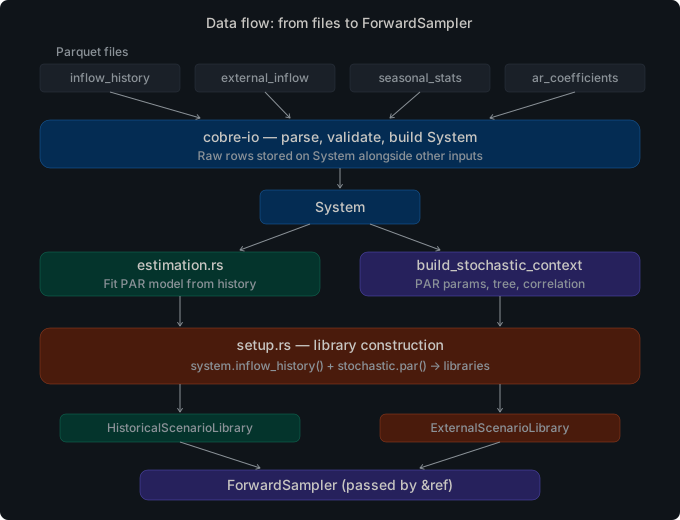
PAR(p) preprocessing and flat array layout
PAR(p) (Periodic Autoregressive) models describe the seasonal autocorrelation
structure of hydro inflow time series. Each hydro plant at each stage has an
InflowModel with a mean (mean_m3s), a standard deviation (std_m3s), and
a vector of AR coefficients in standardized form (ar_coefficients).
PrecomputedPar is built once at initialization from raw InflowModel
parameters. It converts AR coefficients from standardized form (ψ*,
direct Yule-Walker output) to original-unit form at build time:
ψ_{m,ℓ} = ψ*_{m,ℓ} · s_m / s_{m-ℓ}
where s_m is std_m3s for the current stage’s season and s_{m-ℓ} is
std_m3s for the season ℓ stages prior. The converted coefficients and their
derived intercepts (base) are stored in stage-major flat arrays:
array[stage * n_hydros + hydro] (2-D: means, stds, base terms)
psi[stage * n_hydros * max_order + hydro * max_order + lag] (3-D: AR coefficients)
This layout ensures that all per-stage data for every hydro plant is contiguous in memory, maximizing cache utilization during sequential stage iteration within a scenario trajectory.
All hot-path arrays use Box<[f64]> (via Vec::into_boxed_slice()) rather
than Vec<f64>. The boxed-slice type communicates the no-resize invariant and
eliminates the capacity word from each allocation.
Deterministic noise via communication-free seed derivation
Each scenario realization in an iterative optimization run requires a draw from the noise distribution. Rather than broadcasting seeds across compute nodes — which would require communication and create a serialization point as the number of ranks grows — each node independently derives its own seed from a small tuple using SipHash-1-3.
Two derivation functions are provided:
derive_forward_seed(base_seed, iteration, scenario, stage) -> u64: hashes a 20-byte little-endian wire formatbase_seed (8B) ++ iteration (4B) ++ scenario (4B) ++ stage (4B).derive_opening_seed(base_seed, opening_index, stage) -> u64: hashes a 16-byte wire formatbase_seed (8B) ++ opening_index (4B) ++ stage (4B).
The different wire lengths provide domain separation without explicit prefixes,
preventing hash collisions between forward-pass seeds and opening-tree seeds.
stage in both functions is always stage.id (the domain identifier), never
stage.index (the array position), because array positions shift under stage
filtering while IDs are stable.
From the derived seed, a Pcg64 RNG is constructed via rng_from_seed. The
PCG family provides good statistical quality with fast generation, suitable
for producing large numbers of standard-normal samples via the StandardNormal
distribution.
Spectral spatial correlation
Hydro inflow series at neighboring plants are spatially correlated. cobre-stochastic
applies a spectral transformation to convert independent standard-normal samples
into correlated samples.
The spectral decomposition uses a cyclic Jacobi eigendecomposition (~200 lines).
No external linear algebra crate is added to the dependency tree. The symmetric
matrix square root D = V * diag(sqrt(lambda)) * V^T (where V is the matrix
of eigenvectors and lambda are the eigenvalues) is stored in dense n x n
format. Negative eigenvalues are clipped to zero before the square root,
making the method robust to estimated correlation matrices that are not
positive-definite or are rank-deficient.
Correlation profiles can be defined per-season. DecomposedCorrelation holds
all profiles in a BTreeMap<String, Vec<GroupFactor>> — the BTreeMap
guarantees deterministic iteration order, which is required for
declaration-order invariance.
Before entering the hot optimization loop, callers must invoke
DecomposedCorrelation::resolve_positions(&mut self, entity_order: &[EntityId])
once. This pre-computes the positions of each group’s entities within the
canonical entity order and stores them on each GroupFactor as
Option<Box<[usize]>>. With positions pre-computed, apply_correlation
avoids a per-call O(n) linear scan and heap allocation on the hot path.
If a correlation group’s entity IDs are only partially present in
entity_order, the spectral transform is skipped for that group entirely.
Entities not in any group retain their independent noise values unchanged.
Opening tree structure
The opening scenario tree pre-generates all noise realizations used during the backward pass of the optimization algorithm, before the iterative loop begins. This avoids per-iteration recomputation and ensures the backward pass always operates on a fixed, reproducible set of scenarios.
OpeningTree stores all noise values in a single flat contiguous array with
stage-major ordering:
data[stage_offsets[stage] + opening_idx * dim .. + dim]
The stage_offsets array has length n_stages + 1. The sentinel entry
stage_offsets[n_stages] equals data.len(), making bounds checks exact
without special-casing the last stage. This sentinel pattern is used
consistently in PrecomputedPar, OpeningTree, and throughout
StochasticContext.
Pre-study stages (those with negative stage.id) are excluded from the
opening tree but remain in inflow_models for PAR lag initialization.
Noise generation algorithms
The opening tree and the out-of-sample forward pass both use these algorithms
to produce standard-normal noise vectors. The algorithm used at each stage is
selected by the NoiseMethod field on the stage’s ScenarioSourceConfig.
LHS (Latin Hypercube Sampling)
LHS stratifies the unit interval [0, 1) for each dimension into N
equal-probability strata [k/N, (k+1)/N) and ensures exactly one sample per
stratum, guaranteeing better marginal coverage than plain Monte Carlo.
Batch (generate_lhs): for each dimension, generate stratified samples
u[k] = (k + U_k) / N where U_k ~ U(0,1), apply a Fisher-Yates shuffle
to a permutation of 0..N, write output[perm[k] * dim + d] = norm_quantile(u[k]).
Output layout is opening-major: output[opening * dim + entity].
Point-wise (sample_lhs_point): for a single scenario within an
OutOfSample forward pass, derive per-dimension permutations identically on
all workers from (sampling_seed, iteration, stage_id) via
derive_opening_seed. Each worker independently looks up its stratum from the
shared permutation and samples a within-stratum offset from an independent
derive_forward_seed-based RNG. No inter-worker communication is required.
The N scenarios across all workers form a valid LHS design.
Both paths apply norm_quantile to convert uniform stratified samples to
standard-normal values.
Sobol (QMC)
The Sobol sequence is a low-discrepancy sequence that fills the d-dimensional
unit hypercube more uniformly than pseudo-random samples, reducing the
effective variance of Monte Carlo estimates.
Direction numbers: dimension 1 uses the van der Corput sequence. Dimensions
2–21,201 use the Joe-Kuo 2010 direction number dataset (21,200 entries) stored
as a static Rust array — no runtime allocation or deserialization. The maximum
supported dimension is MAX_SOBOL_DIM = 21201.
Batch (generate_qmc_sobol): builds the full 32-bit direction matrix once
per stage, then generates all n_openings points using the Gray-code
recurrence for O(1) updates per point.
Point-wise (scrambled_sobol_point): generates a single scenario’s noise
vector via direct binary decomposition of the scenario index. Used by the
out-of-sample forward pass.
Scrambling: both paths apply Matousek linear scrambling
x' = a*x + b (mod 2^32) with parameters derived from the stage seed. This
breaks the low-dimensional correlation artifacts of the plain Sobol sequence.
After scrambling, each coordinate is divided by 2^32 and transformed to
N(0,1) via norm_quantile.
Halton (QMC)
The Halton sequence assigns each dimension a distinct prime base. Dimension
d (1-indexed) uses the d-th prime: 2, 3, 5, 7, 11, … The coordinate of
point n in dimension d is radical_inverse(n, p_d) — the base-p_d
representation of n reflected about the decimal point.
Prime sieve (sieve_primes): computed once at generator initialization
using the sieve of Eratosthenes. There is no dimension limit.
Scrambling: the plain Halton sequence suffers from correlation artifacts in
high dimensions. Owen-style random digit scrambling applies a seed-derived
permutation pi[d][j] of size p_d to each digit position j of each
dimension d. The permutation tables are deterministic from the stage seed.
Batch (generate_qmc_halton) and point-wise (scrambled_halton_point)
follow the same structure as the Sobol variants. After scrambling and
radical_inverse, each coordinate is transformed to N(0,1) via norm_quantile.
BSM inverse normal CDF (norm_quantile)
All three noise algorithms (LHS, Sobol, Halton) use norm_quantile to convert
uniform values in (0, 1) to standard-normal values. The implementation uses
the Beasley-Springer-Moro (BSM) piecewise approximation:
- Central region (
|p - 0.5| < 0.42): rational approximation iny = p - 0.5withr = y^2. - Intermediate tails (
1e-20 < p <= 0.08or0.92 <= p < 1 - 1e-20): degree-8 polynomial inr = ln(-ln(min(p, 1-p))). - Extreme tails (
p <= 1e-20): clamped to ±8.21.
Absolute error is better than 3e-9 over the entire open interval (0, 1). No external numerical library is required.
Forward sampler architecture
ForwardSampler<'a> is a composite struct that unifies all supported
forward-pass sampling strategies under a single sample() dispatch method.
It holds three ClassSampler<'a> instances — one per entity class (inflow,
load, NCS) — and applies per-class spectral correlation only for
OutOfSample class samplers. Use build_forward_sampler to construct the
appropriate sampler from a ForwardSamplerConfig and a StochasticContext.
ForwardSampler<'a> struct
#![allow(unused)]
fn main() {
pub struct ForwardSampler<'a> {
inflow: ClassSampler<'a>,
load: ClassSampler<'a>,
ncs: ClassSampler<'a>,
dims: ClassDimensions,
inflow_correlation: Option<CorrelationRef<'a>>,
load_correlation: Option<CorrelationRef<'a>>,
ncs_correlation: Option<CorrelationRef<'a>>,
}
}The lifetime 'a refers to the StochasticContext that owns the opening
tree, entity order, and correlation data. The sampler is constructed once and
reused across all (iteration, scenario, stage) calls without per-call
allocation.
The sample() method splits the caller-supplied noise_buf into three
segments [hydros | load_buses | ncs], delegates to each class sampler’s
fill(), then applies per-class spectral correlation where
Some(CorrelationRef) is present. Correlation is only applied to
OutOfSample class samplers; InSample, Historical, and External
samplers produce pre-correlated noise that must not be transformed again.
ClassSampler<'a> enum
ClassSampler<'a> is the per-entity-class noise source. Four variants:
InSample: copies a segment from the pre-generated opening tree. Storestree: OpeningTreeView<'a>,base_seed: u64,offset: usize, andlen: usize. Delegates tosampling::insample::sample_forward.OutOfSample: generates fresh independent N(0,1) noise on-the-fly. Storesforward_seed: u64,dim: usize, andnoise_methods: Box<[NoiseMethod]>(one per stage).Historical: replays a pre-standardized inflow window from aHistoricalScenarioLibrary. Only supported for the inflow class.External: reads from a pre-standardizedExternalScenarioLibrary. Supported for inflow, load, and NCS classes.
build_forward_sampler factory
#![allow(unused)]
fn main() {
pub fn build_forward_sampler(
config: ForwardSamplerConfig<'_>,
) -> Result<ForwardSampler<'_>, StochasticError>
}Constructs a ForwardSampler from a ForwardSamplerConfig struct that
bundles all construction parameters:
class_schemes— per-classSamplingSchemeselections (inflow, load, NCS). ANonescheme defaults toInSample.ctx—&StochasticContextproviding the opening tree, seeds, correlation, and entity order.stages—&[Stage]used byOutOfSampleto read per-stage noise methods.dims—ClassDimensionswith per-class entity counts for buffer splitting.historical_library— required when inflow scheme isHistorical.external_inflow_library,external_load_library,external_ncs_library— required when the corresponding class scheme isExternal.
Returns StochasticError::MissingScenarioSource when:
OutOfSampleis requested but noforward_seedis configured inctx.Historicalis requested for the inflow class buthistorical_libraryisNone.Historicalis requested for load or NCS (only inflow is supported).Externalis requested but the corresponding library isNone.
ForwardNoise<'b> return type
#![allow(unused)]
fn main() {
pub struct ForwardNoise<'b>(pub &'b [f64]);
}A newtype wrapping a borrowed slice of noise values. The lifetime 'b is
tied to the caller-supplied noise_buf. ForwardNoise::as_slice() returns
the underlying &[f64], allowing callers to consume the noise uniformly
regardless of which sampling variant produced it.
SampleRequest<'b> argument bundle
#![allow(unused)]
fn main() {
pub struct SampleRequest<'b> {
pub iteration: u32,
pub scenario: u32,
pub stage: u32,
pub stage_idx: usize,
pub noise_buf: &'b mut [f64],
pub perm_scratch: &'b mut [usize],
pub total_scenarios: u32,
}
}Bundles seven per-call arguments to keep ForwardSampler::sample() within the
project’s argument-budget convention. noise_buf must be at least dims.total
elements long; perm_scratch must be at least total_scenarios elements long.
Both are caller-owned, pre-allocated working buffers — no allocation inside
sample().
FreshNoiseSpec internal bundle
FreshNoiseSpec (in sampling::out_of_sample) bundles seed, dimension, and
method parameters for fill_uncorrelated. It is pub(crate) and not part of
the public API.
OutOfSample dispatch path
When a ClassSampler::OutOfSample is active, its fill() method performs
the following steps:
- Look up
noise_methods[stage_idx]to determine theNoiseMethodfor the current stage. ReturnsStochasticError::InsufficientDataifstage_idxis out of bounds. - Build a
FreshNoiseSpecbundling the forward seed, noise method, iteration, scenario, stage ID, dim, and total scenario count. - Call
fill_uncorrelated(spec, output, perm_scratch), which dispatches onNoiseMethod: callsfill_saa(SAA),sample_lhs_point(LHS),scrambled_sobol_point(QmcSobol), orscrambled_halton_point(QmcHalton).Selectivefalls back to SAA with atracing::warn!.
After all three class buffers are filled, ForwardSampler::sample() applies
per-class spectral correlation for each class that has Some(CorrelationRef).
The correlation transform calls decomposed.apply_correlation_for_class(stage, buf, entity_order, class_name) in-place, transforming the independent N(0,1)
noise to spatially correlated noise. The final ForwardNoise wraps the full
combined buffer slice.
StochasticContext as the integration entry point
StochasticContext bundles the three independently-built components into a
single ready-to-use value:
PrecomputedPar— PAR coefficient cache for LP RHS patching.DecomposedCorrelation— pre-decomposed spectral factors for all profiles.OpeningTree— pre-generated noise realizations for the backward pass.
build_stochastic_context(&system, base_seed) runs the full preprocessing
pipeline in a fixed order: validate PAR parameters, build the coefficient
cache, decompose correlation matrices, generate the opening tree. After
construction, all fields are immutable. StochasticContext is Send + Sync,
verified by a compile-time assertion and a unit test.
sample_forward for InSample scenario selection
sample_forward implements the InSample scenario selection strategy: for each
(iteration, scenario, stage) triple, it deterministically selects one opening
from the tree by deriving a seed via derive_forward_seed and sampling a
Pcg64 RNG. The selected opening index and its noise slice are returned together,
so the caller can both log which opening was chosen and immediately use the
noise values.
PAR model evaluation
The par::evaluate module provides two complementary functions for applying a
fitted PAR(p) model to concrete state and noise values. Both operate on slices
(no allocation) and are designed for repeated calls inside the iterative
optimization loop.
evaluate_par
Computes the inflow for a single hydro plant at a single stage:
a_h = deterministic_base + Σ_{l=0}^{order-1} psi[l] * lags[l] + sigma * eta
where deterministic_base is the precomputed intercept μ_m − Σ ψ_{m,l} μ_{m−l}
(stored in PrecomputedPar), psi[l] are the AR coefficients in original
units, lags[l] are the observed inflow values at lag positions 1..p, sigma
is the residual standard deviation, and eta is the standardized noise draw.
The returned value may be negative; truncation to a physical minimum (e.g., zero) is the caller’s responsibility.
#![allow(unused)]
fn main() {
use cobre_stochastic::evaluate_par;
// AR(1): a_h = 70.0 + 0.48 * 90.0 + 28.62 * 0.5 = 127.51
let a_h = evaluate_par(70.0, &[0.48], 1, &[90.0], 28.62, 0.5);
}The batch variant evaluate_par_batch fills an output slice for all hydro
plants at a given stage in one call, reading from a lag matrix indexed as
[lag * n_hydros + hydro] for cache-optimal access.
solve_par_noise
The inverse function: given a target inflow, solve for the noise value η that
produces it:
η = (target − deterministic_base − Σ psi[l] * lags[l]) / sigma
A common use case is computing the truncation noise floor (the η at which
the inflow would reach zero):
#![allow(unused)]
fn main() {
use cobre_stochastic::solve_par_noise;
// Solve for η such that inflow = 0.0
let eta = solve_par_noise(70.0, &[0.48], 1, &[90.0], 28.62, 0.0);
}When sigma == 0.0 (deterministic stage), f64::NEG_INFINITY is returned to
indicate that no finite noise bound applies. The batch variant solve_par_noise_batch
fills an output slice for all hydros at a given stage.
Estimation pipeline
The par::fitting module implements the complete pipeline for fitting PAR(p)
model parameters from historical inflow observations. The pipeline consists of
four steps, each a standalone function that can be composed independently.
Step 1: Seasonal statistics
estimate_seasonal_stats groups historical observations by (entity, season)
and computes the sample mean and Bessel-corrected standard deviation (N − 1
divisor) for each group. Observations are matched to seasons via the stage
table’s start_date / end_date intervals.
Input: &[(EntityId, NaiveDate, f64)] observation triples, sorted by
(entity_id, date). Output: Vec<SeasonalStats>, sorted by
(entity_id, stage_id).
Step 2: AR coefficient estimation
estimate_ar_coefficients computes cross-seasonal autocorrelations from the
historical observations and calls levinson_durbin internally to fit an AR(p)
model of at most max_order for each (entity, season) pair.
The cross-seasonal autocorrelation for season m at lag l is:
γ_m(l) = (1 / (N_m − 1)) · Σ_{t: season(t)=m} (a_t − μ_m)(a_{t−l} − μ_{m−l})
ρ_m(l) = γ_m(l) / (s_m · s_{m−l})
where μ_m and s_m come from the seasonal statistics and season indices
wrap cyclically. Output: Vec<ArCoefficientEstimate>, each carrying the
standardized AR coefficients ψ*₁..ψ*ₚ and the residual std ratio σ_m / s_m.
Step 3: Levinson-Durbin recursion
levinson_durbin solves the Yule-Walker equations for an AR(p) process in
O(p²) time without forming the full Toeplitz matrix. Given autocorrelations
ρ(1)..ρ(p), it returns a LevinsonDurbinResult containing:
coefficients— fitted AR coefficients ψ*₁..ψ*ₚsigma2_per_order— prediction error variance at each intermediate orderparcor— partial autocorrelation (reflection) coefficientssigma2— final prediction error variance
The recursion is truncated if the prediction error variance drops to or below
f64::EPSILON, handling near-singular autocorrelation sequences without
returning an error.
Step 4: Order selection
Two order selection methods are available:
PACF-based selection (default): select_order_pacf selects the AR order
using the periodic partial autocorrelation function (PACF) with a 95%
significance threshold. The maximum significant lag becomes the AR order.
This method avoids overfitting in series with little autocorrelation and
captures meaningful persistence where it exists. PACF-based selection is the
default since v0.1.9.
AIC-based selection: select_order_aic selects the AR order that minimises
the Akaike Information Criterion:
AIC(p) = N · ln(σ²_p) + 2p
where N is the number of historical observations for the season and σ²_p
is the prediction error variance from LevinsonDurbinResult::sigma2_per_order.
The white-noise baseline (order 0) has AIC(0) = 0.0. On ties the lower
order wins (parsimony principle).
Step 5: Correlation estimation
estimate_correlation computes the Pearson correlation matrix of PAR model
residuals across entities. Residuals are the standardized deviations of
historical observations from their seasonal means. The output is a
CorrelationModel (from cobre-core) suitable for downstream spectral
decomposition.
Public types
StochasticContext
Owns all three preprocessing pipeline outputs: PrecomputedPar,
DecomposedCorrelation, and OpeningTree. Constructed by
build_stochastic_context and then consumed read-only. Accessors:
par(), correlation(), opening_tree(), tree_view(), base_seed(),
dim(), n_stages(). Both Send and Sync.
PrecomputedPar
Cache-friendly PAR(p) model data for LP RHS patching. Stores means, standard
deviations, original-unit AR coefficients (ψ), and intercept terms (base) in
stage-major flat arrays (Box<[f64]>). Built via PrecomputedPar::build.
Accessors: n_hydros(), n_stages(), max_order(), mean(), std(),
base(), psi().
PrecomputedNormal
Cache-friendly normal noise model data for LP RHS patching, analogous to
PrecomputedPar for entities following a simple i.i.d. Gaussian model
(x = μ + σ · f_b · ε). Built once at initialization from raw LoadModel
parameters via PrecomputedNormal::build. The three-dimensional factor
array supports per-(stage, entity, block) scaling and defaults to 1.0 for
any (stage, entity, block) combination not explicitly provided.
Arrays use stage-major layout:
mean[stage * n_entities + entity_idx]
factors[stage * n_entities * max_blocks + entity_idx * max_blocks + block_idx]
Accessors: n_stages(), n_entities(), max_blocks(), mean(stage, entity),
std(stage, entity), block_factor(stage, entity, block). Implements Default
as an empty sentinel for systems without normal-noise entities.
DecomposedCorrelation
Holds spectrally decomposed correlation factors for all profiles, keyed by
profile name in a BTreeMap. Built via DecomposedCorrelation::build, which
validates and decomposes all profiles eagerly — errors surface at initialization,
not at per-stage lookup time. Call resolve_positions once with the canonical
entity order before entering the optimization loop.
OpeningTree
Fixed opening scenario tree holding pre-generated noise realizations. All noise
values are in a flat Box<[f64]> with stage-major ordering and a sentinel
offset array of length n_stages + 1. Provides opening(stage_idx, opening_idx) -> &[f64] for element access and view() -> OpeningTreeView<'_> for a
zero-copy borrowed view.
OpeningTreeView<'a>
A zero-copy borrowed view over an OpeningTree, with the same accessor API:
opening(stage_idx, opening_idx), n_stages(), n_openings(stage_idx),
dim(). Passed to sample_forward to avoid cloning the tree data.
ForwardSampler<'a>
Composite forward-pass sampler struct holding one ClassSampler<'a> per
entity class (inflow, load, NCS). Constructed once per run via
build_forward_sampler and reused across all (iteration, scenario, stage)
calls without per-call allocation. The lifetime 'a borrows from the
StochasticContext that owns the opening tree, entity order, and correlation
data. See “Forward sampler architecture” above.
ClassSampler<'a>
Per-entity-class noise source enum. Four variants:
| Variant | Description |
|---|---|
InSample | Copies a segment from the pre-generated opening tree |
OutOfSample | Generates fresh independent N(0,1) noise on-the-fly |
Historical | Replays a pre-standardized window from HistoricalScenarioLibrary |
External | Reads from a pre-standardized ExternalScenarioLibrary |
The fill() method writes exactly output.len() f64 values into the
caller-provided buffer. For InSample, Historical, and External the
noise is pre-correlated; for OutOfSample the noise is independent N(0,1)
and correlation is applied at the ForwardSampler level.
ForwardNoise<'b>
Noise payload returned by ForwardSampler::sample. A newtype wrapping
&'b [f64]. The lifetime 'b is tied to the caller-supplied noise_buf.
as_slice() -> &[f64] extracts the underlying slice.
SampleRequest<'b>
Per-call argument bundle for ForwardSampler::sample. Fields: iteration,
scenario, stage (domain ID as u32), stage_idx (array position as
usize), noise_buf: &'b mut [f64] (at least dims.total elements),
perm_scratch: &'b mut [usize] (at least total_scenarios elements),
total_scenarios: u32.
build_forward_sampler
Factory function:
#![allow(unused)]
fn main() {
pub fn build_forward_sampler(
config: ForwardSamplerConfig<'_>,
) -> Result<ForwardSampler<'_>, StochasticError>
}Constructs a ForwardSampler from a ForwardSamplerConfig struct. Returns
StochasticError::MissingScenarioSource when required resources are absent
for the configured scheme. See “Forward sampler architecture” above.
StochasticError
Returned by all fallible APIs. Nine variants covering six failure domains:
| Variant | When it occurs |
|---|---|
InvalidParParameters | AR order > 0 with zero standard deviation, or ill-conditioned coefficients |
SpectralDecompositionFailed | Eigendecomposition of correlation matrix failed to converge |
InvalidCorrelation | Missing default profile, ambiguous profile set, or out-of-range correlation entry |
InsufficientData | Fewer historical records than the PAR order requires, or index out of bounds |
SeedDerivationError | Hash computation produces an invalid result during seed derivation |
UnsupportedNoiseMethod | NoiseMethod variant not supported at the requested stage |
DimensionExceedsCapacity | Noise dimension exceeds the method’s maximum (e.g., dim > MAX_SOBOL_DIM) |
UnsupportedSamplingScheme | Sampling scheme variant not implemented for the requested operation |
MissingScenarioSource | Required configuration absent for the requested sampling scheme |
Implements std::error::Error, Send, and Sync.
ParValidationReport
Return type of validate_par_parameters. Contains a list of ParWarning
values for non-fatal issues (e.g., high AR coefficients that may indicate
numerical instability) that the caller can inspect or log before proceeding
to PrecomputedPar::build.
ParWarning
A non-fatal PAR parameter warning. Carries the hydro ID, stage ID, and a human-readable description of the potential issue.
SeasonalStats
Seasonal mean and standard deviation for one (entity, season) pair. Produced
by estimate_seasonal_stats and consumed by AR coefficient estimation. Fields:
entity_id, stage_id (the first stage whose season matches), mean, std
(Bessel-corrected).
ArCoefficientEstimate
Standardized AR coefficients for one (entity, season) pair, as produced by
estimate_ar_coefficients. Fields: hydro_id, season_id, coefficients
(ψ*₁..ψ*ₚ; empty for white noise), residual_std_ratio (σ_m / s_m,
always in (0, 1]).
LevinsonDurbinResult
Full output of the Levinson-Durbin recursion. Fields: coefficients (AR
coefficients for the fitted order), sigma2_per_order (prediction error
variance at each intermediate order, length = actual fitted order), parcor
(partial autocorrelation coefficients), sigma2 (final prediction error
variance).
PacfSelectionResult
Output of select_order_pacf. Fields: selected_order (0 for white noise),
pacf_values (partial autocorrelation values for each candidate lag).
AicSelectionResult
Output of select_order_aic. Fields: selected_order (0 for white noise),
aic_values (one entry per candidate order from 0 to p_max inclusive).
GroupFactor
A single correlation group’s spectral factor with its associated entity ID
mapping. Fields: factor: SpectralFactor, entity_ids: Vec<EntityId>, and
pre-computed positions: Option<Box<[usize]>> (filled by resolve_positions).
SpectralFactor
The symmetric matrix square root D = V * diag(sqrt(lambda)) * V^T of a
correlation matrix, stored in dense n x n format. Computed via cyclic Jacobi
eigendecomposition with negative-eigenvalue clipping (robustness to
non-positive-definite and rank-deficient matrices). Constructed via
SpectralFactor::decompose(&matrix) and applied via
transform(&input, &mut output).
Usage examples
InSample forward pass (opening tree)
The following shows how to construct a stochastic context from a loaded system and use it to sample a forward-pass scenario using the InSample strategy.
#![allow(unused)]
fn main() {
use cobre_stochastic::{
build_stochastic_context,
sampling::insample::sample_forward,
};
// `system` is a `cobre_core::System` produced by `cobre_io::load_case`.
// `base_seed` comes from the study configuration (application layer handles
// the Option<i64> -> u64 conversion and OS-entropy fallback).
let ctx = build_stochastic_context(&system, base_seed)?;
println!(
"stochastic context: {} hydros, {} study stages",
ctx.dim(),
ctx.n_stages(),
);
// Obtain a borrowed view over the opening tree (zero-copy).
let tree_view = ctx.tree_view();
// In the iterative optimization loop, select a forward scenario for each
// (iteration, scenario, stage) triple.
let iteration: u32 = 0;
let scenario: u32 = 0;
for (stage_idx, stage) in study_stages.iter().enumerate() {
// stage.id is the domain identifier; stage_idx is the array position.
let (opening_idx, noise_slice) = sample_forward(
&tree_view,
ctx.base_seed(),
iteration,
scenario,
stage.id as u32,
stage_idx,
);
// `noise_slice` has length `ctx.dim()` (one value per hydro plant).
// Pass to LP RHS patching together with `ctx.par()`.
let _ = (opening_idx, noise_slice);
}
Ok::<(), cobre_stochastic::StochasticError>(())
}OutOfSample forward pass (fresh noise)
The following shows how to use ForwardSampler with the OutOfSample strategy
to generate fresh noise on each forward-pass call, using whatever NoiseMethod
is configured per stage (LHS, Sobol, Halton, or SAA).
#![allow(unused)]
fn main() {
use cobre_core::scenario::SamplingScheme;
use cobre_stochastic::{
build_stochastic_context,
sampling::{SampleRequest, build_forward_sampler},
};
// Build the stochastic context. `forward_seed` must be Some(_) for OutOfSample.
let ctx = build_stochastic_context(&system, base_seed)?;
// Construct the sampler once; reuse across all iterations and scenarios.
let sampler = build_forward_sampler(SamplingScheme::OutOfSample, &ctx, &study_stages)?;
// Pre-allocate per-call working buffers outside the loop.
let dim = ctx.dim();
let total_scenarios: u32 = 200;
let mut noise_buf = vec![0.0f64; dim];
let mut perm_scratch = vec![0usize; total_scenarios as usize];
let iteration: u32 = 0;
let scenario: u32 = 0;
for (stage_idx, stage) in study_stages.iter().enumerate() {
let noise = sampler.sample(SampleRequest {
iteration,
scenario,
stage: stage.id as u32,
stage_idx,
noise_buf: &mut noise_buf,
perm_scratch: &mut perm_scratch,
total_scenarios,
})?;
// `noise.as_slice()` has length `dim` (one value per hydro plant).
// For OutOfSample this is a FreshNoise variant borrowing from noise_buf.
let _ = noise.as_slice();
}
Ok::<(), cobre_stochastic::StochasticError>(())
}Performance notes
cobre-stochastic is designed so that all performance-critical preprocessing
happens once at initialization. The iterative optimization loop consumes
already-materialized data through slice indexing, with no re-allocation on the
hot path.
Pre-computed entity positions (resolve_positions)
DecomposedCorrelation::resolve_positions must be called once before entering
the optimization loop. It pre-computes the mapping from each correlation group’s
entity IDs to their positions in the canonical entity_order slice and stores
the result as Option<Box<[usize]>> on each GroupFactor. Without this
pre-computation, apply_correlation would perform an O(n) linear scan and a
Vec allocation for every noise draw.
Stack-allocated buffers for small groups (MAX_STACK_DIM = 64)
Inside apply_correlation, intermediate working buffers for correlation groups
with at most 64 entities are stack-allocated (using arrayvec or a fixed-size
array on the stack). Groups larger than this threshold fall back to
heap-allocated Vec.
Dense mat-vec in spectral transform
The spectral SpectralFactor stores the matrix square root D in dense n x n
format (replacing the packed lower-triangular storage used by the former Cholesky
approach). The transform method computes y = D * x via a straightforward
dense matrix-vector multiply. For typical small-to-medium correlation groups
(n ≤ 64), this fits in L1/L2 cache and avoids indirect indexed loads, making
the extra memory usage (n² vs n(n+1)/2 words) a worthwhile trade-off for
simpler code and robustness to rank-deficient matrices.
Box<[f64]> for the no-resize invariant
All fixed-size hot-path arrays in PrecomputedPar, PrecomputedNormal,
OpeningTree, and SpectralFactor use Box<[f64]> rather than Vec<f64>.
The boxed-slice type communicates that these arrays are immutable after
construction, eliminates the capacity word from each allocation, and allows
the optimizer to treat the length as a compile-time-stable bound.
Feature flags
cobre-stochastic has no optional feature flags. All dependencies are always
compiled. No external system libraries are required (HiGHS, MPI, etc.).
# Cargo.toml
cobre-stochastic = { version = "0.1" }
Testing
Running the test suite
cargo test -p cobre-stochastic
No external dependencies or system libraries are required. All dependencies
(siphasher, rand, rand_pcg, rand_distr, thiserror) are Cargo-managed. The
--all-features flag is not needed — there are no feature flags.
Test suite overview
The test suite covers unit tests, conformance integration tests, reproducibility integration tests, and doc-tests. Tests were added in v0.1.1 for the PAR evaluation functions, normal noise precomputation, and the estimation pipeline.
Conformance suite (tests/conformance.rs)
The conformance test suite verifies the PAR(p) preprocessing pipeline against hand-computed fixtures with known exact outputs.
Two fixtures are used:
- AR(0) fixture: a zero-order AR model (pure noise, no lagged terms). The
precomputed
psiarray must be all-zeros and thebasevalues must equal the raw means. Tolerance: 1e-10. - AR(1) fixture: a first-order AR model with a pre-study stage (negative
stage.id) that supplies the lag mean and standard deviation for coefficient unit conversion. The conversion formulaψ = ψ* · s_m / s_lagis tested against a hand-computed value. Tolerance: 1e-10.
Reproducibility suite (tests/reproducibility.rs)
Four tests verify the determinism and invariance properties that are required for correct behavior in a distributed, multi-run setting:
- Seed determinism: calling
derive_forward_seedandderive_opening_seedwith the same inputs always returns bitwise-identical seeds. Golden-value regression pins the exact hash output for a known(base_seed, ...)tuple. - Opening tree seed sensitivity: different
base_seedvalues produce different opening trees (verified by checking that at least one noise value differs across the full tree). Usesany()over all tree entries rather thanassert_ne!on the whole tree, to handle the astronomically unlikely case where two seeds produce one identical value. - Declaration-order invariance: inserting hydros in reversed order into a
SystemBuilder(which sorts byEntityIdinternally) produces aStochasticContextwith bitwise-identical PAR arrays, opening tree, and spectral transform output. This verifies the canonical-order invariant across the full preprocessing pipeline. - Infrastructure genericity gate: a grep audit confirms that no algorithm-specific
references appear anywhere in the crate source tree. The gate is encoded as a
#[test]usingstd::process::Commandso it runs automatically in CI.
Design notes
Communication-free noise generation
The original design considered broadcasting a seed from the root rank to all workers before each iteration. This approach was rejected because it adds an MPI collective on the hot path and creates a serialization point as the number of ranks grows.
The alternative — deriving each rank’s seeds independently from a common
base_seed plus a context tuple — requires no communication and produces
identical results regardless of the number of ranks. SipHash-1-3 was chosen
because it is non-cryptographic (fast), produces high-quality 64-bit hashes
suitable for seeding a CSPRNG, and is available in the siphasher crate with
no system dependencies.
The two wire formats (20 bytes for forward seeds, 16 bytes for opening seeds) use length-based domain separation rather than an explicit prefix byte, which is slightly more efficient and equally correct given that the two sets of input tuples have different shapes and lengths.
Type renames (completed in v0.1.3)
Two types previously carried an Lp suffix (PrecomputedParLp,
PrecomputedNormalLp) that incorrectly implied coupling to a specific solver
backend. Since cobre-stochastic is deliberately solver-agnostic, these were
renamed to PrecomputedPar and PrecomputedNormal in v0.1.3.
cobre-solver
alpha
cobre-solver is the LP solver abstraction layer for the Cobre ecosystem. It
defines a backend-agnostic interface for constructing, solving, and querying
linear programs, with a HiGHS backend as
the default implementation.
The crate has no dependency on any other Cobre crate. It is infrastructure that optimization algorithm crates consume through a generic type parameter, not a shared registry or runtime-selected component. Every solver method call compiles directly to the concrete backend implementation — there is no virtual dispatch overhead on the hot path where iterative LP solving occurs.
Module overview
| Module | Purpose |
|---|---|
ffi | Raw unsafe FFI bindings to the cobre_highs_* C wrapper functions |
types | Canonical data types: StageTemplate, RowBatch, Basis, LpSolution, SolutionView, SolverError, SolverStatistics |
trait_def | SolverInterface trait definition with the method contracts |
highs | HighsSolver — the HiGHS backend implementing SolverInterface |
| (root) | Re-exports: SolverInterface, HighsSolver, and all public types |
The ffi and highs modules are compiled only when the highs feature is
enabled (the default). The trait_def and types modules are always compiled,
making it possible to write algorithm code against SolverInterface without
depending on any particular backend.
Architecture
Compile-time monomorphization
SolverInterface is resolved as a generic type parameter at compile time,
not as Box<dyn SolverInterface> or any other form of dynamic dispatch. An
optimization algorithm crate parameterizes its entry point as:
#![allow(unused)]
fn main() {
fn run<S: SolverInterface>(solver_factory: impl Fn() -> S, ...) { ... }
}The compiler generates one concrete implementation per backend. The HiGHS backend is the only active backend in a standard build; the binary contains no solver-selection branch. This pattern uses compile-time monomorphization.
Custom FFI — not highs-sys
cobre-solver does not use any third-party highs-sys crate. Instead it
ships a thin C wrapper (csrc/highs_wrapper.c) that exposes the 20-odd HiGHS
C API functions needed by the backend as cobre_highs_* symbols. This approach:
- Controls exactly which HiGHS API surface is exposed.
- Allows the wrapper to enforce Cobre-specific invariants before delegating to
the underlying
Highs_*calls. - Avoids a build-time dependency on any external Rust crate for FFI bindings.
The ffi module declares extern "C" signatures for each cobre_highs_*
function. All FFI calls are unsafe; safe wrappers live in highs.rs.
Vendored HiGHS build
HiGHS is compiled from source at build time via the cmake crate. The source
lives in crates/cobre-solver/vendor/HiGHS/ as a git submodule. The build script
(crates/cobre-solver/build.rs) invokes cmake with a fixed Release
configuration and links the resulting static library. HiGHS is always built in
Release mode regardless of the Cargo profile, because a debug HiGHS build is
substantially slower and would produce misleading performance results.
Per-crate unsafe override
The workspace lint configuration forbids unsafe code at the workspace level.
cobre-solver overrides this lint to allow in its own Cargo.toml because
the HiGHS FFI layer genuinely requires unsafe blocks. All other workspace
lints (missing_docs, unwrap_used, clippy pedantic) remain active. Every
unsafe block carries a // SAFETY: comment explaining the invariants that
justify it.
SolverInterface trait
#![allow(unused)]
fn main() {
pub trait SolverInterface: Send { ... }
}The trait defines the methods that together constitute the full LP lifecycle for
one solver instance. Implementations must satisfy the pre- and post-condition
contracts documented in each method’s rustdoc. See the
trait_def rustdoc for the
complete contracts.
Method summary
| Method | &self / &mut self | Returns | Description |
|---|---|---|---|
load_model | &mut self | () | Bulk-loads a structural LP from a StageTemplate; replaces any prior model |
add_rows | &mut self | () | Appends a RowBatch of constraint rows to the dynamic region |
set_row_bounds | &mut self | () | Updates row lower/upper bounds at indexed positions |
set_col_bounds | &mut self | () | Updates column lower/upper bounds at indexed positions |
solve | &mut self | Result<SolutionView<'_>, SolverError> | Solves the current LP; encapsulates internal retry logic |
solve_with_basis | &mut self | Result<SolutionView<'_>, SolverError> | Sets a cached basis, then solves (warm-start path) |
reset | &mut self | () | Clears solver state for error recovery or model switch |
get_basis | &mut self | () | Writes basis status codes into a caller-owned &mut Basis |
statistics | &self | SolverStatistics | Returns accumulated monotonic solve counters |
name | &self | &'static str | Returns a static string identifying the backend |
solver_name_version | &self | String | Returns "name vX.Y.Z" (e.g. "HiGHS v1.8.1") for metadata output |
Mutability convention
Methods that mutate solver state — loading a model, adding constraints, patching
bounds, solving, resetting, and extracting a basis — take &mut self. get_basis
requires &mut self because it writes to internal scratch buffers during
extraction. Methods that only read accumulated state (statistics, name) take
&self. This
convention makes data-race hazards visible at the type level: the borrow checker
prevents concurrent mutation without locks.
Error recovery contract
When solve or solve_with_basis returns Err, the solver’s internal state is
unspecified. The caller is responsible for calling reset() before reusing
the instance. Failing to reset after a terminal error may produce incorrect
results or panics on the next load_model call.
Thread safety
SolverInterface requires Send but not Sync. Send allows a solver
instance to be transferred to a worker thread at startup. The absence of Sync
prevents concurrent access from multiple threads, which matches the reality of
C-library solver handles: they maintain mutable factorization workspaces that
are not thread-safe. Each worker thread owns exactly one solver instance.
Public types
StageTemplate
Pre-assembled structural LP for one stage, in CSC (column-major) form. Built
once at initialization from resolved internal structures and shared read-only
across all threads. Passed to load_model to bulk-load the LP. Fields include
the CSC matrix arrays (col_starts, row_indices, values), bounds, objective
coefficients, and layout metadata (n_state, n_transfer, n_dual_relevant,
n_hydro, max_par_order) used by the calling algorithm for state transfer and
cut extraction. See the StageTemplate rustdoc.
RowBatch
Batch of constraint rows for addition to a loaded LP, in CSR (row-major) form.
Assembled from an active constraint pool before each LP rebuild and passed to
add_rows in a single call. Appended rows occupy the dynamic constraint region
of the LP matrix. See the RowBatch rustdoc.
Basis
Raw simplex basis stored as solver-native i32 status codes — one per column
and one per row. The codes are opaque to the calling algorithm; they are
extracted from one solve via get_basis and passed back to the next via
solve_with_basis for warm-starting. Stored in the original (unpresolved)
problem space for portability across solver versions and presolve strategies.
When the LP gains new dynamic constraint rows after a basis was saved,
solve_with_basis handles the dimension mismatch by filling new row slots
with the solver-native “Basic” code. See the
Basis rustdoc.
SolutionView<'a>
Zero-copy borrowed view over solver-internal buffers, returned by solve and
solve_with_basis. Provides objective(), primal(), dual(),
reduced_costs(), iterations(), and solve_time_seconds() as slice
references into the solver’s internal arrays. The view borrows the solver and
is valid until the next &mut self call. Call to_owned() to copy the data
into an LpSolution when the solution must outlive the borrow. See the
SolutionView rustdoc.
LpSolution
Owned solution produced by SolutionView::to_owned(): objective (f64,
minimization sense), primal (Vec of column values), dual (Vec of row dual
multipliers, normalized to the canonical sign convention), reduced_costs,
iterations, and solve_time_seconds. Dual values are normalized before the
struct is returned — HiGHS row duals are already in the canonical convention
and require no negation. See the LpSolution
rustdoc.
SolverError
Terminal LP solve error returned after all retry attempts are exhausted. Six variants correspond to six failure categories:
| Variant | Hard stop? | Diagnostic |
|---|---|---|
Infeasible | Yes | No |
Unbounded | Yes | No |
NumericalDifficulty | No | Yes |
TimeLimitExceeded | No | Yes |
IterationLimit | No | Yes |
InternalError | Yes | No |
Infeasible and Unbounded are unit variants (no fields). NumericalDifficulty
carries a message, TimeLimitExceeded carries elapsed_seconds, and
IterationLimit carries iterations. InternalError carries message and
an optional error_code. See the SolverError
rustdoc.
SolverStatistics
Accumulated solve metrics for one solver instance. All counters grow
monotonically from zero. reset() does not zero them — statistics persist for
the lifetime of the solver instance and are aggregated across threads after
iterative solving completes.
The basis_reconstructions counter is incremented once per reconstruct_basis
call. A non-zero value confirms that slot-tracked basis reconstruction is
active; a zero value on a warm-start run indicates no stored basis was available
or none was applied.
| Field | Type | Description |
|---|---|---|
solve_count | u64 | Total solve and solve_with_basis calls. |
success_count | u64 | Solves that returned optimal. |
failure_count | u64 | Solves that returned terminal error after retries. |
total_iterations | u64 | Total simplex iterations across all solves. |
retry_count | u64 | Total retry attempts across all solves. |
total_solve_time_seconds | f64 | Cumulative wall-clock solve time. |
basis_consistency_failures | u64 | solve_with_basis calls where isBasisConsistent returned false; solver fell back to cold-start. |
first_try_successes | u64 | Solves optimal on first attempt. Enables: first_try_rate = first_try_successes / solve_count. |
basis_offered | u64 | Total solve_with_basis calls. Enables: basis_acceptance_rate = 1 - basis_consistency_failures / basis_offered. |
load_model_count | u64 | Total load_model calls. |
total_load_model_time_seconds | f64 | Cumulative time in load_model. |
total_set_bounds_time_seconds | f64 | Cumulative time in set_row_bounds / set_col_bounds. |
total_basis_set_time_seconds | f64 | Cumulative time in basis installation (solve_with_basis). |
basis_reconstructions | u64 | Number of reconstruct_basis invocations that applied a stored warm-start basis via slot reconciliation. Incremented by the calling algorithm, not the solver. |
retry_level_histogram | Vec<u64> | Per-level retry success counts (length 12 for HiGHS). Sum = success_count - first_try_successes. |
See the SolverStatistics
rustdoc.
HiGHS backend (HighsSolver)
Construction
#![allow(unused)]
fn main() {
pub fn new() -> Result<Self, SolverError>
}HighsSolver::new() allocates a HiGHS handle via cobre_highs_create() and
applies the performance-tuned default options below before returning:
| Option | Value | Rationale |
|---|---|---|
solver | "simplex" | Simplex is faster than IPM for warm-started LPs |
simplex_strategy | 1 | Dual simplex; performs well on LP sequences |
presolve | "on" | Simplify the LP before simplex; faster production solves |
parallel | "off" | Each thread owns one solver; no internal threads |
output_flag | false | Suppress HiGHS console output |
primal_feasibility_tolerance | 1e-9 | Tighter than the HiGHS default (1e-7) for numerical precision |
dual_feasibility_tolerance | 1e-9 | Same |
If HiGHS handle creation or any option call fails, the handle is destroyed
before returning Err(SolverError::InternalError { .. }).
12-level retry escalation
When HiGHS returns SOLVE_ERROR or UNKNOWN (not a definitive terminal
status), HighsSolver::solve escalates through twelve retry levels organised
in two phases, with wall-clock budgets per level and an overall budget:
Phase 1 (levels 0–4): core cumulative sequence
| Level | Action |
|---|---|
| 0 | Clear the cached basis and factorization (clear_solver) |
| 1 | Enable presolve (presolve = "on") |
| 2 | Switch to dual simplex (simplex_strategy = 1) |
| 3 | Relax feasibility tolerances (primal and dual to 1e-6) |
| 4 | Switch to interior point method (solver = "ipm") |
Phase 2 (levels 5–11): extended strategies with scaling
Each level starts from restored defaults with presolve and iteration limits, then applies level-specific scaling, tolerance, and solver options.
| Level | Action |
|---|---|
| 5 | Presolve + scale strategy 3 |
| 6 | Presolve + primal simplex + scale strategy 4 |
| 7 | Presolve + scale strategy 3 + relaxed tolerances (1e-6) |
| 8 | Presolve + objective scale (-10) |
| 9 | Presolve + primal simplex + objective scale (-10) + bound scale (-5) |
| 10 | Presolve + objective scale (-13) + bound scale (-8) + relaxed tol |
| 11 | Presolve + IPM + objective scale (-10) + bound scale (-5) + relaxed tol |
The first level that returns OPTIMAL exits the loop. If a definitive terminal
status (INFEASIBLE, UNBOUNDED, TIME_LIMIT, ITERATION_LIMIT) is reached
during a retry level, the loop exits immediately with the corresponding
SolverError variant. If all twelve levels are exhausted or the overall
wall-clock budget expires, the method returns
SolverError::NumericalDifficulty. Default settings are restored
unconditionally after the retry loop, regardless of outcome, so subsequent calls
see the standard configuration.
The retry sequence is entirely internal — the caller of solve never sees
intermediate failures, only the final Ok(LpSolution) or Err(SolverError).
Dual normalization
HiGHS row duals are already in the canonical Cobre sign convention: a positive
dual on a <= constraint means increasing the RHS increases the objective.
HighsSolver::extract_solution copies row_dual directly into LpSolution.dual
without negation. The col_dual from HiGHS is the reduced cost vector and is
placed in LpSolution.reduced_costs.
Warm-start basis management
solve_with_basis loads the Basis status codes directly into HiGHS via
Highs_setBasis. When the saved basis has fewer rows than the current LP
(because new dynamic constraint rows were added since the basis was extracted),
the extra rows are filled with the HiGHS “Basic” status code (1). When the
saved basis has more rows than the current LP, the extra entries are truncated.
If HiGHS rejects the basis (isBasisConsistent returns false),
the method falls back to a cold-start solve and increments
SolverStatistics.basis_consistency_failures. After setting the basis, solve_with_basis
delegates to solve(), which handles the retry escalation sequence.
The calling algorithm (cobre-sddp) wraps each stored basis in a
CapturedBasis struct and uses reconstruct_basis to classify cut rows as
preserved, new-tight, or new-slack before calling solve_with_basis. This
slot-tracked reconciliation replaces the naive row-count fill that solve_with_basis
performs internally. The single basis_reconstructions counter in
SolverStatistics is incremented by the algorithm once per reconstruct_basis
invocation. The underlying classification (preserved vs new-tight vs new-slack)
is still performed at runtime but is no longer surfaced as separate counters.
SoA bound patching
The set_row_bounds and set_col_bounds methods take three separate slices:
#![allow(unused)]
fn main() {
fn set_row_bounds(&mut self, indices: &[usize], lower: &[f64], upper: &[f64]);
fn set_col_bounds(&mut self, indices: &[usize], lower: &[f64], upper: &[f64]);
}This is a Structure of Arrays (SoA) signature. The alternative — a single slice
of (usize, f64, f64) tuples (Array of Structures, AoS) — would require the
caller to convert from its natural SoA representation before the call, and the
HiGHS C API (Highs_changeRowsBoundsBySet) would then expect SoA again,
producing a double conversion on the hottest solver path.
The calling algorithm naturally holds separate index, lower-bound, and upper-bound arrays; the C API expects separate arrays; so the trait signature matches both, eliminating any intermediate conversion. The performance impact is meaningful because bound patching happens at every scenario realization, which occurs on the innermost loop of iterative LP solving.
Usage example
The following shows the complete LP rebuild sequence for one stage: load the structural model, append active constraint rows, patch scenario-specific row bounds, solve, and extract the basis for the next iteration.
use cobre_solver::{
Basis, HighsSolver, LpSolution, RowBatch, SolverError,
SolverInterface, StageTemplate,
};
fn solve_stage(
solver: &mut HighsSolver,
template: &StageTemplate,
cuts: &RowBatch,
row_indices: &[usize],
lower: &[f64],
upper: &[f64],
cached_basis: Option<&Basis>,
basis_buf: &mut Basis,
) -> Result<LpSolution, SolverError> {
// Step 1: load structural LP (replaces any prior model).
solver.load_model(template);
// Step 2: append active constraint rows.
solver.add_rows(cuts);
// Step 3: patch row bounds for this scenario realization.
solver.set_row_bounds(row_indices, lower, upper);
// Step 4: solve, optionally warm-starting from a cached basis.
let view = match cached_basis {
Some(basis) => solver.solve_with_basis(basis)?,
None => solver.solve()?,
};
// Step 5: copy the zero-copy view into an owned solution.
let solution = view.to_owned();
// Step 6: extract basis into the caller-owned buffer for warm-starting.
solver.get_basis(basis_buf);
Ok(solution)
}
fn main() -> Result<(), SolverError> {
let mut solver = HighsSolver::new()?;
assert_eq!(solver.name(), "HiGHS");
// Print cumulative statistics after a run.
let stats = solver.statistics();
println!(
"solves={} successes={} retries={}",
stats.solve_count, stats.success_count, stats.retry_count
);
Ok(())
}Solver profiles
HighsProfile is a set of LP-solver tuning values that callers swap in at
phase boundaries. It defines how the solver is configured for the default solve
attempt — the retry ladder layers additional behavior on top, without
overriding the profile.
HighsProfile fields
| Field | Type | Units / meaning |
|---|---|---|
primal_feasibility_tolerance | f64 | Absolute primal feasibility tolerance. Smaller values are stricter. |
dual_feasibility_tolerance | f64 | Absolute dual feasibility tolerance. Same strictness convention. |
simplex_iteration_limit | u32 | Per-attempt simplex iteration cap. The sentinel value DEFAULT_PROFILE_HEURISTIC_SENTINEL (0) signals the solver to use its historical per-call heuristic (num_cols * 50, capped at 100_000). Any non-zero value is applied verbatim as a flat cap. |
ipm_iteration_limit | u32 | Per-attempt IPM iteration cap. The sentinel value DEFAULT_PROFILE_IPM_UNBOUNDED_SENTINEL (0) means no cap. Any positive value is applied verbatim. |
simplex_dual_edge_weight_strategy | i32 | HiGHS dual edge-weight strategy: -1=Choose, 0=Dantzig, 1=Devex, 2=SteepestEdge. |
simplex_scale_strategy | i32 | HiGHS scaling strategy: 0=Off, 1=Choose, 2=Curtis–Reid, 4=Equilibration. The cobre prescaler already normalizes matrix entries, so the default is 0 (off). |
simplex_price_strategy | i32 | HiGHS pricing strategy: 0=Col, 1=Row, 2=RowHyperSparse, 3=RowSparse. BACKWARD_PROFILE overrides this to 2. |
HighsProfile is Copy and PartialEq, enabling the wrapper to compare
the requested profile against the currently-applied profile and skip FFI
option-setter calls when nothing has changed.
Default profile
HighsProfile::default() returns values that match the historical hard-coded
configuration bit-for-bit, so callers that never configure profiles see no
behavioral change:
| Field | Default value |
|---|---|
primal_feasibility_tolerance | 1e-9 |
dual_feasibility_tolerance | 1e-9 |
simplex_iteration_limit | 0 (use heuristic — see DEFAULT_PROFILE_HEURISTIC_SENTINEL) |
ipm_iteration_limit | 10_000 |
simplex_dual_edge_weight_strategy | 1 (Devex) |
simplex_scale_strategy | 0 (off) |
simplex_price_strategy | 1 (Row) |
ProfiledSolver<S> wrapper
ProfiledSolver<S> wraps any SolverInterface implementor with per-phase
profile tracking. It resolves S at compile time via monomorphization, so
wrapping carries no virtual-dispatch overhead on the hot path.
Key methods:
ProfiledSolver::new(inner)— wraps the inner solver, assuming its current state is consistent withHighsProfile::default(). Issues no FFI calls on construction.set_profile(&mut self, profile: &HighsProfile)— applies a new profile. The requested profile is compared against the currently-applied one with a single whole-structPartialEqcheck; if they are equal the call returns immediately with zero inner method calls. Otherwise the whole profile is applied in oneapply_profilecall — there is no per-field delta dispatch.current_profile(&self) -> &HighsProfile— returns the last successfully applied profile, orHighsProfile::default()if no profile has been applied since construction.inner(&self) -> &S/inner_mut(&mut self) -> &mut S— shared and exclusive references to the wrapped solver, intended for test adapters and inspection sites; not used on the hot path.
ProfiledSolver<S> implements SolverInterface by transparently forwarding
all trait method calls to the inner solver.
Retry-level tolerance composition
Profile tolerance values compose with the retry-level tolerances via a max
rule:
applied_tolerance = max(level_default, profile_value)
This means a strict profile (small tolerance) is never silently relaxed by an early retry level, and a loose profile is never tightened by the profile mechanism. The retry ladder uses its own level defaults as a floor, not as an override. The rule applies to both primal and dual feasibility tolerances at all retry levels that override them (levels 3, 7, 10, and 11 of the HiGHS backend).
Build requirements
Git submodule
HiGHS is vendored as a git submodule at crates/cobre-solver/vendor/HiGHS/. Before building
cobre-solver for the first time (or after a fresh clone), initialize the
submodule:
git submodule update --init --recursive
The build script checks for crates/cobre-solver/vendor/HiGHS/CMakeLists.txt and panics with a
clear error message if the submodule is not initialized.
System dependencies
| Dependency | Minimum version | Notes |
|---|---|---|
| cmake | 3.15 | Required by the HiGHS build system |
| C compiler | C11 | gcc or clang; HiGHS and the C wrapper are C/C++ |
| C++ compiler | C++17 | Required by HiGHS internals |
Not needed — disabled via CMAKE_DISABLE_FIND_PACKAGE_ZLIB |
Feature flags
| Feature | Default | Description |
|---|---|---|
highs | yes | Enables the HiGHS backend and the build script |
Without the highs feature, only SolverInterface, the type definitions, and
the ffi module stubs are compiled. The HighsSolver struct is not available.
Additional solver backends (CLP, commercial solvers) are planned behind their
own feature flags but are not yet implemented.
Testing
Running the test suite
cargo test -p cobre-solver --features highs
This requires cmake, a C/C++ compiler, and an initialized crates/cobre-solver/vendor/HiGHS/
submodule (see Build requirements).
Conformance suite (tests/conformance.rs)
The integration test file tests/conformance.rs implements the backend-agnostic
conformance contract from the Solver Interface Testing spec. It verifies the
SolverInterface contract using only the public API against the HighsSolver
concrete type. The fixture LP is a 3-variable, 2-constraint minimization problem
(the SS1.1 fixture) with known optimal solution (x0=6, x1=0, x2=2, obj=100.0).
The conformance suite covers:
load_modelloads a structural LP and produces the expected objective and primal values onsolve.load_modelfully replaces a previous model when called a second time.add_rowsappends constraint rows without altering structural rows.set_row_boundspatches bounds and the re-solve reflects the new bounds.solve_with_basiswarm-starts successfully and returns the correct optimal solution.get_basisreturns a basis with the correct column and row count after a successful solve.statisticscounters increment correctly across solve calls.resetclears model state, allowingload_modelto be called again cleanly.
Unit tests
src/highs.rs and src/types.rs carry #[cfg(test)] unit tests covering
individual methods in isolation, including the NoopSolver in src/trait_def.rs
that verifies SolverInterface compiles as a generic bound and satisfies the
Send requirement.
cobre-comm
alpha
cobre-comm is the pluggable communication backend abstraction for the Cobre
ecosystem. It defines the Communicator and SharedMemoryProvider traits that
decouple distributed computations from specific communication technologies,
allowing solver crates to run unchanged in single-process, MPI-distributed, and
future TCP or shared-memory configurations.
The crate currently provides two concrete backends:
local— single-process backend, always available, zero external dependencies.mpi— MPI backend via ferrompi, feature-gated behindfeatures = ["mpi"].
Two additional backend slots are deferred for future implementation:
tcp— TCP/IP coordinator pattern (no MPI required).shm— POSIX shared memory for single-node multi-process execution.
The factory function create_communicator
selects the backend at startup based on Cargo feature flags and an optional
environment variable override. Downstream solver crates depend on the
Communicator trait through a generic type parameter — never on a concrete
backend type.
Module overview
| Module | Purpose |
|---|---|
traits | Core trait definitions: Communicator, SharedMemoryProvider, SharedRegion, CommData, LocalCommunicator |
types | Shared types: ReduceOp, CommError, BackendError |
local | LocalBackend (single-process) and HeapRegion (heap-backed shared region) |
ferrompi | FerrompiBackend — MPI backend (only compiled with features = ["mpi"]) |
factory | create_communicator, BackendKind, CommBackend, available_backends |
Communicator trait
#![allow(unused)]
fn main() {
pub trait Communicator: Send + Sync { ... }
}The trait provides the six operations used during distributed computations:
four collective operations and two infallible accessor methods. The trait is
intentionally not object-safe — it carries generic methods
(allgatherv<T>, allreduce<T>, broadcast<T>) that require static dispatch.
This is the same monomorphization pattern used by SolverInterface in
cobre-solver: callers parameterize a generic
function once and the compiler generates one concrete instantiation per backend.
Since a Cobre binary uses exactly one communicator backend (MPI for distributed
execution, LocalBackend for single-process mode), the binary contains only
one instantiation per generic call site. LocalBackend’s no-op implementations
compile to zero instructions after inlining.
Method summary
| Method | Signature | Returns | Description |
|---|---|---|---|
allgatherv | (&self, send, recv, counts, displs) -> Result<(), CommError> | Result<(), CommError> | Gather variable-length data from all ranks into all ranks |
allreduce | (&self, send, recv, op: ReduceOp) -> Result<(), CommError> | Result<(), CommError> | Element-wise reduction (sum, min, or max) across all ranks |
broadcast | (&self, buf, root: usize) -> Result<(), CommError> | Result<(), CommError> | Copy data from the root rank to all other ranks |
barrier | (&self) -> Result<(), CommError> | Result<(), CommError> | Block until all ranks have entered; pure synchronization |
rank | (&self) -> usize | usize | Return this rank’s index (0..size); infallible |
size | (&self) -> usize | usize | Return total number of ranks; infallible |
Design: compile-time static dispatch
Writing Box<dyn Communicator> does not compile — the trait is intentionally
not object-safe. All callers use a generic type parameter:
#![allow(unused)]
fn main() {
use cobre_comm::{Communicator, CommError};
fn print_topology<C: Communicator>(comm: &C) {
println!("rank {} of {}", comm.rank(), comm.size());
}
}This is the mandated enum dispatch pattern for closed variant sets in Cobre. The
dispatch overhead for CommBackend is a single branch-predictor-friendly
integer comparison, negligible compared to the cost of the MPI collective
operation or LP solve it wraps.
Thread safety
Communicator requires Send + Sync. All collective methods take &self
(shared reference). Callers are responsible for serializing concurrent calls —
the training loop ensures that multiple threads never invoke the same collective
simultaneously on the same communicator instance. rank() and size() are
safe to call concurrently: their values are cached at construction time and
never change.
SharedMemoryProvider trait
#![allow(unused)]
fn main() {
pub trait SharedMemoryProvider: Send + Sync { ... }
}SharedMemoryProvider is a companion trait to Communicator for managing
intra-node shared memory regions. It is a separate trait rather than a
supertrait of Communicator, which preserves flexibility: not all backends
support true shared memory. Functions that only need collective communication
use C: Communicator; functions that additionally need shared memory use
C: Communicator + SharedMemoryProvider.
HeapRegion — the minimal viable region type
For the minimal viable implementation, all backends use HeapRegion<T> as
their SharedMemoryProvider::Region<T> type. HeapRegion<T> is a thin
wrapper around Vec<T>: each rank holds its own private heap allocation with
no actual memory sharing between processes. The three-phase lifecycle
(allocation, population, read-only) degenerates to simple Vec operations,
with fence() a no-op.
True shared memory via MPI windows or POSIX shared memory segments is planned for a future optimization phase.
LocalCommunicator — object-safe intra-node coordination
LocalCommunicator is a purpose-built object-safe sub-trait that exposes
only the three non-generic methods needed for intra-node initialization
coordination:
#![allow(unused)]
fn main() {
use cobre_comm::LocalCommunicator;
fn determine_leader(local_comm: &dyn LocalCommunicator) -> bool {
local_comm.rank() == 0
}
}SharedMemoryProvider::split_local returns Box<dyn LocalCommunicator> — an
intra-node communicator used only during initialization (leader/follower role
assignment). Because this is an initialization-only operation far off the hot
path, dynamic dispatch is the correct trade-off, and LocalCommunicator is the
bridge that makes it possible without compromising the static dispatch
of the hot-path Communicator trait.
LocalBackend
#![allow(unused)]
fn main() {
pub struct LocalBackend;
}LocalBackend is a zero-sized type (ZST) with no runtime state and no
external dependencies. All collective operations use identity-copy or no-op
semantics:
rank()always returns0.size()always returns1.allgathervcopiessendintorecvat the specified displacement (identity copy — with one rank, gather is trivial).allreducecopiessendtorecvunchanged (reduction of a single operand is the identity).broadcastis a no-op (data is already at the only rank).barrieris a no-op (nothing to synchronize).
Because LocalBackend is a ZST, it occupies zero bytes at runtime and has no
construction cost. Its collective method implementations compile to zero
instructions after inlining in single-feature builds.
Example
#![allow(unused)]
fn main() {
use cobre_comm::{LocalBackend, Communicator, ReduceOp};
let comm = LocalBackend;
assert_eq!(comm.rank(), 0);
assert_eq!(comm.size(), 1);
// allreduce with one rank: identity copy regardless of op.
let send = vec![1.0_f64, 2.0, 3.0];
let mut recv = vec![0.0_f64; 3];
comm.allreduce(&send, &mut recv, ReduceOp::Sum).unwrap();
assert_eq!(recv, send);
}LocalBackend also implements SharedMemoryProvider with HeapRegion<T> as
the region type, and LocalCommunicator for use in intra-node initialization
code.
FerrompiBackend
FerrompiBackend is the MPI backend, powered by the
ferrompi crate. It is only compiled
when features = ["mpi"] is specified:
# Cargo.toml
cobre-comm = { version = "0.1", features = ["mpi"] }
FerrompiBackend wraps a ferrompi::Mpi environment handle and an
MPI_COMM_WORLD communicator. Construction calls MPI_Init_thread with
ThreadLevel::Funneled, matching the Cobre execution model where only the main
thread issues MPI calls. When FerrompiBackend is dropped, the RAII guard
calls MPI_Finalize automatically.
FerrompiBackend requires an MPI runtime to be installed on the system. If no
MPI runtime is found, FerrompiBackend::new() returns
Err(BackendError::InitializationFailed).
The unsafe impl Send + Sync on FerrompiBackend reflects the fact that
ferrompi::Mpi is !Send + !Sync by default (using a PhantomData<*const ()>
marker), but the Cobre RAII pattern guarantees that construction and
finalization happen on the same thread, making the impl sound.
Factory function: create_communicator
#![allow(unused)]
fn main() {
pub fn create_communicator() -> Result<impl Communicator, BackendError>
}create_communicator is the single entry point for constructing a communicator
at startup. It selects the backend according to:
- The
COBRE_COMM_BACKENDenvironment variable (runtime override). - The Cargo features compiled into the binary (auto-detection).
- A fallback to
LocalBackendwhen no distributed backend is available or detected.
BackendKind enum
BackendKind is provided for library-mode callers (such as cobre-python or
cobre-mcp) that need to select a backend programmatically rather than through
environment variables:
| Variant | Behavior |
|---|---|
BackendKind::Auto | Let the factory choose the best available backend (default) |
BackendKind::Mpi | Request the MPI backend; fails if mpi feature is not compiled in |
BackendKind::Local | Always use LocalBackend, even when MPI is available |
COBRE_COMM_BACKEND environment variable
| Value | Behavior |
|---|---|
| (unset) | Auto-detect: MPI if MPI launcher env vars are present, otherwise LocalBackend |
"auto" | Same as unset |
"mpi" | Use FerrompiBackend; fails if mpi feature is not compiled in |
"local" | Always use LocalBackend |
"tcp" | Deferred; returns BackendNotAvailable (no implementation yet) |
"shm" | Deferred; returns BackendNotAvailable (no implementation yet) |
Auto-detection checks for the presence of MPI launcher environment variables
(PMI_RANK, PMI_SIZE, OMPI_COMM_WORLD_RANK, OMPI_COMM_WORLD_SIZE,
MPI_LOCALRANKID, SLURM_PROCID). If any of these is set, the factory
attempts to initialize the MPI backend.
Example
#![allow(unused)]
fn main() {
use cobre_comm::{create_communicator, Communicator};
// With COBRE_COMM_BACKEND unset (auto-detect):
// - returns FerrompiBackend if launched via mpirun/mpiexec
// - returns LocalBackend otherwise
let comm = create_communicator().expect("backend selection failed");
println!("rank {} of {}", comm.rank(), comm.size());
}When distributed features are compiled in, create_communicator returns a
CommBackend enum that delegates each method call to the active concrete
backend via a match. When no distributed features are compiled in, it returns
LocalBackend directly.
CommBackend enum
CommBackend is the enum-dispatched communicator wrapper present in builds
where at least one distributed backend feature (mpi, tcp, or shm) is
compiled in. It implements both Communicator and SharedMemoryProvider by
delegating each method to the active inner backend:
#![allow(unused)]
fn main() {
use cobre_comm::{create_communicator, Communicator};
// With COBRE_COMM_BACKEND=local, the factory returns CommBackend::Local.
let comm = create_communicator().expect("backend selection failed");
let send = [42.0_f64];
let mut recv = [0.0_f64];
comm.allgatherv(&send, &mut recv, &[1], &[0]).unwrap();
assert_eq!(recv[0], 42.0);
}Error types
CommError
Returned by all fallible methods on Communicator and SharedMemoryProvider.
| Variant | When it occurs |
|---|---|
CollectiveFailed | An MPI collective operation failed at the library level (carries MPI error code and description) |
InvalidBufferSize | Buffer sizes provided to a collective are inconsistent (e.g., recv.len() < sum(counts) in allgatherv, or send.len() != recv.len() in allreduce) |
InvalidRoot | The root rank argument is out of range (root >= size()) |
InvalidCommunicator | The communicator is in an invalid state (e.g., MPI has been finalized) |
AllocationFailed | A shared memory allocation request was rejected by the OS (size too large, insufficient permissions, or system limits exceeded) |
BackendError
Returned by create_communicator when the backend cannot be selected or
initialized.
| Variant | When it occurs |
|---|---|
BackendNotAvailable | The requested backend is not compiled into this binary (e.g., COBRE_COMM_BACKEND=mpi without the mpi feature) |
InvalidBackend | The COBRE_COMM_BACKEND value does not match any known backend name |
InitializationFailed | The backend was correctly selected but failed to initialize (e.g., MPI runtime not installed) |
MissingConfiguration | Required environment variables for the selected backend are not set (relevant for future tcp/shm backends) |
Deferred features
The following features are planned but not yet implemented:
- TCP backend (
"tcp"feature): a TCP/IP coordinator pattern for distributed execution without requiring an MPI installation. Will follow the sameCommunicatortrait interface. - Shared memory backend (
"shm"feature): POSIX shared memory for single-node multi-process execution with zero inter-process copy overhead. Will implementSharedMemoryProviderusing POSIX shared memory segments or MPI shared windows rather than the currentHeapFallbacksemantics.
Feature flags
| Feature | Default | Description |
|---|---|---|
mpi | no | Enables FerrompiBackend and the ferrompi dependency |
tcp | no | Deferred: future TCP backend (no implementation yet) |
shm | no | Deferred: future shared memory backend (no implementation yet) |
Without any feature flags, only LocalBackend, the trait definitions, and
the type definitions are compiled. create_communicator returns LocalBackend
directly (not wrapped in CommBackend).
Testing
Running the test suite
cargo test -p cobre-comm
This runs all unit, integration, and doc-tests for the default (no-feature) configuration. No MPI installation is required.
To run the full test suite including the MPI backend:
cargo test -p cobre-comm --features mpi
This requires an MPI runtime (libmpich-dev on Debian/Ubuntu, mpich on
Fedora or macOS Homebrew). CI runs tests without the mpi feature by default;
the MPI feature tests require a manual setup with an MPI installation.
Conformance suite (tests/conformance.rs)
The integration test file tests/conformance.rs implements the
backend-agnostic conformance contract. It verifies the Communicator contract
using only the public API against the LocalBackend concrete type. The
conformance suite covers:
rank()returns0andsize()returns1for single-process mode.allgathervcopiessendintorecvat the correct displacement.allreducecopiessendtorecvunchanged (identity for a single rank), for all threeReduceOpvariants.broadcastis a no-op forroot == 0.barrierreturnsOk(()).- Buffer precondition violations return the correct
CommErrorvariants. HeapRegionlifecycle: allocation, write viaas_mut_slice,fence, and read viaas_slice.CommBackend::Localdelegates allCommunicatorandSharedMemoryProvidermethods correctly.
Design notes
Enum dispatch
CommBackend uses enum dispatch rather than Box<dyn Communicator>. The
Communicator trait carries generic methods that make it intentionally not
object-safe. Enum dispatch is the mandated pattern for closed variant sets
in Cobre: a single match arm delegates each method to the inner
concrete type. The overhead is a single branch-predictor-friendly integer
comparison per call, which is negligible compared to the cost of the
underlying MPI collective or LP solve.
CommData conditional supertrait
The CommData marker trait — required for all types transmitted through
collective operations — has a conditional supertrait:
- With
mpifeature:CommDataadditionally requiresferrompi::MpiDatatype, narrowing the set of valid types to the seven primitives that MPI can transmit directly (f32,f64,i32,i64,u8,u32,u64). - Without
mpifeature:CommDataaccepts allCopy + Send + Sync + Default + 'statictypes, includingbooland tuples used in tests.
This design avoids an extra bound on every method signature: FerrompiBackend
can delegate directly to ferrompi’s generic FFI methods because the
MpiDatatype constraint is already satisfied by CommData.
cfg-gate strategy
Backend modules and types are compiled only when their feature is enabled. The
CommBackend enum is only present when at least one distributed feature
(mpi, tcp, or shm) is compiled in — builds without distributed features
use LocalBackend directly. This ensures that single-process builds have no
code-size cost from unused backends.
cobre-sddp
alpha
cobre-sddp implements the Stochastic Dual Dynamic Programming (SDDP) algorithm
(Pereira & Pinto, 1991) for long-term hydrothermal dispatch and energy planning.
It is the first algorithm vertical in the Cobre ecosystem: a training loop that
iteratively improves a piecewise-linear approximation of the value function for
multi-stage stochastic linear programs.
For the mathematical foundations — including the Benders decomposition, cut coefficient derivation, and risk measure theory — see the methodology reference.
This crate depends on cobre-core for system data types, cobre-stochastic for
inflow scenario generation and load noise parameters, cobre-solver for LP
subproblem solving, and cobre-comm for distributed communication.
Iteration lifecycle
Each training iteration follows a fixed eight-step sequence. The ordering ensures the lower bound is evaluated after the backward pass and cut synchronization, not during forward synchronization.
┌─────────────────────────────────────────────────────────────────────────┐
│ Step 1 Forward pass │
│ Each rank simulates config.forward_passes scenarios through │
│ all stages, solving the LP at each (scenario, stage) pair with │
│ the current FCF approximation. │
├─────────────────────────────────────────────────────────────────────────┤
│ Step 2 Forward sync │
│ allreduce (sum + broadcast) aggregates local UB statistics into │
│ a global mean, standard deviation, and 95% CI half-width. │
├─────────────────────────────────────────────────────────────────────────┤
│ Step 3 State exchange │
│ allgatherv gathers all ranks' trial point state vectors so │
│ every rank can solve the backward pass at ALL trial points. │
├─────────────────────────────────────────────────────────────────────────┤
│ Step 4 Backward pass │
│ Sweeps stages T-2 down to 0, solving the successor LP under │
│ every opening from the fixed tree, extracting LP duals to form │
│ Benders cut coefficients, and inserting one cut per trial point │
│ per stage into the Future Cost Function (FCF). │
├─────────────────────────────────────────────────────────────────────────┤
│ Step 5 Cut sync │
│ allgatherv shares each rank's newly generated cuts so that all │
│ ranks maintain an identical FCF at the end of each iteration. │
│ │
│ Step 5a Cut management pipeline (optional, two stages) │
│ S1: Strategy-based selection (Level1/LML1/Dominated) — │
│ runs at multiples of check_frequency. Dynamic (DCS) is a │
│ per-solve lazy loop that ignores check_frequency. │
│ S2: Budget enforcement — hard cap on active cuts per stage, │
│ runs every iteration when max_active_per_stage is set. │
│ │
│ Step 5b LB evaluation │
│ Rank 0 solves the stage-0 LP for every opening in the tree │
│ and aggregates the objectives via the stage-0 risk measure. │
│ The scalar lower bound is broadcast to all ranks. │
├─────────────────────────────────────────────────────────────────────────┤
│ Step 6 Convergence check │
│ The ConvergenceMonitor updates bound statistics and evaluates │
│ the configured stopping rules to determine whether to stop. │
├─────────────────────────────────────────────────────────────────────────┤
│ Step 7 Checkpoint │
│ The FlatBuffers policy checkpoint infrastructure is │
│ implemented in cobre-io (write_policy_checkpoint). The CLI │
│ writes a final snapshot after training completes. Periodic │
│ in-loop writes via checkpoint_interval are not yet wired │
│ into the training loop. │
├─────────────────────────────────────────────────────────────────────────┤
│ Step 8 Event emission │
│ TrainingEvent values are sent to the optional event channel │
│ for real-time monitoring by the CLI or TUI layer. │
└─────────────────────────────────────────────────────────────────────────┘
The convergence gap is computed as:
gap = (UB - LB) / max(1.0, |UB|)
The max(1.0, |UB|) guard prevents division by zero when the upper bound is
near zero.
Module overview
| Module | Responsibility |
|---|---|
training | train: the top-level loop orchestrator; wires all steps together |
forward | run_forward_pass, sync_forward: step 1 and step 2 |
state_exchange | ExchangeBuffers: step 3 allgatherv of trial point state vectors |
backward | run_backward_pass: step 4 Benders cut generation with work-stealing parallelism |
cut_sync | CutSyncBuffers: step 5 allgatherv of new cut wire records |
cut_selection | CutSelectionStrategy, CutMetadata, CutActivityUpdates: step 5a Stage 1 pool pruning |
lower_bound | evaluate_lower_bound: step 5b risk-adjusted LB computation (parallelized across openings) |
convergence | ConvergenceMonitor: step 6 bound tracking and stopping rule evaluation |
cut | CutPool, FutureCostFunction, CutRowMap, WARM_START_ITERATION: append-only cut storage with RHS-toggle deactivation, wire format, and LP row mapping |
basis_reconstruct | reconstruct_basis: slot-tracked warm-start basis reconstruction — reconciles stored cut rows by slot identity and classifies newly added cuts at the capture-time state |
config | TrainingConfig: algorithm parameters |
context | StageContext, TrainingContext: hot-path argument bundles that absorb parameters into context structs |
stopping_rule | StoppingRule, StoppingRuleSet, MonitorState: termination criteria |
risk_measure | RiskMeasure, BackwardOutcome: risk-neutral and CVaR aggregation |
horizon_mode | HorizonMode: finite vs. cyclic stage traversal (only Finite currently) |
indexer | StageIndexer, EquipmentCounts, FphaColumnLayout: LP column/row offset arithmetic for stage subproblems |
lp_builder | build_stage_templates, StageTemplates, PatchBuffer: stage template construction, LP scaling, and row-bound patch arrays |
workspace | SolverWorkspace, WorkspacePool, BasisStore, CapturedBasis: per-worker solver instances with pre-allocated scratch buffers and slot-tracked basis storage |
trajectory | TrajectoryRecord: forward pass LP solution record (primal, dual, state, cost) |
noise | Noise-to-RHS-patch logic shared across forward, backward, and simulation passes; includes accumulate_and_shift_lag_state for sub-monthly lag accumulation |
lag_transition | precompute_stage_lag_transitions: builds per-stage StageLagTransition configs from stage dates and lag period boundaries; accumulator seeding from RecentObservation for mid-season starts |
solver_stats | SolverStatsEntry, SolverStatsDelta, aggregate_solver_statistics: per-phase solver statistics delta computation and cross-worker aggregation |
scaling_report | ScalingReport, StageScalingReport, CoefficientRange: LP prescaling diagnostics written to JSON |
simulation | Full simulation pipeline with stage-major loop; all result types (SimulationHydroResult, etc.); simulate, aggregate_simulation |
error | SddpError: unified error type aggregating solver, comm, stochastic, and I/O errors |
fpha_fitting | FPHA fitting pipeline — computes piecewise-linear hydroelectric production hyperplanes from reservoir geometry |
hydro_models | prepare_hydro_models, EvaporationModel, FphaPlane, ResolvedProductionModel: hydro model preprocessing at initialization |
generic_constraints | Generic constraint row entries — user-defined linear constraints with 20 variable types |
inflow_method | InflowNonNegativityMethod: Truncation, Penalty, TruncationWithPenalty, and None strategies |
estimation | EstimationReport, StdRatioDivergence: PAR estimation pipeline outputs |
provenance | ModelProvenanceReport, build_provenance_report: round-trip audit trail for model preprocessing |
stochastic_summary | StochasticSummary, build_stochastic_summary: human-readable summary of stochastic preprocessing |
visited_states | VisitedStatesArchive: forward-pass trial point storage for cut selection and policy diagnostics |
policy_export | Policy checkpoint writing (FlatBuffers cuts, basis, states, metadata) |
policy_load | build_basis_cache_from_checkpoint, validate_policy_compatibility, load_boundary_cuts, inject_boundary_cuts: policy loading for warm-start, resume, and terminal boundary cut injection from external checkpoints |
training_output | build_training_output: assembles all training results for the output writers |
conversion | Type conversion utilities between internal and I/O representations |
setup | StudySetup, StudyParams, prepare_stochastic: pre-built study state; holds four optional scenario libraries (historical_library, external_inflow_library, external_load_library, external_ncs_library) built conditionally from per-class SamplingScheme selections |
Configuration
TrainingConfig
TrainingConfig controls the training loop parameters. All fields are public
and must be set explicitly — there is no Default implementation, preventing
silent misconfigurations.
| Field | Type | Description |
|---|---|---|
forward_passes | u32 | Scenarios per rank per iteration (must be >= 1) |
max_iterations | u64 | Safety bound on total iterations; also sizes the row pool |
checkpoint_interval | Option<u64> | Write checkpoint every N iterations; None = disabled |
warm_start_cuts | Vec<u32> | Per-stage pre-loaded cut counts from a policy file |
event_sender | Option<Sender<TrainingEvent>> | Channel for real-time monitoring events; None = silent |
cut_selection | Option<CutSelectionStrategy> | Stage 1 cut selection strategy; None = no selection |
budget | Option<u32> | Stage 2 max active cuts per stage; None = no budget |
StoppingRuleSet
The stopping rule set composes one or more termination criteria. Every set
must include an IterationLimit rule as a safety bound against infinite loops.
| Rule variant | Trigger condition |
|---|---|
IterationLimit | iteration >= limit |
TimeLimit | wall_time_seconds >= seconds |
BoundStalling | Relative LB improvement over a sliding window falls below tolerance |
SimulationBased | Periodic Monte Carlo simulation costs stabilize |
GracefulShutdown | External SIGTERM / SIGINT received (always evaluated first) |
The mode field controls how multiple rules combine:
StoppingMode::Any(OR): stop when any rule triggers.StoppingMode::All(AND): stop when all rules trigger simultaneously.
use cobre_sddp::stopping_rule::{StoppingMode, StoppingRule, StoppingRuleSet};
let stopping_rules = StoppingRuleSet {
rules: vec![
StoppingRule::IterationLimit { limit: 500 },
StoppingRule::BoundStalling {
tolerance: 0.001,
iterations: 20,
},
StoppingRule::GracefulShutdown,
],
mode: StoppingMode::Any,
};RiskMeasure
RiskMeasure controls how per-opening backward pass outcomes are aggregated
into Benders cuts and how the lower bound is computed.
| Variant | Description |
|---|---|
Expectation | Risk-neutral expected value. Weights equal opening probabilities. |
CVaR | Convex combination (1 - λ)·E[Z] + λ·CVaR_α[Z]. alpha ∈ (0, 1], lambda ∈ [0, 1]. |
alpha = 1 with CVaR is equivalent to Expectation. lambda = 0 with
CVaR is also equivalent to Expectation. One RiskMeasure value is
assigned per stage from the stages.json configuration field risk_measure.
CutSelectionStrategy
Cut selection is optional. When configured, it forms Stage 1 of the two-stage cut management pipeline that also includes budget enforcement (Stage 2). See the user-facing Performance Accelerators guide for the full pipeline description.
| Variant | Selection mechanism |
|---|---|
Level1 | Deactivates cuts below tie_tolerance of the per-state max at every visited state |
Lml1 | Deactivates cuts that are not the oldest eligible within tie_tolerance at any visited state |
Dominated | Deactivates cuts below threshold of the per-state max at every visited state (all populated cuts) |
Dynamic | Lazy incremental scheme (DCS): adds at most nadic cuts per inner re-solve round (the inner loop repeats up to max_inner_iterations rounds per backward solve) that violate the LP solution by more than epsilon_viol; never deactivates cuts from the pool |
Level1, Lml1, and Dominated respect a check_frequency parameter:
selection only runs at iterations that are multiples of check_frequency
and never at iteration 0. Stage 0 is always exempt.
Level1, Lml1, and Dominated share a single value-evaluation kernel
(select_for_stage in cut_selection.rs) that performs
O(|populated cuts| x |visited states|) work per stage per check.
The VisitedStatesArchive is always collected during training when any
of these three variants is enabled; the archive feeds the kernel for
Level1, Lml1, and Dominated alike. Dominated uses its threshold
field as the tie tolerance; Level1 and Lml1 use tie_tolerance
(default 1e-10).
Dynamic (Dynamic Cut Selection, DCS) operates differently: it is a
per-solve lazy selection loop that adds cuts on demand. It never invokes
the value-evaluation kernel and does not respect check_frequency. The
initial active set is seeded from the active_window most recent
iterations. See the
Performance Accelerators
guide for the full description and the
cut_selection reference for
all DCS parameters.
Key data structures
StudySetup
StudySetup is constructed once by StudySetup::new from a validated System and Config. It owns all precomputed state — stage templates, stochastic context, FCF, indexer, initial state, risk measures, and entity counts — and holds it across async boundaries as owned (non-borrowed) data.
Four optional library fields are built conditionally based on per-class SamplingScheme selections:
| Field | Type | Built when |
|---|---|---|
historical_library | Option<HistoricalScenarioLibrary> | inflow_scheme == SamplingScheme::Historical |
external_inflow_library | Option<ExternalScenarioLibrary> | inflow_scheme == SamplingScheme::External |
external_load_library | Option<ExternalScenarioLibrary> | load_scheme == SamplingScheme::External |
external_ncs_library | Option<ExternalScenarioLibrary> | ncs_scheme == SamplingScheme::External |
Callers borrow StudySetup to construct TrainingContext and StageContext; the public accessor methods (historical_library(), external_inflow_library(), etc.) return Option<&T> and are None for sampling schemes that do not use those libraries.
FutureCostFunction
The Future Cost Function (FCF) holds one CutPool per stage. Each CutPool
is an append-only flat array of cut slots. Cuts are inserted deterministically
by (iteration, forward_pass_index) to guarantee bit-for-bit identical FCF
state across all MPI ranks. Once a slot is populated it retains a stable
integer index for the lifetime of the run — no slot is ever reused or removed.
The FCF is built once before training begins. Total slot capacity is
warm_start_cuts + max_iterations * forward_passes per stage.
Cut deactivation is applied via set_active(stage, slot, false). An inactive
cut remains in storage and in the stage LP; only its row bounds are toggled to
[-f64::INFINITY, +f64::INFINITY], making the constraint trivially satisfied
without affecting the slot index or LP row index. The LP row index of each
cut slot is therefore stable across iterations, including after cut-selection
deactivation.
Two aggregate metrics are available per stage and are written to
training/metadata.json under the row_pool object: cuts_in_lp counts the
rows in the stage LP (active inactive sentinel rows together — equal to
populated_count, the high-water mark of cuts ever inserted at that stage);
cuts_active counts only the currently active subset.
Cut pool memory and LP shape
The stage LP grows monotonically: each stage LP carries
base_rows + populated_count rows, where base_rows is the fixed structural
row count and populated_count is the number of cut slots ever populated at
that stage. Sentinel rows for inactive cuts occupy a row in the LP permanently
but contribute no binding constraint.
The worst-case coefficient storage per rank is bounded by:
populated_per_stage × state_dimension × 8 bytes × num_stages
Inactive cuts still consume pricing time during the LP solve: the row coefficients participate in dual-simplex scanning even when the RHS is at the infinity sentinel. This is a deliberate tradeoff — stable row indices enable allocation-free iteration and correct basis warm-start across cut-set changes, at the cost of a proportionally larger LP for runs that deactivate many cuts.
The cuts_in_lp and cuts_active fields in training/metadata.json under
row_pool expose this tradeoff quantitatively: cuts_in_lp is the total LP
row count (active + inactive), and cuts_active is the active subset. Both
fields are u64 and default to 0 when deserialising older manifests that
lack them.
PatchBuffer
A PatchBuffer holds the pre-allocated row-bound and column-bound arrays
consumed by the LP solver’s set_row_bounds and set_col_bounds calls.
It carries two regions:
-
Row-bound region — sized for
N + M*B + Npatches (N hydros, M stochastic load buses, B max blocks), holding Categories 3, 4, and 5:- Category 3
[0, N)— noise innovation: water-balance RHS at scenario noise. - Category 4
[N, N + M*B_active)— load balance row patches: equality constraint at stochastic load demand per bus per block (optional; empty whenn_load_buses == 0). - Category 5
[N + M*B, 2N + M*B)— z-inflow definition RHS.
- Category 3
-
Column-bound region — sized for
N*(1+L) + A*Kentries (A anticipated thermals, K max lead stages), holding Categories 1, 2, and 6:- Category 1 — incoming storage columns:
col_lower[h] == col_upper[h] == state[h]for each hydroh. - Category 2 — AR lag columns: tight bounds at each lag state value.
- Category 6 — anticipated-state columns: tight bounds at each ring-buffer slot.
- Category 1 — incoming storage columns:
State pinning (Categories 1, 2, 6) is applied exclusively via column bounds
(fill_col_state_patches); there are no equality rows for state fixing.
The backward pass writes only the column-bound region; noise innovations come
from the fixed opening tree and are written to the row-bound region via
fill_forward_patches.
The forward pass writes both regions (fill_forward_patches,
fill_col_state_patches, and optionally fill_load_patches).
When n_load_buses == 0, Category 4 is empty and forward_patch_count
returns N unchanged, so load noise adds no patch entries when absent.
ExchangeBuffers and CutSyncBuffers
Both types pre-allocate all communication buffers once at construction time and reuse them across all stages and iterations. This keeps the per-stage exchange allocation-free on the hot path.
ExchangeBuffers handles the state vector allgatherv (step 3):
- Send buffer:
local_count * n_statefloats. - Receive buffer:
local_count * num_ranks * n_statefloats (rank-major order).
CutSyncBuffers handles the cut wire allgatherv (step 5):
- Send buffer:
max_cuts_per_rank * cut_wire_size(n_state)bytes. - Receive buffer:
max_cuts_per_rank * num_ranks * cut_wire_size(n_state)bytes.
Load noise integration
When load_seasonal_stats.parquet is present in the case directory, the
cobre-io loader populates a PrecomputedNormal (from cobre-stochastic)
alongside the PAR model. This object stores the per-stage, per-bus mean and
standard deviation for stochastic bus demand and the per-block load factors
derived from the seasonal statistics.
The forward and backward passes apply stochastic load noise as follows:
-
Noise drawing: for each stochastic load bus
iat staget, the pass draws a standard normal variateeta(from the shared noise vector whose firstn_hydrosentries are inflow innovations and nextn_load_busesentries are load innovations). The realized demand is:load_rhs[i * K + blk] = max(0, mean(t, i) + std(t, i) * eta) * block_factor(t, i, blk)The
max(0, ...)clamp prevents negative demand.block_factorscales the base realization by the per-block load profile. -
Load patching:
fill_load_patcheswrites eachload_rhsentry into Category 4 of thePatchBuffer, targeting the load balance row for that bus and block. Row indices are provided byload_balance_row_starts(one per stage) andload_bus_indices(position of each stochastic bus within the LP row layout). -
State independence: load noise realizations do not produce additional state variables. The Benders cut coefficients cover only the hydro state dimensions (storage volumes and AR lags). Load noise enters the subproblem purely as a right-hand side perturbation of the bus power balance constraints.
Load noise follows the same PAR(p) framework used for inflow noise — the
combined noise vector [inflow_noise | load_noise] is drawn from the
correlated multivariate normal defined by the StochasticContext. For details
on the PAR(p) model and correlation structure, see the cobre-stochastic
crate page.
Convergence monitoring
ConvergenceMonitor tracks bound statistics and evaluates stopping rules. It
is constructed once before the loop begins and updated at the end of each
iteration via update(lb, &sync_result).
#![allow(unused)]
fn main() {
use cobre_sddp::convergence::ConvergenceMonitor;
use cobre_sddp::forward::SyncResult;
use cobre_sddp::stopping_rule::{StoppingMode, StoppingRule, StoppingRuleSet};
let rule_set = StoppingRuleSet {
rules: vec![StoppingRule::IterationLimit { limit: 100 }],
mode: StoppingMode::Any,
};
let mut monitor = ConvergenceMonitor::new(rule_set);
let sync = SyncResult {
global_ub_mean: 110.0,
global_ub_std: 5.0,
ci_95_half_width: 2.0,
sync_time_ms: 10,
};
let (stop, results) = monitor.update(100.0, &sync);
assert!(!stop);
assert_eq!(monitor.iteration_count(), 1);
// gap = (110 - 100) / max(1.0, 110.0) = 10/110
assert!((monitor.gap() - 10.0 / 110.0).abs() < 1e-10);
}Accessor methods on ConvergenceMonitor:
| Method | Returns |
|---|---|
lower_bound() | Latest LB value |
upper_bound() | Latest UB mean |
upper_bound_std() | Latest UB standard deviation |
ci_95_half_width() | Latest 95% CI half-width |
gap() | Convergence gap: (UB - LB) / max(1.0, abs(UB)) |
iteration_count() | Number of completed update calls |
set_shutdown() | Signal a graceful shutdown before next update |
Event system
The training loop emits TrainingEvent values (from cobre-core) at each
lifecycle step boundary when config.event_sender is Some. Events carry
structured data for real-time display in the TUI or CLI layers.
Key events emitted during training:
| Event variant | When emitted |
|---|---|
ForwardPassComplete | After step 1 completes for all local scenarios |
ForwardSyncComplete | After step 2 global UB statistics are merged |
BackwardPassComplete | After step 4 row generation for all trial points |
PolicySyncComplete | After step 5 policy-row allgatherv |
PolicySelectionComplete | After step 5a Stage 1 selection (when strategy is set) |
PolicyBudgetEnforcementComplete | After step 5a Stage 2 budget enforcement (when budget is set) |
ConvergenceUpdate | After step 6 stopping rules evaluated |
IterationSummary | At the end of each iteration (LB, UB, gap, timing) |
TrainingFinished | When a stopping rule triggers |
Quick start (pseudocode)
The following shows the shape of a train call. All arguments must be built
from the upstream pipeline (cobre-io for system data, cobre-stochastic for
the opening tree, cobre-solver for the LP solver instance).
use cobre_sddp::{
FutureCostFunction, HorizonMode, RiskMeasure, StageIndexer,
TrainingConfig, TrainingResult,
stopping_rule::{StoppingMode, StoppingRule, StoppingRuleSet},
train,
};
// Build the FCF for num_stages stages, n_state state dimensions,
// forward_passes scenarios per rank, max_iterations iterations.
let mut fcf = FutureCostFunction::new(num_stages, n_state, forward_passes, max_iterations, &vec![0; num_stages]);
let config = TrainingConfig {
forward_passes: 10,
max_iterations: 500,
checkpoint_interval: None,
warm_start_cuts: 0,
event_sender: None,
};
let stopping_rules = StoppingRuleSet {
rules: vec![
StoppingRule::IterationLimit { limit: 500 },
StoppingRule::GracefulShutdown,
],
mode: StoppingMode::Any,
};
let horizon = HorizonMode::Finite { num_stages };
let result: TrainingResult = train(
&mut solver, // SolverInterface impl (e.g., HiGHS)
config,
&mut fcf,
&templates, // one StageTemplate per stage
&base_rows, // AR dynamics base row index per stage
&indexer, // StageIndexer from StageIndexer::new(n_hydro, max_par_order)
&initial_state, // known initial storage volumes
&opening_tree, // from cobre_stochastic::build_stochastic_context
&stochastic, // StochasticContext
&horizon,
&risk_measures, // one RiskMeasure per stage
stopping_rules,
None, // no cut selection in this example
None, // no external shutdown flag
&comm, // Communicator (LocalBackend or FerrompiBackend)
)?;
println!(
"Converged in {} iterations: LB={:.2}, UB={:.2}, gap={:.4}",
result.iterations, result.final_lb, result.final_ub, result.final_gap
);Per-phase configuration
cobre-sddp defines three algorithmic phases and associates a HighsProfile
with each one. This lets the LP solver be tuned differently for training and
simulation without modifying call sites.
Phase enum
pub enum Phase {
Forward,
Backward,
Simulation,
}| Variant | When it runs |
|---|---|
Forward | Forward sweep: solving LPs from stage 1 to T to sample trajectories. |
Backward | Backward sweep: solving LPs from stage T to 1 to generate Benders cuts. |
Simulation | Policy simulation: evaluating the trained policy on out-of-sample scenarios. |
Phase is Copy + Eq, so it can be used in match patterns and stored
cheaply by value. Phase::profile() returns the HighsProfile that should be
applied when entering that phase.
Named profile constants
Three pub const values define the per-phase solver configurations:
| Constant | Applied during |
|---|---|
FORWARD_PROFILE | Phase::Forward entry |
BACKWARD_PROFILE | Phase::Backward entry |
SIMULATION_PROFILE | Phase::Simulation entry |
In the current release FORWARD_PROFILE and SIMULATION_PROFILE equal
HighsProfile::default() field-for-field, while BACKWARD_PROFILE overrides
simplex_price_strategy to 2 (RowHyperSparse) to exploit sparsity on the
backward LPs; all other backward fields match the default. Compile-time
assertions in solver_phase.rs catch any future drift between the constants
and their documented values.
Further tuning — particularly of BACKWARD_PROFILE to reduce backward-pass
load imbalance — would update these constants without changing the call sites
or the Phase API.
Orchestrator call sites
Profiles are applied once per phase at the point where a solver workspace is first acquired for that phase:
- Forward sweep — applied in
forward_pass_state.rswhen a worker enters the forward pass. - Backward sweep — applied in
backward_pass_state.rswhen a worker enters the backward pass. - Simulation — applied in
simulation/state.rswhen the simulation pool worker is initialized.
Each call site invokes ProfiledSolver::set_profile with the result of
Phase::Forward.profile(), Phase::Backward.profile(), or
Phase::Simulation.profile(). Because ProfiledSolver skips FFI calls when
the requested profile matches the current one, re-entering the same phase
within a run incurs no overhead.
Error handling
All fallible operations return Result<T, SddpError>. The error type is
Send + Sync + 'static and can be propagated across thread boundaries or
wrapped by anyhow.
SddpError variant | Trigger |
|---|---|
Solver | LP solve failed for numerical or timeout reasons |
Communication | MPI collective operation failed |
Stochastic | Scenario generation or PAR model validation failed |
Io | Case directory loading or validation failed |
Validation | Algorithm configuration is semantically invalid |
Infeasible | LP has no feasible solution (stage, iteration, scenario) |
Simulation | Simulation phase error (LP failure, I/O, policy issue) |
Performance notes
For a comprehensive user-facing guide to all performance optimizations, see the Performance Accelerators chapter.
Pre-allocation discipline
The training loop makes no heap allocations on the hot path inside the iteration loop. All workspace buffers are allocated once before the loop:
WorkspacePool: oneSolverWorkspaceper thread (solver + PatchBuffer + ScratchBuffers + Basis).TrajectoryRecordflat vec:forward_passes * num_stagesrecords.PatchBuffer:N * (2 + L) + M * max_blocksentries per worker.ExchangeBuffers:local_count * num_ranks * n_statefloats.CutSyncBuffers:max_cuts_per_rank * num_ranks * cut_wire_size(n_state)bytes.ScratchBuffers: noise, inflow, lag matrix, PAR, eta, load, z-inflow buffers per worker.BasisStore:forward_passes * num_stagesbasis slots.
Backward pass work-stealing
The inner trial-point loop in the backward pass uses atomic counter
work-stealing (AtomicUsize::fetch_add(1, Relaxed)) instead of static
partitioning. Staged cuts are sorted by trial_point_idx after the parallel
region to preserve bit-for-bit determinism across thread counts.
Model persistence and incremental cuts
CutRowMap provides O(1) slot-to-row lookup so the append path skips cuts
that are already present in a given LP.
Both the stage LP and the LB LP are append-only: cuts are added but never
removed. The stage LP toggles inactive cuts’ RHS to
[-f64::INFINITY, +f64::INFINITY] (trivially satisfied) rather than dropping
the row; the LB LP does not toggle activity at all (it never deactivates cuts).
Cut row positions are stable across iterations in both LPs, and the lower
bound remains monotonically non-decreasing because the LB LP accumulates
every cut ever generated.
Cut wire format
The cut wire format used by CutSyncBuffers is at version 1
(CUT_WIRE_VERSION = 1). Every record is a cut record. Each record carries
a version byte at offset 0 and a record-tag byte at offset 13
(RECORD_TAG_CUT = 0, zeroed padding reserved for future tag dispatch):
- Cut record: a 25-byte fixed header (1 version byte + 24 bytes of
fields: slot index, iteration, forward pass index, 3 padding bytes,
intercept) followed by
n_state * 8bytes of coefficients. The total record size iscut_wire_size(n_state) = 25 + n_state * 8bytes.
Receivers reject any record whose version byte does not equal
CUT_WIRE_VERSION. No compatibility shim is provided; redeploy all nodes
when upgrading.
Basis cache wire format
CapturedBasis owns the pack/unpack layout for broadcasting a stored
basis via to_broadcast_payload and try_from_broadcast_payload. Each
stage’s payload is either a 0_i32 absent-sentinel or a 1_i32
present-sentinel followed by five length fields, the col_status and
row_status slices, the cut_row_slots indices cast to i32, and the
state_at_capture values carried in a separate f64 buffer.
broadcast_basis_cache in training issues four broadcasts per
transfer — i32 length, i32 payload, f64 length, f64 payload — wrapping
the single-stage serialisation in a stage-major loop.
Communication-free parallelism
Forward pass noise is generated without inter-rank communication. Each rank
independently derives its noise seed from (base_seed, iteration, scenario, stage_id)
using deterministic SipHash-1-3 seed derivation from cobre-stochastic. The opening tree is
pre-generated once before training and shared read-only across all iterations.
Solver statistics instrumentation
Per-call, per-phase timing and counting of all solver operations is tracked
in SolverStatistics and written to training/solver/iterations.parquet
and training/solver/retry_histogram.parquet. In multi-threaded runs,
per-worker statistics are aggregated via aggregate_solver_statistics() which
sums all fields across workers.
Testing
cargo test -p cobre-sddp
The crate requires no external system libraries beyond what is needed by the
workspace (HiGHS is always available; MPI is optional via the mpi feature
of cobre-comm).
Test suite overview
The test suite covers:
- Unit tests for each module’s core logic.
- Integration tests using
LocalBackend(single-rank) for the communication-involving modules (forward,backward,cut_sync,state_exchange,lower_bound,training). - Doc-tests for all public types and functions with constructible examples.
Feature flags
cobre-sddp has no optional feature flags of its own. Feature flag propagation
from cobre-comm (the mpi feature) controls whether MPI-based distributed
training is available at link time.
# Cargo.toml
cobre-sddp = { version = "0.1" }
cobre-cli
alpha
cobre-cli provides the cobre binary: the command-line interface for running
SDDP studies, validating input data, and inspecting results. It ties together
cobre-io, cobre-stochastic, cobre-solver, cobre-comm, and cobre-sddp
into a single executable with a consistent user interface.
Subcommands
| Subcommand | Description |
|---|---|
cobre run <CASE_DIR> | Load a case, train an SDDP policy, optionally simulate, and write all results |
cobre validate <CASE_DIR> | Run the layered validation pipeline and print a structured diagnostic report |
cobre report <RESULTS_DIR> | Read result manifests and print a machine-readable JSON summary to stdout |
cobre summary <OUTPUT_DIR> | Display the human-readable post-run summary table from a completed output directory |
cobre init <DIRECTORY> | Scaffold a new case directory from an embedded template |
cobre schema <COMMAND> | Manage JSON Schema files for case directory input types |
cobre version | Print version, solver backend, communication backend, and build information |
Exit Code Contract
All subcommands map failures to a typed exit code through the CliError type.
The mapping is stable across releases:
| Exit Code | Category | Cause |
|---|---|---|
0 | Success | Command completed without errors |
1 | Validation | Case directory failed validation |
2 | I/O | Filesystem error during loading or output |
3 | Solver | LP infeasible or numerical solver failure |
4 | Internal | Communication failure or unexpected state |
This contract enables cobre run to be driven from shell scripts and batch
schedulers by inspecting the process exit code.
Output and Terminal Behavior
cobre run writes a progress bar to stderr and a run summary after completion
(both suppressed in --quiet mode). Error messages are always written to stderr.
cobre report prints pretty-printed JSON to stdout, suitable for piping to jq.
cobre summary prints the same human-readable summary table as cobre run to
stderr, reading it from the files in the output directory rather than from a
live run.
cobre init
Scaffolds a new case directory from a built-in template. This is the recommended
way to start a new study: the template provides a complete, valid case that passes
cobre validate out of the box and can be run immediately with cobre run.
Arguments
| Argument | Required | Description |
|---|---|---|
<DIRECTORY> | Yes (unless --list) | Path where the case directory will be created |
Options
| Option | Description |
|---|---|
--template <NAME> | Template name to scaffold. Required unless --list is given. |
--list | List all available templates and exit. Mutually exclusive with --template. |
--force | Overwrite existing files in the target directory if it is non-empty. |
Available Templates
| Template | Description |
|---|---|
1dtoy | Single-bus hydrothermal system: 4 stages, 1 hydro plant, 2 thermals |
Usage Examples
# List all available templates
cobre init --list
# Scaffold the 1dtoy template into a new directory
cobre init --template 1dtoy my_study
# Overwrite an existing directory
cobre init --template 1dtoy my_study --force
After scaffolding, validate and run the case:
cobre validate my_study
cobre run my_study --output my_study/results
Error Behavior
- Unknown template name: exits with code 1 and lists available templates.
- Target directory is non-empty and
--forceis not set: exits with code 2. - Write failure: exits with code 2 with the failing path in the error message.
Related Documentation
- Installation — how to install the
cobrebinary - Running Studies — end-to-end workflow guide
- Configuration —
config.jsonreference - CLI Reference — complete flag and subcommand reference
- Error Codes — validation error catalog
ferrompi
alpha
Safe MPI 4.x bindings for Rust, used by cobre-comm as the MPI communication backend. This is a separate repository at github.com/cobre-rs/ferrompi.
ferrompi provides type-safe wrappers around MPI collective operations (allgatherv, allreduce, broadcast, barrier) with RAII-managed MPI_Init_thread / MPI_Finalize lifecycle. It supports ThreadLevel::Funneled initialization, which matches the Cobre execution model where only the main thread issues MPI calls.
See the ferrompi README and the backend specification for details.
Contributing
See the CONTRIBUTING.md file in the repository root for complete guidelines on:
- Prerequisites and building
- Reporting bugs and suggesting features
- Submitting code (branching, commit messages, CI checks)
- Coding guidelines (per-crate rules, testing, dependencies)
- Domain knowledge resources